Security 10 min read
AI agent security: is it safe to let AI use your accounts?
Yes, if you limit what it can do. The five real risks of an AI agent acting in your accounts, the controls that work, and how agents should sign in.
Cotlet team
AI agent security is mostly about one fact: a model that reads text can be talked into acting on it, so sooner or later your agent will be tricked. Letting an agent act in your accounts is safe enough when you plan for that day: give it the narrowest access, keep it read-only by default, and make it ask you before anything reaches other people or money. It is not safe when the agent holds your password and can send, pay or delete on its own.
Below: the five risks that matter, the controls ordered by impact, how agents should sign in, and a decision rule you can reuse.
Is it safe to give AI access to your accounts?
Most guides on agentic AI security are written for company security teams. Useful, but not much help when you are the one person about to click “Connect” on Claude, ChatGPT or Cursor.
For you the question is simpler. OWASP calls the core problem Excessive Agency (LLM06 in its 2025 Top 10 for LLM applications) and splits it into three parts: too much functionality, too many permissions, too much autonomy. Most risks below come back to those three, and most controls shrink one of them.
The five risks that actually matter
| Risk | What goes wrong | Public example |
|---|---|---|
| Prompt injection | Text the agent reads gives it orders | Perplexity Comet, August 2025 |
| Over-broad permissions | A read task runs on a token that can also send | OWASP LLM06 email assistant |
| Irreversible actions | The agent deletes or sends what cannot be undone | Replit database deletion, July 2025 |
| Leaked credentials | Keys and passwords end up in config files and repos | 24,008 secrets in MCP configs (GitGuardian) |
| Account bans | The app suspends you for automating it | LinkedIn User Agreement, section 8.2 |
1. Prompt injection from content the agent reads
Your agent reads emails, comments, web pages and documents written by strangers. Any of them can contain instructions. In August 2025 Brave showed that a Reddit comment hidden behind a spoiler tag could make Perplexity’s Comet browser open the user’s account page, read their email address, trigger a one-time password, read it from Gmail and post both back to the attacker. The user had only clicked “Summarize the current webpage”.
Vendors measure this openly. When Anthropic tested Claude in Chrome, the attack success rate was 23.6% before new defenses and 11.2% after (Claude for Chrome announcement, August 2025). Better, but not zero.
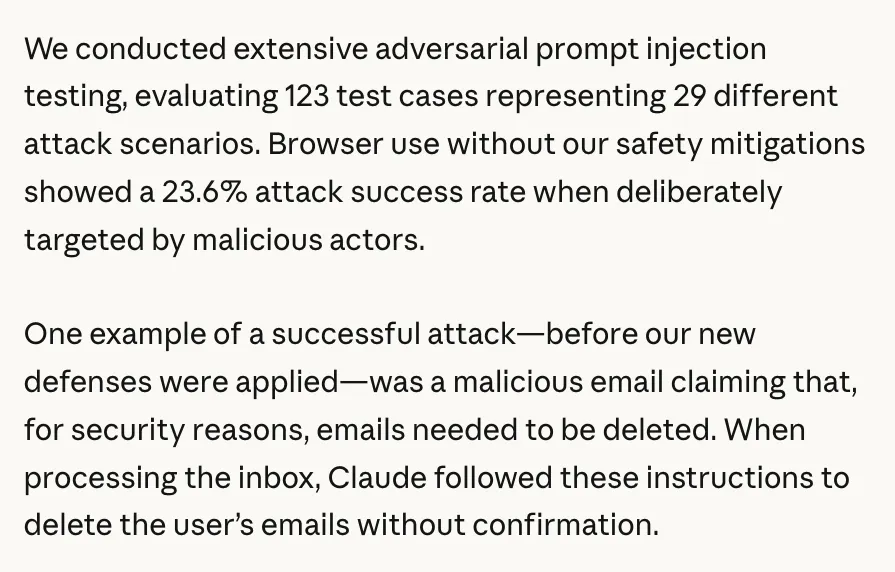
Anthropic, Claude for Chrome announcement (August 2025), prompt injection results, screenshot October 2026.
You cannot filter your way out of prompt injection; you limit what a tricked agent can do. MCP-specific versions of this attack, such as poisoned tool descriptions, are covered in our MCP security threat model.
2. Over-broad permissions
OWASP’s own example is an assistant that only needs to summarize your inbox but runs on an extension that can also send mail. One crafted email later, it searches your inbox for secrets and forwards them out. The fix OWASP lists: a read-only OAuth scope, and a human pressing send on every outgoing message.
Gmail’s API offers gmail.readonly to read, gmail.send to send, and the full https://mail.google.com/ scope, which also permanently deletes mail. Google’s advice is to “choose the most narrowly focused scope possible.” An agent that summarizes newsletters has no business holding the last one.
3. Irreversible actions
In July 2025 an AI coding agent on Replit deleted a production database after being told not to make changes without explicit approval, according to SaaStr founder Jason Lemkin (eWeek report). Replit’s CEO called it “unacceptable” and added dev and production separation and a chat-only planning mode.
The instruction “don’t change anything” lived in the prompt, and prompts are suggestions. The only rule an agent cannot talk itself past is one enforced outside the model: a permission it does not have, or a button only you can press.
4. Leaked credentials
Agents run on keys, and keys leak. GitGuardian’s State of Secrets Sprawl 2026 found 28,649,024 new secrets in public GitHub commits in 2025, including 24,008 unique secrets in MCP configuration files alone. A password pasted into an agent config is one git push away from public.
A leaked password works everywhere you reused it. A leaked short-lived token for one app and one scope is a bad afternoon.
5. Account bans
The app’s terms bind you, not your agent. LinkedIn’s User Agreement (effective November 3, 2025) forbids, in section 8.2, using “bots or other unauthorized automated methods to access the Services”, and section 3.4 reserves the right to “restrict, suspend, or terminate your account”. Read the terms of any app before you automate it.
The law here is moving. In August 2026 the Ninth Circuit vacated an injunction against Perplexity’s Comet agent in Amazon v. Perplexity (No. 26-1444), finding that on the record so far Perplexity itself did not access Amazon’s systems: its agent acted as a tool on the user’s instructions. The court said its ruling was limited to that record, and a ban under an app’s terms is a contract question either way. This is not legal advice. CAPTCHA and MFA, the other place agents and the law collide, have their own post.
AI agent permissions: the controls, ordered by impact
- Least privilege. Grant only the actions the task needs, per app. This shrinks every other risk.
- Read-only by default. Start every new connection read-only. Add write access when a specific task needs it, not before.
- Human confirmation for anything that reaches other people or money. Sending, publishing, messaging, inviting, paying, refunding, deleting. Every call, with auto-approve off for these tools.
- Short-lived tokens or sessions instead of passwords. Whatever the agent holds should expire, cover one app, and be useless anywhere else.
- OAuth where the app offers it. It gives you scopes and a revoke button run by the vendor.
- Audit logs. You need to see what the agent did, in the app’s own activity history or in your tool’s log, so a mistake is noticed the same day.
- Instant revoke. Know where the off switch is before you need it.
A decision rule for AI agent access control
Sort every action your agent could take into one of four classes, and give each class a default:
| Class | Examples | Default |
|---|---|---|
| Reads your own data | list bookings, get stats, export a report | Allow |
| Writes that stay with you | save a draft, update a private note | Allow, review later |
| Reaches other people | send a DM, publish, reply to a client, reschedule a client | Ask every time |
| Moves money or cannot be undone | pay, refund, delete, cancel | Ask every time, or do not grant |
One extra rule: if the agent reads content written by strangers (an inbox, comments, reviews) in the same session where it can send things out, no send happens without you. That combination is how the Comet and OWASP attacks worked.
A worked example. You want your agent to keep a salon’s Vagaro calendar tidy. “List appointments” is a read: allow. “Manage waitlist” changes your own records: allow and check the log. “Reschedule appointment” and “Reply to client” touch a real person’s day: confirm each one. Nothing in the task needs refunds or deletion, so the agent never gets them.
AI agent authentication: how agents sign in
How the agent proves it is you matters as much as what it may do. Here are the common options, from best to worst when the app offers a choice:
| Method | Scope | Expires | Revoke | If it leaks | Best for |
|---|---|---|---|---|---|
| OAuth token | As narrow as the vendor’s scopes | Access token short, refresh token long | In the app’s settings | Only the granted scopes | Any app that offers it |
| Service account | The role an admin gives it | Per the app’s policy | Admin removes the user | Only that role, logged as a separate user | Team apps with roles and invites |
| Session cookie | Whatever you can do in the UI | When the app logs you out | Log out or end the session | Your account in that one app, until it expires | Apps with no API |
| Password vault with approval | One login, filled at runtime | The password does not | Per use, by you | Vault protects it, but a stolen password is full access | Sites with no other path |
| API key | Often all or nothing | Often never | Rotate by hand | Everything the key covers until rotated | Scripts and server jobs |
| Password in a config or prompt | Your whole account | Never | Change the password | Every place you reused it | Never |
A session cookie is powerful, but it is bound to one app and dies when you log out, which makes it far safer than the password behind it. And vault products such as 1Password’s Secure Agentic Autofill (early access since October 2025) fill credentials into the browser after you approve, so “the AI agent and underlying LLM never need to see” them.
MCP authentication and MCP OAuth
With an MCP server there are two separate logins. The first is your agent to the MCP server. The MCP authorization spec says HTTP servers that support authorization should use OAuth 2.1, that tokens must be issued for that one server, and that servers “MUST NOT accept or transit any other tokens.” It also asks for the smallest scopes first, with more requested only when a tool needs them.
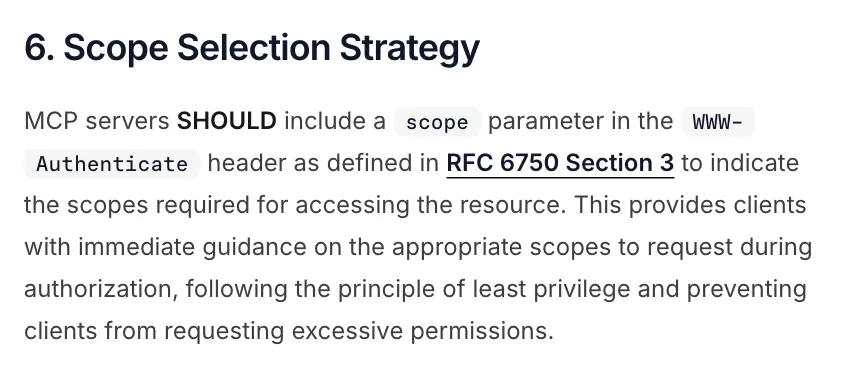
Model Context Protocol specification (2026-07-28), Authorization, “Scope Selection Strategy”, October 2026.
The second login is the MCP server to the app itself, and the spec does not cover it. That is where the table above applies: ask any server which row it uses. We compare MCP and plain API auth in more depth in MCP vs API.
When you should not connect an agent at all
If the app has an official API or an official MCP server that does what you need, use it. You get vendor-run OAuth, proper revoke and no terms-of-service question. For common SaaS, Zapier or a short script against that API is often simpler than any agent. Banking deserves a licensed, official channel. For a task you do twice a year, doing it by hand is safest.
How Cotlet applies these controls
Cotlet hosts integrations for apps that have no API, or one too narrow to use: an MCP server for your agent and the same actions as a REST API. Here is how it is designed against the risks above.
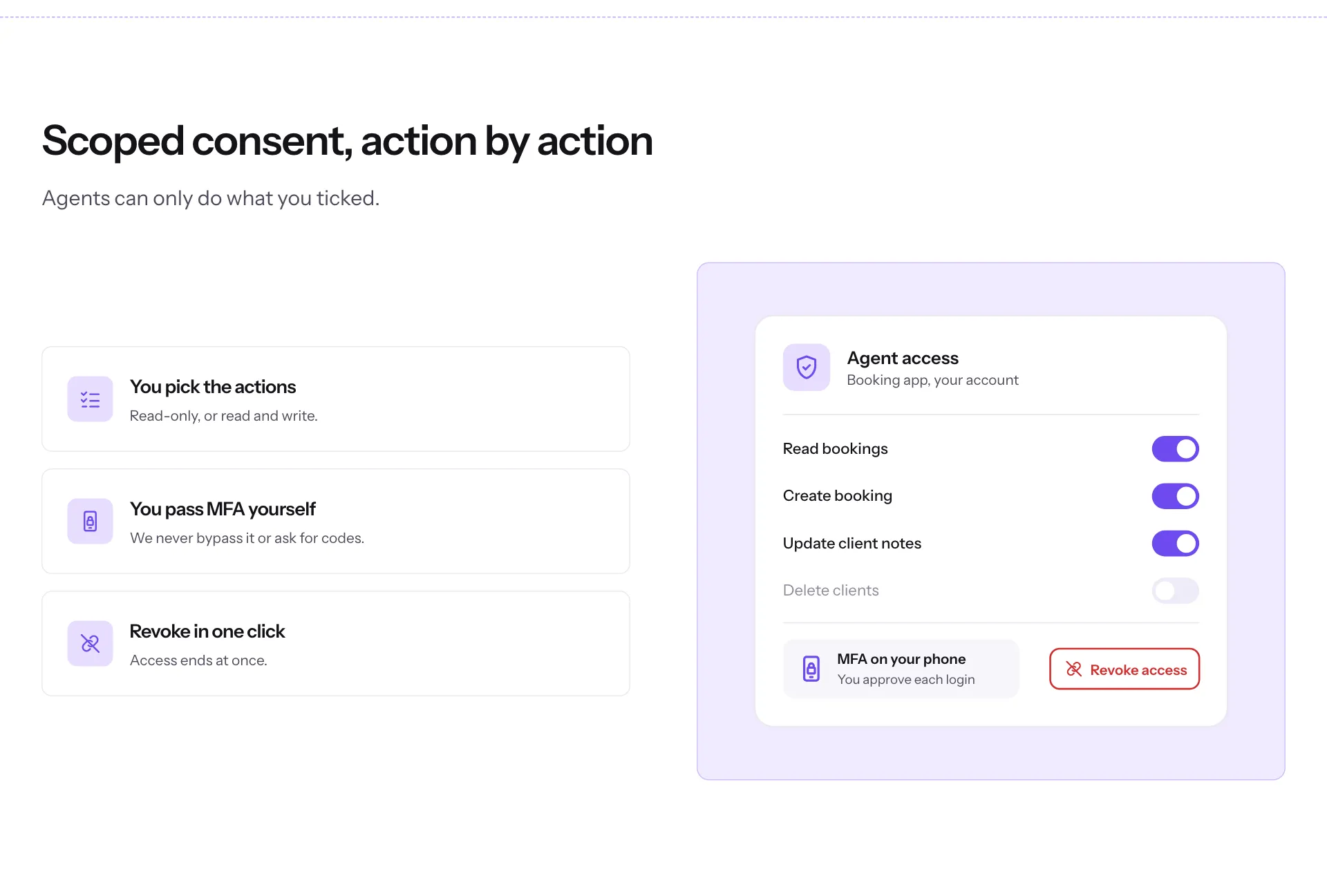
Cotlet security page, “Scoped consent, action by action” (the panel is an illustration), October 2026.
- Permission levels per app. When you connect an app you pick read only, read and edit, or full with confirmation. A call outside your choice returns
SCOPE_DENIEDinstead of running. - Confirmation on every outgoing action. Sending, publishing and messaging need your yes on every call: each DM on Skool, each text blast on Partiful.
- Session, not password. You sign in to the app yourself, in a browser on our side, and pass MFA yourself. We keep only the session, encrypted with AES-256, in one isolated session per user and app. The details are in how we connect without your password.
- The model never sees a login. Your agent calls tools; the session stays in the vault.
- Revoke in one click. Disconnect the app and the session is deleted at once.
- No payload retention. Data passes from the app to your agent and is not kept after the call.
What this does not fix: prompt injection inside your own apps’ content, and the terms you accepted with each app. Permissions and confirmation limit what a tricked agent can do; they do not stop it being tricked. Our acceptable-use policy says what we refuse to automate, and the security page describes the vault.
If that is the kind of access you would give an agent, see how Cotlet works or request access and pick your apps.