Can AI solve CAPTCHA? What the research and the law say
Models and solver services beat most CAPTCHAs today. What the research shows, what courts said about getting past them, and how MFA works for agents.
Cotlet team 8 min read
Yes, AI can solve CAPTCHA. Researchers have beaten Google’s reCAPTCHA v2 image grids in every attempt, agents have been talked into solving puzzles, and paid services clear them for about a euro per thousand. Whether your agent should is a different question, and the answer involves copyright law, computer-misuse law and plain trust. This post covers both, plus how sign-in and MFA should work for an agent.
Can AI solve CAPTCHA today?
Short answer: most of the classic puzzles, yes. The evidence, as of October 2026:
| What | Result | Source |
|---|---|---|
| ETH Zurich, “Breaking reCAPTCHAv2” (2024) | YOLO image models solved 100% of reCAPTCHA v2 challenges, up from 68 to 71% in earlier work. Humans and bots needed about the same number of tries. | arXiv 2409.08831 |
| ChatGPT agent (2025) | After researchers primed it to believe the CAPTCHAs were fake, it solved one-click, logic and text CAPTCHAs, and some drag-and-drop and rotation puzzles. | Malwarebytes, 22 Sept 2025 |
| 2Captcha, a solver service | “Most captchas tasks are solved automatically by AI models”, with human workers for low-confidence cases. reCAPTCHA v2 costs €0.99 to €2.80 per 1,000. | 2captcha.com, checked October 2026 |
| Browserbase, a browser platform for agents | “Browserbase enables CAPTCHA solving by default for all sessions.” | Browserbase docs |
Two things the top answers to this question usually skip.
Can AI pass reCAPTCHA v3 and Turnstile?
There is no puzzle to pass. reCAPTCHA v3 shows no challenge at all; it returns a score from 0.0 to 1.0 and “will never interrupt your users” (Google). Cloudflare Turnstile runs “a series of small non-interactive JavaScript challenges” in the background (Cloudflare). The ETH team also found that reCAPTCHA v2 leans heavily on cookies and browser history. So the real question is often not “can a model read the picture” but “does this browser look like a person”. Getting past that means faking a person: spoofed fingerprints, rotating residential IPs, synthetic mouse movement. It is also why an agent browser on a VPS runs into CAPTCHAs that never show up on your laptop (what to do about it in Hermes Agent).
Do assistants solve CAPTCHAs on request?
Mostly not. Malwarebytes notes that “most of the openly accessible AI chat agents have been barred from solving CAPTCHAs by their developers.” The ChatGPT result above needed a prompt injection to get around that rule.
Why do agent platforms ship solvers anyway?
Because agents fail without them, and failing agents churn. If your workflow hits a challenge at step four, a solver keeps it running.
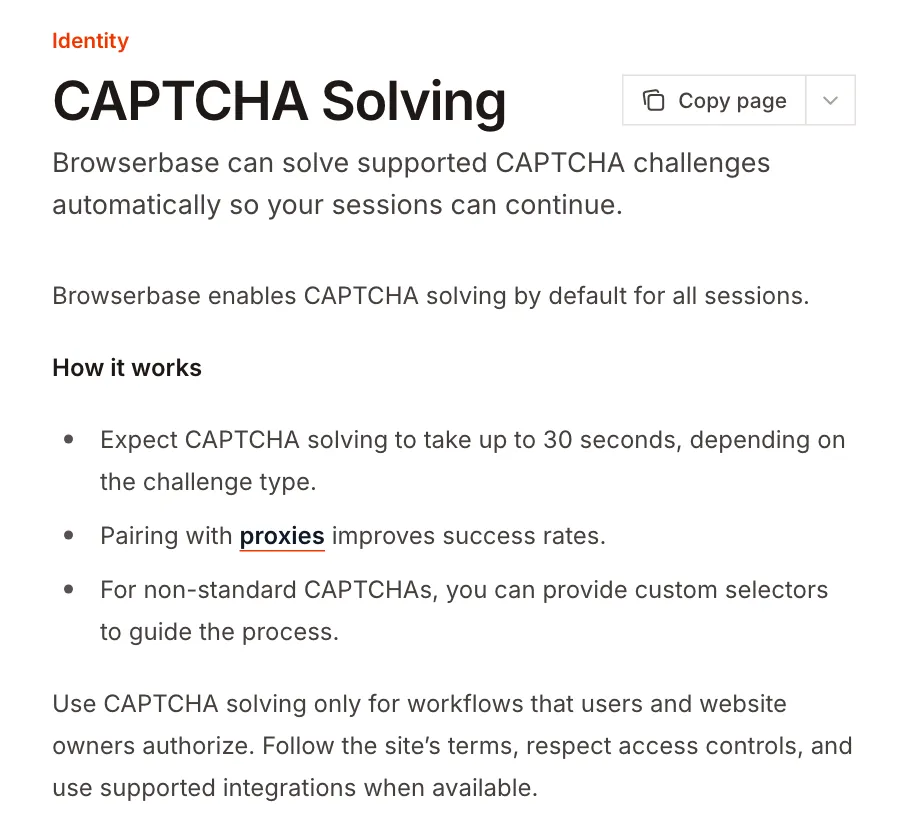
Browserbase documentation, CAPTCHA Solving page, October 2026.
Read the last paragraph of that page: “Use CAPTCHA solving only for workflows that users and website owners authorize.” With solving on by default, that check falls to each customer, workflow by workflow. Browserbase also documents how to turn it off (solveCaptchas: false).
Is it legal to bypass a CAPTCHA?
This is not legal advice. But the cases point in one direction. (For scraping law in general, see is web scraping legal; here we stay on CAPTCHAs and logins.)
DMCA section 1201: a CAPTCHA can be an access control
- Ticketmaster v. RMG Technologies (C.D. Cal., October 2007). RMG sold software that let ticket brokers get past Ticketmaster’s CAPTCHA. The court granted a preliminary injunction and held that CAPTCHA “is a technological measure that regulates access to a copyrighted work”, because a user cannot reach the purchase pages without solving it (order, CV 07-2534). Section 1201 has no minimum-loss threshold like the computer-fraud statute; circumventing the measure, or selling the tool, is the violation.
- Ticketmaster v. Prestige Entertainment (C.D. Cal., 31 January 2018). Brokers allegedly used bots, “CAPTCHA farm” workers and automated solving. The court let the DMCA claim proceed: “CAPTCHA was a technological measure under the DMCA” (Proskauer summary).
- Google v. SerpApi (N.D. Cal., July 2026). The limit of the theory. Judge Yvonne Gonzalez Rogers agreed that spoofing fingerprints, rotating IPs and solving CAPTCHAs to get past Google’s SearchGuard is circumvention, but dismissed the claims about ordinary search results because the wall was not guarding copyrighted works (Search Engine Roundtable). Claims about licensed content got leave to amend.
Read together: solving a CAPTCHA is circumvention. Whether that is illegal under the DMCA depends on what sits behind it. Behind a login, what sits there is usually someone’s account full of content.
Computer-misuse law: consent can be withdrawn
- Facebook v. Power Ventures (9th Cir., July 2016, amended December 2016). Power’s users had clicked a consent button to let Power use their Facebook accounts. The court said that consent was like “allowing a friend to use a computer”. But once Facebook sent a cease-and-desist and blocked Power’s IP, continued access broke the CFAA (opinion). The user’s permission does not outrank the platform’s explicit no.
- Outside the US, wording matters too. Poland’s Criminal Code, art. 267 §1, punishes gaining access to information by “breaking or circumventing” (przełamując albo omijając) a security measure, with up to two years in prison (text). A CAPTCHA is a textbook security measure. Using a session the user created themselves, with their consent, does not circumvent anything.
What about MFA? The “ai agent 2fa” question
MFA is a sharper line than CAPTCHA. A CAPTCHA asks “are you a person”. MFA asks “are you this person”. An agent that can pass MFA on its own has, by definition, a second factor it should not have.
The bad patterns look like this:
- The agent asks you to paste the six-digit code into the chat. Now the code sits in the model’s context, in logs, and in any tool output a prompt injection can read.
- A service stores your TOTP seed next to your password, so “two factors” live in one vault.
- An integration reads your SMS or email to grab the code without you seeing the prompt.
The MCP spec draws the same line. Since the 2025-11-25 revision, a server that needs a secret must send you to a URL instead of asking through the chat.
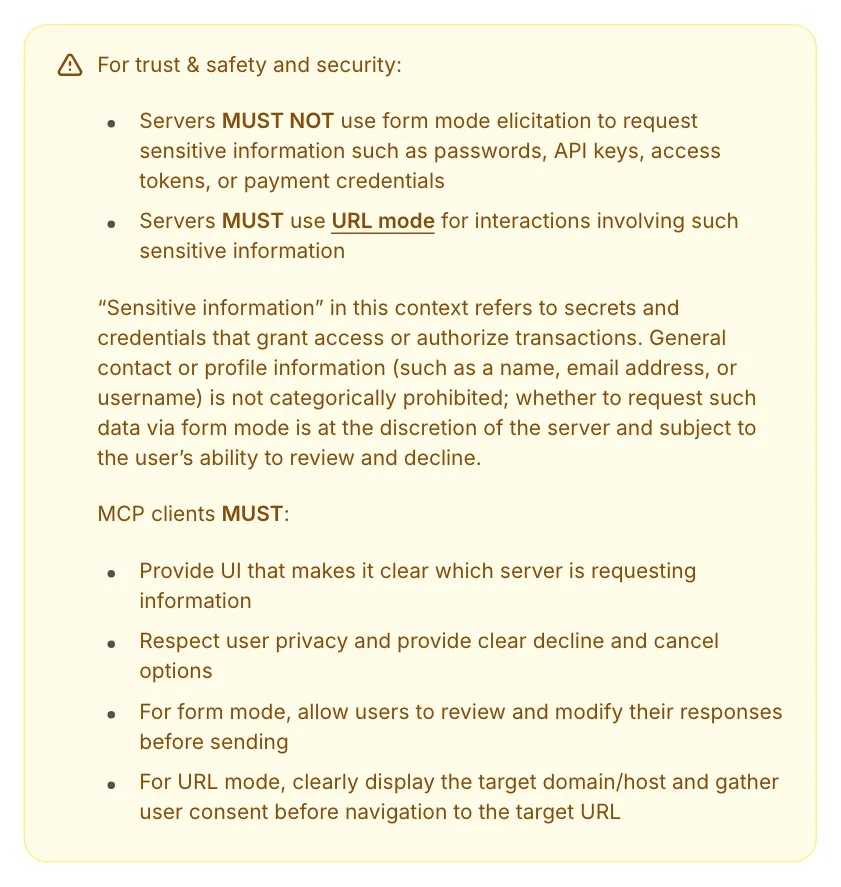
Model Context Protocol specification, Elicitation page (version 2026-07-28), October 2026.
URL mode exists so that “sensitive credentials never pass through the LLM context, MCP client or any intermediate MCP servers” (MCP spec). Clients must show you the full URL and get your consent before opening it. That is the right “mcp 2fa” pattern: the server sends you to a page, you finish the check in a real browser, and the agent never touches the code.
If your team needs integrations to re-authenticate on their own, the clean answer is a dedicated service account that your admin creates, with its own MFA, not a person’s second factor handed to a bot. (For the wider set of controls around agents and accounts, see AI agent account security.)
Signed agents: a way to say what an agent is
The industry is building a way for agents to identify themselves to websites.
- Cloudflare signed agents (28 August 2025): a bot class for agents “directed by an end user rather than a single company”, whose requests are signed with Web Bot Auth. Launch partners included ChatGPT agent, Block’s Goose, Browserbase and Anchor Browser (Cloudflare blog).
- IETF webbotauth working group: chartered to standardize how automated clients cryptographically authenticate to websites and tell sites who operates them (IETF datatracker).
A signed agent can be blocked or allowed with one rule, so the site owner gets to decide.
A sign-in rule for your own agent
Whatever tools you use, this table holds up for sign-in and MFA:
| Your agent hits… | Do this | Not this |
|---|---|---|
| A sign-in page | Send the person to a browser where they sign in themselves | Ask for the password in chat |
| An MFA prompt | Send the person to a URL where they enter it themselves | Ask for the code in chat, store the seed |
| An expired session | Ask the person to sign in again | Replay a stored password |
| A cease-and-desist or a block | Stop for everyone, now | Keep going with user consent |
And two checks before you build anything:
- Is there an official API or MCP server? Use it. OAuth beats everything else in this post. Zapier, Make or doing the task by hand can also do the job.
- Who owns the account? Act only on accounts the person controls and has agreed to automate, action by action.
How Cotlet handles sign-in and MFA
Cotlet hosts unofficial integrations, as an MCP server for agents and your own endpoints for scripts, for apps that have no API or a narrow one: booking tools like Booksy, creator platforms like Patreon. Here is how it is designed to treat sign-in and MFA:
- You pass the first sign-in yourself. You sign in in your own Cloud Browser, a Chrome we run for you that you open from the console. You type your login and enter your 2FA code. Password saving is off, so your password is not stored anywhere. The security page has the details.
- Same browser, same country. Calls are requests from your Cloud Browser, with its cookies and its residential IP in the country you chose, at a human pace, and each one is listed in your Activity. That keeps sign-in checks rare after the first sign-in: apps mostly ask again when a login looks suspicious. When an IP gets slow we switch to another one in the same country, and a few apps sign you out when that happens.
- When a check needs you, you get a link. A tool call returns
AUTH_EXPIREDorMFA_REQUIREDwith a link to your Cloud Browser. Your agent asks you to finish there. We never log in for you and never bypass MFA. The help page lists every code.
The cost is real: now and then you will open a link and sign in again. In exchange, your password and your second factor stay with you. The full list of what we will not automate is in the acceptable-use policy, and the Cloud Browser is described on the security page.
If you want your agent working in apps that never gave it a door, sign up and add your apps.