Agents 10 min read
Claude connectors: how to add one, and what if your app is missing
What Claude connectors are, how to add one in Claude.ai, Desktop and Claude Code, which plans allow custom ones, and your options when an app has none.
Cotlet team
Claude connectors are MCP servers that link Claude to an outside app, so it can read data there and take actions for you. You add one from the Connectors directory under Customize > Connectors, or add any remote MCP server by its URL as a custom connector, on every plan including Free. If your app is not in the directory, it usually has no API to build one on; most of this post is about that case.
Most guides stop at “open the directory and click Connect”. This one also covers Claude Code and the listing rule that keeps many small business apps out. Details are from Anthropic’s docs as of October 2026.
What are Claude connectors?
A connector is a Model Context Protocol server that Claude talks to. Anthropic’s connectors guide covers the basics; if MCP itself is new to you, MCP vs API explains it.
Every connector you see in Claude carries one of three labels, per Anthropic’s verification page:
| Label | Who built it | What Anthropic checked |
|---|---|---|
| Verified | The vendor or a third party | Tools tested for quality and compatibility, policy met at review time. “It isn’t a security audit.” |
| Community | A third-party developer | Screened before listing, not reviewed in depth |
| Custom | You added it by URL | Nothing |
The label changes how a connector is shown, not what it can do. Once connected, a Community or Custom connector has the same reach into your account as a Verified one.
Where each kind works, per the same guide:
| Claude app | Remote connectors | Local connectors |
|---|---|---|
| Claude.ai (web) | Yes, including MCP Apps with interactive content | No |
| Claude Desktop | Yes | Yes, as desktop extensions (MCPB) |
| Claude mobile | Yes | No |
| Claude Code | Yes, plus the ones you added in Claude.ai | Yes, as stdio servers |
Where do you find Claude connectors?
In Claude.ai or the desktop app, open Customize > Connectors and select Discover. Search by name or browse categories. The directory page says the same catalog serves Claude.ai, Desktop, mobile, Claude Code and Cowork, and ranking is usage-based.
Two things people get wrong:
- The open MCP Registry is a different list. Publishing a server to the MCP Registry or the
modelcontextprotocol/serversrepo does not put it in Claude’s directory, per Anthropic’s directory vs custom comparison. - Claude only suggests listed connectors. Directory entries can show up as Suggested Connectors in a chat. Custom connectors are never suggested, so Claude will not point you to one.
How to add a connector in Claude.ai and Claude Desktop
From the directory
- Open Customize > Connectors, select Discover, find the app.
- Select Connect to Claude. Some ask for a region or server URL first.
- Sign in to the app on its own page and approve the access Claude asks for.
- In a chat, select +, then Connectors, and switch it on for that conversation.
You can set each tool to Always allow, Needs approval or Blocked on the connector’s page. On Team and Enterprise plans an Owner adds the connector for the organization first; members see a Request button until then.
By URL, as a custom connector
If the app is not listed but someone runs a remote MCP server for it, you add it by URL. Per Anthropic’s unlisted connectors page:
- Customize > Connectors, then Add custom connector.
- Enter a name and the server’s HTTPS URL, for example
https://mcp.example.com/mcp. - Pick how people sign in: Sign in now, Sign in when needed, or No sign-in.
- If the server uses OAuth, choose how Claude identifies itself. Anthropic recommends Use Claude’s published identity; Register automatically uses Dynamic Client Registration.
- Select Add.
One detail most guides miss: if the server wants a fixed API key instead of OAuth, you need the Request headers section, and that is “in beta and available to a limited set of organizations” as of October 2026. If you do not see it, a key-based server has no place for its key in the Claude.ai dialog. Claude Code has no such limit (next section).
Local servers in Claude Desktop
Desktop also runs local servers: drag a .mcpb desktop extension onto Settings > Extensions, or edit claude_desktop_config.json under Settings > Developer (MCP local server guide). Transports and each client’s config are in remote MCP servers explained.
How to add an MCP server to Claude Code
Claude Code does not have a connectors screen. You add servers from the terminal, per the Claude Code MCP docs:
# remote server over HTTP, with a key in a header
claude mcp add --transport http myapp https://mcp.example.com/mcp \
  --header "Authorization: Bearer YOUR_KEY"

# local server started as a process
claude mcp add --env API_KEY=YOUR_KEY myapp -- npx -y some-mcp-server- Scope. The default
localscope applies to the current project only.--scope usermakes the server available in all your projects.--scope projectwrites.mcp.jsoninto the repo so your team gets it too; Claude Code asks before it uses a server from that file. - OAuth. For a server that signs in with OAuth, run
/mcpinside Claude Code and finish the login in your browser. - Manage.
claude mcp list,claude mcp get myapp,claude mcp remove myapp. - Connectors you already have. Servers you added in Claude.ai show up in Claude Code automatically when you are logged in with that account. Set
"disableClaudeAiConnectors": truein settings if you do not want that.
Which plans allow custom connectors?
Every plan can add a custom connector by URL. The limits are about how many, and who:
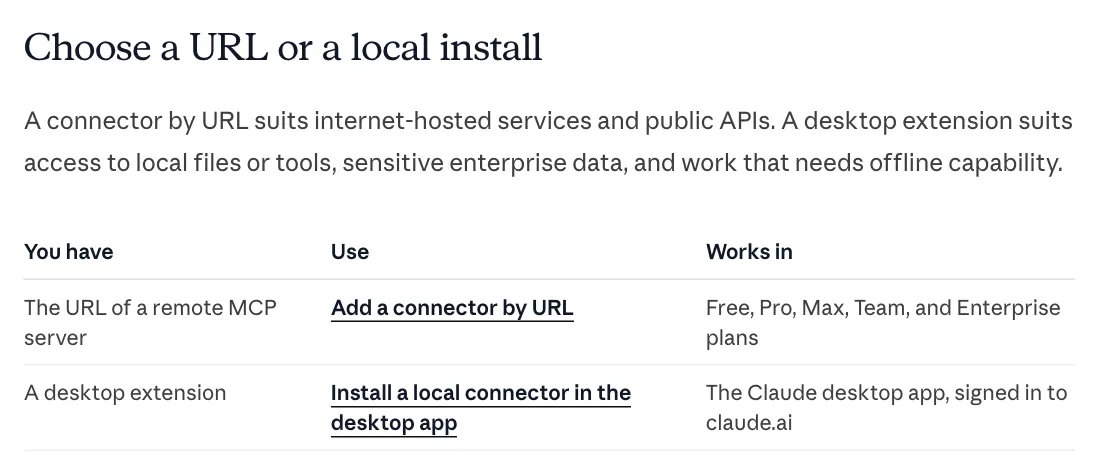
Claude docs, “Add a connector that isn’t in the directory”, choose a URL or a local install, October 2026.
| Plan | Custom connectors | Who adds them |
|---|---|---|
| Free | One | You |
| Pro, Max | No stated limit | You |
| Team | Yes | An Owner, for the organization; members then connect their own account |
| Enterprise | Yes | An Owner, or a custom role that manages the organization’s libraries |
Source: the unlisted connectors page and the Help Center article on custom connectors.
What does a connector need to get into the directory?
Anthropic publishes a pre-submission checklist and a Software Directory Policy (dated April 15, 2026). The parts that shape what you find there:
- Separate read and write tools. A catch-all
api_requesttool with amethodparameter is rejected. - Annotations on every tool. A
title, plusreadOnlyHintordestructiveHint. Claude uses these to decide which calls need your approval. - No instructions hidden in descriptions. Descriptions that tell Claude to call other tools or override its instructions fail review.
- OAuth for authenticated remote servers. The policy asks for “secure OAuth 2.0”.
- A privacy policy, public docs and test credentials for a fully populated account.
- No money transfers and no AI image, video or audio generation.
- API ownership. This is the one that matters if your app is missing:
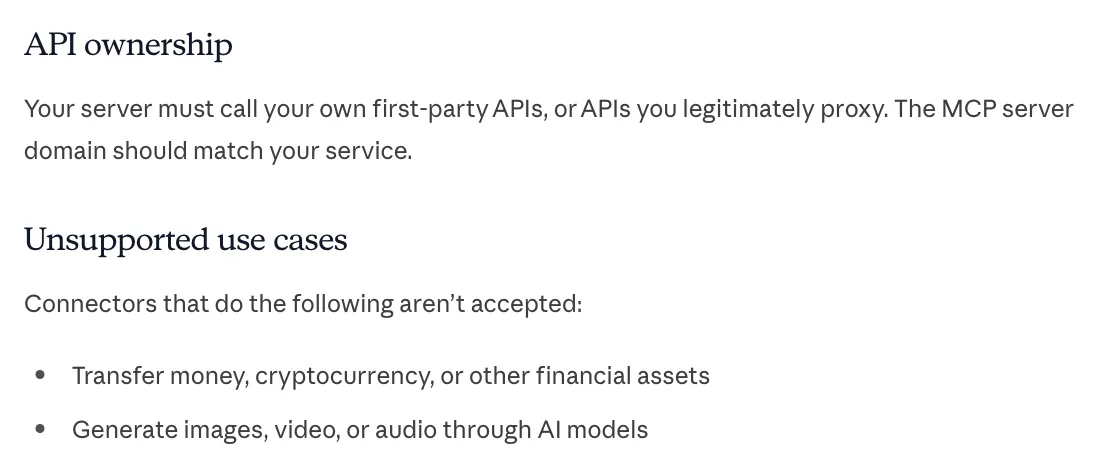
Claude docs, connector pre-submission checklist, “API ownership” and “Unsupported use cases”, October 2026.
Policy section 3F agrees: developers “must verify that they own or control any API endpoint, domain, or user interface their Software connects to.”
Why is your app not in the directory?
In practice a directory connector comes from the app’s vendor, or from someone wrapping the vendor’s API with permission. So an app is missing for one of three reasons:
- The vendor has an API but no connector yet. You can build your own meanwhile.
- The vendor has no public API. There is nothing for anyone to wrap. Why companies don’t offer a public API covers the vendor’s side of that choice.
- The API exists but leaves your task out. The connector, if it ever comes, can only do what the API does.
Three real examples from our research for the Cotlet catalog:
- Dubsado: no public API. Zapier offers 5 triggers and 1 action (Create Project), on the Premier plan.
- GlossGenius: no API, no webhooks, no Zapier app. Only manual report downloads.
- Pirate Ship: no API or webhooks for rates, labels or tracking.
None of these gets a directory connector until the vendor ships an API. A third party wrapping private web endpoints does not meet “your own first-party APIs”, so it stays a custom connector at most.
What are your options when the app has no connector?
| Option | Works when | Trade-off |
|---|---|---|
| Official API + your own MCP server | The vendor has an API that covers your task | Best stability and inside the vendor’s terms. You write and host the server. |
| Zapier MCP or a similar automation hub | The hub already has the exact action | Fast to set up. Limited to the actions the hub supports, which for apps like Dubsado is very few. |
| Community MCP server from GitHub | Someone reverse-engineered the app | Free and readable. Built on private endpoints that change, and you hold the credentials. |
| Browser automation (for example Claude in Chrome, paid plans) | Rare, one-off tasks you watch | Works on any site you can open. Slow, runs in your browser, and Anthropic calls it “still risky”. |
| Hosted unofficial integration | No API, frequent task, you want it in your agent | Someone else maintains it. You trust a third party with a session to your account. |
| By hand | A few times a year | No risk, no setup. |
Open source MCP servers for apps with no API goes deeper on the GitHub option, with a checklist before you install one.
A decision rule you can reuse
- Search the directory first. If the vendor’s own connector covers your task, use it.
- If the vendor has an API that covers the task, use it. Wrap it in a small MCP server, even if it needs a plan upgrade.
- If an automation hub has the exact action, use it.
- If the task is rare, do it by hand.
- If it is frequent and none of the above works, pick between a community server you will maintain and a hosted integration someone else maintains. Read the app’s terms on automation either way.
Before you add any custom connector: a short checklist
- Who runs the server, and on what domain? A custom connector “connects Claude to an unverified service”, in Anthropic’s words.
- What does the sign-in screen ask for? Grant the smallest access that does the job.
- List the tools. Set anything that sends, pays or deletes to Needs approval, and Blocked if you do not need it.
- Do not give Research mode write tools: Anthropic notes it can call connector tools without asking.
- Check again after updates. The developer can change tools at any time.
The threats behind these steps, with real incidents, are in MCP security: a threat model.
Where Cotlet fits
Cotlet is for step 5 of the rule above. It hosts unofficial integrations for apps with no API or a narrow one: one MCP server for agents like Claude Code, Claude Desktop, Codex and Cursor, and the same actions as a REST API for scripts, with one key.
Cotlet is not in Claude’s connectors directory and is not affiliated with Anthropic. By the ownership rule above it could not be listed, since it does not own the apps it connects to. You add it the same way as any custom connector: by URL in Claude.ai or Desktop, or with one command in Claude Code:
claude mcp add --transport http cotlet https://cotlet.dev/mcp/v1 \
  --header "Authorization: Bearer YOUR_COTLET_KEY"
Each app you connect adds its tools to that one server. Setup for each client is in the API docs, and why there is one key for MCP and REST is in MCP for your agent, REST for your scripts.
How it is designed to work: you sign in to each app yourself, once, in a browser on our side. Cotlet keeps the encrypted session, never your password. It never solves CAPTCHAs, never bypasses MFA, and keeps no payloads after a call. If an app owner objects, the integration is paused within 24 hours. And if an official API covers your task, use that instead.
Access is granted per account, and nothing is charged until your access is active. If your app is in the catalog, request access and pick it.