Product 10 min read
Remote MCP server vs local: how to run MCP and who should host it
A remote MCP server runs over Streamable HTTP at a URL, a local one runs on your machine over stdio. How auth, secrets, clients and hosting differ.
Cotlet team
A remote MCP server is an MCP server your agent reaches at a URL over HTTP, instead of a program it starts on your own machine. Local servers talk over stdio, read their secrets from your environment and only exist while your client runs. Remote servers talk over Streamable HTTP, authenticate every request, and work from any client and device, including web apps like claude.ai and ChatGPT that cannot start a program on your laptop.
Most pages on this topic stop at “local is private, remote is scalable”. This one covers what you need to actually choose: what the current spec says about each transport, where your credentials end up, which clients accept what, and what you take on when you host a server yourself.
What is the difference between a local and a remote MCP server?
The MCP specification (revision 2026-07-28, current as of October 2026) defines two standard transports:
- stdio. “The client launches the MCP server as a subprocess” and the two talk over stdin and stdout (stdio binding). One client, one process, on one machine.
- Streamable HTTP. “The server operates as an independent process that can handle multiple client connections” and exposes one endpoint, such as
https://example.com/mcp, that accepts POST (Streamable HTTP binding).
“Local” and “remote” are mostly shorthand for these two. You can run a Streamable HTTP server on localhost, and some clients can tunnel to a stdio server, but the defaults hold: stdio lives on your machine, HTTP lives at a URL.
Two details most comparisons miss:
- The old SSE transport is deprecated. The HTTP+SSE transport from 2024 has been deprecated since revision 2025-03-26, and new implementations “SHOULD NOT adopt it”. If a guide tells you to expose
/sse, it is out of date. - Remote servers got simpler to host in the July 2026 revision. Streamable HTTP no longer has protocol-level sessions (the old
Mcp-Session-Idheader) or a separate GET stream. Every message is its own POST, and the protocol version, method and tool name are mirrored into headers (MCP-Protocol-Version,Mcp-Method,Mcp-Name) so that “load balancers, gateways, observability tooling” can route without parsing the body. In practice, any instance behind a load balancer can answer any request, with no sticky sessions to manage. Older clients still speak the 2025 shape, so servers keep a fallback.
Local vs remote MCP: the short comparison
| Local (stdio) | Remote (Streamable HTTP) | |
|---|---|---|
| Where it runs | A subprocess your client starts | A service at a URL |
| Who can use it | One client on one machine | Any client, any device, a whole team |
| Auth in the spec | None; “retrieve credentials from the environment” | OAuth 2.1 with Protected Resource Metadata, or a fixed header |
| Where secrets live | Env vars and config files on your disk | With whoever runs the server, plus a token in your client |
| Works in claude.ai, ChatGPT web, mobile | No | Yes, if publicly reachable |
| Uptime | Up while your client is open | Someone has to keep it up |
| Updates | You pull a new version (or npx pulls it for you) |
The operator deploys; every user gets it at once |
| Reaches files on your machine | Yes | No |
That last row is the honest case for local. A filesystem server, a git helper or anything that touches your working copy belongs on your machine. Putting it behind a URL adds risk and buys nothing.
Where do your secrets live?
This is the question that actually decides it, and there are two layers of credentials, not one.
Layer 1: your client to the MCP server. For stdio there is nothing to authenticate: the client started the process. The authorization spec says stdio implementations “SHOULD NOT” follow it and should read credentials from the environment instead. For HTTP, authorization is optional, but servers that support it follow OAuth 2.1, and they “MUST implement OAuth 2.0 Protected Resource Metadata (RFC 9728)”. That is the document at /.well-known/oauth-protected-resource that tells your client, after a 401, which authorization server to send you to. Tokens must be bound to that one server, and a server “MUST NOT accept or transit any other tokens”. The MCP vs API post covers OAuth versus API keys in more depth.
Layer 2: the MCP server to the app it controls. A Notion or GitHub server still needs a Notion or GitHub credential. With stdio, that is usually an API key in your config file:
claude mcp add --env AIRTABLE_API_KEY=YOUR_KEY --transport stdio airtable \
  -- npx -y airtable-mcp-server
That example is straight from the Claude Code MCP docs. The key sits in a config file on your disk (~/.claude.json by default), where anything else running as you can read it. With a remote server, that second credential lives with the operator, and your client only holds a token for the server.
So the trade is not “local is safe, remote is risky”. Local spreads long-lived app keys across every laptop that runs the server. Remote concentrates them with one operator, which is better or worse depending on who that operator is and how they store them. The MCP security threat model covers what can go wrong on either side.
One guard worth knowing: in Claude Code, credential variables such as ANTHROPIC_API_KEY “read as empty” when used in a remote server’s url or headers in .mcp.json. That stops a project you cloned from quietly sending your keys to a server it names.
Which clients support remote MCP servers?
All the major clients support remote servers as of October 2026, but they differ in how you add one and what auth they accept.
| Client | Remote setup | Auth for remote | Local stdio |
|---|---|---|---|
| Claude Code | claude mcp add --transport http ... |
OAuth via /mcp, or --header |
Yes |
| Claude.ai, Desktop, mobile | Customize > Connectors > Add custom connector | OAuth, or fixed request headers | Desktop only, via claude_desktop_config.json |
| ChatGPT | Add custom MCP server, public HTTPS endpoint | OAuth 2.1 for servers that need sign-in | Through OpenAI’s Secure MCP Tunnel |
| Cursor | url entry in ~/.cursor/mcp.json or .cursor/mcp.json |
OAuth, or headers |
Yes |
| VS Code | "type": "http" in .vscode/mcp.json |
OAuth, or headers |
Yes |
Sources: Claude Code, Claude custom connectors, OpenAI Apps SDK: connect and auth, Cursor, VS Code.
The commands look like this. Claude Code, with a fixed key:
claude mcp add --transport http secure-api https://api.example.com/mcp \
  --header "Authorization: Bearer your-token"
Or with OAuth: add it without the header, then run /mcp inside Claude Code and sign in in the browser. Add --scope project to write the entry to .mcp.json so your team gets it from git.
Each client spells environment variables differently, which trips people up when they share config:
- Claude Code
.mcp.json:"Authorization": "Bearer ${API_KEY}" - Cursor:
"Authorization": "Bearer ${env:MY_SERVICE_TOKEN}" - VS Code:
"Authorization": "Bearer ${input:api-token}", which prompts you once
The detail that catches most people is where the connection comes from in Claude’s web and desktop apps:
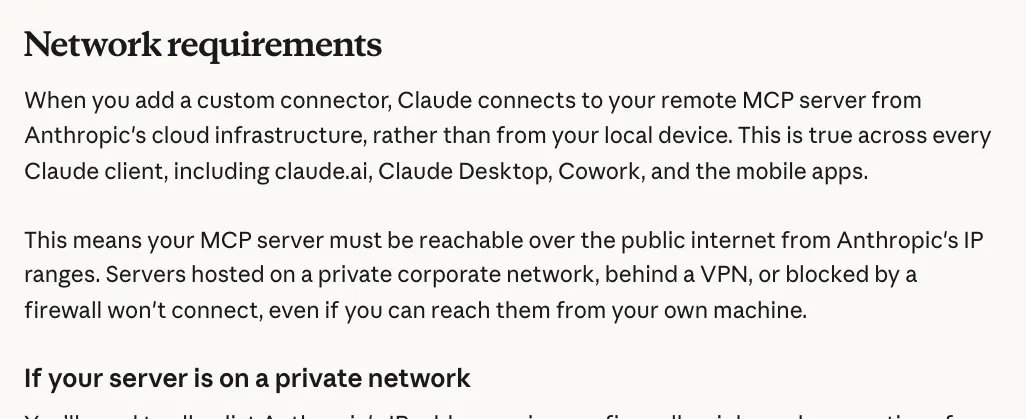
Claude Help Center, “Getting started with custom connectors using remote MCP”, Network requirements, October 2026.
A server on localhost, behind a VPN or on your office network works in Claude Code and fails as a custom connector in claude.ai, even though you can open it from your own browser. ChatGPT has the same rule: a public endpoint must be HTTPS, with a tunnel as the only way in for private servers. If you want one server that works everywhere, it has to be on the public internet, which means it has to authenticate properly. (For the ready-made servers listed inside Claude, see the post on Claude connectors.)
Self-hosted vs managed MCP hosting
Once you decide on remote, someone has to run it. You have three options: the app vendor’s own hosted server (Notion, GitHub, Asana and others run one), a server you deploy yourself, or a managed host that runs servers for you.
The spec gives you the minimum bar for the self-hosted route in three lines:
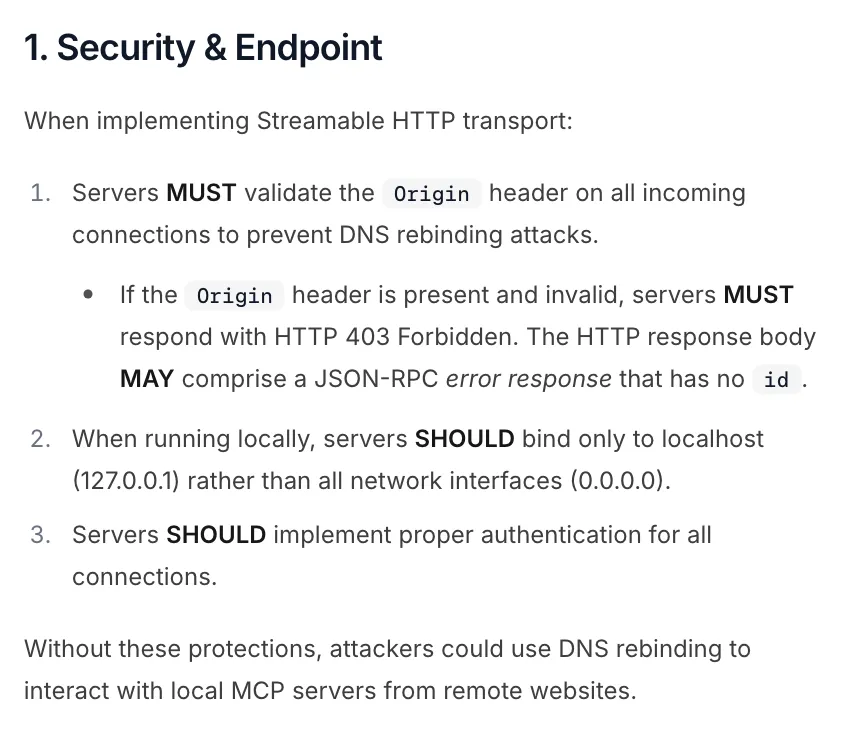
Model Context Protocol spec, revision 2026-07-28, Streamable HTTP, “Security & Endpoint”, October 2026.
That is the floor. A self-hosted server that real people use also needs everything below.
| You need | Self-hosted MCP server | Managed or vendor-hosted |
|---|---|---|
| TLS and a public URL | You set it up and renew it | Done |
| Origin checks, auth, token validation | You build or configure them | Done, but you trust their build |
| OAuth authorization server | You run one or wire in your IdP | Theirs; you may not get SSO with yours |
| App credentials (layer 2) | In your vault | In their vault |
| Uptime and alerts | Yours | Theirs, check if they publish status |
| Updates when the spec or the app changes | Yours | Theirs |
| Logs and audit | Full control | What they expose |
| Cost | Your infra plus your time | A subscription or usage fee |
Rules of thumb:
- If the app vendor runs an official remote server, use it. It talks to the official API with official OAuth scopes. Nobody else can match that.
- Self-host when the server touches your internal systems, when you need your own identity provider in front of it, or when compliance says data cannot leave your network.
- Use a managed host when the hard part is not the server but what sits behind it: credentials, sessions and breakage you do not want to maintain.
- Stay local for anything that works on your files, and for experiments.
Should you run it local or remote? A checklist
Answer these in order. The first “yes” usually decides.
- Does it need files, processes or networks on your machine? Local stdio.
- Does the app vendor run an official remote MCP server? Use theirs.
- Do you need it in claude.ai, ChatGPT or on your phone? Remote, on a public HTTPS URL.
- Will more than one person use it? Remote, so you rotate one credential instead of ten.
- Does it touch internal systems or regulated data? Self-host remote, behind your own IdP.
- Is it an app without an API, where the work is keeping a login and a scraper alive? A managed host, or an open source server if you accept being its maintainer (the trade-offs are here).
Then, for whichever remote server you pick, check four things before you connect an account: it serves /.well-known/oauth-protected-resource or documents its auth plainly, it uses Streamable HTTP rather than the deprecated SSE endpoint, it states where it keeps your app credentials, and it tells you how to revoke them.
How Cotlet works as a hosted MCP server
Cotlet is a hosted MCP server for apps that have no API, or a narrow one: booking tools like Booksy, community platforms like Skool, creator tools like Substack. It is designed around the trade-offs above:
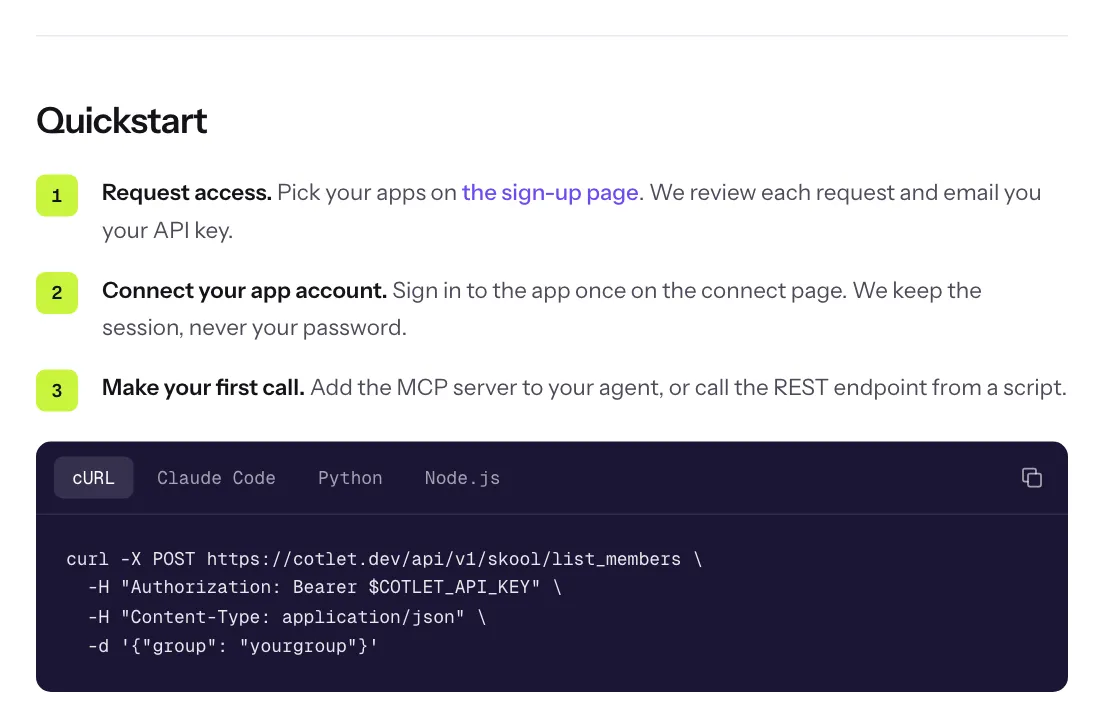
Cotlet API docs, Quickstart section, October 2026.
- One URL for every app. You add
https://cotlet.dev/mcp/v1once, over Streamable HTTP. Each app you connect adds its tools to that same server, so your agent sees them on the next tool list. There is no server per app to install or update. More on that in MCP for agents, REST for scripts, one key. - One key. Your client sends a bearer key; the same key works for the REST API. Setup for Claude Code, Claude Desktop, ChatGPT, Cursor and n8n is in the docs.
- Layer 2 stays out of your config. You sign in to each app yourself, once, in a browser on our side. Cotlet keeps the encrypted session, never the password, and the model only calls tools and never sees a login. It never solves CAPTCHAs, never bypasses MFA and keeps no payloads after a call. How it works shows the full flow.
- Upkeep is ours. Every integration is designed to be tested daily and paused, with credits refunded, when a site changes.
The limits, plainly: access is granted per account, and nothing is charged until your access is active (pricing). And if your app has an official API or its own MCP server, use that instead.
If your app is in the catalog, you can pick it when you sign up.