How to connect Wanderlog to ChatGPT and Claude, no code needed
Wanderlog has no official MCP server (checked 24 Oct 2026). Connect Wanderlog to ChatGPT, Claude or any AI agent with Cotlet.dev in two steps.
Cotlet team 15 min read
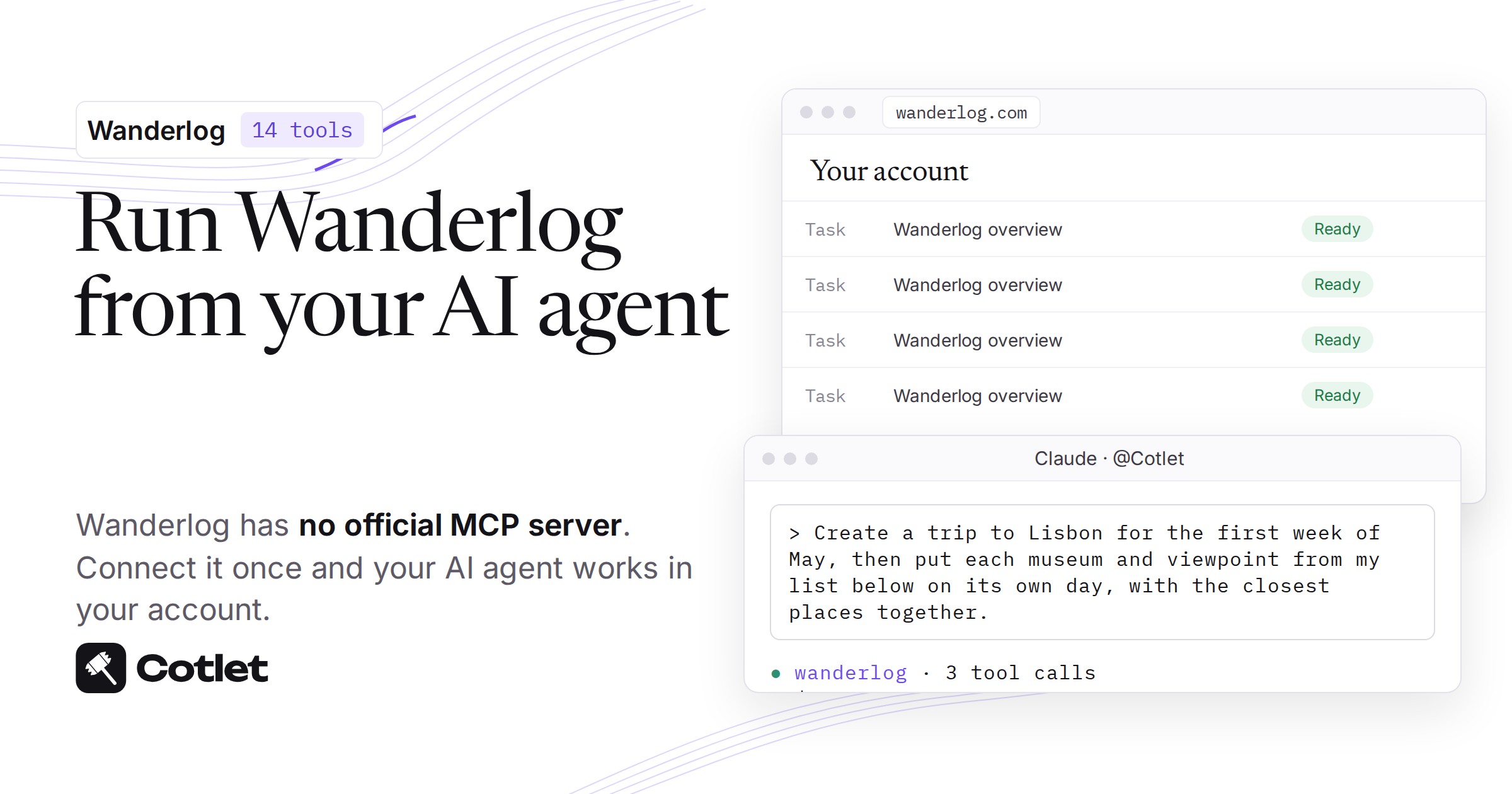
Wanderlog has no official MCP server and no ChatGPT or Claude connector (checked 24 Oct 2026). Wanderlog also has no public API and no webhooks, so nothing official lets an agent read or edit your trips (checked 24 Oct 2026). This guide shows how to connect Wanderlog to ChatGPT, Claude and any AI agent through Cotlet.dev, which runs 14 Wanderlog tools in your own Wanderlog account.
Wanderlog is where you keep every itinerary, hotel booking, receipt and tripmate list for the trips you run, and the typing that goes into it adds up. Cotlet.dev is for people who run a business in Wanderlog and want an AI agent to manage their account, so a customer who only books or buys should stay with Wanderlog’s own AI Assistant. If you own or manage trips for a team, this guide hands the repeat work to ChatGPT or Claude in your own account.
What ChatGPT and Claude can do in your Wanderlog trips: itineraries, hotels, receipts and tripmates
Your AI agent gets 14 Wanderlog tools through Cotlet.dev, grouped here by area of Wanderlog.
| Area of Wanderlog | What your AI agent does there |
|---|---|
| Trips | Lists your trips and trips shared with you, opens the full itinerary and creates a trip for a destination and date range, private until you invite someone |
| Places | Searches attractions and hotels near the trip destination with rating and address, then adds a place to a day or to a list such as “Places to visit”, or removes it |
| Notes | Writes free-text notes on a day or the trip: transit tips, opening hours, booking details |
| Route order | Reorders the places of one day for a shorter route, as the app’s route optimization does; needs Wanderlog Pro |
| Hotels and bookings | Adds lodging with check-in and check-out dates and an optional confirmation number, and fetches the address for forwarding flight, hotel and car confirmations |
| Budget | Reads expenses with amount, currency, category and date plus totals by category, and logs an expense in the currency you paid |
| Checklists | Adds a packing, to-do or shopping checklist for the whole trip or one day |
| Tripmates | Invites someone by email to collaborate on the trip |
Wanderlog expense splits and tripmate invites wait for your OK in your Cotlet.dev console, because a split changes what tripmates owe and an invite is an email from Wanderlog in your name (2 of 14 tools ask first). Places, notes and hotels run at once, and the Remove place tool undoes them, so tripmates who watch a shared trip see them appear as they are added.
Wanderlog tools are listed with their inputs and an example response on the Cotlet.dev Wanderlog integration page.
What Wanderlog offers an agent on its own: no public API, no MCP server, no connector
Wanderlog has no public API, no webhooks and no MCP server (checked 24 Oct 2026). Wanderlog also has no ChatGPT app and no Claude connector, so no official route lets your own agent open a trip.
Wanderlog’s in-app AI Assistant is “Powered by ChatGPT” and adds its own suggestions to the trip on the same page (checked 24 Oct 2026). Your agent in Claude or ChatGPT cannot reach it. Zapier and n8n have no Wanderlog app (checked 24 Oct 2026), and community MCP servers on GitHub run on your computer with a login credential copied out of your browser (checked 24 Oct 2026).
Cotlet.dev runs 14 Wanderlog tools hosted, and its address is https://cotlet.dev/mcp/v1. Paste that address into the MCP server or connector field of ChatGPT, Claude or another agent, and your AI agent works in your own Wanderlog account, on the trips you own or can edit.
Have these Wanderlog details ready before you connect
Your AI agent needs very little from you, but check these points first.
- Wanderlog account: your own account is enough. Your AI agent works on trips you own or can edit, and sees the tripmate names and expenses on them.
- Wanderlog plan: your current plan stays as it is. Only route ordering needs Wanderlog Pro, and a call to it on an account without Pro fails.
- Wanderlog sign-in: you log in yourself, with your usual Wanderlog login, inside the Cotlet.dev Cloud Browser.
- Wanderlog on web or phone: you set up once in a browser, and your trips then open from any chat, in the ChatGPT and Claude phone apps too.
- Wanderlog bookings: your Gmail link, your Pro plan, your password and deleting a trip are never touched by any tool.
- Cotlet.dev account: create one before Step 1, because the Cloud Browser and the Enable for agents button live in its console.
Step 1: Log in to Wanderlog once inside your own Cloud Browser
Your Wanderlog login happens in the Cotlet.dev Cloud Browser, with your own account.
- Create a Cotlet.dev account.
- Open Wanderlog under Integrations in the console and log in to Wanderlog in its Cloud Browser.
- Press Enable for agents.
Wanderlog’s own page takes your password, typed by you. Cotlet.dev never sees or stores it; it keeps your logged-in Wanderlog profile, encrypted, in Finland.
Your AI agent gets only the 14 Wanderlog tools and never the login credential behind them. If Wanderlog logs you out, your agent sends you a link to log in again, and Cotlet.dev never types it for you. To cut access, use Disable for agents, reset the browser, or log out of Wanderlog everywhere.
Step 2: Give your Wanderlog trips to ChatGPT, Claude or any other agent
Your AI agent connects to Wanderlog the same way in ChatGPT, Claude, Claude Code, Codex, Cursor, Grok, Hermes Agent, n8n and other MCP clients: put https://cotlet.dev/mcp/v1 in the MCP server or connector field.
Pick your AI above to see its steps.
How to connect Wanderlog to ChatGPT
Do this on chatgpt.com in your browser. Cotlet then works in the ChatGPT desktop and phone apps too.
- Open Plugins in ChatGPT and click Add.
- Click Add custom MCP server. Not in the menu? Turn on Developer mode in Settings, Security and login, then come back.
- Paste the name
Cotletand the server URLhttps://cotlet.dev/mcp/v1/connect. Keep Authentication on OAuth. - Tick “I understand and want to continue” and click Create as a plugin.
- Click Connect Cotlet. A Cotlet page opens, click Allow access.
- In a new chat, type
@Cotletand pick it from the list. - Ask ChatGPT: “Are you signed in to Cotlet through MCP?” Then try a first Wanderlog task: “Create a trip to Lisbon for the first week of May, then put each museum and viewpoint from my list below on its own day, with the closest places together.”
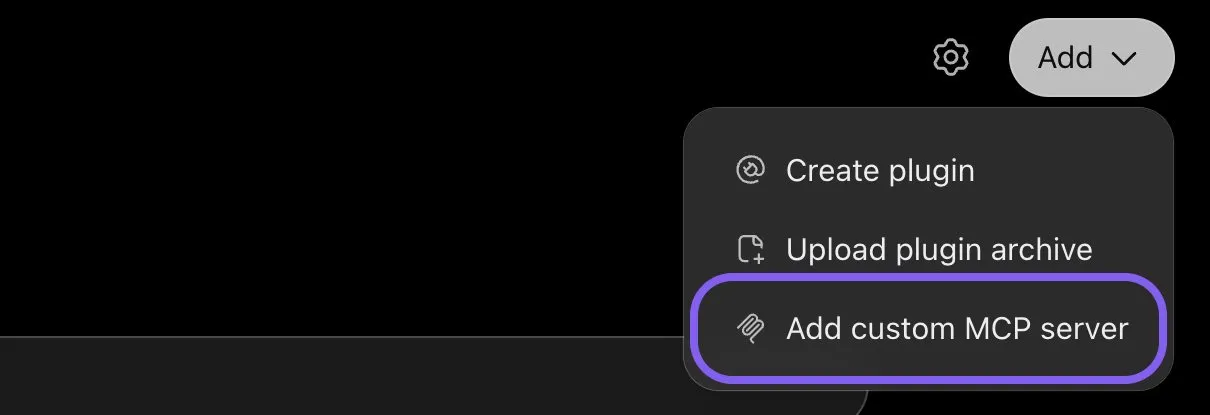
ChatGPT, Add menu on the Plugins page, November 2026.
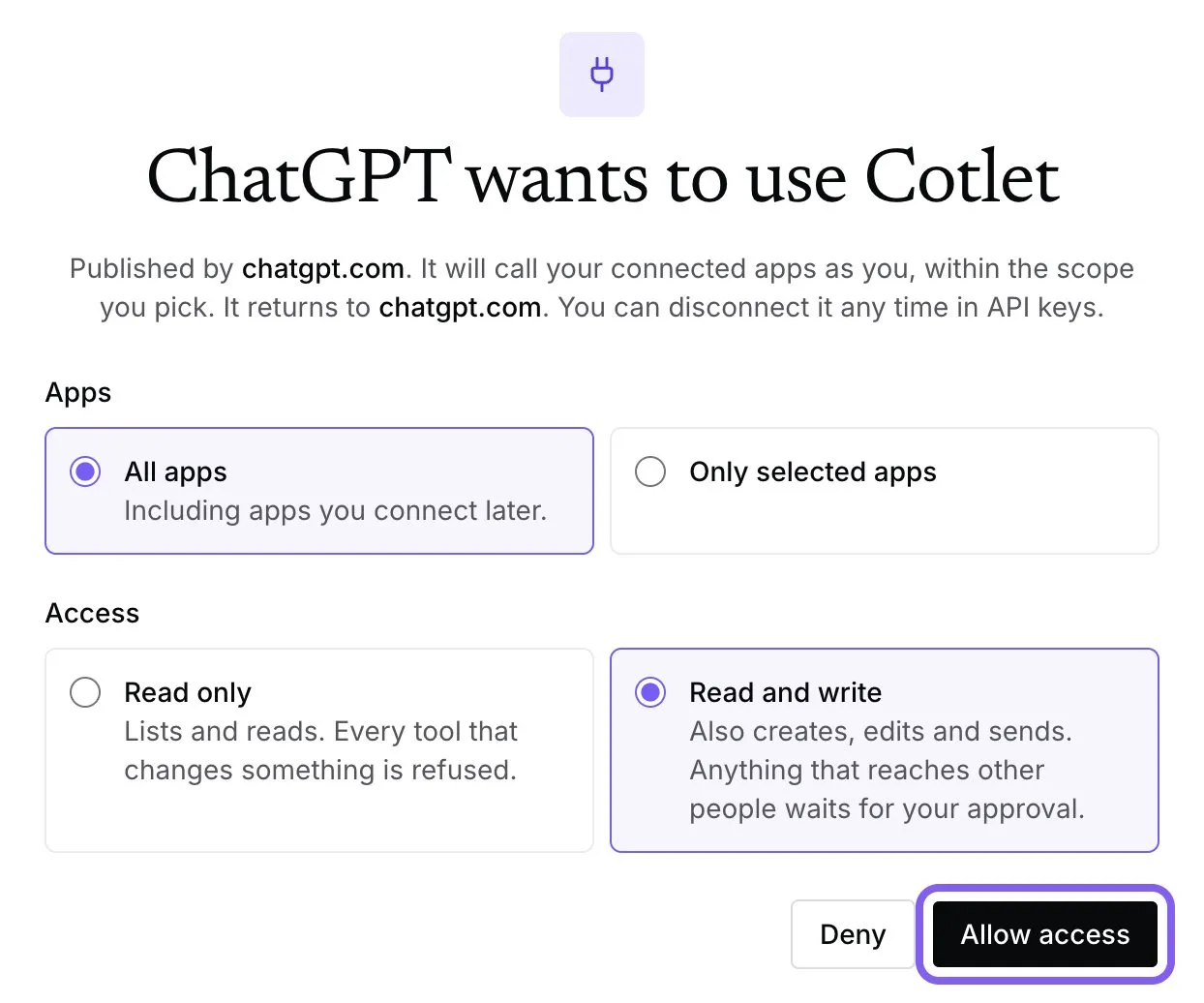
Cotlet consent page after you connect it in ChatGPT, November 2026.
ChatGPT asks “Allow ChatGPT to use Cotlet?” before some steps. Pick Always allow, or the chat waits for your click. On a Business, Enterprise or Edu workspace, an admin has to allow custom MCP servers first.
How to connect Wanderlog to Claude
- Open Connectors in Claude and click Add. In the desktop app it is under Customize, Connectors.
- Click Add custom connector.
- Paste the name
Cotletand the URLhttps://cotlet.dev/mcp/v1/connect, then click Continue. - Keep the settings and click Add.
- A Cotlet page opens. Click Allow access.
- In a chat, click the plus button, then Connectors, and turn Cotlet on.
- Ask Claude: “Are you signed in to Cotlet through MCP?”, then “Read the receipts below, log each one in the currency I paid, split the dinner between all tripmates, and show me what we have spent so far by category.”. Claude asks before it uses a Cotlet tool the first time. Click Allow.
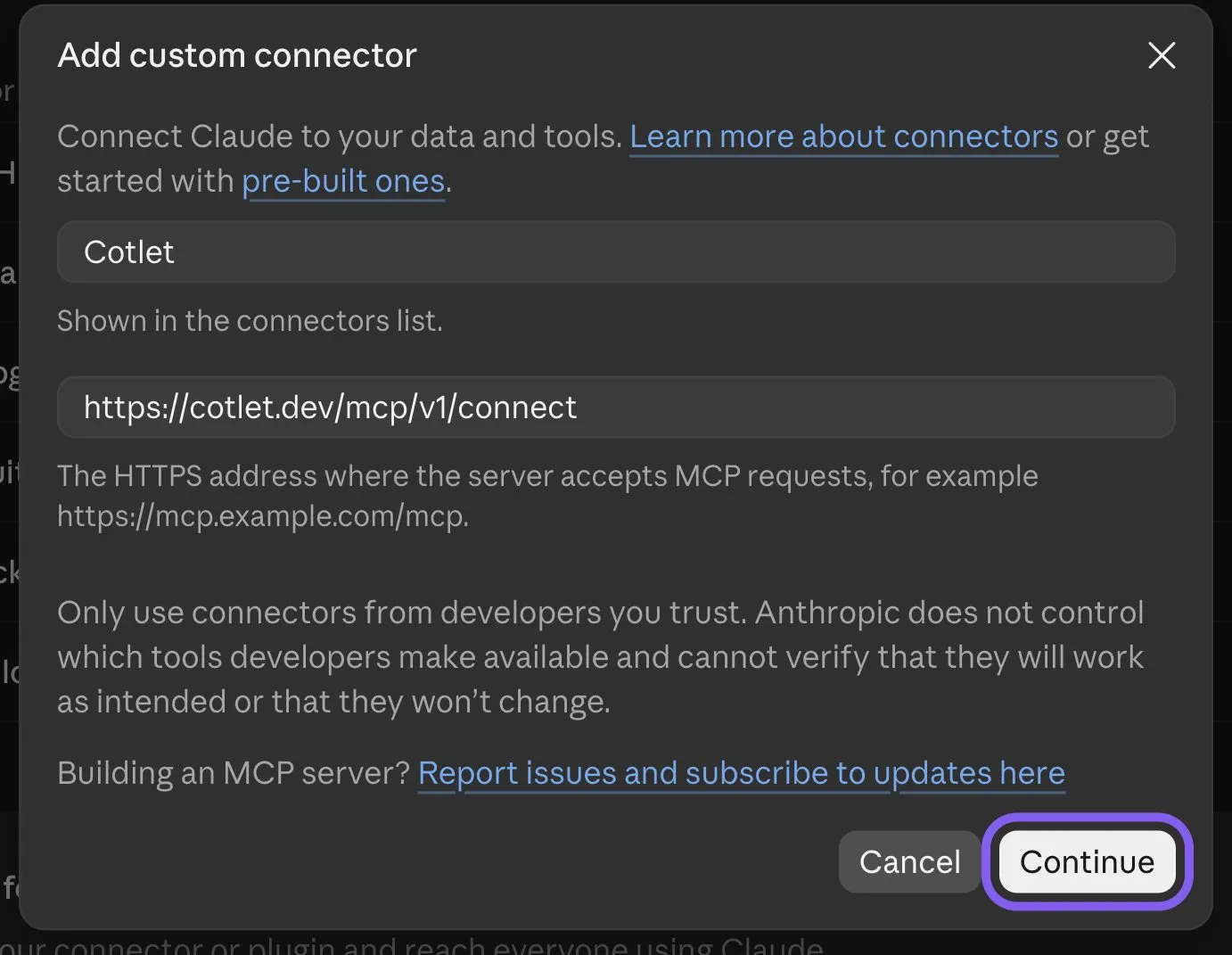
Claude, Add custom connector form, November 2026.
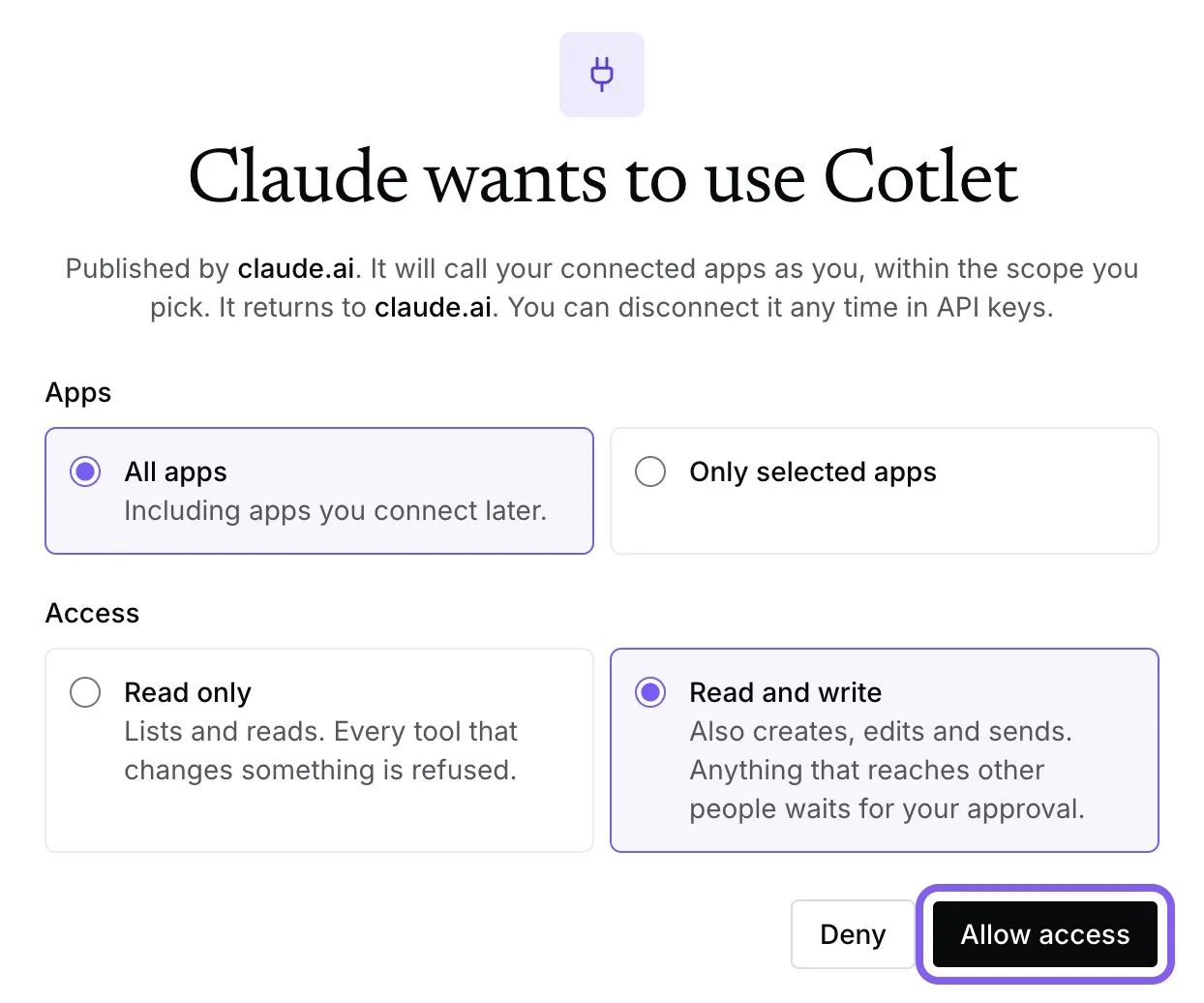
Cotlet consent page after you add the connector in Claude, November 2026.
Claude’s free plan allows one custom connector. On a Team or Enterprise plan, an owner adds Cotlet in Organization settings, Connectors, and you click Connect next to it.
How to connect Wanderlog to Claude Code
Add Cotlet without a key, then sign in once in the browser:
claude mcp add --transport http cotlet https://cotlet.dev/mcp/v1/connectRun /mcp in Claude Code, pick cotlet and sign in to Cotlet. Prefer an API key, for example on a server? Create one in the Cotlet console and use:
claude mcp add --transport http cotlet https://cotlet.dev/mcp/v1 \
  --header "Authorization: Bearer $COTLET_API_KEY"
How to connect Wanderlog to Codex
Create an API key in the Cotlet console, put it in the COTLET_API_KEY environment variable and add this to ~/.codex/config.toml:
[mcp_servers.cotlet]
url = "https://cotlet.dev/mcp/v1"
bearer_token_env_var = "COTLET_API_KEY"
How to connect Wanderlog to Cursor
Create an API key in the Cotlet console, put it in the COTLET_API_KEY environment variable and add this to ~/.cursor/mcp.json:
{
  "mcpServers": {
    "cotlet": {
      "url": "https://cotlet.dev/mcp/v1",
      "headers": { "Authorization": "Bearer ${env:COTLET_API_KEY}" }
    }
  }
}
How to connect Wanderlog to Grok
Grok takes custom MCP servers on grok.com, per xAI’s connectors documentation (checked 8 November 2026).
- Open grok.com/connectors and click New Connector.
- Pick Custom and paste the server URL
https://cotlet.dev/mcp/v1/connect. - Sign in to Cotlet when Grok asks, then click Allow access.
- Ask Grok: “Are you signed in to Cotlet through MCP?”
On Grok Business, an admin adds the connector first in the xAI console, under Grok Business, Connectors. The Grok chat inside X has no custom connector menu.
How to connect Wanderlog to Hermes Agent
Add Cotlet to ~/.hermes/config.yaml in the format of the Hermes MCP config reference:
mcp_servers:
  cotlet:
    url: "https://cotlet.dev/mcp/v1"
    headers:
      Authorization: "Bearer ${COTLET_API_KEY}"
    trust: untrusted
Put COTLET_API_KEY in ~/.hermes/.env and check it with hermes mcp test cotlet. With trust: untrusted, Hermes runs reads at once and asks before every write. More on Hermes in our post on the Hermes Agent browser.
How to connect Wanderlog to n8n
Use the MCP Client node, or the MCP Client Tool inside an AI Agent node:
- Server Transport: HTTP Streamable
- MCP Endpoint URL:
https://cotlet.dev/mcp/v1 - Authentication: Bearer Auth, with your Cotlet API key as the token
- Tools: Cotlet.dev’s browser tools; the AI Agent node reads the Wanderlog guide first
Use it to run this on a schedule: add the hotel and get the address for the flight confirmation.
Any other MCP client
Point the client at https://cotlet.dev/mcp/v1 over Streamable HTTP, with the header Authorization: Bearer <your Cotlet API key>. A client that supports OAuth sign-in can use https://cotlet.dev/mcp/v1/connect instead and needs no key. The full reference is in the MCP docs.
Cotlet.dev shares that one address with every other app on your account. Chat apps such as ChatGPT and Claude open a Cotlet.dev sign-in; approve it and the 14 Wanderlog tools appear. If you turned Wanderlog on after you connected, refresh the connector and the tools show up.
Your AI agent is ready for a first test with a short request such as “List my Wanderlog trips.” If your trips come back with destination, dates and tripmates, the connection works.
Three Wanderlog jobs to hand over first: a list-based itinerary, a split receipt and a hotel booking
Your AI agent can show its worth on three jobs, each from a different area of Wanderlog.
Build days from your own list of places instead of the assistant’s picks
Your AI agent can take this request: “Create a trip to Lisbon for the first week of May, then put each museum and viewpoint from my list below on its own day, with the closest places together.” Wanderlog’s in-app AI Assistant adds its own suggestions to the trip, one by one, while your agent builds the days from your list with the Create trip, Search places and Add place tools (checked 24 Oct 2026). Nothing needs approval, because places show up for tripmates at once and the Remove place tool undoes them. It saves adding every place by hand and keeps the trip to your picks.
Log and split a night’s receipts so the budget matches what was paid
Your AI agent can take this request: “Read the receipts below, log each one in the currency I paid, split the dinner between all tripmates, and show me what we have spent so far by category.” It reads the tripmates and the expenses already logged, turns each receipt into a line with amount, currency and the day it was paid, and leaves out duplicates. Each split waits for your OK in your Cotlet.dev console, because a split changes what tripmates owe, and then your agent reports spending by category in the trip’s home currency. By hand, that is one visit to the “$” tab per receipt, and you can still edit or delete a split there.
Add the hotel and get the address for the flight confirmation
Your AI agent can take this request: “Add the Hotel Alfama to my Lisbon trip, checking in Friday and out Monday, with the confirmation number below, then give me the address to forward the flight confirmation to.” It uses the Add hotel and Get booking import address tools. Zapier and n8n have no Wanderlog app, so bookings come in only by forwarding a confirmation email or, on Pro, by Gmail scanning (checked 24 Oct 2026), and Wanderlog then fills in dates and times itself. The hotel needs no approval and Remove place undoes it, and Cotlet.dev never opens your mailbox, so you only forward one email per booking.
Other ways to reach Wanderlog from an AI agent and where each one stops
- Wanderlog’s official API: none, because Wanderlog has no public API and no webhooks (checked 24 Oct 2026).
- Wanderlog’s in-app AI Assistant: “Powered by ChatGPT”, it adds its own suggestions to the trip and works only inside Wanderlog.
- Wanderlog in Zapier, Make and n8n: Zapier and n8n have no Wanderlog app (checked 24 Oct 2026), and Make has none either.
- Wanderlog’s community MCP servers on GitHub: they run on your computer while it is on, with a login credential copied out of your browser (checked 24 Oct 2026), and the main one lists 33 tools.
- Wanderlog’s command line tool wanderlog-cli: it runs on the API the Android app uses, for scripts, and is not an MCP server.
- Wanderlog alternatives such as TREK and Tralendr: they are trip planners with their own AI or chatbot apps, and you move your trips and tripmates off Wanderlog.
Cotlet.dev is the one route that gives you everything you can do in Wanderlog, on every screen, read and write, from ChatGPT, Claude or any agent, with no API key to set up, on your current Wanderlog plan.
FAQ
Has Wanderlog released a ChatGPT or Claude connector of its own?
Wanderlog has no ChatGPT app and no Claude connector (checked 24 Oct 2026). Its in-app AI Assistant is “Powered by ChatGPT” and adds its own suggestions to the trip on the same page, and your agent in Claude or ChatGPT cannot reach it. Cotlet.dev connects ChatGPT and Claude to your own Wanderlog account instead.
Is there a public Wanderlog interface or MCP address for agents?
Wanderlog has no public API, no webhooks and no MCP server (checked 24 Oct 2026). Cotlet.dev runs 14 Wanderlog tools hosted, over MCP for agents at https://cotlet.dev/mcp/v1, and the same tools answer scripts. You do not need to connect an agent to use them from a script.
Can an automation tool such as Zapier, Make or n8n run my Wanderlog trips?
Wanderlog has no app in Zapier or n8n (checked 24 Oct 2026), and none in Make either. Bookings come in only by forwarding a confirmation email or, on Pro, by Gmail scanning. For an AI agent that reads and edits your trips directly, Cotlet.dev is the route to use.
Can ChatGPT build a whole trip in my Wanderlog account?
Your AI agent can, with Cotlet.dev. It creates the trip for a destination and date range, searches places, adds them to days, then adds hotels with check-in dates, notes and a checklist. The trip shows up in your Wanderlog app and stays private until you invite someone.
Does my agent need Wanderlog Pro?
Wanderlog Pro is needed only for route ordering, which works on one day per call. 13 of the 14 Wanderlog tools work without it, and a route ordering call on an account without Pro fails.
Will my tripmates see what the agent adds?
Wanderlog shows places, notes and hotels to tripmates at once, as with any edit on a shared trip. The Remove place tool takes a place out again. Expense splits and tripmate invites wait for your OK first.
Can the agent delete a trip?
Cotlet.dev has no tool that deletes a trip. Delete one yourself in the app, and Wanderlog support can help bring back a trip deleted by mistake. A trip your agent creates stays private until you invite someone.
Can my agent import a booking from my email?
Wanderlog takes bookings in only by forwarding a confirmation email or, on Pro, by Gmail scanning (checked 24 Oct 2026). Your AI agent can fetch the forwarding address of a trip, and Wanderlog then fills in the dates and times itself. Cotlet.dev never opens your mailbox.
Did Wanderlog build or approve Cotlet.dev?
Cotlet.dev is independent and not affiliated with Wanderlog or Travelchime Inc. Your own Wanderlog account does the work, and you can cut access at any time with Disable for agents.
Check one Wanderlog trip’s spending with your agent today
Your AI agent is ready as soon as the connector lists the 14 Wanderlog tools. Ask it to list your trips, open the one with the most tripmates and report spending so far by category, and approve any split yourself. Set it up from the Cotlet.dev Wanderlog integration page.