How to connect BookingKoala to ChatGPT, Claude and any AI agent
Zapier's BookingKoala MCP can only create a lead. How cleaning companies let ChatGPT or Claude read bookings, assign providers and handle refunds.
Cotlet team 10 min read
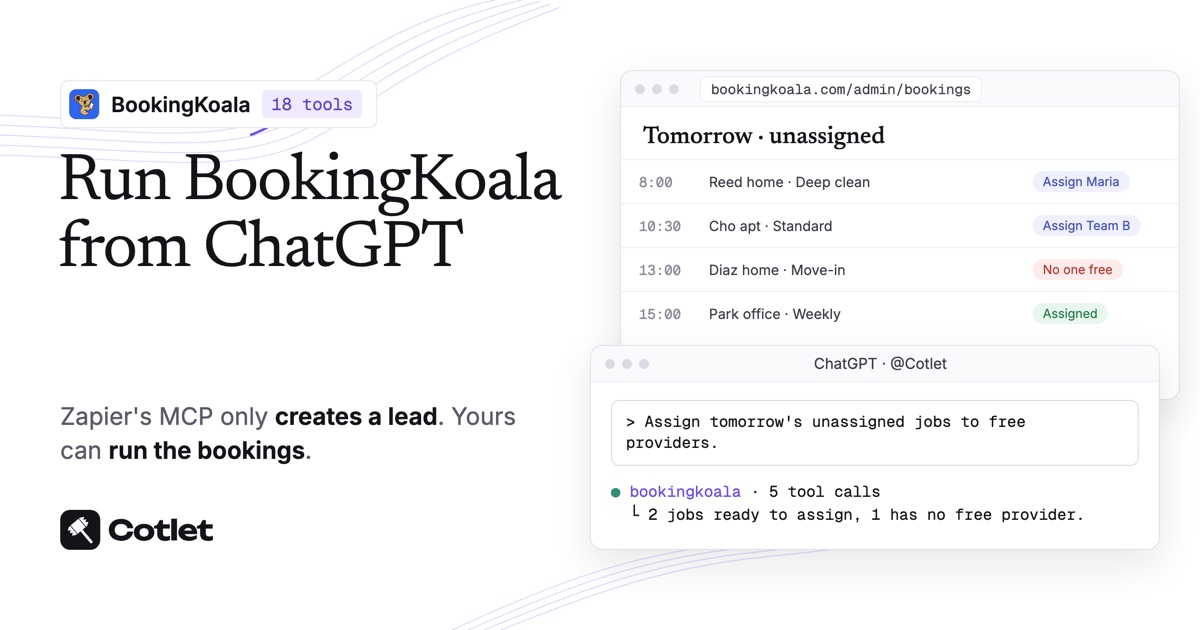
BookingKoala has no developer API, no ChatGPT app and no Claude connector, as of November 2026. You can generate an API key in BookingKoala, but only to link Zapier or Make, and Zapier’s BookingKoala MCP gives an AI one action: Create Lead. For ChatGPT, Claude or another AI agent to actually manage bookings, Cotlet connects them: you log in to BookingKoala once in a Cotlet cloud browser, and your AI gets 18 BookingKoala tools for bookings, providers, customers, charges and invoices. About ten minutes, no code.
Cotlet is for the owner or office manager of a cleaning, pet care or home services company who runs the day in the BookingKoala admin panel. Your customers keep booking on your BookingKoala site and your providers keep working from their app. The AI takes the office side: the unassigned jobs at 9 pm, the refund request, the invoices nobody paid.
What ChatGPT and Claude can do in BookingKoala once connected
With BookingKoala connected, you ask in plain words and the AI uses 18 tools:
| Area | What the AI can do in your BookingKoala account |
|---|---|
| Dashboard | Read revenue, provider payouts, booking counts, ratings and referral sources for a period |
| Bookings | List upcoming, unassigned, completed or declined-payment bookings, open one with its price breakdown |
| Providers | List providers and teams, assign one to a booking or a whole recurring schedule |
| Customers | Search customers by name, email or phone, read addresses and history |
| Changes | Reschedule or cancel a booking or a recurring schedule, copy a booking as a draft |
| Money | List charges, refund all or part of one, list invoices and resend them |
Seven of the eight write tools ask for your confirmation first, among them assigning a provider, cancelling, refunding and resending an invoice. Reading never needs it.
Every tool and its inputs are listed on the BookingKoala API and MCP server page.
Does BookingKoala have AI, an API or an official ChatGPT app?
BookingKoala connects to Zapier and Make, and that is where its openness ends.
- An API key, for Zapier and Make only. BookingKoala’s help says the Generate API Key button “will create a unique key for you to connect your BookingKoala account with Zapier”, per its Zapier article (checked 9 November 2026). There are no developer docs for using that key elsewhere.
- Zapier MCP, one action. Zapier offers a BookingKoala MCP that works with Claude and ChatGPT, but its only supported action is “Create Lead”, per Zapier’s BookingKoala MCP page. It cannot read, assign, cancel or refund a booking.
- No AI of its own for owners, and no BookingKoala app in ChatGPT or Claude, as of November 2026.
So Zapier is fine for pushing new leads in. For an AI that runs bookings, a hosted MCP server working in BookingKoala as you is the way. If BookingKoala publishes a full API, use it.
You will need
- A BookingKoala admin login with access to bookings, providers and payments.
- ChatGPT at chatgpt.com, or Claude on claude.ai or desktop. Claude’s free plan leaves room for one custom connector.
- A Cotlet account; the 7-day trial includes 2,000 credits and asks for no card.
Step 1: sign in to BookingKoala in your Cloud Browser
From the Cotlet console, open BookingKoala in your Cloud Browser and log in to your admin panel as usual. The session is saved on Cotlet’s side, so the AI can work through tomorrow’s schedule after the office has closed.
You type the password into BookingKoala, never into Cotlet, and Cotlet does not store it: only the encrypted session is kept. If BookingKoala logs you out, the AI tells you and sends a link so you can log back in. See the security page.
Step 2: connect BookingKoala to ChatGPT, Claude or another AI agent
Your dispatcher on ChatGPT, you on Claude, a nightly n8n check: each connection below reaches the same BookingKoala account with the same 18 tools.
Pick your AI above to see its steps.
How to connect BookingKoala to ChatGPT
Do this on chatgpt.com in your browser. Cotlet then works in the ChatGPT desktop and phone apps too.
- Open Plugins in ChatGPT and click Add.
- Click Add custom MCP server. Not in the menu? Turn on Developer mode in Settings, Security and login, then come back.
- Paste the name
Cotletand the server URLhttps://cotlet.dev/mcp/v1/connect. Keep Authentication on OAuth. - Tick “I understand and want to continue” and click Create as a plugin.
- Click Connect Cotlet. A Cotlet page opens, click Allow access.
- In a new chat, type
@Cotletand pick it from the list. - Ask ChatGPT: “Are you signed in to Cotlet through MCP?” Then try a first BookingKoala task: “How much revenue did BookingKoala record this month, and how many bookings are still unassigned?”
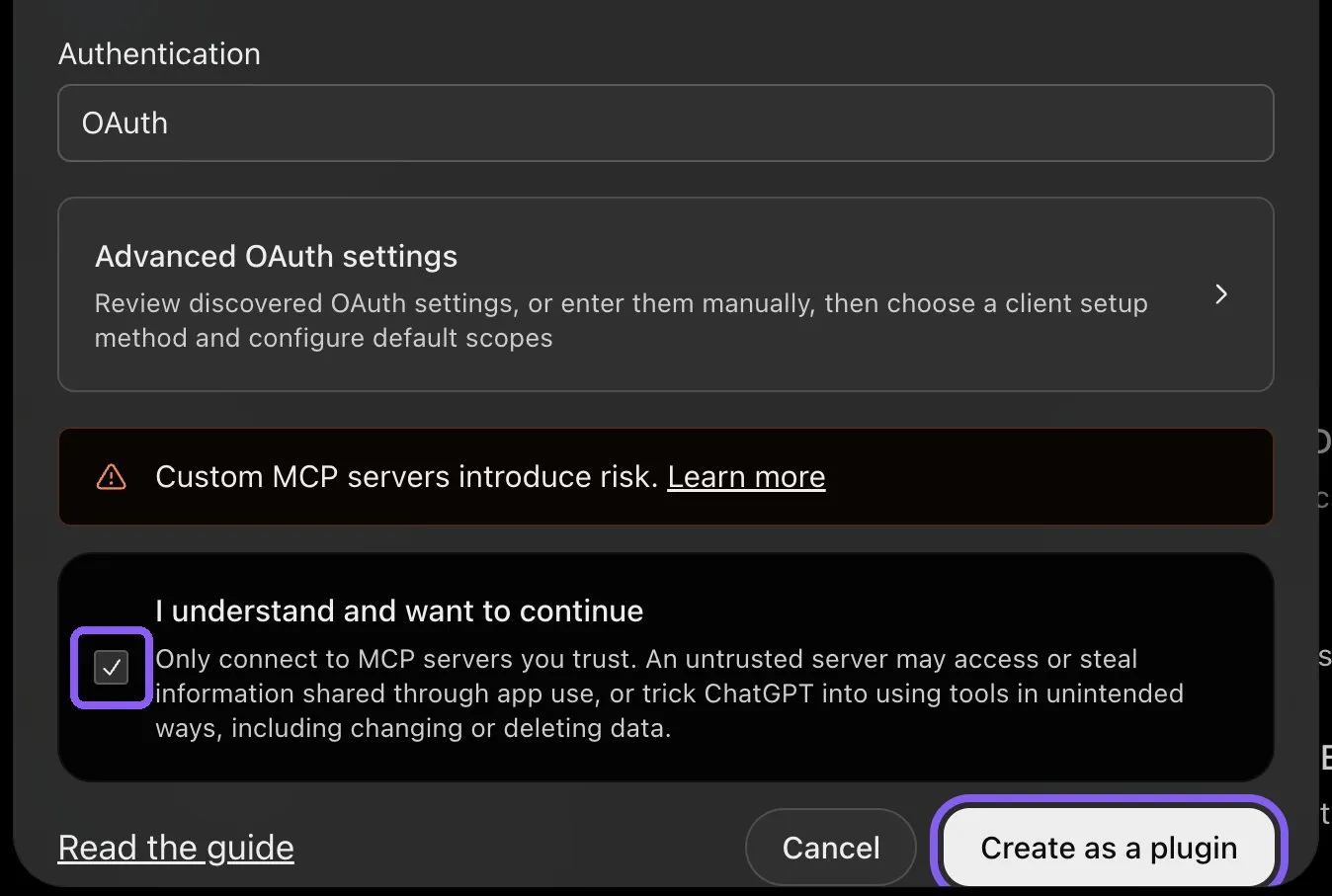
ChatGPT, bottom of the custom MCP server form, November 2026.
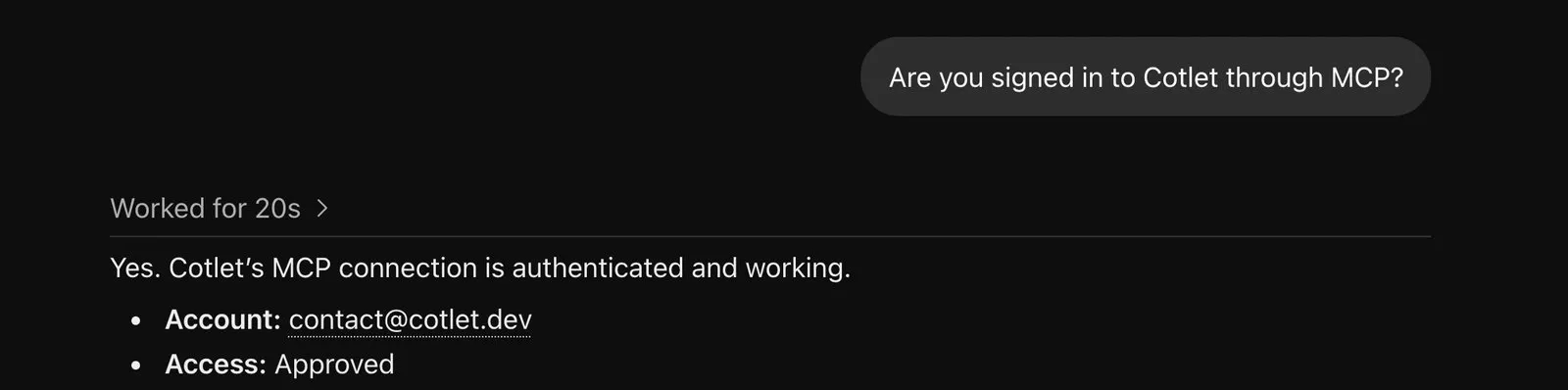
ChatGPT confirming the Cotlet connection, November 2026.
ChatGPT asks “Allow ChatGPT to use Cotlet?” before some steps. Pick Always allow, or the chat waits for your click. On a Business, Enterprise or Edu workspace, an admin has to allow custom MCP servers first.
How to connect BookingKoala to Claude
- Open Connectors in Claude and click Add. In the desktop app it is under Customize, Connectors.
- Click Add custom connector.
- Paste the name
Cotletand the URLhttps://cotlet.dev/mcp/v1/connect, then click Continue. - Keep the settings and click Add.
- A Cotlet page opens. Click Allow access.
- In a chat, click the plus button, then Connectors, and turn Cotlet on.
- Ask Claude: “Are you signed in to Cotlet through MCP?”, then “List BookingKoala bookings this week where the card payment was declined.”. Claude asks before it uses a Cotlet tool the first time. Click Allow.
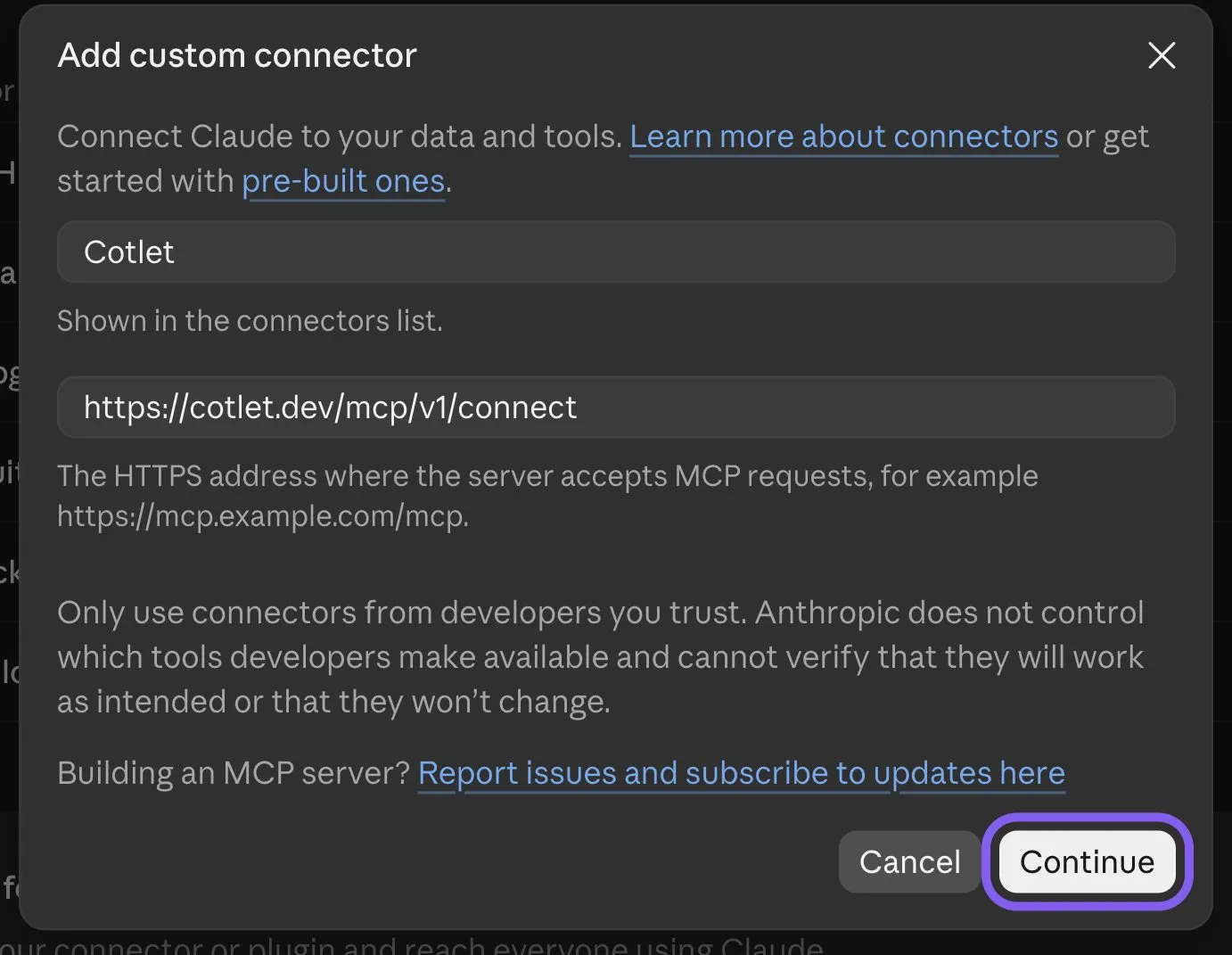
Claude, Add custom connector form, November 2026.
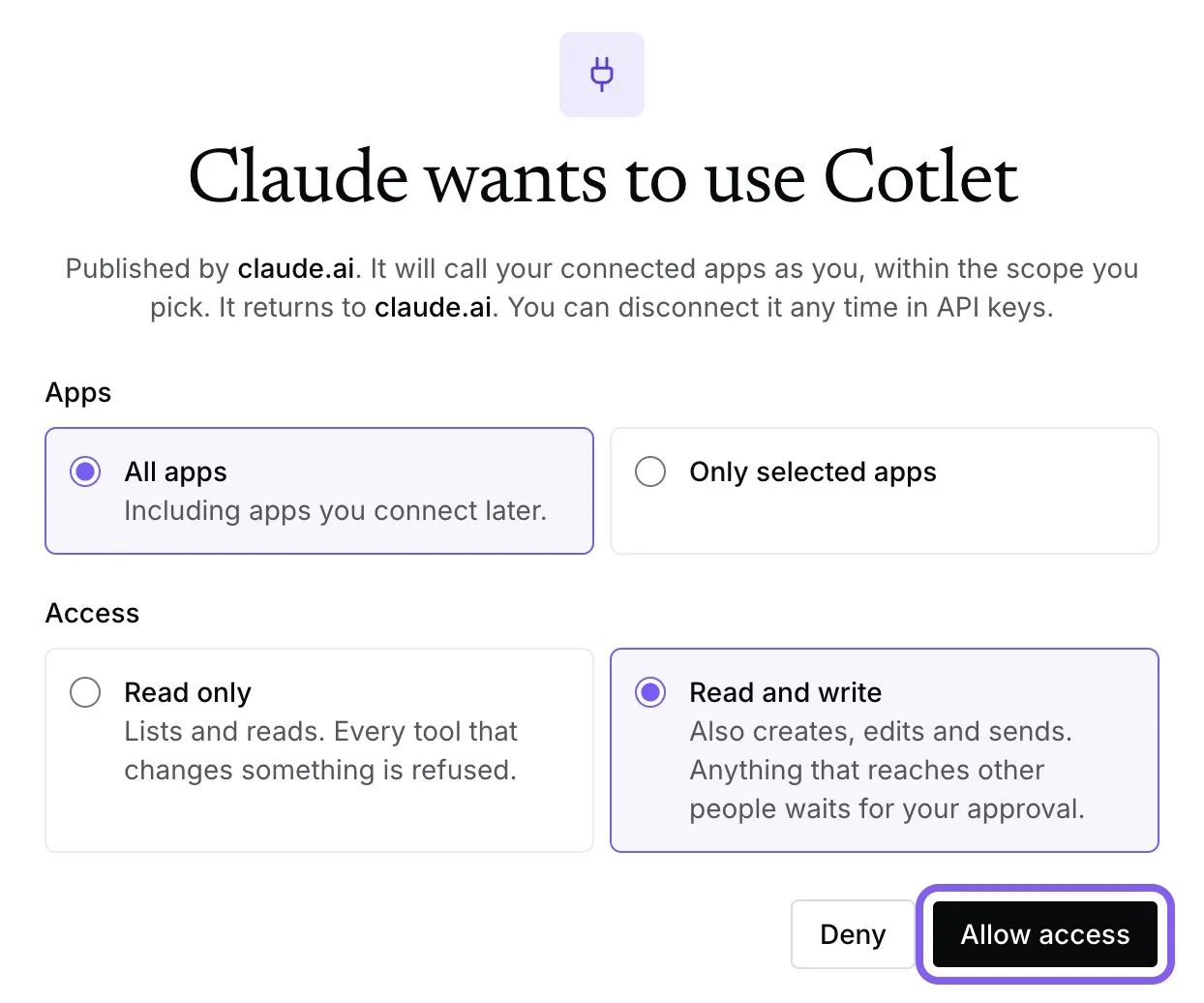
Cotlet consent page after you add the connector in Claude, November 2026.
Claude’s free plan allows one custom connector. On a Team or Enterprise plan, an owner adds Cotlet in Organization settings, Connectors, and you click Connect next to it.
How to connect BookingKoala to Claude Code
Add Cotlet without a key, then sign in once in the browser:
claude mcp add --transport http cotlet https://cotlet.dev/mcp/v1/connectRun /mcp in Claude Code, pick cotlet and sign in to Cotlet. Prefer an API key, for example on a server? Create one in the Cotlet console and use:
claude mcp add --transport http cotlet https://cotlet.dev/mcp/v1 \
  --header "Authorization: Bearer $COTLET_API_KEY"
How to connect BookingKoala to Codex
Create an API key in the Cotlet console, put it in the COTLET_API_KEY environment variable and add this to ~/.codex/config.toml:
[mcp_servers.cotlet]
url = "https://cotlet.dev/mcp/v1"
bearer_token_env_var = "COTLET_API_KEY"
How to connect BookingKoala to Cursor
Create an API key in the Cotlet console, put it in the COTLET_API_KEY environment variable and add this to ~/.cursor/mcp.json:
{
  "mcpServers": {
    "cotlet": {
      "url": "https://cotlet.dev/mcp/v1",
      "headers": { "Authorization": "Bearer ${env:COTLET_API_KEY}" }
    }
  }
}
How to connect BookingKoala to Grok
Grok takes custom MCP servers on grok.com, per xAI’s connectors documentation (checked 8 November 2026).
- Open grok.com/connectors and click New Connector.
- Pick Custom and paste the server URL
https://cotlet.dev/mcp/v1/connect. - Sign in to Cotlet when Grok asks, then click Allow access.
- Ask Grok: “Are you signed in to Cotlet through MCP?”
On Grok Business, an admin adds the connector first in the xAI console, under Grok Business, Connectors. The Grok chat inside X has no custom connector menu.
How to connect BookingKoala to Hermes Agent
Add Cotlet to ~/.hermes/config.yaml in the format of the Hermes MCP config reference:
mcp_servers:
  cotlet:
    url: "https://cotlet.dev/mcp/v1"
    headers:
      Authorization: "Bearer ${COTLET_API_KEY}"
    trust: untrusted
Put COTLET_API_KEY in ~/.hermes/.env and check it with hermes mcp test cotlet. With trust: untrusted, Hermes runs reads at once and asks before every write. More on Hermes in our post on the Hermes Agent browser.
How to connect BookingKoala to n8n
Use the MCP Client node, or the MCP Client Tool inside an AI Agent node:
- Server Transport: HTTP Streamable
- MCP Endpoint URL:
https://cotlet.dev/mcp/v1 - Authentication: Bearer Auth, with your Cotlet API key as the token
- Tool:
bookingkoala_readfor reads,bookingkoala_writefor changes
Use it for work that should run on its own, such as an 8 pm check that posts tomorrow’s unassigned BookingKoala jobs to your team Slack.
Any other MCP client
Point the client at https://cotlet.dev/mcp/v1 over Streamable HTTP, with the header Authorization: Bearer <your Cotlet API key>. A client that supports OAuth sign-in can use https://cotlet.dev/mcp/v1/connect instead and needs no key. The full reference is in the MCP docs.
Three BookingKoala jobs to try first
Run one on tomorrow’s schedule and check the booking in BookingKoala afterwards.
Clear tomorrow’s unassigned jobs
List tomorrow’s unassigned bookings, check which providers are free for each, and assign them after I approve. Tell each provider about the new job.
The AI pulls the unassigned bookings, checks provider availability and proposes one provider per job. It assigns them after your OK; a provider who is not available is refused, so nobody gets double-booked by accident. It also reminds you of a BookingKoala setting worth having on: the help center recommends “enabling your providers’ email and SMS notifications to alert them when new jobs are added to the folder”, per its unassigned folder article.
Refund part of a charge, tax included
Refund $40 of the Johnson charge for Tuesday’s deep clean as a partial refund, and tell me exactly what she gets back.
The AI finds the charge, shows you the refund and processes it after your yes. It checks one detail first: for a partial refund, BookingKoala says “The amount you enter here will automatically include the taxes if there are any”, per its refund article. So $40 means $40 back including tax, and the AI says so before it refunds.
Chase overdue invoices
Resend every overdue invoice from the last 30 days. Text them if my plan allows it, otherwise email.
The AI lists overdue invoices and resends each after your OK. It picks the channel your plan supports: invoices “can now be sent via both Email and SMS, but only for Premium Subscribers”, per BookingKoala’s resend invoice article. On Starter or Growing, it uses email and lists the customers you may want to call.
Pricing
Cotlet has no monthly fee. You buy credits in packs from $29 that keep for 12 months, and you begin with 7 free days and 2,000 credits, with no card asked. Failed calls cost nothing. Packs are on the pricing page.
BookingKoala’s own plan stays the same, and Cotlet does not use Zapier or your BookingKoala API key.
FAQ
Does BookingKoala have a ChatGPT integration?
Only through Zapier, which can pass data to ChatGPT or create a lead. There is no BookingKoala app in ChatGPT. With Cotlet, ChatGPT works in your BookingKoala account itself.
Is there a BookingKoala MCP server?
Zapier has one with a single action, Create Lead. Cotlet’s hosted MCP server has 18 BookingKoala tools, reads and writes, and adds to ChatGPT or Claude with one URL.
Does BookingKoala have an API?
Not a documented one. BookingKoala lets you generate a key to connect Zapier or Make, with no developer documentation for other uses, as of November 2026.
Can ChatGPT read and cancel my BookingKoala bookings?
Yes, through Cotlet. It lists bookings, opens one with its price breakdown, and cancels or reschedules after you confirm. A customer is only notified if you ask for it.
Is this an official BookingKoala integration?
No. Cotlet is independent and not affiliated with BookingKoala. It works through your own signed-in BookingKoala account, the way you would by hand.
Run the BookingKoala office from a chat
Zapier can bring leads in. The bookings, providers and refunds need more than one action. Sign up for Cotlet, connect BookingKoala once, and ask Claude what is still unassigned for tomorrow. For other service-business apps with no API, see the integrations catalog.