How to connect Fresha to ChatGPT, Claude and any AI agent
Fresha's ChatGPT and Claude apps are for clients looking for a salon. How to connect your own Fresha calendar, clients, sales and reviews to your AI.
Cotlet team 13 min read
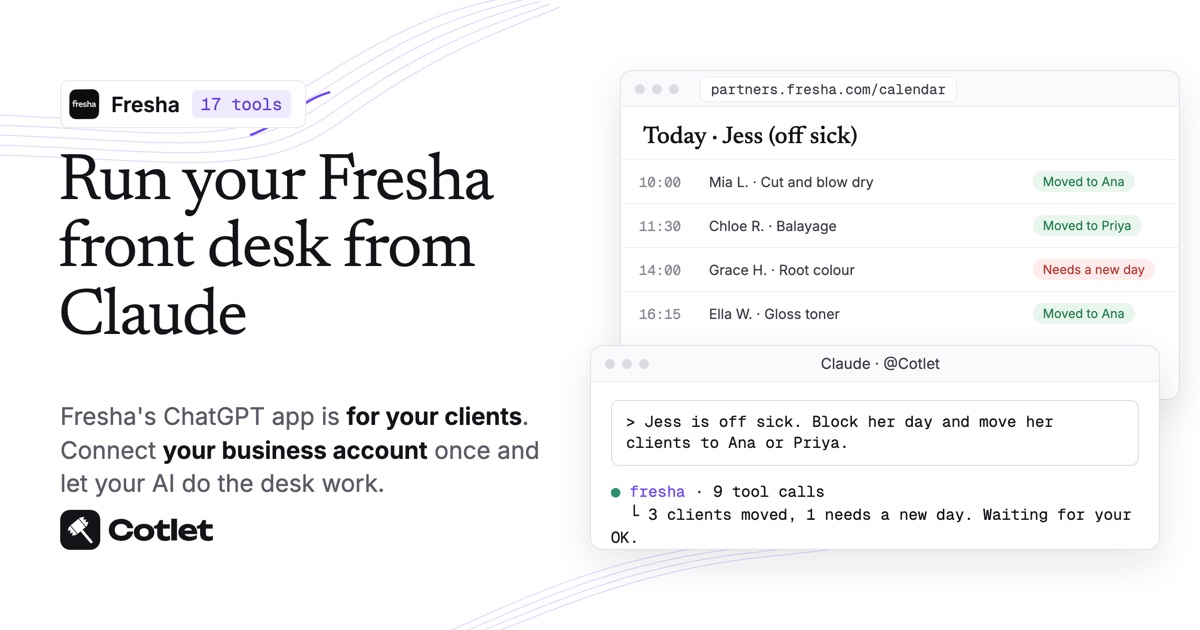
Fresha’s official ChatGPT and Claude apps help clients find and book a salon, but they never see your business account. They cannot read your calendar, your client list, your sales or your reviews, and Fresha has no public API for its business side, as of November 2026. To connect your own Fresha account to ChatGPT, Claude or another AI agent, you use Cotlet: it signs in to partners.fresha.com as you, in a browser on our side, and gives your AI 17 Fresha tools for appointments, clients, sales and reviews. Setup takes about ten minutes and needs no code.
If you searched this after reading that “Fresha is now on ChatGPT”, you are not alone. The news was about clients asking ChatGPT for “a gel manicure near me on Saturday”. This guide is for the other side of that booking. Cotlet is made for salon and spa owners, managers and front desk staff who want their AI to run the work in their Fresha account, while clients keep booking through Fresha’s own app.
Fresha’s ChatGPT app vs connecting your business account
| Fresha app in ChatGPT and Claude | Your Fresha account through Cotlet | |
|---|---|---|
| Who it is for | Clients looking for an appointment | You and your team |
| What the AI sees | Public marketplace listings: services, prices, ratings, open times | Your calendar, clients, client notes, sales and reviews |
| What the AI can do | Suggest a venue, then send the client to Fresha to book and pay | Book, move and cancel appointments, block time, add clients and notes, read sales, reply to reviews |
| Who sets it up | The client, in their own ChatGPT or Claude | You, once, in your ChatGPT or Claude |
Both can run at the same time. Clients keep finding you through Fresha’s app, and your AI works in your account.
What ChatGPT and Claude can do in Fresha once connected
You ask in plain words, and the AI works in partners.fresha.com for you. These are the 17 Fresha tools Cotlet gives it:
| Area | What the AI can do in your Fresha account |
|---|---|
| Calendar | List appointments by day, team member or client, open one, find free slots for a service |
| Booking | Create an appointment with a named team member, reschedule it, cancel it with your reason |
| Time off | Block a team member’s hours for a day so nobody books into them |
| Clients | Search clients, open a profile, add a new client, add a note the team sees |
| Sales | List sales for a date range, read the Sales summary for a period |
| Reviews | List reviews with and without your reply, post a public reply |
| Team and menu | List team members, locations and services with prices and durations |
Changes that reach a client wait for your OK: a booking, a move, a cancellation and a review reply. A new client, a client note or blocked time sends nothing to anyone. If you run more than one location, the AI asks which one, or you name it in the request.
Inputs and limits of every tool are on the Fresha API and MCP server page.
Does Fresha have AI, an API or an official ChatGPT app?
Yes to AI and to a ChatGPT app, no to an API, and none of them lets your own AI work in your business account.
- No public API for businesses. Fresha publishes no developer docs and gives salons no API keys. Zapier and n8n have no Fresha app either.
- Data Connector. A paid add-on, priced per location, that copies your raw Fresha data into Snowflake for Power BI, Tableau or Looker, per Fresha’s Data connector overview (checked 8 November 2026). It only reads, and it is built for reports, not for booking.
- AI Concierge. An optional add-on, priced per location, that answers client calls and messages around the clock and books into your calendar, per its feature page (checked 8 November 2026). It talks to your clients for you. It does not take your instructions in ChatGPT or Claude.
- The marketplace apps in ChatGPT and Claude. Launched on 4 August 2026, per Fresha’s announcement. Fresha’s own help article for Claude says that when a client picks an appointment, “you’re taken to Fresha to complete your booking”.
So for your own calendar, clients and reviews, a hosted MCP server is the way in today. If Fresha opens an API for businesses, use it.
What you need before you start
- The owner login of your Fresha business account on partners.fresha.com, or a team login with access to the calendar, clients, sales and reviews you want the AI to use.
- The phone on that account. Fresha texts a code at each sign-in.
- ChatGPT on chatgpt.com, or Claude on claude.ai or the desktop app. Claude’s free plan allows one custom connector.
- A Cotlet account. The free trial gives you 2,000 credits for 7 days, no card.
Step 1: sign in to Fresha in your Cloud Browser
In the Cotlet console, open Fresha in your Cloud Browser and sign in at partners.fresha.com with your usual email and password. When Fresha texts you the code, enter it and tick Trust this device. Fresha then keeps you signed in between your AI’s requests, so you are not asked for a new code every time.
You type the password into Fresha’s own page. Cotlet does not see it and does not store it, it keeps only the signed-in session, encrypted. If Fresha signs you out one day, your AI says so and sends you a link to sign in again. Details are on the security page.
Step 2: connect Fresha to ChatGPT, Claude or another AI agent
Pick the AI you already use. ChatGPT, Claude, Claude Code, Codex, Cursor, Grok, Hermes Agent, n8n and other MCP clients all get the same 17 Fresha tools.
Pick your AI above to see its steps.
How to connect Fresha to ChatGPT
Do this on chatgpt.com in your browser. Cotlet then works in the ChatGPT desktop and phone apps too.
- Open Plugins in ChatGPT and click Add.
- Click Add custom MCP server. Not in the menu? Turn on Developer mode in Settings, Security and login, then come back.
- Paste the name
Cotletand the server URLhttps://cotlet.dev/mcp/v1/connect. Keep Authentication on OAuth. - Tick “I understand and want to continue” and click Create as a plugin.
- Click Connect Cotlet. A Cotlet page opens, click Allow access.
- In a new chat, type
@Cotletand pick it from the list. - Ask ChatGPT: “Are you signed in to Cotlet through MCP?” Then try a first Fresha task: “List my Fresha appointments for tomorrow, grouped by team member.”
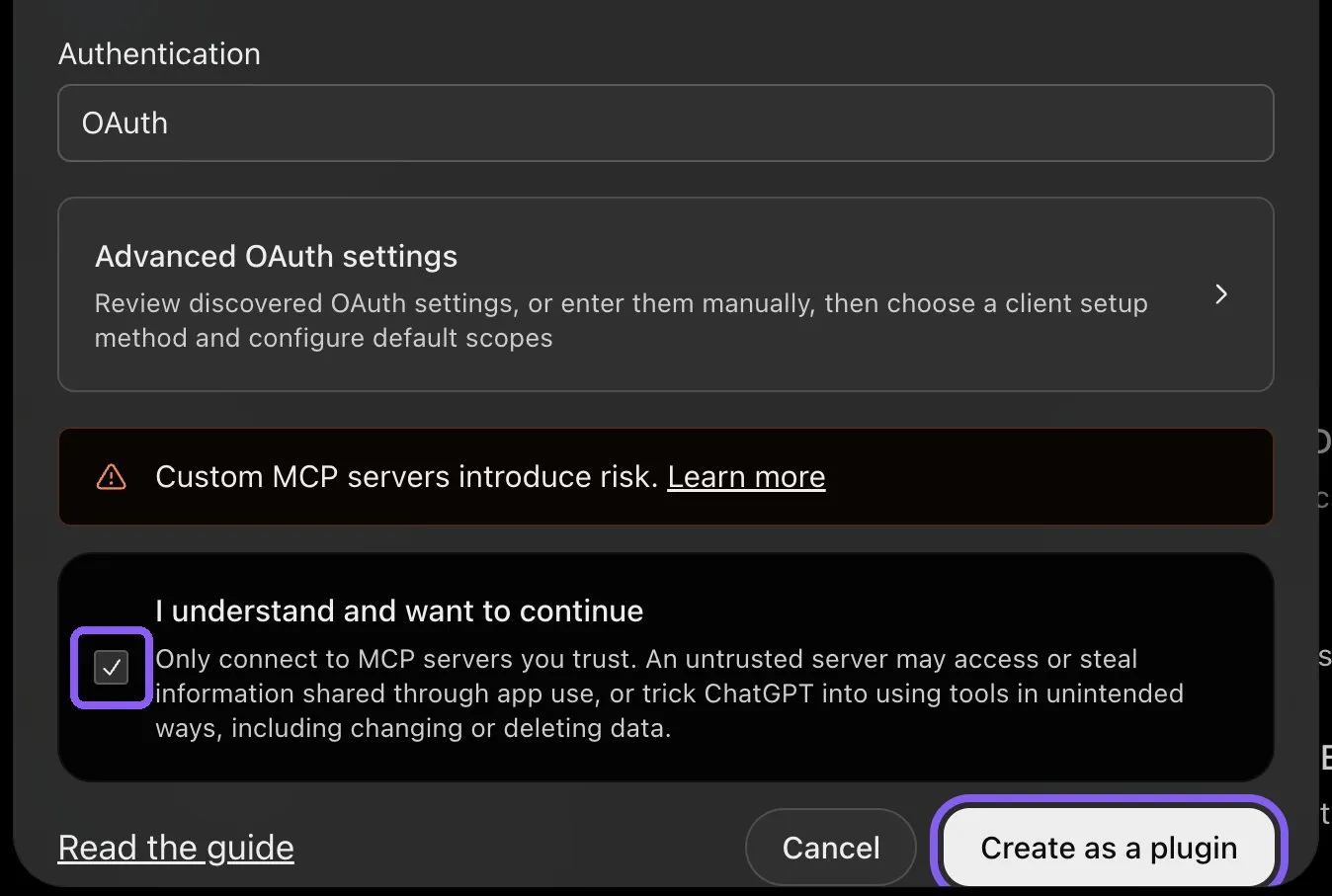
ChatGPT, bottom of the custom MCP server form, November 2026.
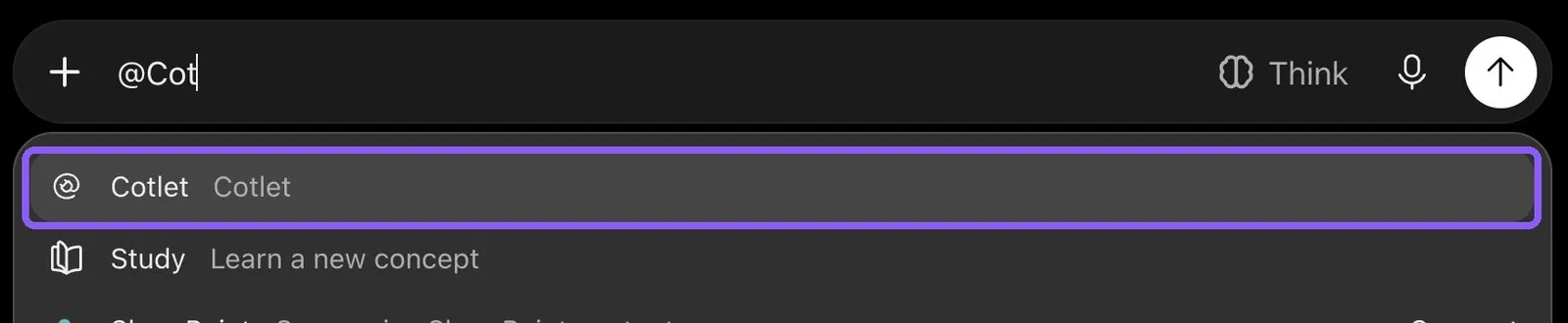
ChatGPT, picking Cotlet in a new chat with @, November 2026.
ChatGPT asks “Allow ChatGPT to use Cotlet?” before some steps. Pick Always allow, or the chat waits for your click. On a Business, Enterprise or Edu workspace, an admin has to allow custom MCP servers first.
How to connect Fresha to Claude
- Open Connectors in Claude and click Add. In the desktop app it is under Customize, Connectors.
- Click Add custom connector.
- Paste the name
Cotletand the URLhttps://cotlet.dev/mcp/v1/connect, then click Continue. - Keep the settings and click Add.
- A Cotlet page opens. Click Allow access.
- In a chat, click the plus button, then Connectors, and turn Cotlet on.
- Ask Claude: “Are you signed in to Cotlet through MCP?”, then “Which Fresha reviews from the last 30 days have no reply yet?”. Claude asks before it uses a Cotlet tool the first time. Click Allow.

Claude, Customize, Connectors, November 2026.
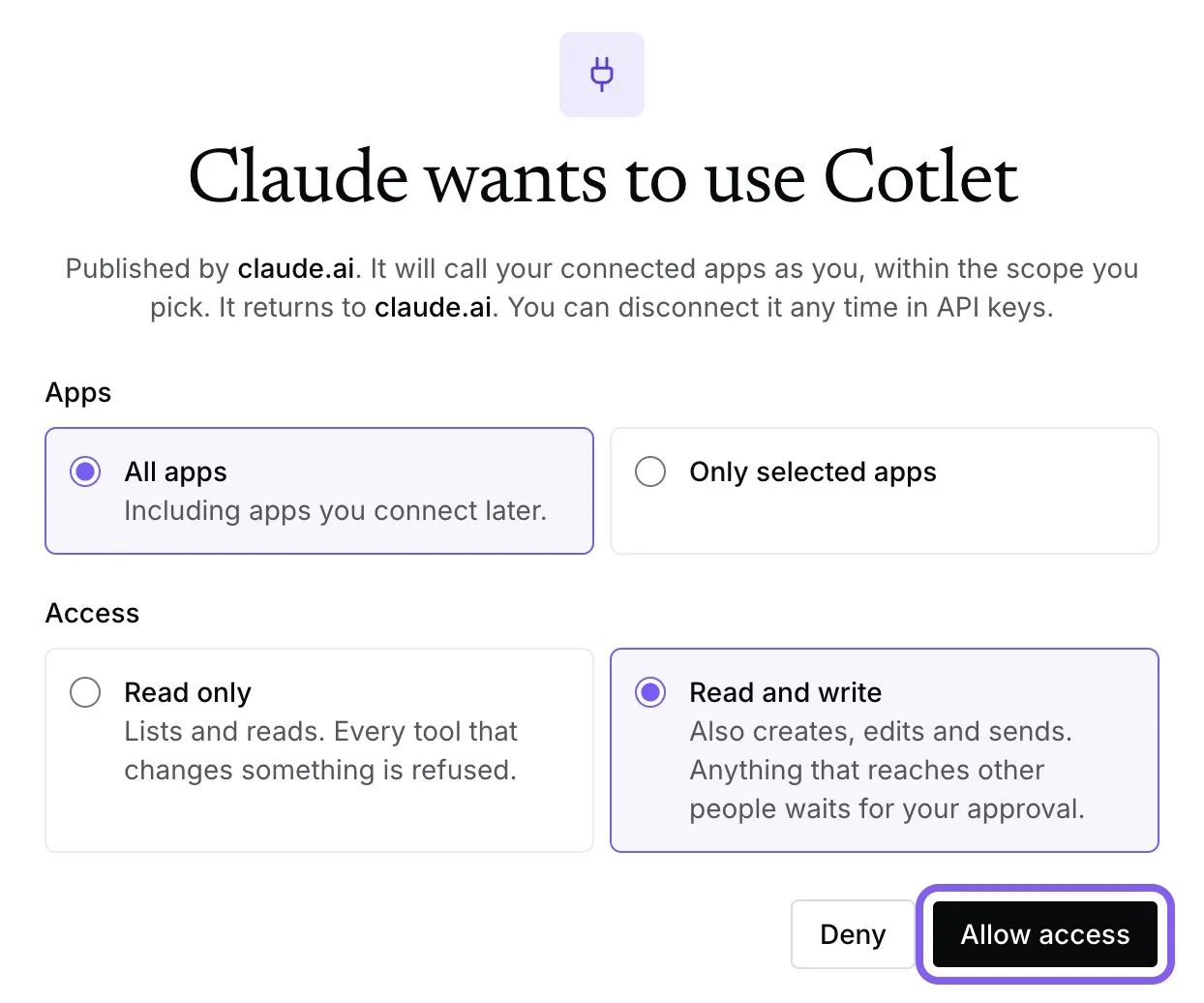
Cotlet consent page after you add the connector in Claude, November 2026.
Claude’s free plan allows one custom connector. On a Team or Enterprise plan, an owner adds Cotlet in Organization settings, Connectors, and you click Connect next to it.
How to connect Fresha to Claude Code
Add Cotlet without a key, then sign in once in the browser:
claude mcp add --transport http cotlet https://cotlet.dev/mcp/v1/connectRun /mcp in Claude Code, pick cotlet and sign in to Cotlet. Prefer an API key, for example on a server? Create one in the Cotlet console and use:
claude mcp add --transport http cotlet https://cotlet.dev/mcp/v1 \
  --header "Authorization: Bearer $COTLET_API_KEY"
How to connect Fresha to Codex
Create an API key in the Cotlet console, put it in the COTLET_API_KEY environment variable and add this to ~/.codex/config.toml:
[mcp_servers.cotlet]
url = "https://cotlet.dev/mcp/v1"
bearer_token_env_var = "COTLET_API_KEY"
How to connect Fresha to Cursor
Create an API key in the Cotlet console, put it in the COTLET_API_KEY environment variable and add this to ~/.cursor/mcp.json:
{
  "mcpServers": {
    "cotlet": {
      "url": "https://cotlet.dev/mcp/v1",
      "headers": { "Authorization": "Bearer ${env:COTLET_API_KEY}" }
    }
  }
}
How to connect Fresha to Grok
Grok takes custom MCP servers on grok.com, per xAI’s connectors documentation (checked 8 November 2026).
- Open grok.com/connectors and click New Connector.
- Pick Custom and paste the server URL
https://cotlet.dev/mcp/v1/connect. - Sign in to Cotlet when Grok asks, then click Allow access.
- Ask Grok: “Are you signed in to Cotlet through MCP?”
On Grok Business, an admin adds the connector first in the xAI console, under Grok Business, Connectors. The Grok chat inside X has no custom connector menu.
How to connect Fresha to Hermes Agent
Add Cotlet to ~/.hermes/config.yaml in the format of the Hermes MCP config reference:
mcp_servers:
  cotlet:
    url: "https://cotlet.dev/mcp/v1"
    headers:
      Authorization: "Bearer ${COTLET_API_KEY}"
    trust: untrusted
Put COTLET_API_KEY in ~/.hermes/.env and check it with hermes mcp test cotlet. With trust: untrusted, Hermes runs reads at once and asks before every write. More on Hermes in our post on the Hermes Agent browser.
How to connect Fresha to n8n
Use the MCP Client node, or the MCP Client Tool inside an AI Agent node:
- Server Transport: HTTP Streamable
- MCP Endpoint URL:
https://cotlet.dev/mcp/v1 - Authentication: Bearer Auth, with your Cotlet API key as the token
- Tool:
fresha_readfor reads,fresha_writefor changes
Use it for work that should run on its own, such as a Monday list of Fresha reviews still waiting for a reply, each with a draft answer for you to approve.
Any other MCP client
Point the client at https://cotlet.dev/mcp/v1 over Streamable HTTP, with the header Authorization: Bearer <your Cotlet API key>. A client that supports OAuth sign-in can use https://cotlet.dev/mcp/v1/connect instead and needs no key. The full reference is in the MCP docs.
Three Fresha jobs to try first
Pick one you did by hand this week, ask for it, and check the result in your Fresha calendar.
Book a client who messaged you on Instagram
Mia Lopez messaged on Instagram: she wants a cut and blow dry with Jess, Friday after 3 pm. Find her in Fresha, add her if she is new, and book the first slot that fits. Show me before you book.
The AI looks Mia up by name first, so you do not get a second profile for the same person. It checks Jess’s free slots for both services on Friday afternoon and shows you the one it picked. That check matters: Fresha lets staff double book the same time slot from the calendar, per its help article on creating appointments. After your OK it books, and Fresha sends Mia its usual confirmation if her notification settings allow it.
Cover for a team member who called in sick
Jess is off sick today. Block her day, move her clients to Ana or Priya at the same time where they are free, and list the ones nobody can take. Ask me before each change.
The AI blocks Jess’s hours first, so no new booking lands in her column while it works. Then it shows one plan: who moves to whom, at what time, and who is left over. Each move runs only after your OK. For the clients nobody can take, you choose: a later day with Jess, or a cancellation with your own reason. This is the morning scramble that usually happens on the phone before the first client walks in.
Read yesterday’s takings, tips included
How did yesterday go compared with the same day last week? Sales, services, products, discounts and refunds. Tell me where the tips are.
The AI reads Fresha’s Sales summary for both days and puts them side by side. It also reminds you of a gap in that report: Fresha builds the Sales summary from sale items, so tips and service charges are not in it, per its Sales summary help article. You find those in the Tips summary report. Ask for this every morning, and you have the numbers before the doors open.
How much it costs
Cotlet has no subscription. You buy credit packs from $29, valid for 12 months, after a free 7-day trial with 2,000 credits and no card. A call that fails costs nothing. See the pricing page for the packs.
You keep your Fresha plan and add-ons as they are. Cotlet works inside the Fresha account you already have and needs no Data Connector.
FAQ
Is this the same as the Fresha app in ChatGPT and Claude?
No. Fresha’s own app in ChatGPT and Claude is for clients searching the Fresha marketplace for a salon. Cotlet connects your business account on partners.fresha.com, so your AI works in your calendar, clients, sales and reviews.
Can ChatGPT or Claude manage my Fresha appointments and clients?
Yes, once your Fresha account is connected through Cotlet. The AI finds free slots, books, moves and cancels appointments, adds clients and client notes, and asks for your OK before any change a client would see.
Can I use Fresha’s Data Connector with ChatGPT instead?
Only for reading. The Data Connector copies your Fresha data into Snowflake for reporting tools, so an AI pointed at it can answer questions about past sales and visits. It cannot book, move or cancel an appointment or reply to a review, because nothing flows back into Fresha. It is also a paid add-on per location.
What about the free Fresha MCP server on GitHub?
The open source mcp-fresha server reads Data Connector tables from Snowflake, so it needs that add-on and your Snowflake login in a local config file. It reads reports only and runs on your own computer. Cotlet is hosted and works in your live Fresha account, reads and writes included.
Can ChatGPT agent just log in to Fresha itself?
ChatGPT agent can use websites in its own virtual browser, and when a task needs a login it pauses and asks you to take over the browser, per OpenAI’s ChatGPT agent help article (checked 9 November 2026). Fresha also texts a code at each sign-in. Cotlet keeps your Fresha session signed in between requests and gives the AI named Fresha tools, so a booking is one tool call rather than a run of clicks.
Do I need Fresha’s AI Concierge for this?
No. AI Concierge answers your clients’ calls and messages inside Fresha. Cotlet lets your own ChatGPT or Claude do work in Fresha when you ask. You can use both, or either.
Is this an official Fresha integration?
No. Cotlet is independent and not affiliated with Fresha. It works through your own signed-in Fresha account, the way you would by hand.
Connect your Fresha account today
Your clients can already find you through ChatGPT. Now the work behind those bookings can go there too. Start a free Cotlet trial, sign in to Fresha once, and connect ChatGPT or Claude with the steps above. Using other apps with no API? They are in the integrations catalog.