How to connect SalonUltimate to ChatGPT, Claude and any AI agent
SalonUltimate (also BookedBy) has no official MCP server or ChatGPT and Claude connector, and no public API found (checked 28 Nov 2026). How to connect it.
Cotlet team 10 min read
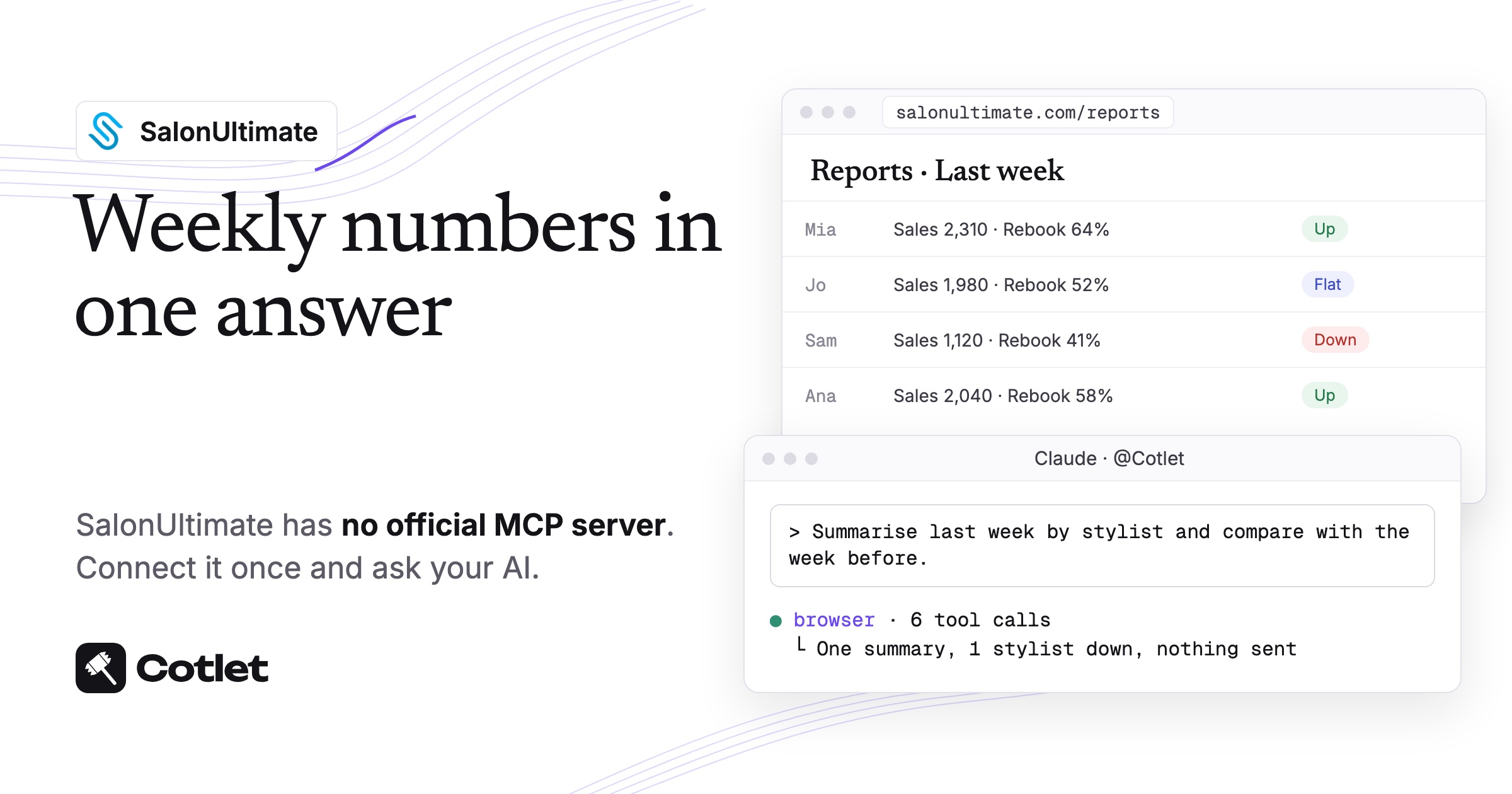
Monday morning, and the question is simple: how did last week go? The answer is scattered over sales by stylist, retail share, rebooking and tips, each one a different report in the SalonUltimate back office. SalonUltimate, which is also sold as BookedBy, has no official MCP server, no ChatGPT app and no Claude connector as of 28 Nov 2026. We found no public API or developer portal either. Cotlet lets an AI agent work in the back office you are already signed in to, so it opens those reports for you and writes the summary. Whatever would reach a client stops and asks you first.
This guide is for owners and managers of independent salons, barber shops, spas and small salon groups who run the SalonUltimate back office. Stylists using the app and clients booking online are out of scope.
Which SalonUltimate screens the AI can work
Name the result you are after, and the agent locates the screen and returns the figures.
| SalonUltimate area | What you can ask |
|---|---|
| Reports | Pulls last week’s sales by stylist, retail share, rebooking rate and tips, with the change from the week before |
| Memberships | Lists memberships with a failed payment or ending this month, with the next charge date |
| Promotions | Counts how often each promotion was used this month and the total discount given |
| Employee scheduling, Appointments | Compares next week’s shifts with booked visits and shows who is overbooked or idle |
| Clients | Spots clients with several visits but a short history, and profiles that share a phone number |
| Reports, payments | Sets card sales per day beside the processor deposits you paste in |
| Gift certificates | Lists certificates sold and not fully redeemed, with the balance |
Reading is safe. A message to a member, or a change to the appointment book, stops until you approve it. The SalonUltimate MCP page lists further jobs.
What SalonUltimate itself offers for integrations
Here is the state of things on 28 November 2026.
- API: none found. A Supergood report card says SalonUltimate publishes no API and no developer portal. The same product is now sold as BookedBy, and we found nothing there either.
- ChatGPT and Claude: no connector. Searching the MCP Registry for SalonUltimate or BookedBy returns nothing.
- Zapier, Make, n8n: no app. The pages for both names answered 404.
- Export: nothing described. The reports page we read does not describe a data export.
The details sit in the SalonUltimate access review.
What you need first
- Your back office login. Each salon signs in at its own address, so use the one you always use.
- Some history in reports and memberships, so the answers have substance.
- ChatGPT or Claude, your choice.
- A free Cotlet account to start (pricing).
Step 1: sign in to SalonUltimate in your Cloud Browser
The Cloud Browser is a Chrome window kept for you on our side. Type your salon’s own address into it and log in the way you would at the front desk. SalonUltimate alone sees the password. We hold an encrypted session that you can cut off in one click (security).
Step 2: connect SalonUltimate to ChatGPT, Claude or another AI agent
Decide which assistant you prefer and add Cotlet to it once. Afterwards SalonUltimate is a mention away in any conversation.
Pick your AI above to see its steps.
How to connect SalonUltimate to ChatGPT
Do this on chatgpt.com in your browser. Cotlet then works in the ChatGPT desktop and phone apps too.
- Open Plugins in ChatGPT and click Add.
- Click Add custom MCP server. Not in the menu? Turn on Developer mode in Settings, Security and login, then come back.
- Paste the name
Cotletand the server URLhttps://cotlet.dev/mcp/v1/connect. Keep Authentication on OAuth. - Tick “I understand and want to continue” and click Create as a plugin.
- Click Connect Cotlet. A Cotlet page opens, click Allow access.
- In a new chat, type
@Cotletand pick it from the list. - Ask ChatGPT: “Are you signed in to Cotlet through MCP?” Then try a first SalonUltimate task: “In SalonUltimate, list the memberships with a failed payment or ending this month, with the client and the next charge date. Change nothing.”
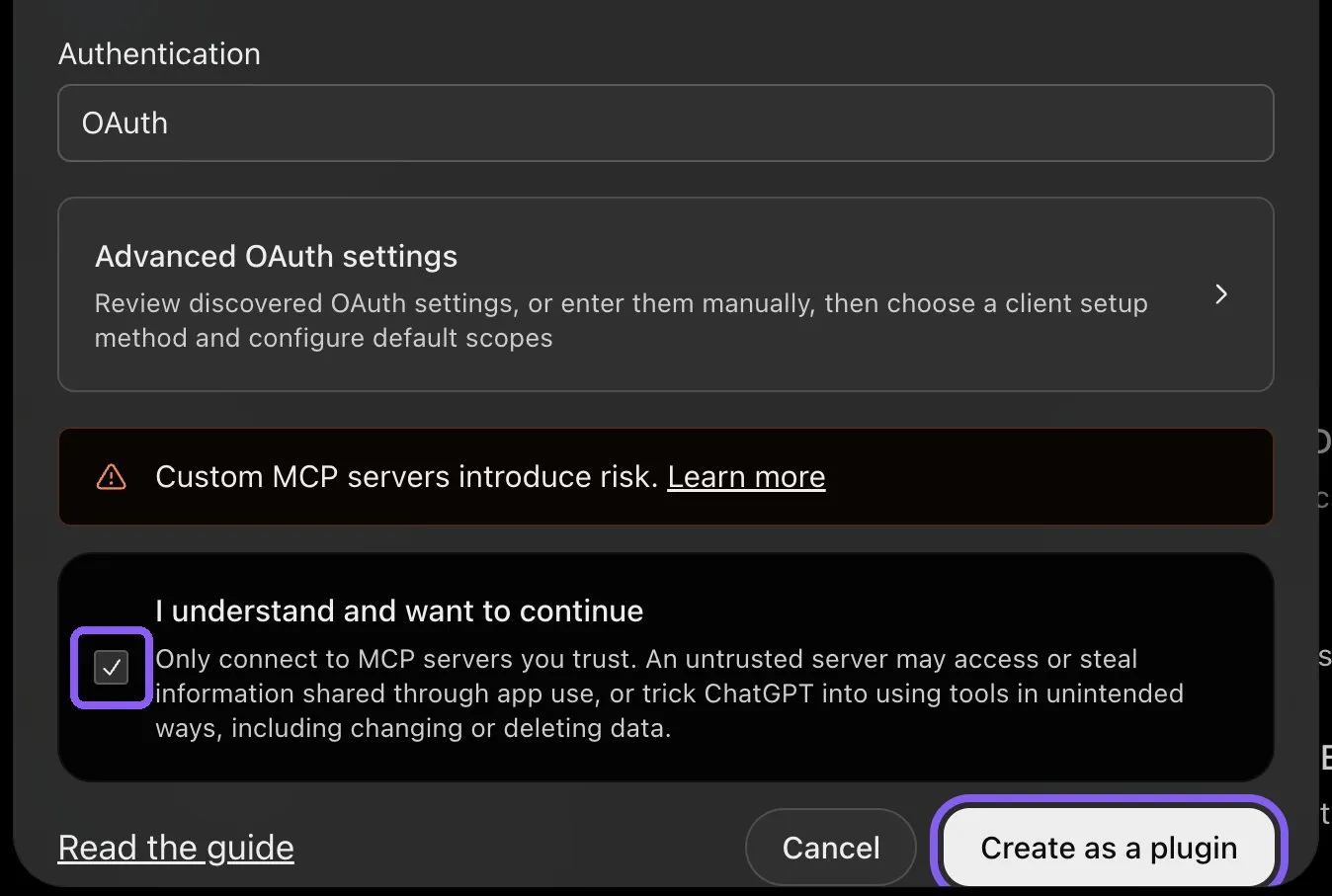
ChatGPT, bottom of the custom MCP server form, November 2026.
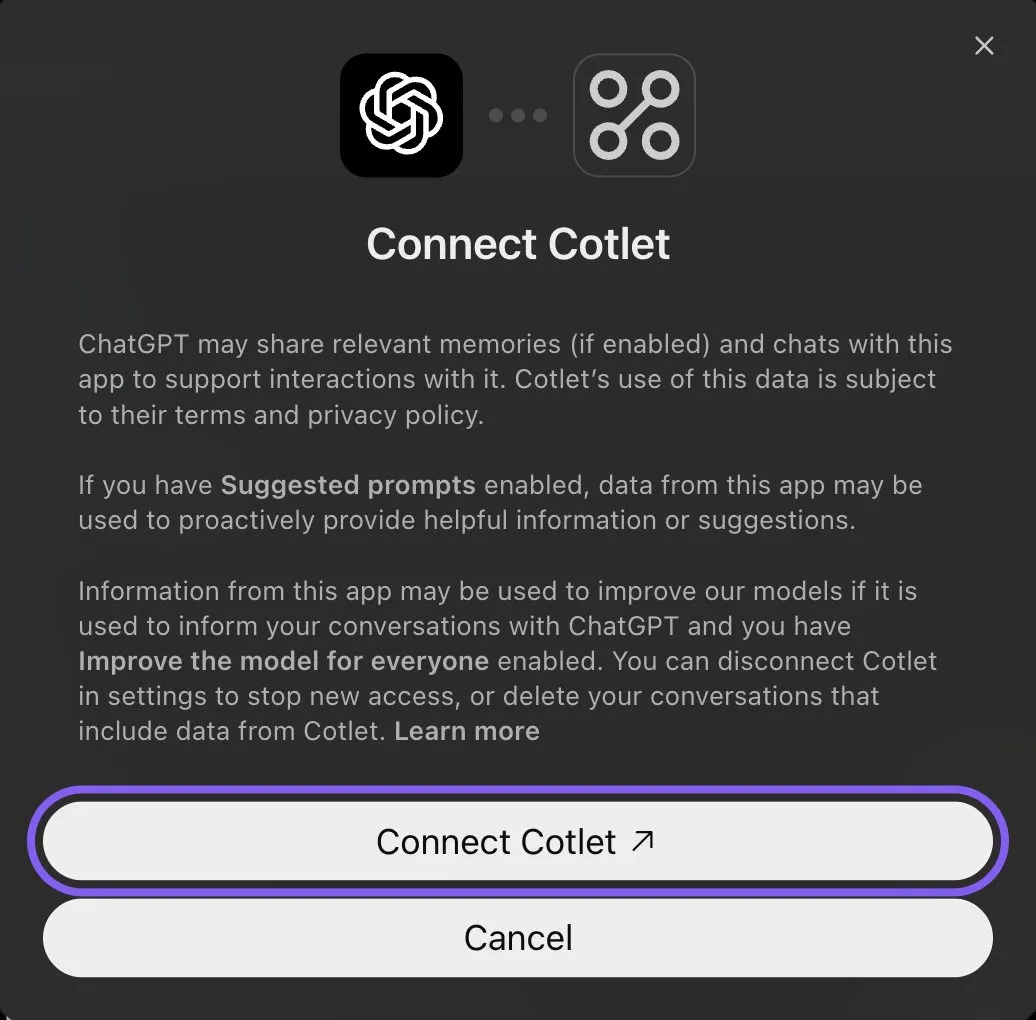
ChatGPT, connecting the Cotlet plugin, November 2026.
ChatGPT asks “Allow ChatGPT to use Cotlet?” before some steps. Pick Always allow, or the chat waits for your click. On a Business, Enterprise or Edu workspace, an admin has to allow custom MCP servers first.
How to connect SalonUltimate to Claude
- Open Connectors in Claude and click Add. In the desktop app it is under Customize, Connectors.
- Click Add custom connector.
- Paste the name
Cotletand the URLhttps://cotlet.dev/mcp/v1/connect, then click Continue. - Keep the settings and click Add.
- A Cotlet page opens. Click Allow access.
- In a chat, click the plus button, then Connectors, and turn Cotlet on.
- Ask Claude: “Are you signed in to Cotlet through MCP?”, then “In SalonUltimate, summarise last week’s sales by stylist, retail share, rebooking rate and tips, compared with the week before. Send nothing.”. Claude asks before it uses a Cotlet tool the first time. Click Allow.

Claude, Add custom connector form, November 2026.

Claude, chat menu, Connectors, November 2026.
Claude’s free plan allows one custom connector. On a Team or Enterprise plan, an owner adds Cotlet in Organization settings, Connectors, and you click Connect next to it.
How to connect SalonUltimate to Claude Code
Add Cotlet without a key, then sign in once in the browser:
claude mcp add --transport http cotlet https://cotlet.dev/mcp/v1/connectRun /mcp in Claude Code, pick cotlet and sign in to Cotlet. Prefer an API key, for example on a server? Create one in the Cotlet console and use:
claude mcp add --transport http cotlet https://cotlet.dev/mcp/v1 \
  --header "Authorization: Bearer $COTLET_API_KEY"
How to connect SalonUltimate to Codex
Create an API key in the Cotlet console, put it in the COTLET_API_KEY environment variable and add this to ~/.codex/config.toml:
[mcp_servers.cotlet]
url = "https://cotlet.dev/mcp/v1"
bearer_token_env_var = "COTLET_API_KEY"
How to connect SalonUltimate to Cursor
Create an API key in the Cotlet console, put it in the COTLET_API_KEY environment variable and add this to ~/.cursor/mcp.json:
{
  "mcpServers": {
    "cotlet": {
      "url": "https://cotlet.dev/mcp/v1",
      "headers": { "Authorization": "Bearer ${env:COTLET_API_KEY}" }
    }
  }
}
How to connect SalonUltimate to Grok
Grok takes custom MCP servers on grok.com, per xAI’s connectors documentation (checked 8 November 2026).
- Open grok.com/connectors and click New Connector.
- Pick Custom and paste the server URL
https://cotlet.dev/mcp/v1/connect. - Sign in to Cotlet when Grok asks, then click Allow access.
- Ask Grok: “Are you signed in to Cotlet through MCP?”
On Grok Business, an admin adds the connector first in the xAI console, under Grok Business, Connectors. The Grok chat inside X has no custom connector menu.
How to connect SalonUltimate to Hermes Agent
Add Cotlet to ~/.hermes/config.yaml in the format of the Hermes MCP config reference:
mcp_servers:
  cotlet:
    url: "https://cotlet.dev/mcp/v1"
    headers:
      Authorization: "Bearer ${COTLET_API_KEY}"
    trust: untrusted
Put COTLET_API_KEY in ~/.hermes/.env and check it with hermes mcp test cotlet. With trust: untrusted, Hermes runs reads at once and asks before every write. More on Hermes in our post on the Hermes Agent browser.
How to connect SalonUltimate to n8n
Use the MCP Client node, or the MCP Client Tool inside an AI Agent node:
- Server Transport: HTTP Streamable
- MCP Endpoint URL:
https://cotlet.dev/mcp/v1 - Authentication: Bearer Auth, with your Cotlet API key as the token
- Tools: let the AI Agent node use Cotlet’s browser tools; it reads Cotlet’s SalonUltimate guide first and works in your signed-in back office
Use it for work that should run on its own, such as a Monday summary of last week’s numbers sent to your inbox.
Any other MCP client
Point the client at https://cotlet.dev/mcp/v1 over Streamable HTTP, with the header Authorization: Bearer <your Cotlet API key>. A client that supports OAuth sign-in can use https://cotlet.dev/mcp/v1/connect instead and needs no key. The full reference is in the MCP docs.
Three SalonUltimate jobs to try first
All three begin by reading.
Get one summary instead of five reports
Pull last week’s sales by stylist, retail share, rebooking rate and tips from the reports and give me one short summary compared with the week before.
The reports hold every figure, spread over several screens. The agent opens them in turn and writes a few lines you can read in a minute. It changes nothing in SalonUltimate.
Catch memberships before the charge fails again
List memberships with a failed payment or ending this month, with the client and the next charge date. Draft a message for each.
Memberships bill clients on a schedule, so a failed payment is easy to miss. The agent lists the affected members and drafts a polite note per person. You decide who receives it.
Find out which promotions cost you money
List the promotions used this month, how many times each was applied and the total discount given.
Promotions are easy to switch on and easy to forget. The agent totals the discount per promotion, so you can drop the ones that give away more than they bring in.
Later in the month
- Compare card sales per day with the deposits from your processor and list the days that differ.
- Show days when a stylist is booked beyond the shift.
- Put your client list and the next 90 days of appointments into one sheet.
- List gift certificates that still hold a balance.
Price
You start with 2,000 credits for seven days and no card. Later packs run from $29 for twelve months, and a call that fails is not billed (pricing). SalonUltimate itself needs no extra access.
FAQ
Does SalonUltimate have an API?
We found none. A third party report card says it publishes no API and no developer portal. Cotlet reads the back office through your own login instead.
Is SalonUltimate the same as BookedBy?
BookedBy is the name the vendor now uses for the same scheduling software, according to the Supergood report and the BookedBy site. This guide is about the SalonUltimate back office you sign in to.
Can I export my client list?
The pages we read describe no export. Cotlet can open the clients and reports screens and copy the list into a sheet.
Can ChatGPT work inside my SalonUltimate account?
Not alone. Through Cotlet it uses the session you signed in to and asks before it changes anything.
Can AI chase my failed memberships?
It finds them and drafts the messages. You approve what is sent.
Is Cotlet a SalonUltimate product?
No, it is a separate company.
Start with Monday’s numbers
Create a free account, sign in to SalonUltimate and ask how last week went. Other salon apps are in the catalog.