How to connect ZenMaid to ChatGPT, Claude and any AI agent
ZenMaid has no API and no MCP server. How cleaning business owners let ChatGPT or Claude run their ZenMaid schedule, cleaners and payments anyway.
Cotlet team 11 min read
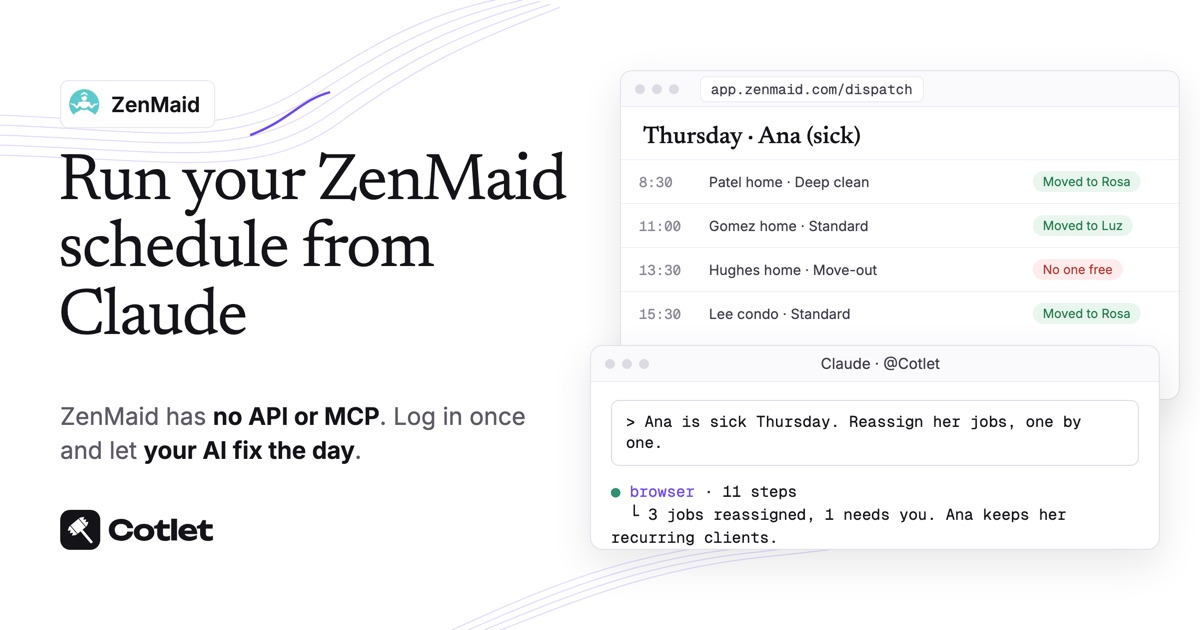
ZenMaid has no public API, no MCP server and no ChatGPT or Claude app, as of November 2026: its own help center says it “offers no REST endpoints, webhook subscriptions, or programmatic data access”. You can still connect ZenMaid to ChatGPT, Claude or any AI agent with Cotlet. You sign in to ZenMaid once in a cloud browser, and your AI works in your Dispatch View, contacts, cleaners and invoices there, as you would. Setup is about ten minutes, with no code.
Cotlet is for the person who runs the cleaning business: the owner or office manager who builds the week in ZenMaid and wants an AI to keep it straight. Your customers keep booking through your ZenMaid booking form as before. Think of the 6:30 am text from a cleaner who is sick, the storm that wipes out Friday, the Venmo payments that never got marked as paid.
What ChatGPT and Claude can do in ZenMaid once connected
Your AI works in the ZenMaid web app at app.zenmaid.com in your signed-in browser, on the same screens you use:
| ZenMaid screen | What you can ask your AI to do |
|---|---|
| Calendar and Dispatch View | Read a day or a week, move appointments to a new date, see who is free |
| Appointment card | Assign or swap cleaners, add appointment notes, send the customer a text or email |
| Appointments list | Filter by date or status, mark paid appointments, cancel a day in bulk |
| Contacts | Find a customer or lead, read their history and notes, add a note |
| Cleaners | Check availability and time off on Pro Max |
| Invoices and reports | Create and send an invoice with a payment link, list customers by unpaid balance |
The AI asks before any step a customer or cleaner will notice: a reassignment, a move, a cancellation, a text or an invoice. It reads schedules and reports without asking.
Details on how the connection works are on Cotlet’s ZenMaid integration page.
Does ZenMaid have AI, an API or an official ChatGPT app?
ZenMaid has an AI assistant in preview and a Zapier app, but no way for your own ChatGPT or Claude to manage the account.
- No API. ZenMaid’s integrations help article (checked 9 November 2026) says it “does not publish a public API on its own website”. A customer request for “a public API, MCP server, or some kind of developer access” on ZenMaid’s feedback board is still marked Pending.
- Zapier, on Pro Max. The same article says “The Zapier integration is only available on the Pro Max plan.” On Zapier, ZenMaid has 11 triggers and 4 actions, and all 4 actions create something: an appointment, a booking, a cleaner or a customer, per the Zapier ZenMaid page. There is no action to find, move, cancel or mark a payment.
- Zoe, in preview. ZenMaid’s own AI “can read your live account data”, per its Zoe announcement, with early access “rolling out in batches”. It works inside ZenMaid and does not connect to ChatGPT or Claude.
So to have ChatGPT or Claude change your schedule today, a hosted MCP server that works in ZenMaid as you is the route. If ZenMaid ships an API, use it.
Before you start
- A ZenMaid login with access to scheduling, contacts and invoices. Cleaner availability and time off are Pro Max features in ZenMaid.
- ChatGPT at chatgpt.com, or Claude in the browser or the desktop app; Claude’s free plan allows a single custom connector.
- A Cotlet account: the free trial is 7 days with 2,000 credits, and it never asks for a card.
Step 1: sign in to ZenMaid in your Cloud Browser
From the Cotlet console, open your Web browser, go to app.zenmaid.com/sign_in and log in with your ZenMaid email and password. The browser lives on Cotlet’s side and keeps you logged in, so your AI can open ZenMaid at 6 am while your laptop is still closed.
Only ZenMaid’s own login page sees your password. Cotlet does not read or keep it, and stores just the encrypted session. If ZenMaid logs you out, the AI pauses and sends you a link to log back in yourself. The security page explains the rest.
Step 2: connect ZenMaid to ChatGPT, Claude or another AI agent
Pick your AI below. ChatGPT, Claude, Claude Code, Codex, Cursor, Grok, Hermes Agent, n8n and other MCP clients all reach ZenMaid through the same Cloud Browser.
Pick your AI above to see its steps.
How to connect ZenMaid to ChatGPT
Do this on chatgpt.com in your browser. Cotlet then works in the ChatGPT desktop and phone apps too.
- Open Plugins in ChatGPT and click Add.
- Click Add custom MCP server. Not in the menu? Turn on Developer mode in Settings, Security and login, then come back.
- Paste the name
Cotletand the server URLhttps://cotlet.dev/mcp/v1/connect. Keep Authentication on OAuth. - Tick “I understand and want to continue” and click Create as a plugin.
- Click Connect Cotlet. A Cotlet page opens, click Allow access.
- In a new chat, type
@Cotletand pick it from the list. - Ask ChatGPT: “Are you signed in to Cotlet through MCP?” Then try a first ZenMaid task: “Show me tomorrow in ZenMaid Dispatch View: each cleaner and their jobs, in order.”
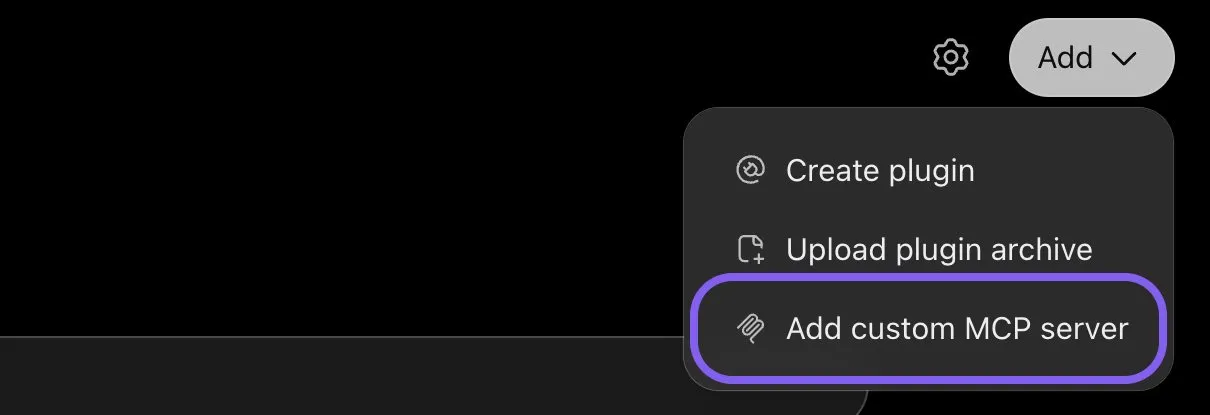
ChatGPT, Add menu on the Plugins page, November 2026.
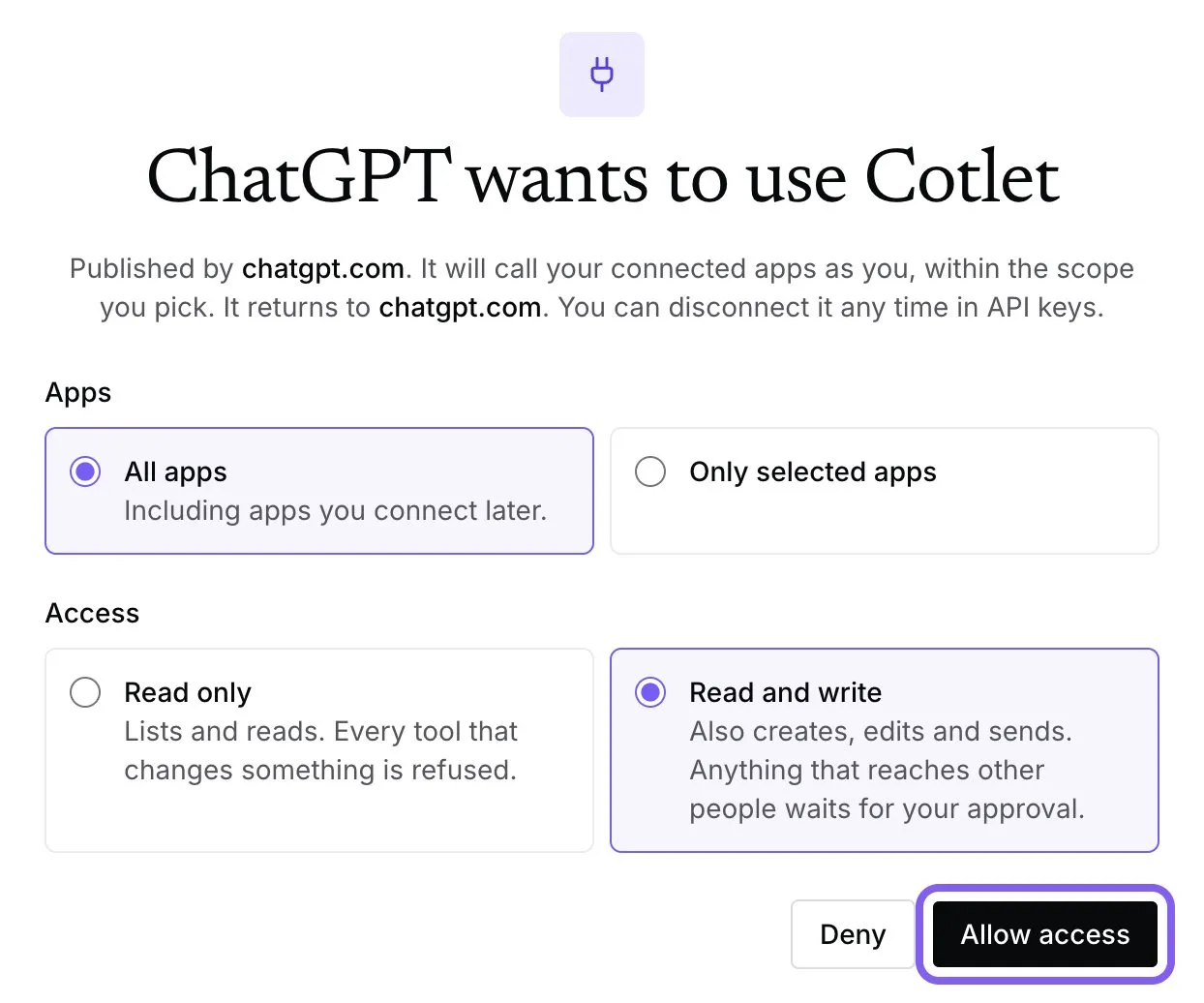
Cotlet consent page after you connect it in ChatGPT, November 2026.
ChatGPT asks “Allow ChatGPT to use Cotlet?” before some steps. Pick Always allow, or the chat waits for your click. On a Business, Enterprise or Edu workspace, an admin has to allow custom MCP servers first.
How to connect ZenMaid to Claude
- Open Connectors in Claude and click Add. In the desktop app it is under Customize, Connectors.
- Click Add custom connector.
- Paste the name
Cotletand the URLhttps://cotlet.dev/mcp/v1/connect, then click Continue. - Keep the settings and click Add.
- A Cotlet page opens. Click Allow access.
- In a chat, click the plus button, then Connectors, and turn Cotlet on.
- Ask Claude: “Are you signed in to Cotlet through MCP?”, then “Which ZenMaid customers have an unpaid balance right now, biggest first?”. Claude asks before it uses a Cotlet tool the first time. Click Allow.

Claude, Customize, Connectors, November 2026.
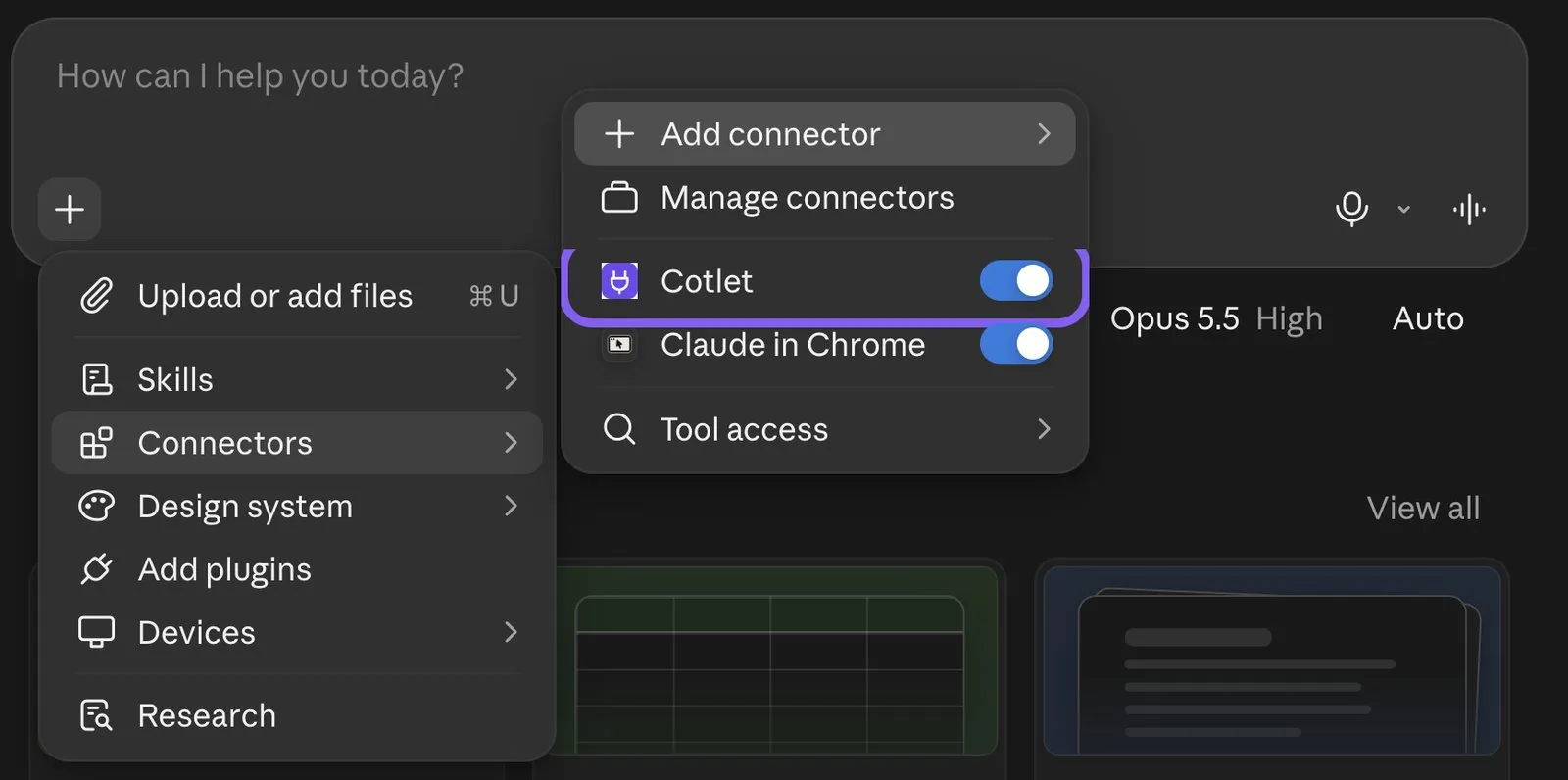
Claude, chat menu, Connectors, November 2026.
Claude’s free plan allows one custom connector. On a Team or Enterprise plan, an owner adds Cotlet in Organization settings, Connectors, and you click Connect next to it.
How to connect ZenMaid to Claude Code
Add Cotlet without a key, then sign in once in the browser:
claude mcp add --transport http cotlet https://cotlet.dev/mcp/v1/connectRun /mcp in Claude Code, pick cotlet and sign in to Cotlet. Prefer an API key, for example on a server? Create one in the Cotlet console and use:
claude mcp add --transport http cotlet https://cotlet.dev/mcp/v1 \
  --header "Authorization: Bearer $COTLET_API_KEY"
How to connect ZenMaid to Codex
Create an API key in the Cotlet console, put it in the COTLET_API_KEY environment variable and add this to ~/.codex/config.toml:
[mcp_servers.cotlet]
url = "https://cotlet.dev/mcp/v1"
bearer_token_env_var = "COTLET_API_KEY"
How to connect ZenMaid to Cursor
Create an API key in the Cotlet console, put it in the COTLET_API_KEY environment variable and add this to ~/.cursor/mcp.json:
{
  "mcpServers": {
    "cotlet": {
      "url": "https://cotlet.dev/mcp/v1",
      "headers": { "Authorization": "Bearer ${env:COTLET_API_KEY}" }
    }
  }
}
How to connect ZenMaid to Grok
Grok takes custom MCP servers on grok.com, per xAI’s connectors documentation (checked 8 November 2026).
- Open grok.com/connectors and click New Connector.
- Pick Custom and paste the server URL
https://cotlet.dev/mcp/v1/connect. - Sign in to Cotlet when Grok asks, then click Allow access.
- Ask Grok: “Are you signed in to Cotlet through MCP?”
On Grok Business, an admin adds the connector first in the xAI console, under Grok Business, Connectors. The Grok chat inside X has no custom connector menu.
How to connect ZenMaid to Hermes Agent
Add Cotlet to ~/.hermes/config.yaml in the format of the Hermes MCP config reference:
mcp_servers:
  cotlet:
    url: "https://cotlet.dev/mcp/v1"
    headers:
      Authorization: "Bearer ${COTLET_API_KEY}"
    trust: untrusted
Put COTLET_API_KEY in ~/.hermes/.env and check it with hermes mcp test cotlet. With trust: untrusted, Hermes runs reads at once and asks before every write. More on Hermes in our post on the Hermes Agent browser.
How to connect ZenMaid to n8n
Use the MCP Client node, or the MCP Client Tool inside an AI Agent node:
- Server Transport: HTTP Streamable
- MCP Endpoint URL:
https://cotlet.dev/mcp/v1 - Authentication: Bearer Auth, with your Cotlet API key as the token
- Tools: let the AI Agent node use Cotlet’s browser tools; it reads Cotlet’s ZenMaid guide first and works in your logged-in ZenMaid
Use it for work that should run on its own, such as a 6 am check of today’s schedule that texts you which jobs still have no cleaner assigned.
Any other MCP client
Point the client at https://cotlet.dev/mcp/v1 over Streamable HTTP, with the header Authorization: Bearer <your Cotlet API key>. A client that supports OAuth sign-in can use https://cotlet.dev/mcp/v1/connect instead and needs no key. The full reference is in the MCP docs.
Three ZenMaid jobs to try first
Try one on a real day and look at Dispatch View afterwards.
Cover for a cleaner who called in sick
Ana called in sick for Thursday. Find every ZenMaid appointment she has that day, suggest a free cleaner for each, and reassign them after I approve.
The AI opens Thursday in Dispatch View, lists Ana’s jobs and checks who is free for each time slot. It reassigns the appointments one by one instead of using ZenMaid’s Replace button, because Replace “will deactivate the cleaner that you’re replacing while unassigning them from all their future appointments”, per ZenMaid’s replace cleaner article. Ana keeps her recurring clients. Only Thursday moves.
Move a day for a storm
An ice storm is coming Friday. Move every ZenMaid appointment on Friday to the same time next Monday where the cleaner is free, keep the notes, and list the ones that do not fit.
The AI moves each Friday job to Monday and copies its notes across by hand, which matters: when you drag an appointment in ZenMaid, “one-time Appointment Notes will not transfer”, per ZenMaid’s drag and drop guide. The gate code for the Hughes house goes with the visit. Before any customer is told, you see the full plan.
Mark the week’s Venmo and Zelle payments
Here are this week’s Venmo and Zelle payments. Mark the matching ZenMaid appointments as paid, then list who still owes us.
The AI filters unpaid appointments in the Appointments list, matches each payment by name and amount, and marks the matches as paid in bulk after your OK. Card payments are left alone: ZenMaid says “appointments paid by card cannot be marked as unpaid or edited”, per its payments article. A payment that could belong to two customers comes back to you as a question.
What Cotlet costs
Cotlet runs on prepaid credits, not a subscription. Packs start at $29 and last 12 months, and the first 7 days are free with 2,000 credits and no card. Calls that fail are free. See the pricing page.
Your ZenMaid plan stays the same. Cotlet does not need Pro Max or Zapier, because it works in the ZenMaid web app itself.
FAQ
Does ZenMaid have an API?
No. ZenMaid publishes no public API, no webhooks and no developer access, per its own help center (checked 9 November 2026). The only built-in route for automation is Zapier, on the Pro Max plan.
Is there a ZenMaid MCP server?
ZenMaid has not released one. Customers have asked for it on ZenMaid’s feedback board. Cotlet runs a hosted MCP server that works in your ZenMaid account through your signed-in Cloud Browser.
Can I use Zapier’s MCP with ZenMaid instead?
For creating records, yes: Zapier’s ZenMaid app has 4 actions, all of them “create”, and needs ZenMaid Pro Max. It cannot read your schedule, move or cancel a visit, swap a cleaner or mark a payment. Cotlet works on every screen of ZenMaid you can open yourself.
Can ChatGPT agent log in to ZenMaid on its own?
It can open websites, but it stops at a login and asks you to take over its browser, per OpenAI’s ChatGPT agent help. With Cotlet, ZenMaid stays logged in on our side, so the AI goes straight to Dispatch View, also on a schedule.
Can customers reply to the texts ZenMaid sends?
Not inside ZenMaid. Its help center says “direct replies to these messages are not supported” because the SMS provider is one-way, per this article. When your AI texts a customer through ZenMaid, it adds your phone number or a link, so a reply reaches you.
Is this an official ZenMaid integration?
No. Cotlet is independent and not affiliated with ZenMaid. It works through your own logged-in ZenMaid account, the way you would by hand.
Let your AI run the ZenMaid schedule
Cleaning days rarely go to plan, and ZenMaid gives you no API to fix that from outside. The quickest test is tomorrow’s Dispatch View: create a Cotlet account, log in to ZenMaid in the Cloud Browser and ask ChatGPT or Claude who is cleaning where. Running jobs in other tools with no API too? Browse the catalog of supported apps.