How to connect ALLDATA to ChatGPT, Claude and any AI agent
ALLDATA has no official MCP server and no public API (checked 26 Nov 2026). Let Claude look up labor times and TSBs in your own ALLDATA account.
Cotlet team 11 min read

As of 26 November 2026 ALLDATA offers no official MCP server, no ChatGPT app, no Claude connector and no API for repair shops. An AI can still work in your account. You log in to ALLDATA one time inside a Cloud Browser that Cotlet hosts, and from then on ChatGPT, Claude or another agent looks up a labor time, lists a car’s TSBs or builds a list of customers who stopped coming. No code, and about ten minutes of setup.
This is for the shop owner or service advisor who has a customer at the counter and a quote to write. The tech with a wiring question benefits too. Cotlet serves whoever runs the shop inside ALLDATA. It is not for the car owner, who never sees these screens.
What an AI can look up and do in ALLDATA
Ask in the words you would use at the counter. The AI opens the screen, reads it and answers:
| Where in ALLDATA | What the AI does |
|---|---|
| Repair, Labor | Gives the labor time and the parts listed for an operation on a vehicle |
| Repair, TSBs | Lists bulletins for a vehicle and a code, newest first, one line each |
| Repair, Wiring Diagrams | Opens a circuit, downloads the PDF and reads out the connector view |
| Repair, Specs and Maintenance | Returns torque specs, fluid types, capacities and what is due next |
| Manage Online, Reports | Lists customers with no visit in six months, with phone and last vehicle |
| Manage Online, QuickBooks Online export | Runs the weekly export and lists the invoices that failed, with the reason |
Opening a screen or downloading a diagram changes nothing in ALLDATA. A step that sends something to a customer waits for your OK. The full list of screens is on the ALLDATA MCP server page, and a way to call these lookups from a sheet or n8n is on the ALLDATA API page.
What ALLDATA offers for AI and integrations today
What exists as of 26 November 2026, point by point:
- No public API. ALLDATA has no developer portal and no self-serve keys for Repair, Collision or Manage Online. Integrations are built with partners such as shop systems and scan tools.
- Data leaves Manage Online in three ways. Reports, an export to QuickBooks Online, and a Shop Data Export that an ALLDATA representative sets up for you. The Shop Data Export article lists the files: Customers, Vehicle, Repair Order and Deferred Work.
- Its own AI lives inside the product. Diagnostic Intelligence suggests a diagnostic path from a code or a symptom inside ALLDATA Repair. It does not connect to ChatGPT or Claude.
- No official MCP server, no ChatGPT app, no Claude connector. Searching the official MCP Registry for ALLDATA returns nothing.
- Unofficial servers exist. An MIT-licensed GitHub project, alldata-mcp-server, runs on your own computer, uses your browser cookies and says it is not affiliated with ALLDATA. A third party also sells a connector for Manage Online.
If you like to run local code and only need Repair lookups, the GitHub server is one route. If you want something hosted that also covers Manage Online and runs on a schedule, a hosted server in your signed-in session is shorter. All routes are scored on Does ALLDATA have an API or MCP server?.
What to have ready
- Your personal ALLDATA login. Repair, Collision and Manage Online all run in a browser.
- The products you subscribe to. A product you do not pay for has no screens to read.
- A short list of jobs to check, such as five operations and the times you quoted.
- A ChatGPT or Claude account. Free Claude can hold a single custom connector, and that is all you need.
- A free Cotlet trial, seven days and no card (pricing).
Step 1: sign in to ALLDATA in your Cloud Browser
In the Cotlet console, start the Cloud Browser and visit my.alldata.com for Repair and Collision. Shops on Manage Online use manageonline.alldata.com instead. Fill in the login you use every day.
The password goes into ALLDATA’s own form, where Cotlet cannot read it. Only an encrypted session stays behind. When ALLDATA logs you out, your agent sends a link for a fresh login. More on the security page.
Step 2: give your AI the Cotlet address and reach ALLDATA
Your AI tool learns Cotlet’s address from one setting, and the ALLDATA session you saved does the rest. Take the tool you use.
Pick your AI above to see its steps.
How to connect ALLDATA to ChatGPT
Do this on chatgpt.com in your browser. Cotlet then works in the ChatGPT desktop and phone apps too.
- Open Plugins in ChatGPT and click Add.
- Click Add custom MCP server. Not in the menu? Turn on Developer mode in Settings, Security and login, then come back.
- Paste the name
Cotletand the server URLhttps://cotlet.dev/mcp/v1/connect. Keep Authentication on OAuth. - Tick “I understand and want to continue” and click Create as a plugin.
- Click Connect Cotlet. A Cotlet page opens, click Allow access.
- In a new chat, type
@Cotletand pick it from the list. - Ask ChatGPT: “Are you signed in to Cotlet through MCP?” Then try a first ALLDATA task: “What is the ALLDATA labor time to replace spark plugs on a 2015 Lexus RX350? Give the operation, the hours and the parts it lists.”

ChatGPT, Plugins page, November 2026.
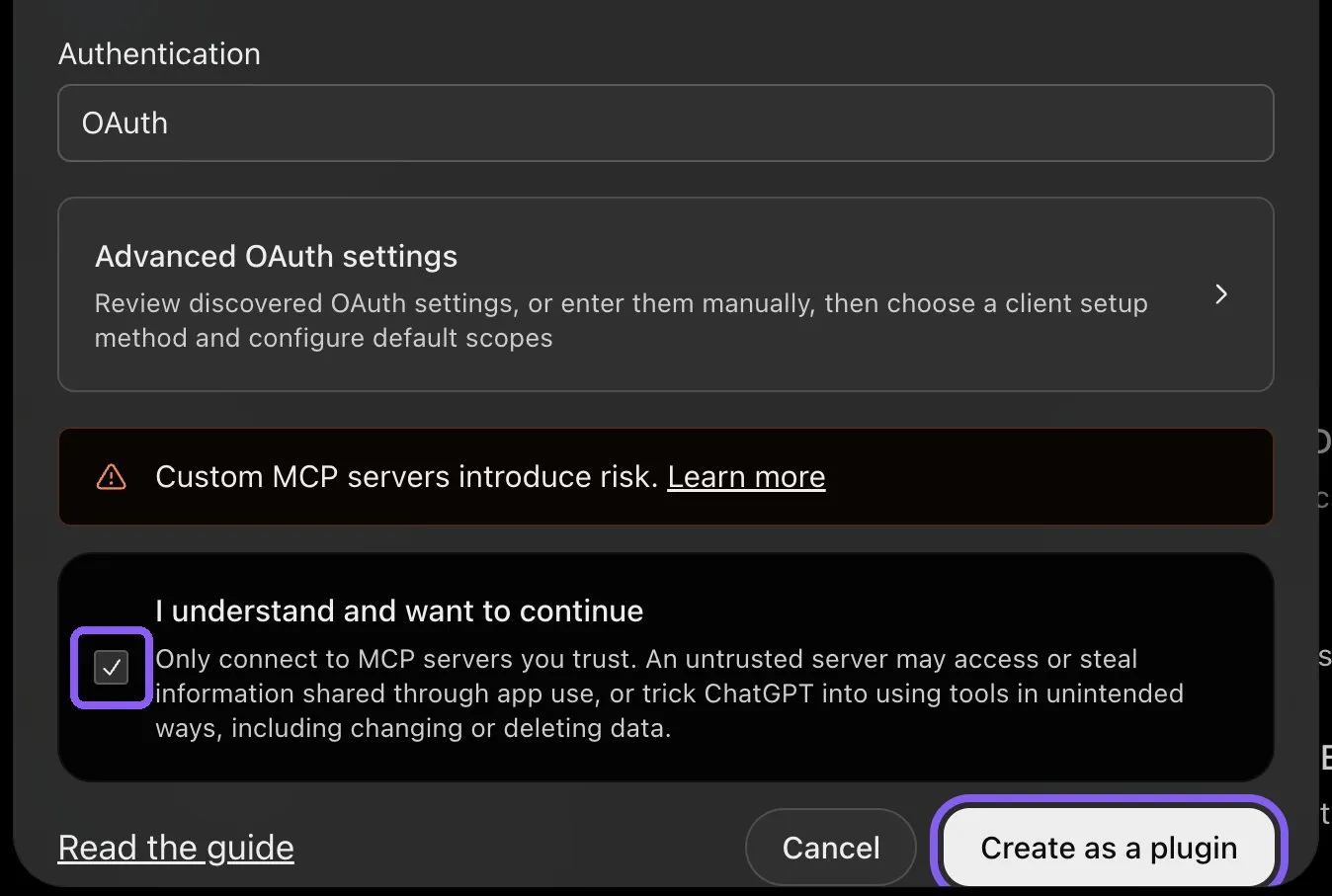
ChatGPT, bottom of the custom MCP server form, November 2026.
ChatGPT asks “Allow ChatGPT to use Cotlet?” before some steps. Pick Always allow, or the chat waits for your click. On a Business, Enterprise or Edu workspace, an admin has to allow custom MCP servers first.
How to connect ALLDATA to Claude
- Open Connectors in Claude and click Add. In the desktop app it is under Customize, Connectors.
- Click Add custom connector.
- Paste the name
Cotletand the URLhttps://cotlet.dev/mcp/v1/connect, then click Continue. - Keep the settings and click Add.
- A Cotlet page opens. Click Allow access.
- In a chat, click the plus button, then Connectors, and turn Cotlet on.
- Ask Claude: “Are you signed in to Cotlet through MCP?”, then “List the TSBs for a 2014 Honda Accord with a P0420 code in ALLDATA, newest first, one line each.”. Claude asks before it uses a Cotlet tool the first time. Click Allow.

Claude, Add custom connector form, November 2026.

Cotlet consent page after you add the connector in Claude, November 2026.
Claude’s free plan allows one custom connector. On a Team or Enterprise plan, an owner adds Cotlet in Organization settings, Connectors, and you click Connect next to it.
How to connect ALLDATA to Claude Code
Add Cotlet without a key, then sign in once in the browser:
claude mcp add --transport http cotlet https://cotlet.dev/mcp/v1/connectRun /mcp in Claude Code, pick cotlet and sign in to Cotlet. Prefer an API key, for example on a server? Create one in the Cotlet console and use:
claude mcp add --transport http cotlet https://cotlet.dev/mcp/v1 \
  --header "Authorization: Bearer $COTLET_API_KEY"
How to connect ALLDATA to Codex
Create an API key in the Cotlet console, put it in the COTLET_API_KEY environment variable and add this to ~/.codex/config.toml:
[mcp_servers.cotlet]
url = "https://cotlet.dev/mcp/v1"
bearer_token_env_var = "COTLET_API_KEY"
How to connect ALLDATA to Cursor
Create an API key in the Cotlet console, put it in the COTLET_API_KEY environment variable and add this to ~/.cursor/mcp.json:
{
  "mcpServers": {
    "cotlet": {
      "url": "https://cotlet.dev/mcp/v1",
      "headers": { "Authorization": "Bearer ${env:COTLET_API_KEY}" }
    }
  }
}
How to connect ALLDATA to Grok
Grok takes custom MCP servers on grok.com, per xAI’s connectors documentation (checked 8 November 2026).
- Open grok.com/connectors and click New Connector.
- Pick Custom and paste the server URL
https://cotlet.dev/mcp/v1/connect. - Sign in to Cotlet when Grok asks, then click Allow access.
- Ask Grok: “Are you signed in to Cotlet through MCP?”
On Grok Business, an admin adds the connector first in the xAI console, under Grok Business, Connectors. The Grok chat inside X has no custom connector menu.
How to connect ALLDATA to Hermes Agent
Add Cotlet to ~/.hermes/config.yaml in the format of the Hermes MCP config reference:
mcp_servers:
  cotlet:
    url: "https://cotlet.dev/mcp/v1"
    headers:
      Authorization: "Bearer ${COTLET_API_KEY}"
    trust: untrusted
Put COTLET_API_KEY in ~/.hermes/.env and check it with hermes mcp test cotlet. With trust: untrusted, Hermes runs reads at once and asks before every write. More on Hermes in our post on the Hermes Agent browser.
How to connect ALLDATA to n8n
Use the MCP Client node, or the MCP Client Tool inside an AI Agent node:
- Server Transport: HTTP Streamable
- MCP Endpoint URL:
https://cotlet.dev/mcp/v1 - Authentication: Bearer Auth, with your Cotlet API key as the token
- Tools: let the AI Agent node use Cotlet’s browser tools; it reads Cotlet’s ALLDATA guide first and works in your signed-in ALLDATA account
Use it for work that should run on its own, such as a list of customers with no visit in six months in your inbox on the first of each month.
Any other MCP client
Point the client at https://cotlet.dev/mcp/v1 over Streamable HTTP, with the header Authorization: Bearer <your Cotlet API key>. A client that supports OAuth sign-in can use https://cotlet.dev/mcp/v1/connect instead and needs no key. The full reference is in the MCP docs.
Start with the one that protects your margin.
Labor times that look too low
For these 5 jobs on these vehicles, list the ALLDATA time next to the warranty time I give you and flag any where ALLDATA is lower.
Techs on r/Justrolledintotheshop complain that some times look short. The AI reads the Labor screen for each job, starts from the part name as ALLDATA’s own tips suggest, and returns one table. It compares only the numbers you give it and does not guess a time. You see at a glance which job you would lose money on.
TSBs before you quote
List the TSBs for a 2014 Honda Accord with a P0420 code, newest first, with a one line summary of each.
The bulletins sit behind the TSB icon in Repair. The AI selects the vehicle, opens the list for the code and writes one line per bulletin. You walk to the counter knowing whether the car has a known issue.
Customers who drifted away
List customers with no visit in the last 6 months from Manage Online, with phone and last vehicle, in a sheet.
Shops that run Manage Online talk about CRM gaps on r/Justrolledintotheshop. The AI opens the Reports section, builds the list and fills your sheet. Run it monthly and the call list writes itself. Any message to a customer waits for your approval.
What Cotlet costs next to your ALLDATA bill
You keep paying ALLDATA what you pay now. Cotlet sells credits as a one-time pack, $29 for 5,000 with a 12 month life, and never renews it. A call that succeeds uses 10 to 100 credits. A call that fails uses none. The 7 day trial brings 500 credits and skips the card (pricing). After it, ALLDATA stays open to agents for 50 credits a day.
FAQ
Can I use ALLDATA with ChatGPT or Claude without a developer?
Yes. Cotlet opens your ALLDATA account in a cloud browser and reads the screens you already use. ALLDATA has no public API for this, so no key is involved.
Does ALLDATA have an official MCP server?
No. ALLDATA publishes no MCP server of its own, and the MCP Registry lists none. The GitHub server by cozadizzle is independent, runs locally and is not affiliated with ALLDATA.
Can AI check labor times against what I quoted?
Yes, for the jobs you list. It reads the time on the Labor screen and sets it beside your number. It reads your account only and never invents a time.
Can ChatGPT or Claude pull a wiring diagram for me?
Yes. It opens the circuit under Wiring Diagrams and downloads the PDF with the connector view. It reads only what ALLDATA shows for your subscription.
Can it send my invoices to QuickBooks Online?
Yes, with your OK. It runs the export from Manage Online, then lists the invoices that failed and the reason ALLDATA gives. It does not change how your books are set up.
Is Cotlet part of ALLDATA?
No. Cotlet is a separate company and signs in only as you.
Start with the next quote
Somewhere in ALLDATA, the time for your next job is already waiting. Start the free Cotlet trial, log in from the Cloud Browser and ask Claude to fetch it. Using another shop system? See the catalog.