How to connect ChiroFusion to ChatGPT, Claude and any AI agent
ChiroFusion has no official MCP server and no public API (checked 26 Nov 2026). Let ChatGPT or Claude match EOBs and chase claims.
Cotlet team 11 min read

On 26 November 2026 ChiroFusion offers an AI no way in: no official MCP server, no ChatGPT or Claude app and no public API. What it calls integrations are projects built with partners, so there is no key to create and no developer page to read. The workaround is a Cloud Browser run by Cotlet, where you log in to ChiroFusion yourself one time. ChatGPT or Claude then drives your scheduler, billing screens and reports like a new front desk hire. Allow ten minutes and no code.
Read on if you are the chiropractor who bills at night, the front desk that retypes every EOB, or the in-house biller with a list of claims nobody has answered. Cotlet serves whoever runs ChiroFusion for the clinic. Patients keep booking and paying exactly as before.
Front desk and billing tasks an AI can run in ChiroFusion
You ask in everyday words. The AI finds the ChiroFusion screen and clicks through it:
| Part of ChiroFusion | What the AI handles |
|---|---|
| Billing and EOB posting | Matches an EOB or insurance check to your open claims and prepares what to post on each |
| Claims | Lists outstanding claims by payer and age, with the last status, oldest first |
| Statements | Finds patients with an old balance and drafts the message for each |
| Scheduler | Finds no-shows with no next visit and drafts a rebooking text |
| Intake forms | Lists patients booked for tomorrow who have not finished their online intake |
| Reports | Downloads visits and collections by provider and fills your sheet |
Three actions pause for your OK: a posting on a claim, a text to a patient and a new appointment. Lists, reports and drafts leave ChiroFusion untouched.
The screens open to the AI are on the ChiroFusion MCP server page. To call the same jobs from n8n, Make or your own code, see the ChiroFusion API page.
ChiroFusion API, AI and ChatGPT: what you can use now
On 26 November 2026, a ChiroFusion clinic has this to work with:
- No public API. The ChiroFusion site and help center cover billing, claims and settings, and neither shows developer docs or API keys.
- Partner integrations only. The practice enhancements page lists what ChiroFusion built with partners, such as Office Ally for claims, OpenEdge for payments and Physitrack for exercise programs. They move data between two products. None opens your data to an AI.
- Phone assistants book through the scheduler. Vendors such as MedReceptionist say they book calls into ChiroFusion with their own setup. That covers booking, and it does not cover EOBs, claims or reports.
- No official ChatGPT or Claude app, and no MCP server. The official MCP Registry returns no ChiroFusion entry, and ChiroFusion does not mention MCP, ChatGPT or Claude.
- No Zapier or Make app. Both return a 404 for ChiroFusion today.
For AI, then, the workable path is a hosted MCP server acting inside your signed-in session. Our route-by-route score is on the page Does ChiroFusion have an API or MCP server?.
What to have ready
- A ChiroFusion user who can open Billing, the scheduler and Reports. The AI gets exactly that access.
- The EOB or insurance check you want matched, as a PDF or a photo, for the first test.
- The number of days you call a claim late. For example 30.
- ChatGPT or Claude. One custom connector is all Cotlet needs, which the free Claude plan allows.
- A Cotlet signup, which needs no card for the first seven days (pricing).
Step 1: sign in to ChiroFusion in your Cloud Browser
From the Cotlet console open the Cloud Browser, then visit chirofusionlive.com and enter the username and password the front desk uses. A code prompt from ChiroFusion is yours to answer. Carry on when you see the scheduler.
Type the password into ChiroFusion’s own page only, because Cotlet never keeps it. What Cotlet holds is the logged-in state, in an encrypted profile on your account. When ChiroFusion closes the session, the AI asks you to come back to this step. Details on the security page.
Step 2: link your AI to Cotlet and open ChiroFusion
Give your AI the Cotlet MCP address one time, and each ChiroFusion screen you can open becomes available to it. Pick your client’s tile for its steps.
Pick your AI above to see its steps.
How to connect ChiroFusion to ChatGPT
Do this on chatgpt.com in your browser. Cotlet then works in the ChatGPT desktop and phone apps too.
- Open Plugins in ChatGPT and click Add.
- Click Add custom MCP server. Not in the menu? Turn on Developer mode in Settings, Security and login, then come back.
- Paste the name
Cotletand the server URLhttps://cotlet.dev/mcp/v1/connect. Keep Authentication on OAuth. - Tick “I understand and want to continue” and click Create as a plugin.
- Click Connect Cotlet. A Cotlet page opens, click Allow access.
- In a new chat, type
@Cotletand pick it from the list. - Ask ChatGPT: “Are you signed in to Cotlet through MCP?” Then try a first ChiroFusion task: “List my ChiroFusion claims outstanding over 30 days by payer, oldest first.”
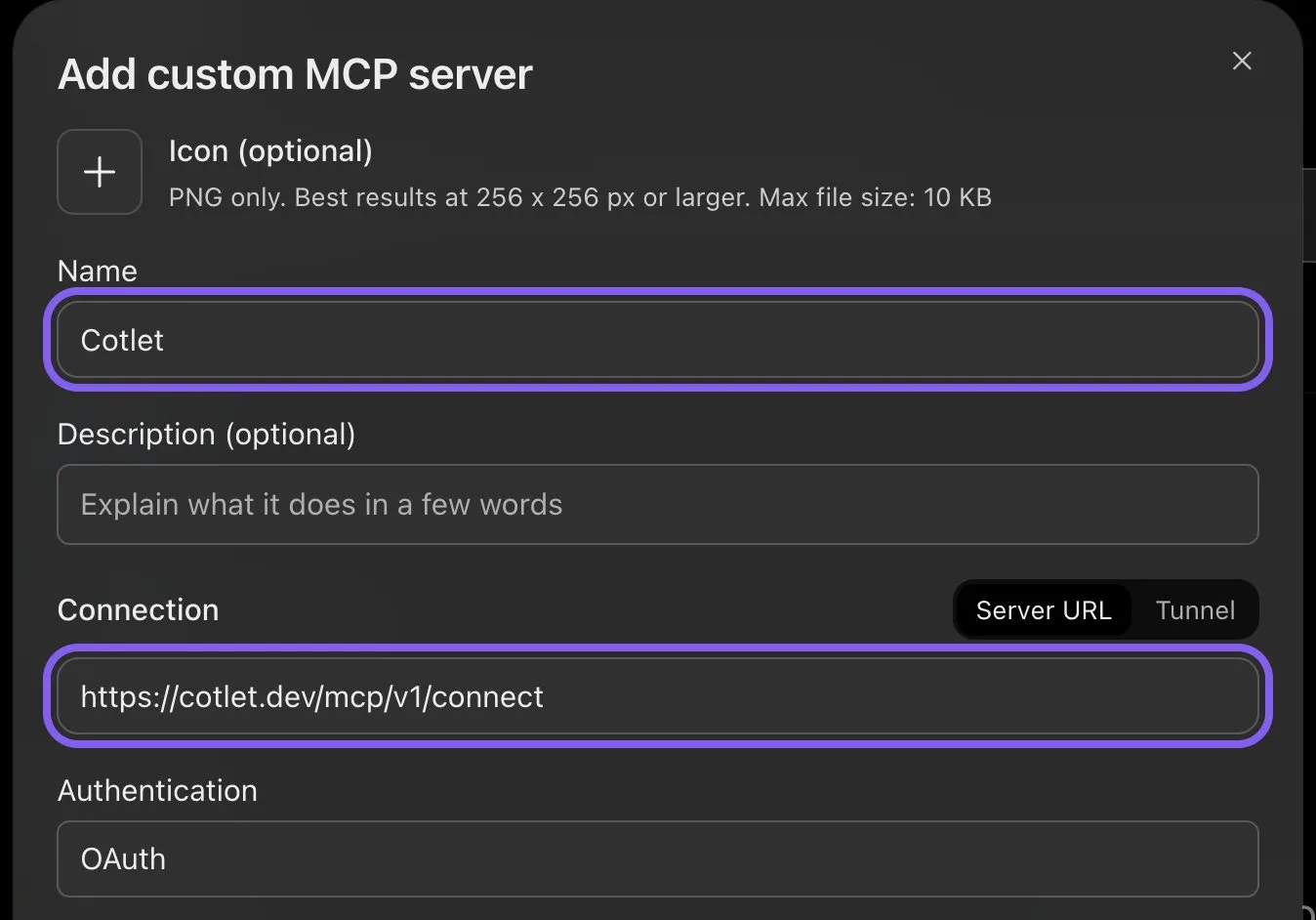
ChatGPT, Add custom MCP server form, November 2026.
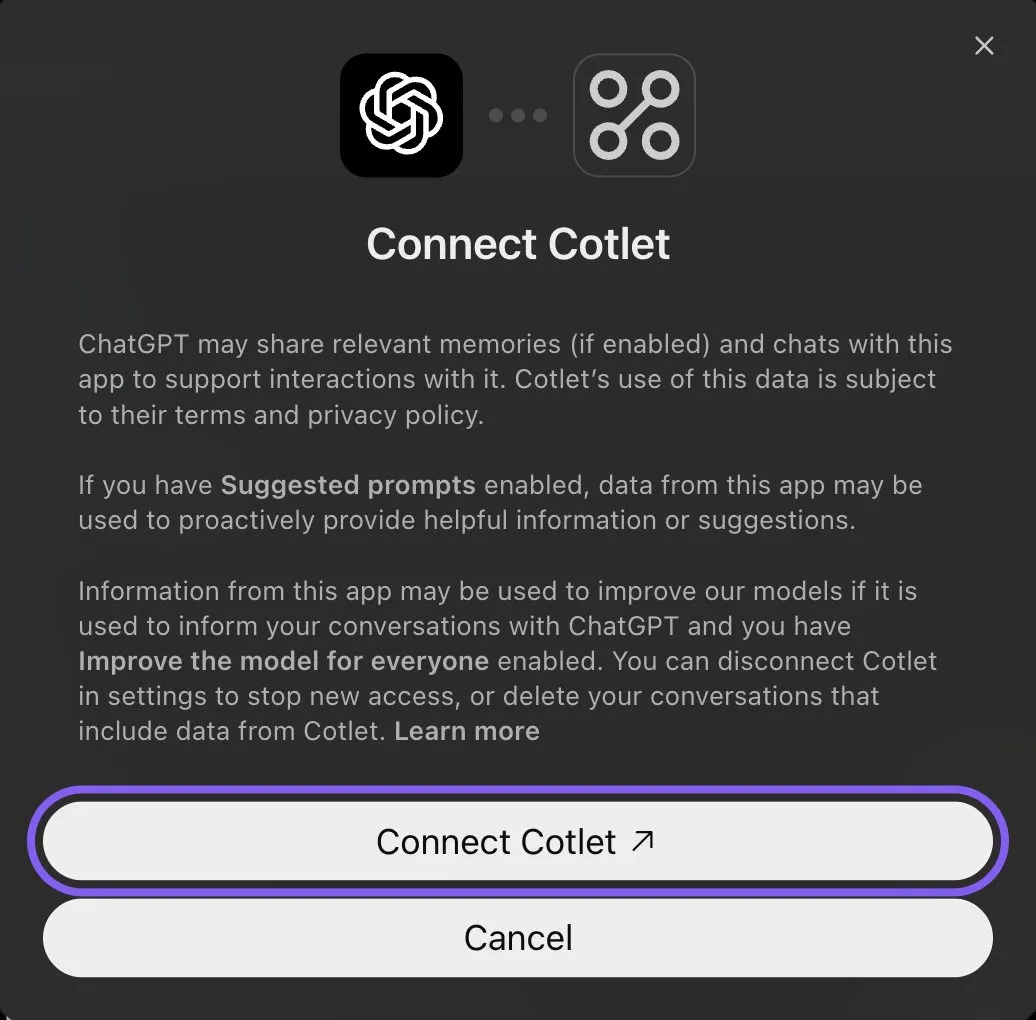
ChatGPT, connecting the Cotlet plugin, November 2026.
ChatGPT asks “Allow ChatGPT to use Cotlet?” before some steps. Pick Always allow, or the chat waits for your click. On a Business, Enterprise or Edu workspace, an admin has to allow custom MCP servers first.
How to connect ChiroFusion to Claude
- Open Connectors in Claude and click Add. In the desktop app it is under Customize, Connectors.
- Click Add custom connector.
- Paste the name
Cotletand the URLhttps://cotlet.dev/mcp/v1/connect, then click Continue. - Keep the settings and click Add.
- A Cotlet page opens. Click Allow access.
- In a chat, click the plus button, then Connectors, and turn Cotlet on.
- Ask Claude: “Are you signed in to Cotlet through MCP?”, then “Who no-showed in ChiroFusion this week and has no next visit?”. Claude asks before it uses a Cotlet tool the first time. Click Allow.

Claude, Customize, Connectors, November 2026.

Claude, chat menu, Connectors, November 2026.
Claude’s free plan allows one custom connector. On a Team or Enterprise plan, an owner adds Cotlet in Organization settings, Connectors, and you click Connect next to it.
How to connect ChiroFusion to Claude Code
Add Cotlet without a key, then sign in once in the browser:
claude mcp add --transport http cotlet https://cotlet.dev/mcp/v1/connectRun /mcp in Claude Code, pick cotlet and sign in to Cotlet. Prefer an API key, for example on a server? Create one in the Cotlet console and use:
claude mcp add --transport http cotlet https://cotlet.dev/mcp/v1 \
  --header "Authorization: Bearer $COTLET_API_KEY"
How to connect ChiroFusion to Codex
Create an API key in the Cotlet console, put it in the COTLET_API_KEY environment variable and add this to ~/.codex/config.toml:
[mcp_servers.cotlet]
url = "https://cotlet.dev/mcp/v1"
bearer_token_env_var = "COTLET_API_KEY"
How to connect ChiroFusion to Cursor
Create an API key in the Cotlet console, put it in the COTLET_API_KEY environment variable and add this to ~/.cursor/mcp.json:
{
  "mcpServers": {
    "cotlet": {
      "url": "https://cotlet.dev/mcp/v1",
      "headers": { "Authorization": "Bearer ${env:COTLET_API_KEY}" }
    }
  }
}
How to connect ChiroFusion to Grok
Grok takes custom MCP servers on grok.com, per xAI’s connectors documentation (checked 8 November 2026).
- Open grok.com/connectors and click New Connector.
- Pick Custom and paste the server URL
https://cotlet.dev/mcp/v1/connect. - Sign in to Cotlet when Grok asks, then click Allow access.
- Ask Grok: “Are you signed in to Cotlet through MCP?”
On Grok Business, an admin adds the connector first in the xAI console, under Grok Business, Connectors. The Grok chat inside X has no custom connector menu.
How to connect ChiroFusion to Hermes Agent
Add Cotlet to ~/.hermes/config.yaml in the format of the Hermes MCP config reference:
mcp_servers:
  cotlet:
    url: "https://cotlet.dev/mcp/v1"
    headers:
      Authorization: "Bearer ${COTLET_API_KEY}"
    trust: untrusted
Put COTLET_API_KEY in ~/.hermes/.env and check it with hermes mcp test cotlet. With trust: untrusted, Hermes runs reads at once and asks before every write. More on Hermes in our post on the Hermes Agent browser.
How to connect ChiroFusion to n8n
Use the MCP Client node, or the MCP Client Tool inside an AI Agent node:
- Server Transport: HTTP Streamable
- MCP Endpoint URL:
https://cotlet.dev/mcp/v1 - Authentication: Bearer Auth, with your Cotlet API key as the token
- Tools: let the AI Agent node use Cotlet’s browser tools; it reads Cotlet’s ChiroFusion guide first and works in your signed-in ChiroFusion account
Use it for work that should run on its own, such as a Monday 8 am list of outstanding claims by payer.
Any other MCP client
Point the client at https://cotlet.dev/mcp/v1 over Streamable HTTP, with the header Authorization: Bearer <your Cotlet API key>. A client that supports OAuth sign-in can use https://cotlet.dev/mcp/v1/connect instead and needs no key. The full reference is in the MCP docs.
Start with these on a day when a stack of EOBs has just come in.
Match an EOB to the open claims
Here is today’s EOB from Blue Cross. Match each line to my open claims and list what to post on each, with the amount and the adjustment. Post after my OK.
ChiroFusion’s own help center has an article on what to do when an insurance check is posted to the wrong payer, which tells you how common the slip is. The AI reads the EOB, finds each claim by patient and date of service, and shows one line per claim. You check the list, say yes, and it posts through Billing and EOB posting, the screen your biller already uses. A line that matches no claim stays on a short list for you.
Rebook the people who no-showed
Who no-showed this week and has no next visit? Draft a rebooking text for each, in my clinic’s voice, and wait for my OK.
ChiroFusion publishes its own advice on reducing no-shows, and a fast follow-up is part of it. The AI reads the scheduler for the week, drops anyone who already has a visit, and writes one short text per patient with the next open slot with their provider. Nothing leaves until you approve it.
Visits and collections for your accountant
Put last month’s visits and collections by provider in a sheet, one row per provider, and add the total.
The ChiroFusion manual describes how to run a report and export it to Excel. That works, and it takes one run per provider every month. The AI runs the report for each provider, downloads the file and fills a Google Sheet. Run it on the first of the month and the sheet is ready before your accountant asks.
What Cotlet costs on top of ChiroFusion
ChiroFusion keeps charging what it charges today. Cotlet is paid per pack, never monthly: $29 buys 5,000 credits that last a year. Calls that succeed cost between 10 and 100 credits, and calls that fail cost zero. Once the trial is over, the Cloud Browser also takes 50 credits daily as long as ChiroFusion is open to agents. The trial comes first: 500 credits, 7 days, no card (pricing).
FAQ
Is there a ChiroFusion API for my clinic?
No public one. As of 26 November 2026 ChiroFusion publishes no API or developer docs, and its integrations are built by ChiroFusion with partners. With Cotlet you build your own endpoint, and the AI does the step in your ChiroFusion account in the browser.
Is there an official ChiroFusion MCP server?
No. Neither an MCP server nor a ChatGPT or Claude app comes from ChiroFusion, and the MCP Registry lists nothing under its name. Cotlet’s server gets in through the ChiroFusion session you opened.
Can AI help with EOB posting in ChiroFusion?
Yes. It reads the EOB, matches each line to an open claim and prepares the posting. It posts only after you say yes, and the posting appears in the same screen your biller uses.
Can I book patients from my website or a phone assistant into ChiroFusion?
Yes. Build an endpoint that takes a name, a date, a time and a provider, and let your form or phone assistant call it. Cotlet books the visit in your scheduler and returns the confirmed time. Booking waits for your OK unless you switch that off for the tool.
Which patients have not finished their intake forms?
Ask the AI each evening to list tomorrow’s patients who have not completed the online intake and to draft a reminder for each. ChiroFusion offers online intake forms, and the AI checks each patient’s intake status in ChiroFusion.
Can I get my patient list out of ChiroFusion without clicking through?
ChiroFusion says a built-in data export lets you export your practice data at any time (pricing FAQ). The AI can run it and drop the file in a folder. Cotlet works in the screens your login opens, so it exports what you could export yourself.
Is Cotlet part of ChiroFusion?
No. Cotlet is a separate company. Only your own ChiroFusion user is ever used.
Clear the EOB pile on Monday
A check that sits in a drawer leaves its claim open in the software. Sign up for the trial, log in to ChiroFusion from the Cloud Browser and hand this week’s EOBs to ChatGPT or Claude. Related chiropractic and wellness apps are in the catalog.