How to connect Crowdcast to ChatGPT, Claude and any AI agent
Crowdcast has no official MCP server, and its API key works only inside Zapier (checked 27 Nov 2026). Let ChatGPT or Claude report on your live events.
Cotlet team 9 min read
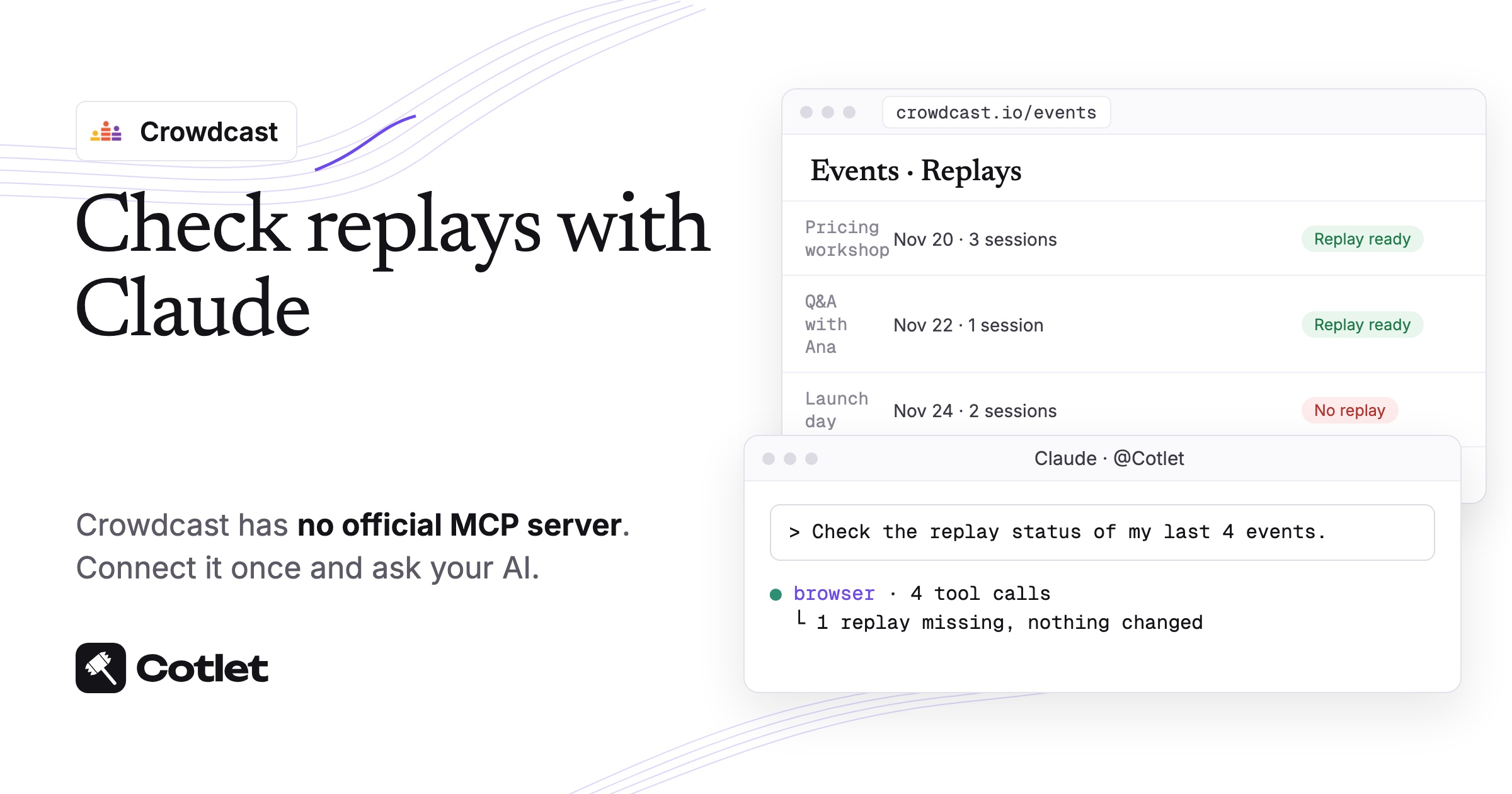
You ran a ticketed workshop on Thursday. Someone writes that the replay will not open, and you also owe yourself a count of tickets sold. Both answers live in different corners of Crowdcast: the event page, the sessions, the analytics, Stripe. When we searched on 27 Nov 2026, Crowdcast had no MCP server, ChatGPT app or Claude connector that we could find. The only API key we found is the one you generate in the channel settings and paste into Zapier. A Cloud Browser agent logged in as you can go through those screens.
This is for course creators, coaches and community hosts who run free and paid live events in Crowdcast. The attendee view is out of scope.
What ChatGPT and Claude can do in Crowdcast once connected
Ask about an event the way you would ask a producer. The agent opens the right page.
| Where in Crowdcast | What you get |
|---|---|
| Event, Analytics | For your last event: registrants, who joined live, who watched the replay and how long they stayed |
| Payments and Stripe | Paid events with tickets sold, price and the Stripe payments, and the event that earned most this month |
| Event, Replay | Replay link and status per session, and a draft email for people who registered but did not attend |
| Sessions | What is wrong when a buyer says the replay is gone: the event, the session and the replay state |
| Contributions | How much attendees contributed at each event |
| Integrations, Patreon | Your events open only to patrons and how many patrons registered |
| Multi-session events | Each session with its date and reminder emails, with a session that has none flagged |
Reading changes nothing. An email to your registrants waits for your approval, and payments stay in your own Stripe account. See the Crowdcast MCP page for more, and the API page to build an endpoint of your own.
Does Crowdcast have AI, an API or an official ChatGPT app?
State on 27 November 2026:
- API: none documented. A search of the Crowdcast Docs for api finds only the key used in Zapier. We found no public API documentation.
- Zapier: yes. The Using Zapier with Crowdcast article says you generate a key in the channel settings under Integrations and enter it in Zapier. A trigger such as New Event Registration sends attendee info to another app. A Zap can also register a contact for an event.
- Export: partly. The event analytics article covers attendance, replay views, ticket sales per ticket type and how to export attendee data.
- Chat connector: none found. The Integrations collection lists Zapier, Patreon and Stripe, not MCP.
Zapier moves new registrations out. It cannot tell you why one replay fails. The Crowdcast access review scores each point.
Before you start
- The host login for the channel that owns the events, not an attendee account.
- A past event with a replay and, for the sales job, one paid event connected to Stripe.
- ChatGPT or Claude.
- A Cotlet trial (pricing). No Zapier key is needed.
Step 1: sign in to Crowdcast in your Cloud Browser
Open crowdcast.io/sign-in in the Cloud Browser and sign in on Crowdcast’s page. Your password goes to Crowdcast, not to Cotlet. We hold an encrypted session, and you can end your agent’s access from the console whenever you want (security).
Step 2: connect Crowdcast to ChatGPT, Claude or another AI agent
It is one short task. Then every new chat can work in your Crowdcast channel.
Pick your AI above to see its steps.
How to connect Crowdcast to ChatGPT
Do this on chatgpt.com in your browser. Cotlet then works in the ChatGPT desktop and phone apps too.
- Open Plugins in ChatGPT and click Add.
- Click Add custom MCP server. Not in the menu? Turn on Developer mode in Settings, Security and login, then come back.
- Paste the name
Cotletand the server URLhttps://cotlet.dev/mcp/v1/connect. Keep Authentication on OAuth. - Tick “I understand and want to continue” and click Create as a plugin.
- Click Connect Cotlet. A Cotlet page opens, click Allow access.
- In a new chat, type
@Cotletand pick it from the list. - Ask ChatGPT: “Are you signed in to Cotlet through MCP?” Then try a first Crowdcast task: “In Crowdcast, for my last event, list registrants, who joined live and who watched the replay. Change nothing.”

ChatGPT, Plugins page, November 2026.
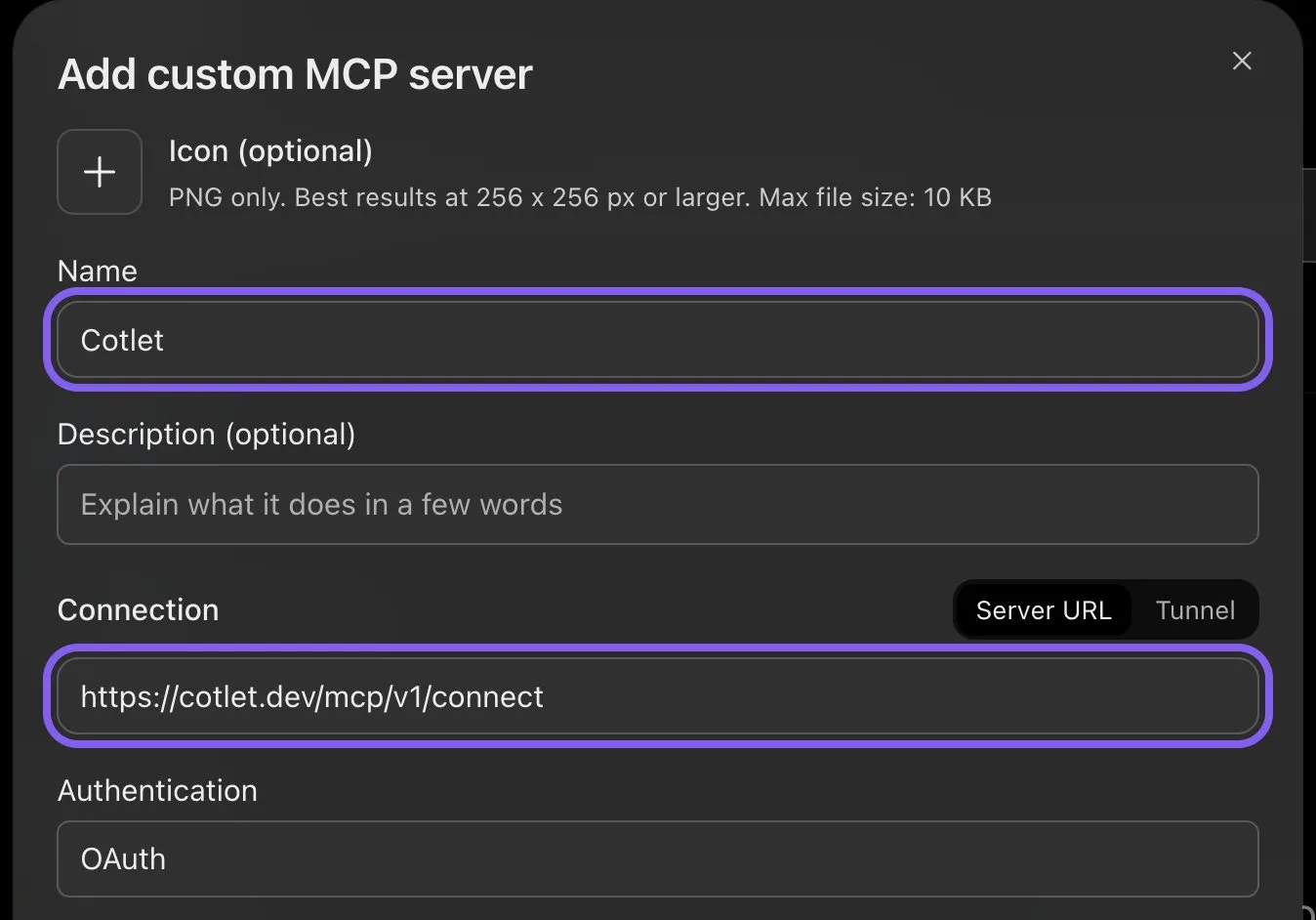
ChatGPT, Add custom MCP server form, November 2026.
ChatGPT asks “Allow ChatGPT to use Cotlet?” before some steps. Pick Always allow, or the chat waits for your click. On a Business, Enterprise or Edu workspace, an admin has to allow custom MCP servers first.
How to connect Crowdcast to Claude
- Open Connectors in Claude and click Add. In the desktop app it is under Customize, Connectors.
- Click Add custom connector.
- Paste the name
Cotletand the URLhttps://cotlet.dev/mcp/v1/connect, then click Continue. - Keep the settings and click Add.
- A Cotlet page opens. Click Allow access.
- In a chat, click the plus button, then Connectors, and turn Cotlet on.
- Ask Claude: “Are you signed in to Cotlet through MCP?”, then “In Crowdcast, list paid events this month with tickets sold and the Stripe payments for each. Change nothing.”. Claude asks before it uses a Cotlet tool the first time. Click Allow.

Claude, Customize, Connectors, Add menu, November 2026.

Claude, chat menu, Connectors, November 2026.
Claude’s free plan allows one custom connector. On a Team or Enterprise plan, an owner adds Cotlet in Organization settings, Connectors, and you click Connect next to it.
How to connect Crowdcast to Claude Code
Add Cotlet without a key, then sign in once in the browser:
claude mcp add --transport http cotlet https://cotlet.dev/mcp/v1/connectRun /mcp in Claude Code, pick cotlet and sign in to Cotlet. Prefer an API key, for example on a server? Create one in the Cotlet console and use:
claude mcp add --transport http cotlet https://cotlet.dev/mcp/v1 \
  --header "Authorization: Bearer $COTLET_API_KEY"
How to connect Crowdcast to Codex
Create an API key in the Cotlet console, put it in the COTLET_API_KEY environment variable and add this to ~/.codex/config.toml:
[mcp_servers.cotlet]
url = "https://cotlet.dev/mcp/v1"
bearer_token_env_var = "COTLET_API_KEY"
How to connect Crowdcast to Cursor
Create an API key in the Cotlet console, put it in the COTLET_API_KEY environment variable and add this to ~/.cursor/mcp.json:
{
  "mcpServers": {
    "cotlet": {
      "url": "https://cotlet.dev/mcp/v1",
      "headers": { "Authorization": "Bearer ${env:COTLET_API_KEY}" }
    }
  }
}
How to connect Crowdcast to Grok
Grok takes custom MCP servers on grok.com, per xAI’s connectors documentation (checked 8 November 2026).
- Open grok.com/connectors and click New Connector.
- Pick Custom and paste the server URL
https://cotlet.dev/mcp/v1/connect. - Sign in to Cotlet when Grok asks, then click Allow access.
- Ask Grok: “Are you signed in to Cotlet through MCP?”
On Grok Business, an admin adds the connector first in the xAI console, under Grok Business, Connectors. The Grok chat inside X has no custom connector menu.
How to connect Crowdcast to Hermes Agent
Add Cotlet to ~/.hermes/config.yaml in the format of the Hermes MCP config reference:
mcp_servers:
  cotlet:
    url: "https://cotlet.dev/mcp/v1"
    headers:
      Authorization: "Bearer ${COTLET_API_KEY}"
    trust: untrusted
Put COTLET_API_KEY in ~/.hermes/.env and check it with hermes mcp test cotlet. With trust: untrusted, Hermes runs reads at once and asks before every write. More on Hermes in our post on the Hermes Agent browser.
How to connect Crowdcast to n8n
Use the MCP Client node, or the MCP Client Tool inside an AI Agent node:
- Server Transport: HTTP Streamable
- MCP Endpoint URL:
https://cotlet.dev/mcp/v1 - Authentication: Bearer Auth, with your Cotlet API key as the token
- Tools: let the AI Agent node use Cotlet’s browser tools; it reads Cotlet’s Crowdcast guide first and works in your signed-in Crowdcast account
Use it for work that should run on its own, such as a monthly table of ticket sales per paid event.
Any other MCP client
Point the client at https://cotlet.dev/mcp/v1 over Streamable HTTP, with the header Authorization: Bearer <your Cotlet API key>. A client that supports OAuth sign-in can use https://cotlet.dev/mcp/v1/connect instead and needs no key. The full reference is in the MCP docs.
Three Crowdcast jobs to try first
Reads first. They leave every event as it is.
Why a buyer cannot open a replay
A buyer says the replay is gone on desktop. Check the event, the session and the replay status, and tell me what is wrong.
Crowdcast explains accessing event replays in its docs. The agent walks the event, then the session, and reports whether the replay is there. You get a reason to reply with.
Ticket sales and Stripe in one table
List paid events with tickets sold, price and the Stripe payments for each, for this month, and name the event that earned most.
Crowdcast covers event payments in Stripe separately from the events. The agent reads both sides and puts them in one table. It cannot take or refund a payment.
Reminders on a multi-session event
For my multi-session event list each session with its date and the reminder emails that will go out, and flag a session with no reminder.
The docs describe how to create a multi-session event. A session with no reminder means a quiet room. You find out before the date, not after.
Later in the week
- Registrants of an event in a table for your CRM, marked for who is already there.
- Attendee contributions per event.
- Which of your events are open only to Patreon patrons.
What it costs
Trial: seven days, 2,000 credits, no card. Then credits come in packs from $29, valid for a year, and you pay only for calls that work (pricing). The Crowdcast plan you have is enough.
FAQ
Does Crowdcast have an API I can use?
None that is public. The one key sits in the channel settings and is meant for Zapier. Cotlet skips keys and uses your session.
Can ChatGPT or Claude take payments for my events?
No. Payments run through your Stripe account and stay out of reach. It reads the sales and prepares the report.
Can it email people who missed an event?
It finds them, gives you the replay link and drafts the email. Nothing is sent until you approve it.
Is Cotlet affiliated with Crowdcast?
No, they are unrelated companies.
Try it on your own Crowdcast account
Take the replay that will not open as your first question. Try Cotlet free, sign in to Crowdcast and ask it. More creator apps are under integrations.