How to connect DistroKid to Claude or ChatGPT and let AI do the work
DistroKid has no official MCP server (checked 28 Oct 2026). Connect ChatGPT, Claude or any AI agent to your own DistroKid account with Cotlet.dev.
Cotlet team 15 min read
DistroKid has no official MCP server and no ChatGPT or Claude connector (MCP server checked 28 Oct 2026, connector checked 6 Nov 2026). DistroKid also has no public API, no developer docs and no webhooks (checked 28 Oct 2026), so your money and stats leave the dashboard only as a Bank file you download by hand. This guide shows how to connect DistroKid to ChatGPT, Claude and any AI agent through Cotlet.dev in about 10 minutes, then gives you three jobs to hand over.
DistroKid work for a small music business repeats every month: checking which releases are still yellow, pulling Bank totals by store, and re-entering collaborators in Splits for each new song. Cotlet.dev is for people who run a business in DistroKid, such as an artist, label owner or manager, and want an AI agent to manage their account, while a listener who only streams or buys music should use DistroKid’s own channel. Your AI agent takes over that repeat work in your own account.
See what ChatGPT and Claude do in DistroKid once they are connected
Your AI agent works through 10 DistroKid tools, and each row below is one area of your account.
| Area of DistroKid | What your AI agent does there |
|---|---|
| Bank earnings | Reads earnings totals from the Bank page grouped by artist, song or store, and lists the detail rows behind them, as under “See excruciating detail”. |
| Daily Stats | Reads estimated daily streams and sales for the last days from the Stats page (Musician Plus or Ultimate only, checked 28 Oct 2026). |
| HyperFollow | Reads visitors and followers added by the HyperFollow page of a release; fan emails are never returned. |
| MyMusic releases | Lists releases newest first with their status, and opens one release with tracks, label, release date and any pending edit request. |
| Edit requests | Submits an edit request for a release, as with Edit Release and Submit Edit Request. |
| Removal | Removes a release from all stores, as with “Remove this release from all stores”. |
| Splits | Reads collaborators and percentages on a release and replaces them on a song. |
DistroKid changes that reach stores or collaborators wait for your OK: 3 of 10 tools ask first, namely Set splits, Submit Edit Request and “Remove this release from all stores”. The other 7 only read. Your AI agent shows a Splits change in your Cotlet.dev console first, and every tool is described on the Cotlet.dev DistroKid integration page.
Read what DistroKid itself offers an agent: no public API, no MCP server, no ChatGPT app
DistroKid has no public API, no developer docs, no webhooks and no MCP server (checked 28 Oct 2026). DistroKid has no app in the ChatGPT apps directory and no Claude connector (checked 6 Nov 2026). Your money and stats leave the dashboard only as a Bank file you download by hand (checked 28 Oct 2026).
DistroKid is also missing from automation tools: Zapier, n8n, Pipedream and Composio have no DistroKid app, and each answers 404 for it (checked 28 Oct 2026). A DistroKid job ad for an API engineer names “Model Context Protocol (MCP) server implementations” as future work, and nothing has shipped.
Cotlet.dev fills the gap with a hosted MCP address, https://cotlet.dev/mcp/v1, that carries 10 DistroKid tools. Your AI agent works in your own DistroKid account through that address, so it reads the same Bank, MyMusic and Splits pages you open yourself.
Confirm your DistroKid login, plan and inbox before you start
- DistroKid login: sign in as the account owner, because Cotlet.dev opens your own DistroKid account in its Cloud Browser.
- DistroKid plan: earnings, releases, Splits and HyperFollow stats work on Musician, Musician Plus and Ultimate, and Daily Stats needs Musician Plus or Ultimate (checked 28 Oct 2026).
- DistroKid inbox: DistroKid emails a sign-in code on a new device, and you type it yourself.
- Your AI agent: ChatGPT, Claude or another MCP client, and ChatGPT and Claude work in their phone apps too once connected.
- Cotlet.dev limits: new uploads, withdrawals, payout details, tax forms and your plan are outside the tools, so you still handle those in DistroKid.
- DistroKid timing: stores report every 1 to 2 months, so the last months of the Bank can be empty (checked 28 Oct 2026).
Step 1: Open DistroKid in the Cloud Browser, type the emailed code and enable agents
Cotlet.dev lists DistroKid under Integrations in its console once you have created an account. Open DistroKid there, and it loads inside the Cloud Browser of Cotlet.dev.
DistroKid asks for the account owner’s login, so sign in as the owner on DistroKid’s own page. DistroKid then emails a sign-in code because the device is new, and you type that code into the page yourself. Press Enable for agents when you are in.
DistroKid’s password is typed on DistroKid’s own page, and Cotlet.dev never stores it. Cotlet.dev keeps only your signed-in DistroKid profile, encrypted, and you can cut access at any time by pressing Disable for agents, resetting the browser or changing your DistroKid password.
Your AI agent never receives the sign-in itself. It receives only the 10 DistroKid tools, which cover releases, Bank totals, stats and the collaborator emails in Splits.
Step 2: Connect the Cotlet.dev address to ChatGPT, Claude or any other agent
Your AI agent reaches DistroKid through one address, https://cotlet.dev/mcp/v1, which you add as a new MCP server or connector in ChatGPT, Claude, Claude Code, Codex, Cursor, Grok, Hermes Agent, n8n or any other MCP client.
Pick your AI above to see its steps.
How to connect DistroKid to ChatGPT
Do this on chatgpt.com in your browser. Cotlet then works in the ChatGPT desktop and phone apps too.
- Open Plugins in ChatGPT and click Add.
- Click Add custom MCP server.
- Paste the name
Cotletand the server URLhttps://cotlet.dev/mcp/v1/connect. Keep Authentication on OAuth. - Tick “I understand and want to continue” and click Create as a plugin.
- Click Connect Cotlet. A Cotlet page opens, click Allow access.
- In a new chat, type
@Cotletand pick it from the list. - Ask ChatGPT: “Are you signed in to Cotlet through MCP?” Then try a first DistroKid task: “Show my DistroKid earnings for last month by store and song, and list the top songs.”
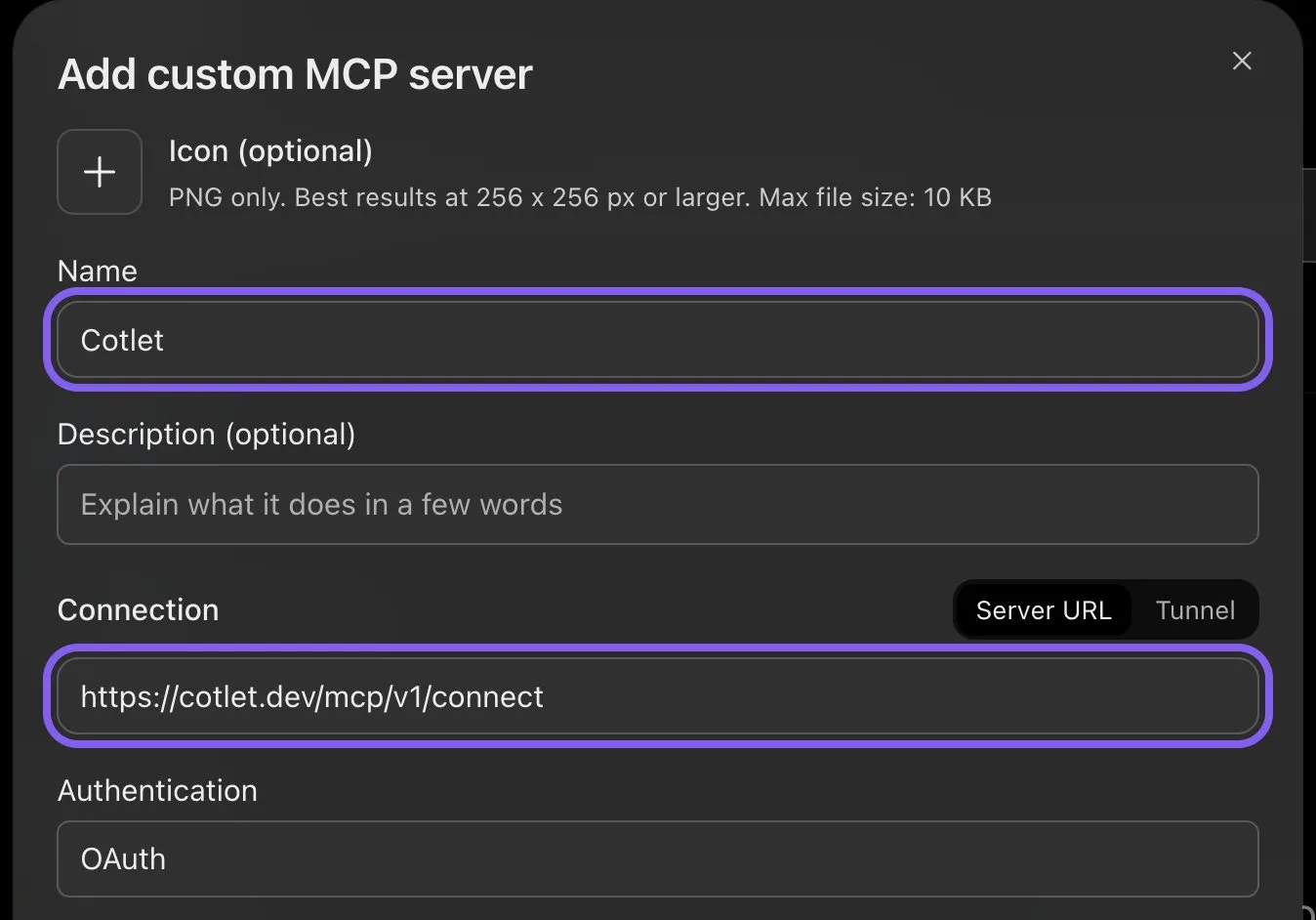
ChatGPT, Add custom MCP server form, November 2026.
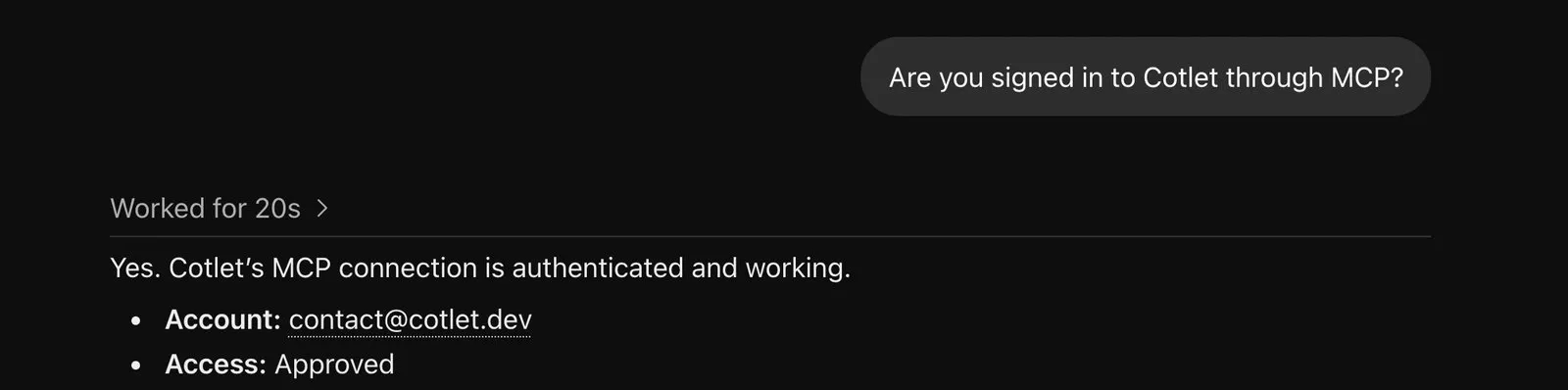
ChatGPT confirming the Cotlet connection, November 2026.
ChatGPT asks “Allow ChatGPT to use Cotlet?” before some steps. Pick Always allow, or the chat waits for your click. On a Business, Enterprise or Edu workspace, an admin has to allow custom MCP servers first.
How to connect DistroKid to Claude
- Open Connectors in Claude and click Add. In the desktop app it is under Customize, Connectors.
- Click Add custom connector.
- Paste the name
Cotletand the URLhttps://cotlet.dev/mcp/v1/connect, then click Continue. - Keep the settings and click Add.
- A Cotlet page opens. Click Allow access.
- In a chat, click the plus button, then Connectors, and turn Cotlet on.
- Ask Claude: “Are you signed in to Cotlet through MCP?”, then “List my DistroKid releases that are still yellow or red, and for each one tell me the release date and whether an edit request is pending.”. Claude asks before it uses a Cotlet tool the first time. Click Allow.

Claude, Customize, Connectors, Add menu, November 2026.

Claude, Add custom connector, last screen, November 2026.
Claude’s free plan allows one custom connector. On a Team or Enterprise plan, an owner adds Cotlet in Organization settings, Connectors, and you click Connect next to it.
How to connect DistroKid to Claude Code
Add Cotlet without a key, then sign in once in the browser:
claude mcp add --transport http cotlet https://cotlet.dev/mcp/v1/connectRun /mcp in Claude Code, pick cotlet and sign in to Cotlet. Prefer an API key, for example on a server? Create one in the Cotlet console and use:
claude mcp add --transport http cotlet https://cotlet.dev/mcp/v1 \
  --header "Authorization: Bearer $COTLET_API_KEY"
How to connect DistroKid to Codex
Create an API key in the Cotlet console, put it in the COTLET_API_KEY environment variable and add this to ~/.codex/config.toml:
[mcp_servers.cotlet]
url = "https://cotlet.dev/mcp/v1"
bearer_token_env_var = "COTLET_API_KEY"
How to connect DistroKid to Cursor
Create an API key in the Cotlet console, put it in the COTLET_API_KEY environment variable and add this to ~/.cursor/mcp.json:
{
  "mcpServers": {
    "cotlet": {
      "url": "https://cotlet.dev/mcp/v1",
      "headers": { "Authorization": "Bearer ${env:COTLET_API_KEY}" }
    }
  }
}
How to connect DistroKid to Grok
Grok takes custom MCP servers on grok.com, per xAI’s connectors documentation (checked 8 November 2026).
- Open grok.com/connectors and click New Connector.
- Pick Custom and paste the server URL
https://cotlet.dev/mcp/v1/connect. - Sign in to Cotlet when Grok asks, then click Allow access.
- Ask Grok: “Are you signed in to Cotlet through MCP?”
On Grok Business, an admin adds the connector first in the xAI console, under Grok Business, Connectors. The Grok chat inside X has no custom connector menu.
How to connect DistroKid to Hermes Agent
Add Cotlet to ~/.hermes/config.yaml in the format of the Hermes MCP config reference:
mcp_servers:
  cotlet:
    url: "https://cotlet.dev/mcp/v1"
    headers:
      Authorization: "Bearer ${COTLET_API_KEY}"
    trust: untrusted
Put COTLET_API_KEY in ~/.hermes/.env and check it with hermes mcp test cotlet. With trust: untrusted, Hermes runs reads at once and asks before every write. More on Hermes in our post on the Hermes Agent browser.
How to connect DistroKid to n8n
Use the MCP Client node, or the MCP Client Tool inside an AI Agent node:
- Server Transport: HTTP Streamable
- MCP Endpoint URL:
https://cotlet.dev/mcp/v1 - Authentication: Bearer Auth, with your Cotlet API key as the token
- Tools: Cotlet.dev’s browser tools; the AI Agent node reads the DistroKid guide first
Use it to run this on a schedule: change Splits on a new song and get your OK first.
Any other MCP client
Point the client at https://cotlet.dev/mcp/v1 over Streamable HTTP, with the header Authorization: Bearer <your Cotlet API key>. A client that supports OAuth sign-in can use https://cotlet.dev/mcp/v1/connect instead and needs no key. The full reference is in the MCP docs.
Your AI agent in a chat app opens a Cotlet.dev sign-in window, and you allow it there. Turned DistroKid on after you connected? Refresh the connector and its 10 tools appear.
Start with three DistroKid jobs: a Bank report, a stuck release and a Splits change
Your AI agent can take these three jobs from three different areas of DistroKid on the first day.
Turn the Bank file into an earnings report without a manual download
Cotlet.dev takes this request as written: “Show my DistroKid earnings for last month by store and song, and list the top songs.”
DistroKid has no public API and no webhooks, so earnings leave the dashboard only as a Bank file you download by hand (checked 28 Oct 2026), and the DistroKid job ad for an API engineer lists MCP server work as future work with nothing shipped. Your AI agent reads the Bank totals grouped by store or song and, when you ask, the detail rows behind them. Nothing waits for approval because both tools only read. You skip the download and the spreadsheet, and you know that stores report every 1 to 2 months, so the latest months can be empty.
Spot releases stuck in yellow or red before they cost you a week
Your AI agent can take this request: “List my DistroKid releases that are still yellow or red, and for each one tell me the release date and whether an edit request is pending.”
DistroKid shows status as a colored circle left of the artwork on MyMusic: green means the release has reached the services, yellow means it is still processing or on its way, and red is an error that blocks it. Your AI agent lists releases newest first, then opens each yellow or red one for tracks, label, release date and any pending edit request. Nothing waits for approval because both tools only read, and review can take several days, so yellow is normal for a new upload. DistroKid sends no events out (checked 28 Oct 2026), so a daily run of this request replaces waiting for a notice and replaces scanning MyMusic circle by circle.
Change Splits on a new song and get your OK first
Cotlet.dev takes this request: “Read the current splits on my newest single, then set them so I keep the larger share and my producer, whose email I give you, gets the rest, adding up to 100.”
Your AI agent reads the current split, meaning who is on the song, at what share, accepted or pending, and checks that the new shares add up to 100, or nothing is saved. It then waits for your OK, which appears in your Cotlet.dev console first, and reports who was invited. DistroKid sends every collaborator a fresh invitation to accept after any change, and a pending collaborator’s share is held until they join, so a typo in an email only delays their money. You skip retyping each collaborator on each song, and a wrong set of shares is fixed by setting them again.
Weigh the other routes into DistroKid and where each one stops
- DistroKid official API: none exists, since DistroKid has no public API, no developer docs and no webhooks (checked 28 Oct 2026).
- DistroKid in Zapier: no DistroKid app exists, and Zapier answers 404 for it (checked 28 Oct 2026).
- DistroKid in n8n, Pipedream and Composio: none has a DistroKid app, and each answers 404 for it (checked 28 Oct 2026).
- DistroKid in Make: Make has nothing official to call, because DistroKid has no public API and no webhooks (checked 28 Oct 2026).
- DistroKid Bank file: you download it by hand, and it is the only way money and stats leave the dashboard (checked 28 Oct 2026).
- DistroKid community code on GitHub: it calls the private API of the iOS app with a token you intercept, and the Go wrapper distrogo has 21 stars with its last push on 29 Jul 2024 (checked 28 Oct 2026).
- DistroKid MCP server on GitHub: solvero-distrokid-mcp is the only one, it prepares release manifests and checks audio and cover files, and by its own README it has no link to a DistroKid account (checked 28 Oct 2026).
- DistroKid royalty tools such as Infinite Catalog and Royalti.io: they import a DistroKid statement, but you still download each Bank file and upload it by hand.
Cotlet.dev gives what none of these routes does: your own DistroKid account across Bank, Stats, HyperFollow, MyMusic, edit requests and Splits, read and write, from ChatGPT, Claude or any agent, with no API key, on the current DistroKid plan.
FAQ
Can I find a DistroKid app inside ChatGPT or Claude?
DistroKid has no app in the ChatGPT apps directory and no Claude connector (checked 6 Nov 2026), and no public API for artists. Cotlet.dev connects ChatGPT and Claude to your own DistroKid account instead.
Where is DistroKid’s own API or MCP server?
DistroKid has no public API, no developer docs, no webhooks and no MCP server (checked 28 Oct 2026). A DistroKid job ad for an API engineer names MCP server work as future work, and nothing has shipped. Cotlet.dev runs 10 DistroKid tools on the hosted MCP address https://cotlet.dev/mcp/v1.
Can Zapier, Make or n8n work in DistroKid for me?
DistroKid has no app in Zapier, n8n, Pipedream or Composio, and each answers 404 for it (checked 28 Oct 2026). DistroKid also has no public API or webhooks, so a Make scenario has no official call to make either. Your AI agent in n8n can use the Cotlet.dev MCP address instead.
Which steps put my DistroKid account into ChatGPT or Claude?
Cotlet.dev connects in three moves: sign in to DistroKid as the account owner in the Cloud Browser and type the emailed code, press Enable for agents, and add https://cotlet.dev/mcp/v1 as a connector in ChatGPT or Claude. Chat apps then open a Cotlet.dev sign-in window, and you allow it. No API key is needed for that path.
Will my agent report which releases are stuck and what I earned?
Your AI agent lists releases with their status, totals earnings by artist, song or store, and reads Daily Stats and HyperFollow stats. Stores report every 1 to 2 months, so the last months of the Bank can be empty (checked 28 Oct 2026). A daily release check and a weekly earnings summary cover most needs.
Can my agent upload songs or move my money?
Your AI agent cannot upload new releases or withdraw money, because both are outside the tools, and money leaves your Bank only when you withdraw it in DistroKid. The tools read earnings and stats, set Splits and submit edit and removal requests. DistroKid also documents that earnings are paid out after streaming services report them, 2 to 3 months later.
Does Daily Stats need a higher DistroKid plan?
DistroKid shows Daily Stats only on Musician Plus and Ultimate (checked 28 Oct 2026), so that one tool needs one of those plans. Earnings, releases, Splits and HyperFollow stats work on Musician, Musician Plus and Ultimate.
Will DistroKid tell my agent when a release turns green?
DistroKid has no webhooks (checked 28 Oct 2026), so nothing tells an agent that a release went green or that new earnings arrived. Run your agent on a schedule instead: a daily release list and a weekly earnings summary cover most needs.
Can I undo a change my agent makes in DistroKid?
DistroKid Splits changes are undone by setting them again, and collaborators accept anew. An edit request cannot be cancelled or sped up, and a removal from stores cannot be undone and takes up to 2 weeks. Any read leaves nothing to undo.
Does DistroKid LLC stand behind Cotlet.dev?
Cotlet.dev is independent and not affiliated with DistroKid LLC. DistroKid is a trademark of its owner, and if DistroKid’s own integrations cover what you need, use them first.
Run your first check on this week’s DistroKid releases
Your first Cotlet.dev run can be the weekly look you never had time for: ask for the releases still yellow or red and for last month’s Bank by store, and read both before your next release. The Cotlet.dev DistroKid integration page lists the 10 tools and what each one needs.


