How to connect Fullbay to ChatGPT, Claude and any AI agent
Fullbay has no official MCP server, and its API sits in a paid add-on (checked 26 Nov 2026). Let ChatGPT or Claude read your service orders and invoices.
Cotlet team 11 min read
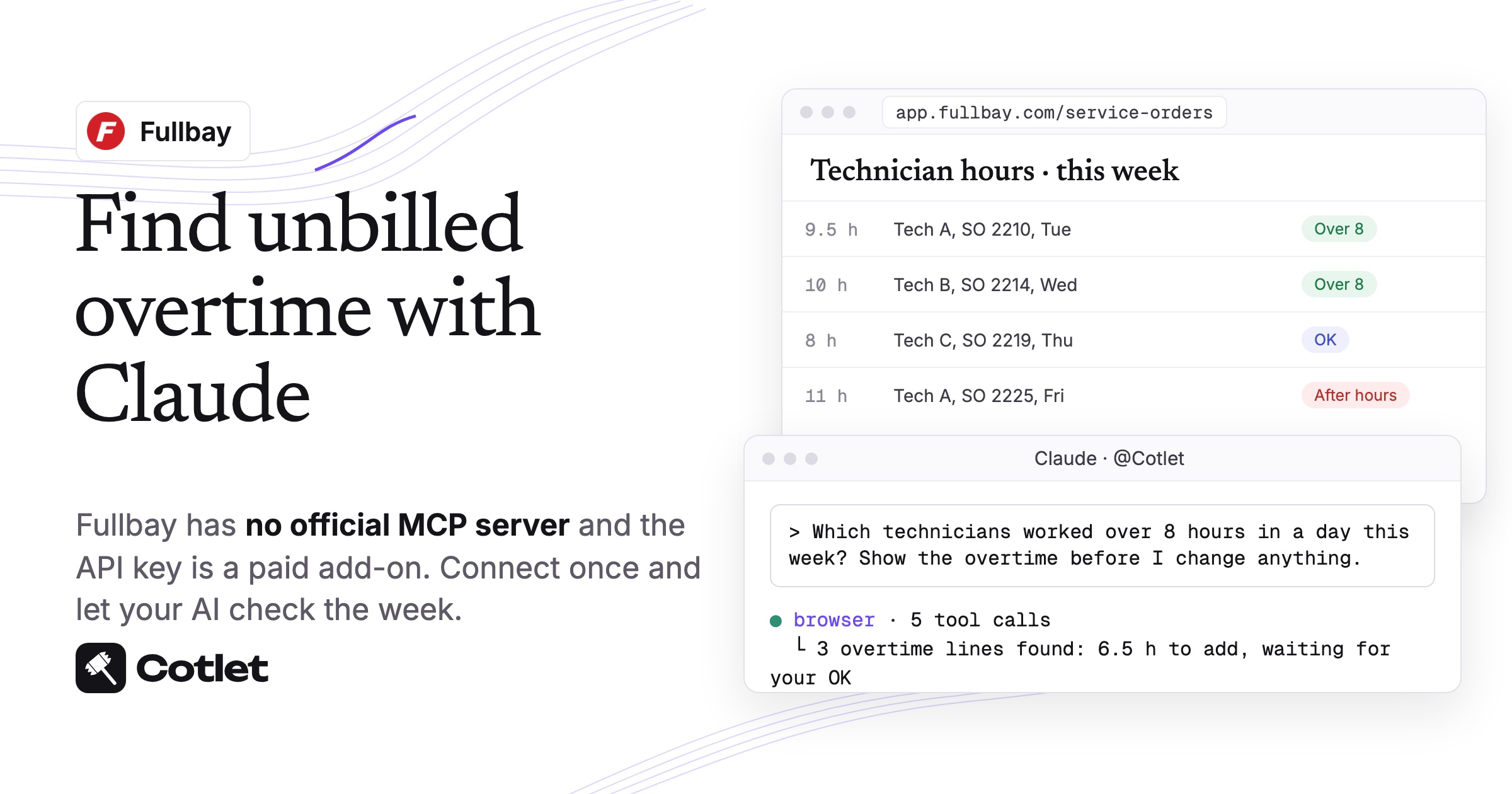
It is Friday, 4 pm, and payroll closes tonight. Six technicians clocked in at different hours this week, and you still have to find who crossed eight hours and bill that time as its own line. Fullbay holds every hour. On 26 November 2026 it has no MCP server, no ChatGPT app and no Claude connector. Its open API key belongs to the paid Fullbay Connect add-on. Your account is still reachable by an AI. Sign in once in a cloud browser that Cotlet runs, then ChatGPT or Claude opens the same screens you do and returns lists. Plan for ten minutes. You write no code.
This post is for the owner, service manager or parts manager of a heavy-duty truck and trailer shop, and for a fleet maintenance manager who runs an in-house shop on Fullbay. Cotlet fits the weekly checks that cut across service orders, parts and invoices. It does not replace Fullbay’s own AI, which works inside the product.
What ChatGPT and Claude can do in Fullbay once connected
You describe the result. The AI walks through the screens your staff already use.
| Where in Fullbay | What the AI does |
|---|---|
| Service orders and technician time | Lists technicians who worked after hours or over 8 hours in a day and shows the overtime to add |
| Estimates | Lists estimates fleets have not approved and drafts a short email for each contact |
| Parts and purchase orders | Finds open service orders waiting on parts that were ordered but never received |
| Cores | Lists cores not yet returned to a vendor with the credit waiting on each |
| Invoices and receivables | Lists fleet invoices unpaid past 30 days and drafts a reminder for each |
| Reports | Puts a month of invoices and payments into one sheet for your bookkeeper |
Reading changes nothing. A sent email, an overtime line or a changed order waits for your OK, and payments stay blocked. The Fullbay MCP server page lists the jobs in full. If another tool needs the same data, the Fullbay API page explains how to build your own endpoint.
Does Fullbay have an API, AI or an official ChatGPT app?
As of 26 November 2026:
- It has AI inside the product. Fullbay AI turns voice into text and cleans up service order notes, and Fullbay Next, launched on 18 August 2026, is built around it. None of it connects to ChatGPT or Claude.
- The API key is an add-on. Fullbay’s Connect add-on includes an open API key for integrations such as QuickBooks. Fullbay does not say which of its four Connect tiers carries the key.
- A developer portal is announced. Fullbay Next promises a self-service developer portal with early access still to come, so a shop cannot yet sign up for a key on its own.
- No official connector. Search the MCP Registry and Fullbay does not appear. ChatGPT and Claude list nothing for it either.
- Fullbay is a browser app. Shops on the older version keep working in the browser while Fullbay Next rolls out in stages, which is what makes a signed-in session possible.
So the official routes cover a paid key or an in-product assistant. A hosted server that works in your signed-in session reaches all of it with your plan as it is. Every route, side by side, is on Does Fullbay have an API or MCP server?.
Before you start
- Your Fullbay sign-in. Shops already on Fullbay Next use that one.
- Which technicians count, and from what hour a shift is overtime, written down in one line.
- Fleet contacts saved on each customer, so a drafted reminder has an address.
- An AI chat: ChatGPT, or Claude (its free tier holds one custom connector).
- A free week of Cotlet. No card is asked (pricing).
Step 1: log in to Fullbay once, inside the Cloud Browser
Your Cotlet console opens the Cloud Browser. Point it at app.fullbay.com. Fullbay Next lives at platform.fullbay.com and takes Google or a passkey. You type the credentials yourself.
Fullbay’s page gets the password. All Cotlet holds is an encrypted session, and a single switch in the console cuts the AI off. A new link appears whenever Fullbay logs you out. The security page has the detail.
Step 2: hook your AI up to Cotlet
Your AI tool needs Cotlet’s address exactly once. The Fullbay session you just saved handles the rest. Choose the tool you use.
Pick your AI above to see its steps.
How to connect Fullbay to ChatGPT
Do this on chatgpt.com in your browser. Cotlet then works in the ChatGPT desktop and phone apps too.
- Open Plugins in ChatGPT and click Add.
- Click Add custom MCP server. Not in the menu? Turn on Developer mode in Settings, Security and login, then come back.
- Paste the name
Cotletand the server URLhttps://cotlet.dev/mcp/v1/connect. Keep Authentication on OAuth. - Tick “I understand and want to continue” and click Create as a plugin.
- Click Connect Cotlet. A Cotlet page opens, click Allow access.
- In a new chat, type
@Cotletand pick it from the list. - Ask ChatGPT: “Are you signed in to Cotlet through MCP?” Then try a first Fullbay task: “List this week’s Fullbay service orders where a technician worked more than 8 hours in a day, with the technician, the order and the hours.”
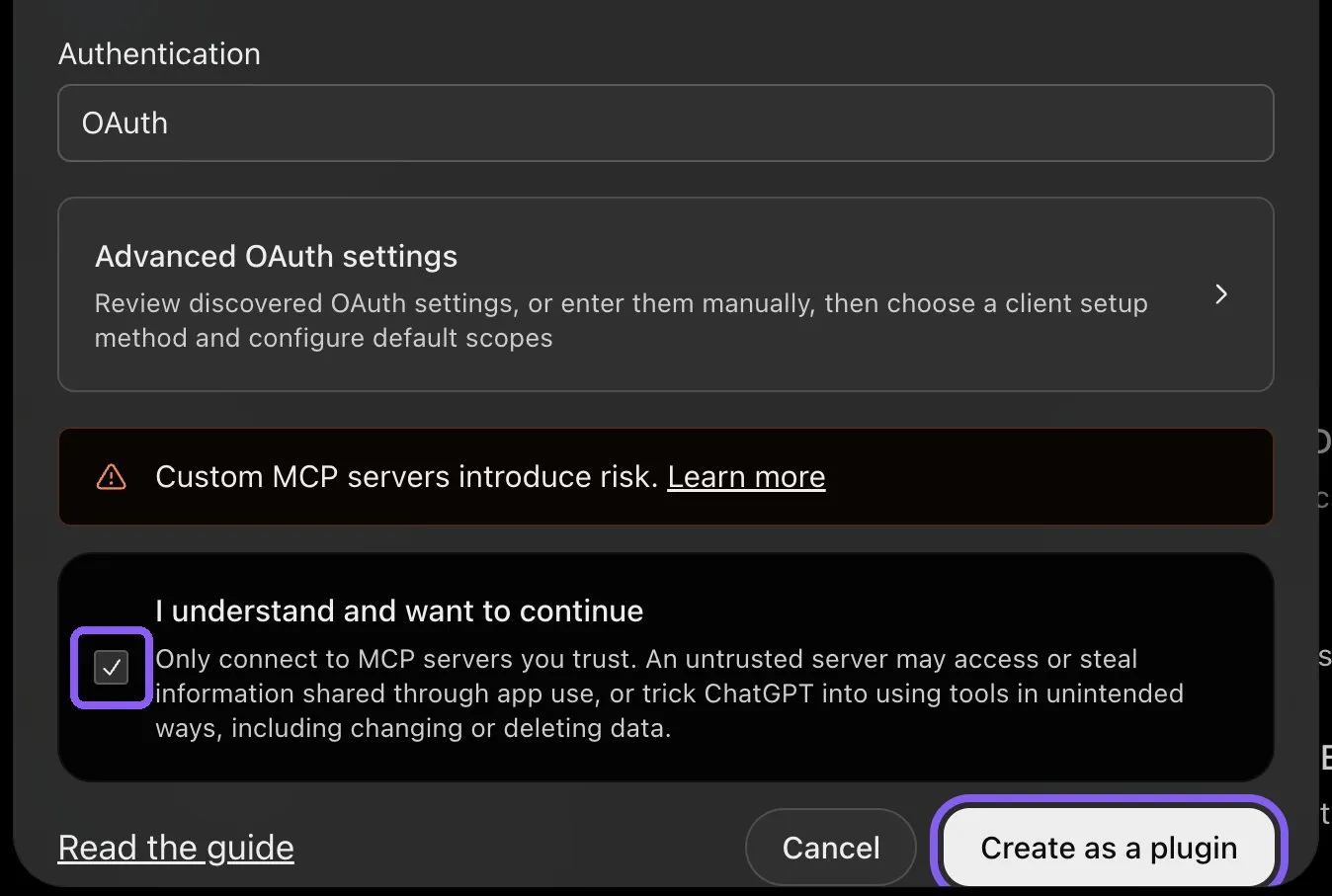
ChatGPT, bottom of the custom MCP server form, November 2026.
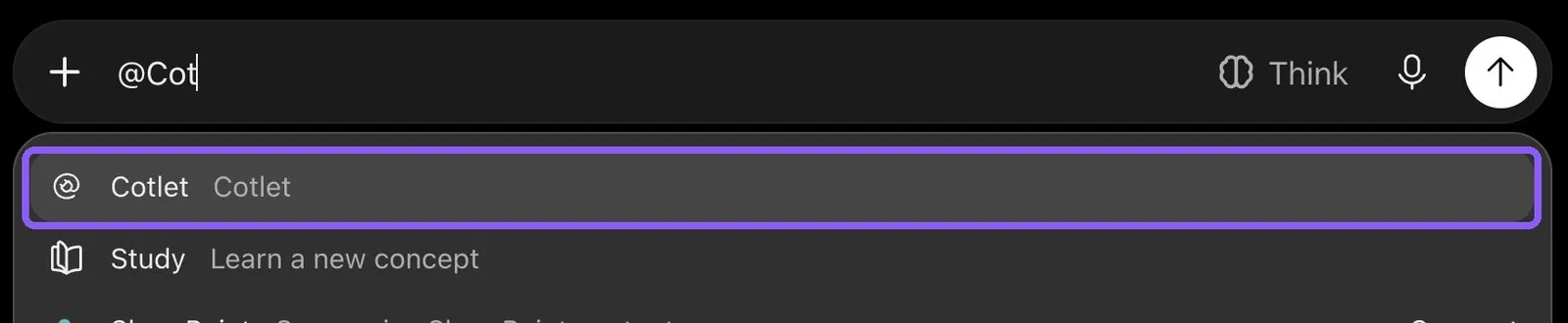
ChatGPT, picking Cotlet in a new chat with @, November 2026.
ChatGPT asks “Allow ChatGPT to use Cotlet?” before some steps. Pick Always allow, or the chat waits for your click. On a Business, Enterprise or Edu workspace, an admin has to allow custom MCP servers first.
How to connect Fullbay to Claude
- Open Connectors in Claude and click Add. In the desktop app it is under Customize, Connectors.
- Click Add custom connector.
- Paste the name
Cotletand the URLhttps://cotlet.dev/mcp/v1/connect, then click Continue. - Keep the settings and click Add.
- A Cotlet page opens. Click Allow access.
- In a chat, click the plus button, then Connectors, and turn Cotlet on.
- Ask Claude: “Are you signed in to Cotlet through MCP?”, then “Which open Fullbay service orders are waiting on parts that were ordered but not received? List the order and the vendor.”. Claude asks before it uses a Cotlet tool the first time. Click Allow.

Claude, Add custom connector form, November 2026.

Claude, Add custom connector, last screen, November 2026.
Claude’s free plan allows one custom connector. On a Team or Enterprise plan, an owner adds Cotlet in Organization settings, Connectors, and you click Connect next to it.
How to connect Fullbay to Claude Code
Add Cotlet without a key, then sign in once in the browser:
claude mcp add --transport http cotlet https://cotlet.dev/mcp/v1/connectRun /mcp in Claude Code, pick cotlet and sign in to Cotlet. Prefer an API key, for example on a server? Create one in the Cotlet console and use:
claude mcp add --transport http cotlet https://cotlet.dev/mcp/v1 \
  --header "Authorization: Bearer $COTLET_API_KEY"
How to connect Fullbay to Codex
Create an API key in the Cotlet console, put it in the COTLET_API_KEY environment variable and add this to ~/.codex/config.toml:
[mcp_servers.cotlet]
url = "https://cotlet.dev/mcp/v1"
bearer_token_env_var = "COTLET_API_KEY"
How to connect Fullbay to Cursor
Create an API key in the Cotlet console, put it in the COTLET_API_KEY environment variable and add this to ~/.cursor/mcp.json:
{
  "mcpServers": {
    "cotlet": {
      "url": "https://cotlet.dev/mcp/v1",
      "headers": { "Authorization": "Bearer ${env:COTLET_API_KEY}" }
    }
  }
}
How to connect Fullbay to Grok
Grok takes custom MCP servers on grok.com, per xAI’s connectors documentation (checked 8 November 2026).
- Open grok.com/connectors and click New Connector.
- Pick Custom and paste the server URL
https://cotlet.dev/mcp/v1/connect. - Sign in to Cotlet when Grok asks, then click Allow access.
- Ask Grok: “Are you signed in to Cotlet through MCP?”
On Grok Business, an admin adds the connector first in the xAI console, under Grok Business, Connectors. The Grok chat inside X has no custom connector menu.
How to connect Fullbay to Hermes Agent
Add Cotlet to ~/.hermes/config.yaml in the format of the Hermes MCP config reference:
mcp_servers:
  cotlet:
    url: "https://cotlet.dev/mcp/v1"
    headers:
      Authorization: "Bearer ${COTLET_API_KEY}"
    trust: untrusted
Put COTLET_API_KEY in ~/.hermes/.env and check it with hermes mcp test cotlet. With trust: untrusted, Hermes runs reads at once and asks before every write. More on Hermes in our post on the Hermes Agent browser.
How to connect Fullbay to n8n
Use the MCP Client node, or the MCP Client Tool inside an AI Agent node:
- Server Transport: HTTP Streamable
- MCP Endpoint URL:
https://cotlet.dev/mcp/v1 - Authentication: Bearer Auth, with your Cotlet API key as the token
- Tools: let the AI Agent node use Cotlet’s browser tools; it reads Cotlet’s Fullbay guide first and works in your signed-in Fullbay account
Use it for work that should run on its own, such as a list of fleet invoices unpaid over 30 days every Monday morning.
Any other MCP client
Point the client at https://cotlet.dev/mcp/v1 over Streamable HTTP, with the header Authorization: Bearer <your Cotlet API key>. A client that supports OAuth sign-in can use https://cotlet.dev/mcp/v1/connect instead and needs no key. The full reference is in the MCP docs.
Three Fullbay jobs to try first
Pick the check you dread most.
Overtime nobody billed
Look at this week’s service orders. Which technicians worked after hours or over 8 hours in a day, and what overtime should I add as a separate line? Show the list before I change anything.
Overtime hides in labor lines, because nobody adds it up by person. The AI reads the labor lines and technician time on this week’s orders and builds a list by person, order and hours. You see it first. Adding the lines happens only after your OK. Fullbay’s own utilization guide shows where those hours live.
Orders stuck on a part nobody received
Which open service orders are waiting on parts that were ordered but not received? List the order, the vendor and how long it has waited.
A truck on your lot earns nothing, and a part that was ordered but never arrived keeps it there. The AI opens the open orders and the purchase orders behind them and returns the order, the vendor and the wait in days. Run it each morning and you phone the vendor before the fleet phones you.
Fleets that do not pay
Which fleet customers have invoices unpaid for over 30 days? Draft a payment reminder for each. Send after my OK.
Fullbay explains accounts receivable as its own workflow. The AI lists each overdue invoice by customer, adds the amount and age, and drafts a short note per contact. You read the drafts and approve the ones that go out. Nothing is sent before that.
What it costs
Fullbay’s invoice stays untouched, and you skip the Connect add-on. Cotlet sells credits in packs, never as a subscription. Pay $29 once for 5,000 credits, usable for a year. Each working call spends 10 to 100, while a failure spends zero. New accounts get 500 trial credits over seven days. After the trial, a Fullbay session open to agents costs 50 credits a day (pricing).
FAQ
Does Fullbay have an API for my shop?
Yes, but it belongs to the paid Fullbay Connect add-on, and Fullbay Next announced a new developer portal with early access still to come. The AI works in your account instead, without a key.
Can AI work in my Fullbay account without a Fullbay API key?
Yes. It works in your account in the browser on the screens you use, so you do not need the key from Connect. Writes and sends wait for your OK.
Is there an official Fullbay MCP server?
No. The MCP Registry has no entry, and neither ChatGPT nor Claude lists a Fullbay connector. Cotlet is a hosted server that does the clicking in your own Fullbay login.
Can it put invoices and payments in a sheet for my bookkeeper?
Yes. It reads a month of invoices and payments and writes one sheet by customer and invoice number. Your bookkeeper then matches it to QuickBooks. It reads only.
Can it check sales tax before an audit?
It can list every invoice for a quarter with the customer, the tax charged and the customer’s tax status. You compare that sheet with what you filed. The AI does not give tax advice.
Which units are due for preventive maintenance?
Ask for units due in the next two weeks. The AI lists unit, customer and what is due from the maintenance schedules in your account.
Is Cotlet part of Fullbay?
No. Cotlet is a separate company that only uses your own login.
Payroll closes tonight
The hours, parts and invoices are in Fullbay already. Start a free Cotlet week, log in through the Cloud Browser and ask your AI for tonight’s lists. Using other software too? Look in the catalog.


