How to connect Gingr to ChatGPT, Claude and any AI agent
Gingr has an API you switch on yourself but no official MCP server (checked 27 Nov 2026). Let ChatGPT or Claude check vaccines and finish report cards.
Cotlet team 10 min read
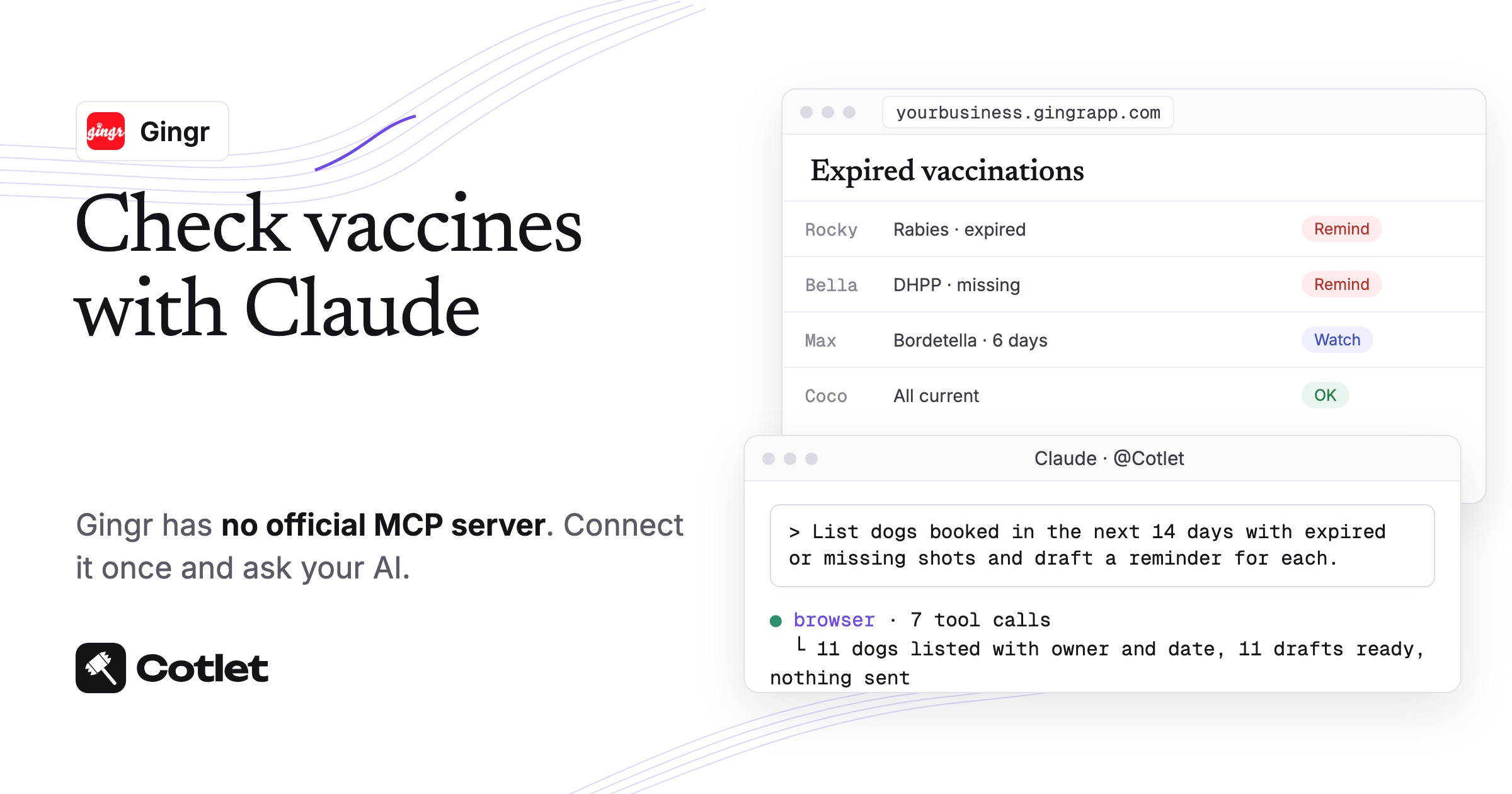
It is 7:30 on Monday, the lobby fills at 8, and nobody has checked which of today’s dogs are missing a rabies certificate. Gingr offers no MCP server and no ChatGPT or Claude app (checked 27 Nov 2026). It does have an API that any admin can switch on, though someone still has to write code against it. Cotlet needs no code. The AI opens the Gingr your team already uses, in a Cloud Browser, and works under your login.
The reader here manages a kennel, a daycare or a grooming facility on Gingr: reservations, pet and owner files, immunizations, report cards, payments. Customers with the Gingr owner app are a different audience.
What ChatGPT and Claude can do in Gingr once connected
Name the day or the date range, then say which list you want.
| Gingr screen | The AI’s job |
|---|---|
| Immunizations | Lists booked dogs whose shots expire or are missing, with owner and reservation date |
| Reservations | Builds today’s arrivals and departures with feeding and medication notes |
| Report cards | Lists dogs in the building with no report card or photo yet |
| Reservation requests | Finds online requests still waiting for an answer after 4 hours |
| Medication report | Prepares tomorrow’s doses by dog and time |
| Transactions | Lists open balances after a deposit and double charges |
| Messages | Finds opted-in clients whose last text failed |
Until you approve, the AI only reads. Owner reminders, request confirmations and charges stay on hold, and card payments are blocked. Further jobs are on the Gingr MCP page.
Does Gingr have AI, an API or an official ChatGPT app?
Checked on 27 November 2026:
- API: open to admins. An admin creates an API key in the dashboard under Settings, Integrations, API Keys. The Gingr API 1.9.3 docs list read and write endpoints for bookings, pets, owners, invoices and payments. We found no plan limit.
- Older read-only API. The legacy version returns data only and cannot write.
- ChatGPT and Claude: no connector. Carly’s post on Claude and Gingr says there is no Claude connector and every user can have an API key.
- MCP Registry: one independent server. A read-only Gingr server from usefulapi is listed. Gingr did not publish it.
- Zapier: no app yet. Zapier’s Gingr page says Gingr has not built an integration there and points to webhooks.
A fixed data feed is a job for the API and a developer. Running the front desk day to day is quicker from a signed-in session. How each point was scored is in Gingr’s API and MCP review.
Before you start
- A login that can open the screens you want read, usually owner or manager.
- Your facility address, which looks like yourname.gingrapp.com.
- One day and one list for round one, for example arrivals.
- Either ChatGPT or Claude on a paid or free account.
- A Cotlet account (pricing).
Step 1: sign in to Gingr in your Cloud Browser
Every facility has its own address. Forgot yours? Gingr’s locate my app page finds it. Open it in the Cloud Browser and log in the usual way.
The credentials stay on Gingr’s login page, unreadable to Cotlet. The stored session is encrypted, and the AI can be switched off in one click (security).
Step 2: connect Gingr to ChatGPT, Claude or another AI agent
Link Cotlet to your assistant once. Every later chat can use the Gingr session that is open.
Pick your AI above to see its steps.
How to connect Gingr to ChatGPT
Do this on chatgpt.com in your browser. Cotlet then works in the ChatGPT desktop and phone apps too.
- Open Plugins in ChatGPT and click Add.
- Click Add custom MCP server. Not in the menu? Turn on Developer mode in Settings, Security and login, then come back.
- Paste the name
Cotletand the server URLhttps://cotlet.dev/mcp/v1/connect. Keep Authentication on OAuth. - Tick “I understand and want to continue” and click Create as a plugin.
- Click Connect Cotlet. A Cotlet page opens, click Allow access.
- In a new chat, type
@Cotletand pick it from the list. - Ask ChatGPT: “Are you signed in to Cotlet through MCP?” Then try a first Gingr task: “In Gingr, list today’s expected arrivals with each dog’s feeding and medication notes. Change nothing.”
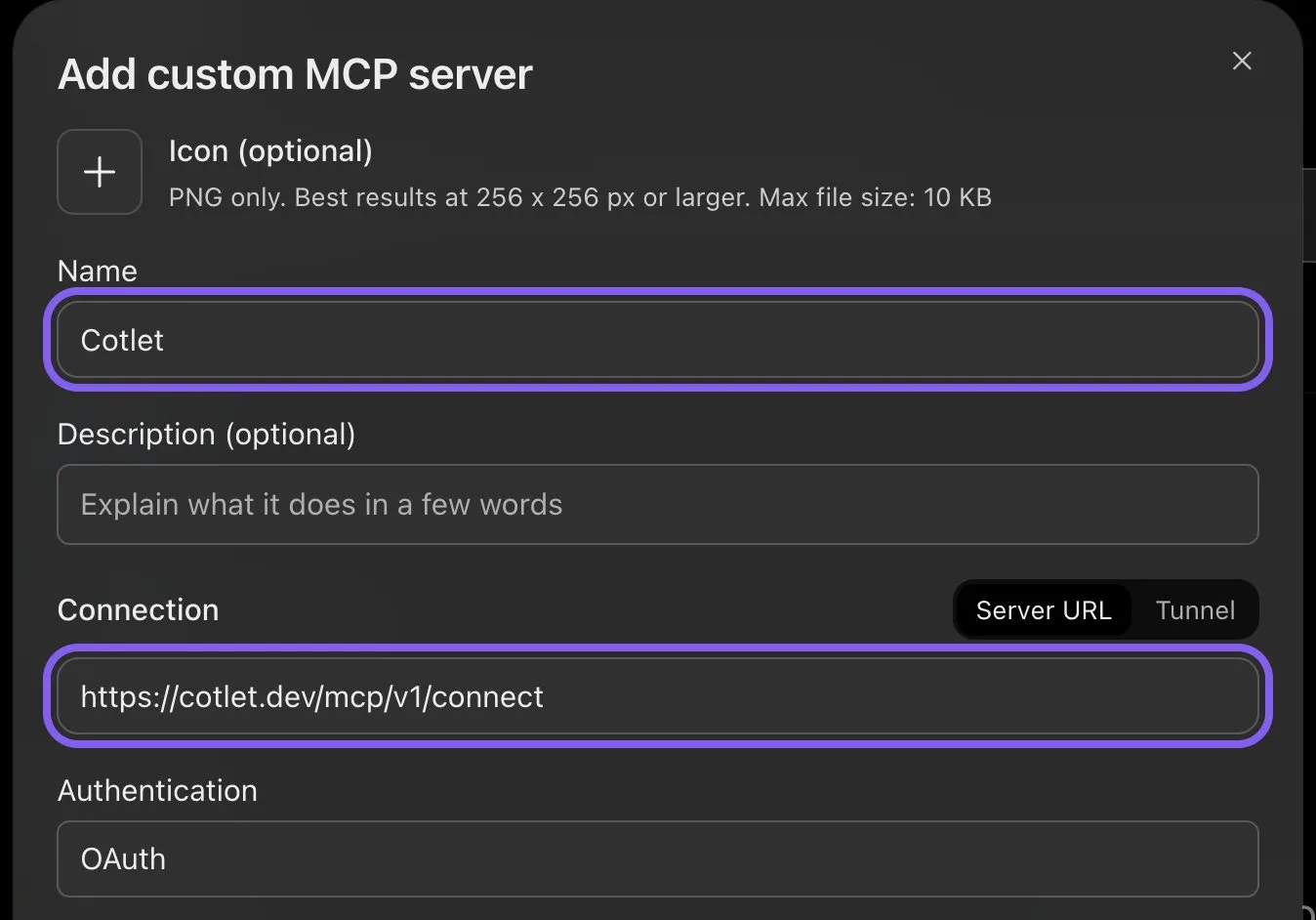
ChatGPT, Add custom MCP server form, November 2026.
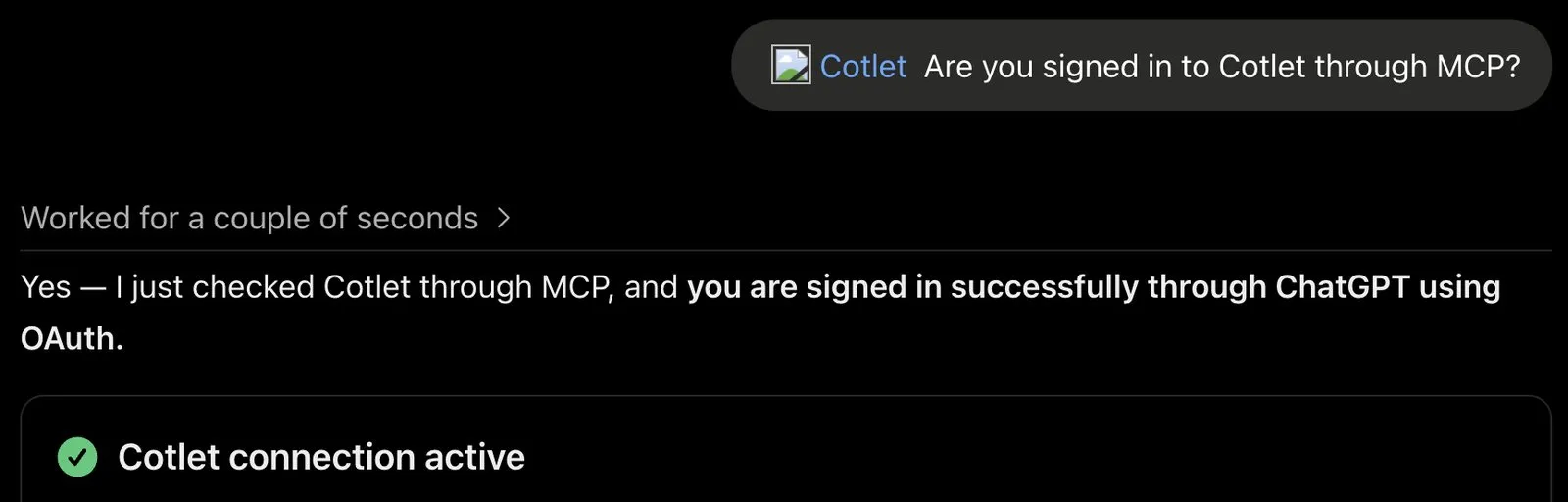
ChatGPT confirming the Cotlet connection, November 2026.
ChatGPT asks “Allow ChatGPT to use Cotlet?” before some steps. Pick Always allow, or the chat waits for your click. On a Business, Enterprise or Edu workspace, an admin has to allow custom MCP servers first.
How to connect Gingr to Claude
- Open Connectors in Claude and click Add. In the desktop app it is under Customize, Connectors.
- Click Add custom connector.
- Paste the name
Cotletand the URLhttps://cotlet.dev/mcp/v1/connect, then click Continue. - Keep the settings and click Add.
- A Cotlet page opens. Click Allow access.
- In a chat, click the plus button, then Connectors, and turn Cotlet on.
- Ask Claude: “Are you signed in to Cotlet through MCP?”, then “In Gingr, list dogs booked this week whose rabies shot is expired or missing, with the owner. Send nothing.”. Claude asks before it uses a Cotlet tool the first time. Click Allow.

Claude, Customize, Connectors, Add menu, November 2026.

Claude, Add custom connector, last screen, November 2026.
Claude’s free plan allows one custom connector. On a Team or Enterprise plan, an owner adds Cotlet in Organization settings, Connectors, and you click Connect next to it.
How to connect Gingr to Claude Code
Add Cotlet without a key, then sign in once in the browser:
claude mcp add --transport http cotlet https://cotlet.dev/mcp/v1/connectRun /mcp in Claude Code, pick cotlet and sign in to Cotlet. Prefer an API key, for example on a server? Create one in the Cotlet console and use:
claude mcp add --transport http cotlet https://cotlet.dev/mcp/v1 \
  --header "Authorization: Bearer $COTLET_API_KEY"
How to connect Gingr to Codex
Create an API key in the Cotlet console, put it in the COTLET_API_KEY environment variable and add this to ~/.codex/config.toml:
[mcp_servers.cotlet]
url = "https://cotlet.dev/mcp/v1"
bearer_token_env_var = "COTLET_API_KEY"
How to connect Gingr to Cursor
Create an API key in the Cotlet console, put it in the COTLET_API_KEY environment variable and add this to ~/.cursor/mcp.json:
{
  "mcpServers": {
    "cotlet": {
      "url": "https://cotlet.dev/mcp/v1",
      "headers": { "Authorization": "Bearer ${env:COTLET_API_KEY}" }
    }
  }
}
How to connect Gingr to Grok
Grok takes custom MCP servers on grok.com, per xAI’s connectors documentation (checked 8 November 2026).
- Open grok.com/connectors and click New Connector.
- Pick Custom and paste the server URL
https://cotlet.dev/mcp/v1/connect. - Sign in to Cotlet when Grok asks, then click Allow access.
- Ask Grok: “Are you signed in to Cotlet through MCP?”
On Grok Business, an admin adds the connector first in the xAI console, under Grok Business, Connectors. The Grok chat inside X has no custom connector menu.
How to connect Gingr to Hermes Agent
Add Cotlet to ~/.hermes/config.yaml in the format of the Hermes MCP config reference:
mcp_servers:
  cotlet:
    url: "https://cotlet.dev/mcp/v1"
    headers:
      Authorization: "Bearer ${COTLET_API_KEY}"
    trust: untrusted
Put COTLET_API_KEY in ~/.hermes/.env and check it with hermes mcp test cotlet. With trust: untrusted, Hermes runs reads at once and asks before every write. More on Hermes in our post on the Hermes Agent browser.
How to connect Gingr to n8n
Use the MCP Client node, or the MCP Client Tool inside an AI Agent node:
- Server Transport: HTTP Streamable
- MCP Endpoint URL:
https://cotlet.dev/mcp/v1 - Authentication: Bearer Auth, with your Cotlet API key as the token
- Tools: let the AI Agent node use Cotlet’s browser tools; it reads Cotlet’s Gingr guide first and works in your signed-in Gingr account
Use it for work that should run on its own, such as a 3 pm list of dogs with no report card yet.
Any other MCP client
Point the client at https://cotlet.dev/mcp/v1 over Streamable HTTP, with the header Authorization: Bearer <your Cotlet API key>. A client that supports OAuth sign-in can use https://cotlet.dev/mcp/v1/connect instead and needs no key. The full reference is in the MCP docs.
Three Gingr jobs to try first
Begin with reads. Check each answer against the screen before the AI writes to an owner.
Catch expiring vaccines before the dog arrives
List dogs booked in the next 14 days whose rabies or other immunizations expire or are missing, with the owner and the reservation date, and draft a reminder for each.
Gingr can send immunization reminders, but you still need to know who is booked and who is short. The AI reads the Expired Vaccinations view against the calendar, so the list shows only dogs that will actually walk in. Reminders leave after your approval.
Finish report cards before pickup
Which dogs in daycare or boarding today have no report card or no photo yet? List them by name so staff can finish before pickup.
A report card is a promise to the owner. At 3 pm the AI lists the dogs still missing one, so the afternoon shift knows exactly where to start.
Find deposits that do not add up
List reservations from this week where a deposit was charged and the balance is still open, or where a card was charged twice. Send nothing.
The Transactions reference holds the payments. The AI cross-checks them with reservations and gives you a short list to look at. It only reads, so no charge is touched.
Three more requests for the same week
- Prepare tomorrow’s medication list by dog, dose and time, plus feeding changes for boarders.
- List online reservation requests older than 4 hours that are not confirmed.
- Put every boarding and daycare reservation for next month in a sheet with dog, owner, dates, services and total.
What it costs
Nothing changes on the Gingr side. The Cotlet trial runs 7 days with 2,000 credits and no card, then packs from $29 last a year. A failed call is never charged (pricing).
FAQ
Does Gingr have an API or MCP server I can use for my daycare?
The API is there for admins to switch on, and no official MCP server exists. Cotlet uses your logged-in browser instead, so you need neither a key nor a developer.
Can ChatGPT or Claude check vaccines in Gingr?
Yes. It reads shot dates and the Expired Vaccinations view and lists dogs to chase. Reminders go out only when you approve.
Does Gingr work with Zapier, Make or n8n?
Zapier has no Gingr app yet, while webhooks are supported. For jobs with no webhook, an n8n flow with a timer can call Cotlet.
Is this an official Gingr integration?
No. Gingr is not involved in Cotlet.
Try it on your own Gingr account
Pull Monday’s vaccine list at 7:30 tomorrow. Start a free Cotlet week, sign in, and ask. More apps are in the catalog.