How to connect PawFinity to ChatGPT, Claude and any AI agent
PawFinity has no official MCP server and no public API found (checked 27 Nov 2026). Let ChatGPT or Claude catch failed reminders and missing clock-outs.
Cotlet team 9 min read
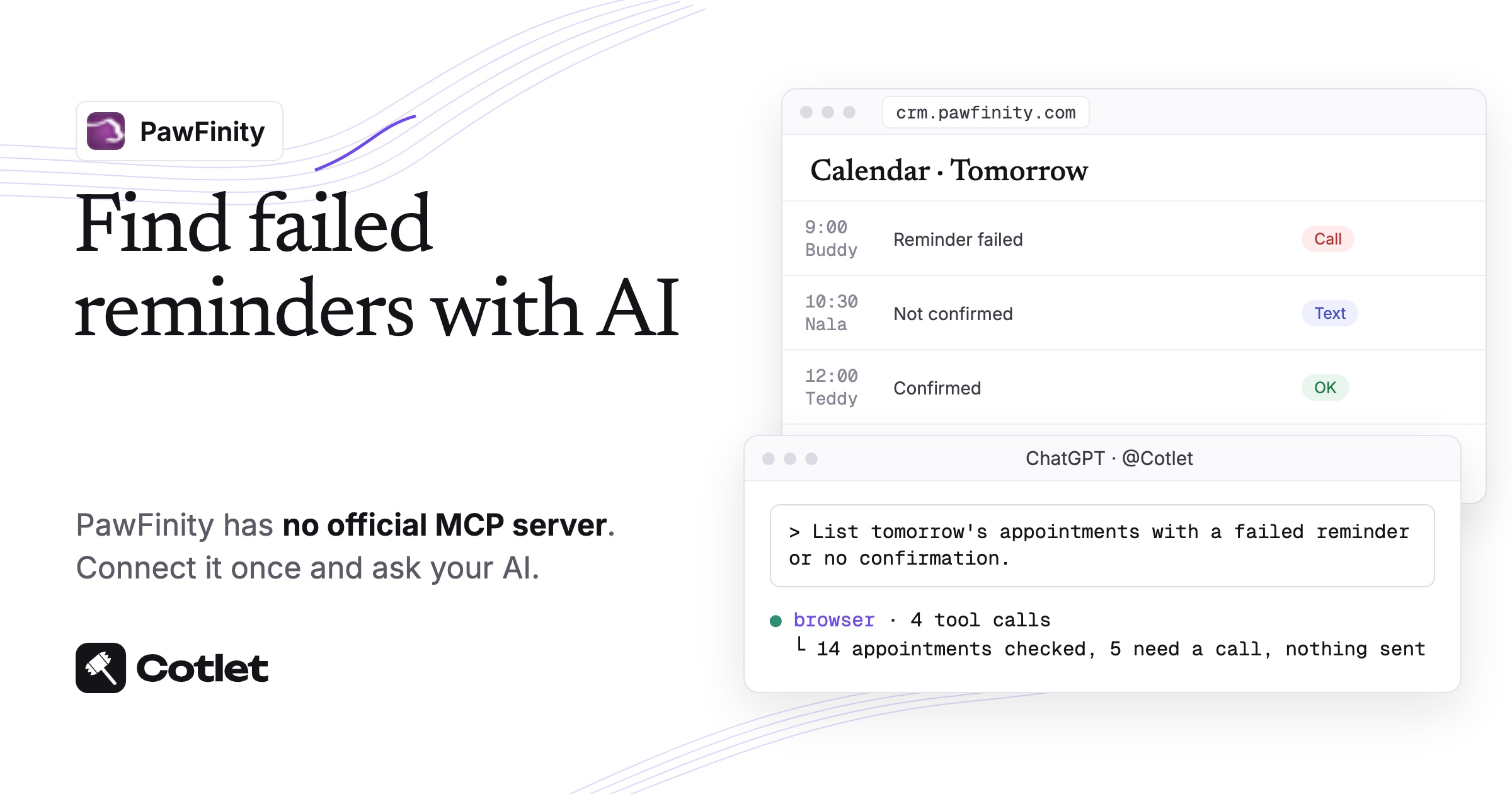
Tomorrow has 14 appointments, and you do not know which reminder texts actually went out. PawFinity lists no MCP server, no ChatGPT or Claude app and no public API that we could find (checked 27 Nov 2026). Its one listed integration is a nightly push to QuickBooks Online. With Cotlet the AI takes the open PawFinity tab of a Cloud Browser, logged in as you, and checks the calendar itself.
It suits whoever manages a grooming shop, a mobile van, a kennel or a daycare on PawFinity: calendar, pet files, reminders, time clock, reports. Clients who book online have their own page and are not the audience.
What ChatGPT and Claude can do in PawFinity once connected
Pick the day, the employee or the clients, and the list you want.
| Feature | Result you get |
|---|---|
| SMS and email reminders | Lists tomorrow’s appointments with a failed or unsent reminder or no confirmation |
| Client and pet profiles | Finds booked dogs with an expired or missing vaccine record |
| Time clock | Shows hours and commission per employee and flags missing clock-outs |
| Clients | Lists duplicate files with the same phone or the same dog name |
| Online booking | Finds clients overdue for their usual visit with nothing booked |
| Mobile mapping | Lists tomorrow’s stops per van with gaps over 20 minutes |
| Sales | Lists closed sales to compare with QuickBooks totals you paste in |
Reading is harmless. Client texts, charges and deletions wait for your approval, and payments cannot be made. The PawFinity MCP page has more ideas.
What PawFinity ships today for AI and APIs
Status on 27 November 2026:
- API: none public. The Supergood API report card found no public API, developer portal or webhooks. The developer and api subdomains point to the home page.
- QuickBooks: one way, nightly. Quickbooks Connect sends transactions to QuickBooks Online every night. It is included free with most accounts and is available in the USA for now.
- Data in and out. The FAQ offers free CSV import of clients and pets and a daily backup that PawFinity keeps.
- ChatGPT and Claude: no connector. Neither directory has a PawFinity entry, and the MCP Registry returns no server.
That leaves no key to request, even for a developer. The logged-in browser is the only door open now, and an official API from PawFinity would be the better one when it comes. The scoring is in PawFinity’s API and MCP review, and the API page sketches an endpoint for your shop.
Before you start
- Manager or owner access to PawFinity in the browser.
- A day that has appointments, so the first list has rows.
- ChatGPT or Claude, free or paid.
- A Cotlet account (pricing).
Step 1: sign in to PawFinity in your Cloud Browser
Load crm.pawfinity.com in the Cloud Browser, then enter your normal PawFinity email and password.
Those go straight to PawFinity, so Cotlet has nothing to read. The encrypted session can be cut off with one switch (security).
Step 2: connect PawFinity to ChatGPT, Claude or another AI agent
Do this pairing once. Afterwards your assistant reuses the PawFinity session from step 1.
Pick your AI above to see its steps.
How to connect PawFinity to ChatGPT
Do this on chatgpt.com in your browser. Cotlet then works in the ChatGPT desktop and phone apps too.
- Open Plugins in ChatGPT and click Add.
- Click Add custom MCP server. Not in the menu? Turn on Developer mode in Settings, Security and login, then come back.
- Paste the name
Cotletand the server URLhttps://cotlet.dev/mcp/v1/connect. Keep Authentication on OAuth. - Tick “I understand and want to continue” and click Create as a plugin.
- Click Connect Cotlet. A Cotlet page opens, click Allow access.
- In a new chat, type
@Cotletand pick it from the list. - Ask ChatGPT: “Are you signed in to Cotlet through MCP?” Then try a first PawFinity task: “In PawFinity, list tomorrow’s appointments where the reminder failed or the client has not confirmed. Send nothing.”
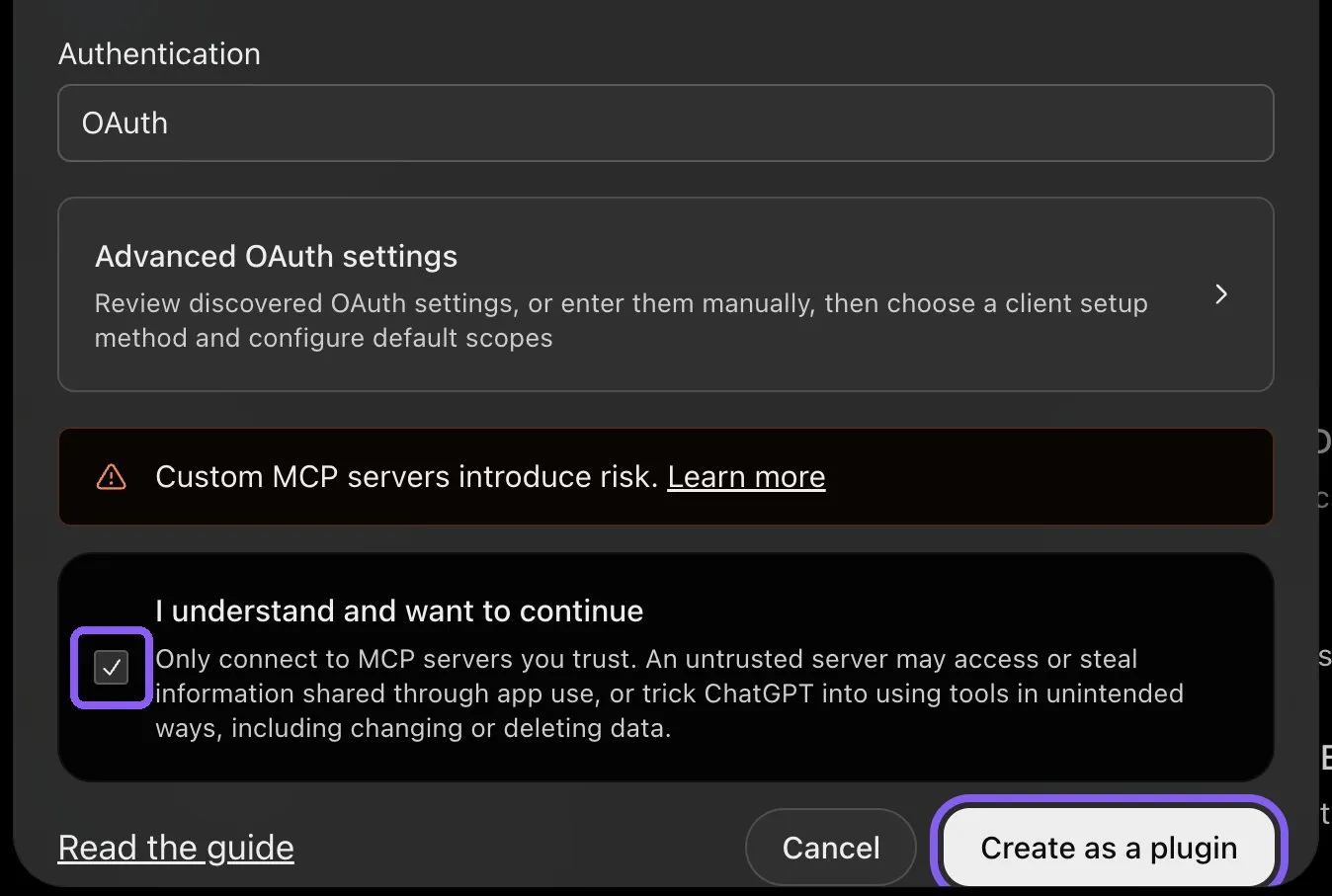
ChatGPT, bottom of the custom MCP server form, November 2026.
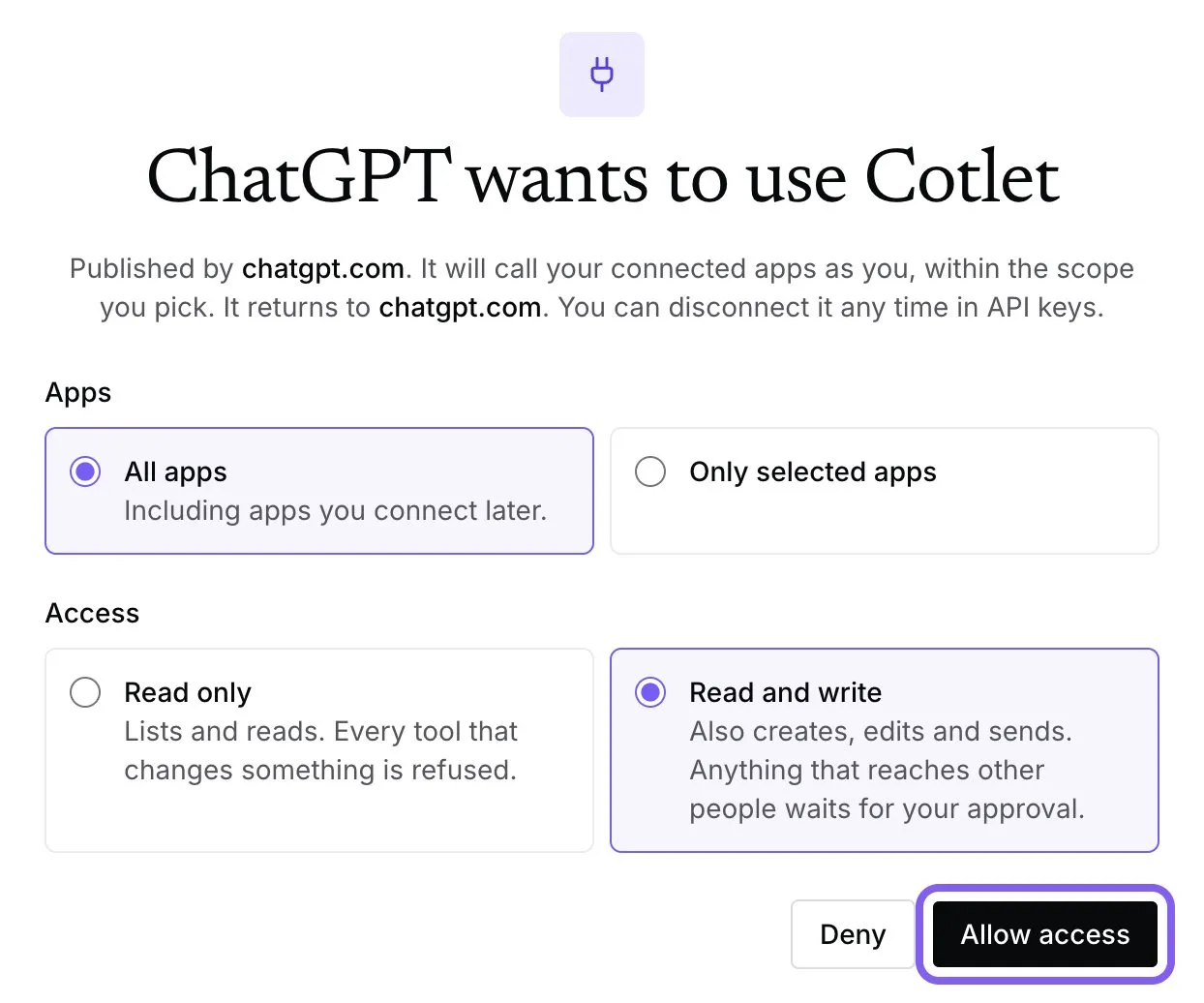
Cotlet consent page after you connect it in ChatGPT, November 2026.
ChatGPT asks “Allow ChatGPT to use Cotlet?” before some steps. Pick Always allow, or the chat waits for your click. On a Business, Enterprise or Edu workspace, an admin has to allow custom MCP servers first.
How to connect PawFinity to Claude
- Open Connectors in Claude and click Add. In the desktop app it is under Customize, Connectors.
- Click Add custom connector.
- Paste the name
Cotletand the URLhttps://cotlet.dev/mcp/v1/connect, then click Continue. - Keep the settings and click Add.
- A Cotlet page opens. Click Allow access.
- In a chat, click the plus button, then Connectors, and turn Cotlet on.
- Ask Claude: “Are you signed in to Cotlet through MCP?”, then “In PawFinity, show each employee’s hours for the last pay period and flag missing clock-outs. Change nothing.”. Claude asks before it uses a Cotlet tool the first time. Click Allow.

Claude, Add custom connector form, November 2026.

Cotlet consent page after you add the connector in Claude, November 2026.
Claude’s free plan allows one custom connector. On a Team or Enterprise plan, an owner adds Cotlet in Organization settings, Connectors, and you click Connect next to it.
How to connect PawFinity to Claude Code
Add Cotlet without a key, then sign in once in the browser:
claude mcp add --transport http cotlet https://cotlet.dev/mcp/v1/connectRun /mcp in Claude Code, pick cotlet and sign in to Cotlet. Prefer an API key, for example on a server? Create one in the Cotlet console and use:
claude mcp add --transport http cotlet https://cotlet.dev/mcp/v1 \
  --header "Authorization: Bearer $COTLET_API_KEY"
How to connect PawFinity to Codex
Create an API key in the Cotlet console, put it in the COTLET_API_KEY environment variable and add this to ~/.codex/config.toml:
[mcp_servers.cotlet]
url = "https://cotlet.dev/mcp/v1"
bearer_token_env_var = "COTLET_API_KEY"
How to connect PawFinity to Cursor
Create an API key in the Cotlet console, put it in the COTLET_API_KEY environment variable and add this to ~/.cursor/mcp.json:
{
  "mcpServers": {
    "cotlet": {
      "url": "https://cotlet.dev/mcp/v1",
      "headers": { "Authorization": "Bearer ${env:COTLET_API_KEY}" }
    }
  }
}
How to connect PawFinity to Grok
Grok takes custom MCP servers on grok.com, per xAI’s connectors documentation (checked 8 November 2026).
- Open grok.com/connectors and click New Connector.
- Pick Custom and paste the server URL
https://cotlet.dev/mcp/v1/connect. - Sign in to Cotlet when Grok asks, then click Allow access.
- Ask Grok: “Are you signed in to Cotlet through MCP?”
On Grok Business, an admin adds the connector first in the xAI console, under Grok Business, Connectors. The Grok chat inside X has no custom connector menu.
How to connect PawFinity to Hermes Agent
Add Cotlet to ~/.hermes/config.yaml in the format of the Hermes MCP config reference:
mcp_servers:
  cotlet:
    url: "https://cotlet.dev/mcp/v1"
    headers:
      Authorization: "Bearer ${COTLET_API_KEY}"
    trust: untrusted
Put COTLET_API_KEY in ~/.hermes/.env and check it with hermes mcp test cotlet. With trust: untrusted, Hermes runs reads at once and asks before every write. More on Hermes in our post on the Hermes Agent browser.
How to connect PawFinity to n8n
Use the MCP Client node, or the MCP Client Tool inside an AI Agent node:
- Server Transport: HTTP Streamable
- MCP Endpoint URL:
https://cotlet.dev/mcp/v1 - Authentication: Bearer Auth, with your Cotlet API key as the token
- Tools: let the AI Agent node use Cotlet’s browser tools; it reads Cotlet’s PawFinity guide first and works in your signed-in PawFinity account
Use it for work that should run by itself, such as a 6 pm list of tomorrow’s unconfirmed appointments.
Any other MCP client
Point the client at https://cotlet.dev/mcp/v1 over Streamable HTTP, with the header Authorization: Bearer <your Cotlet API key>. A client that supports OAuth sign-in can use https://cotlet.dev/mcp/v1/connect instead and needs no key. The full reference is in the MCP docs.
Three PawFinity jobs to try first
List first, messages later.
Find reminders that did not go out
Which appointments tomorrow show a reminder not sent or failed, and which clients have not confirmed? List them so I can call or text.
PawFinity sends SMS and email reminders by itself, but nobody opens each appointment to see whether one failed. The AI walks through tomorrow’s calendar and gives you the names to phone before the day starts.
Check vaccine records before the visit
Which clients booked this week have an expired or missing vaccine record? List dog and owner and draft a request for the update.
Records sit in the client and pet profiles. The AI reads them for the week’s bookings only and drafts one polite request per owner. You decide which ones go out.
Catch missing clock-outs before payroll
Show each employee’s hours and commission for the last pay period and flag missing clock-outs.
The time clock and payroll screen holds the hours. The AI lists each person’s total and points at the shifts with no clock-out, so you correct them before you pay.
Three further asks for a busy week
- List duplicate client files with the same phone or the same dog name. Delete nothing.
- Show clients whose last visit is longer ago than their usual interval and who have nothing booked, with a rebook text for each.
- Match yesterday’s closed sales against QuickBooks totals I paste, and name any that differ.
What it costs
Your PawFinity plan is untouched. Seven free days come with 2,000 credits and no card. Packs start at $29 and run a year, and nothing is charged for a call that fails (pricing).
FAQ
Is there a PawFinity API or MCP server for a salon owner?
No official MCP server, and no public API turned up. The one integration is a nightly one-way push to QuickBooks Online. Cotlet instead works in your signed-in account.
Can ChatGPT or Claude read my PawFinity calendar and clients?
Yes, from your own logged-in browser. Texts, charges and edits wait for you.
Does PawFinity work with Zapier, Make or n8n?
No webhooks or developer tools turned up on 27 November 2026. An n8n flow on a schedule can still call Cotlet for a daily list.
Is PawFinity behind this connection?
No. PawFinity did not take part in building Cotlet.
Try it on your own PawFinity account
Tomorrow’s reminders are a safe first run. Open a free Cotlet week, log in to PawFinity there and put the question to your agent. More software is in the catalog.