How to connect ProPet to ChatGPT, Claude and any AI agent
ProPet has no official MCP server or ChatGPT app, and its Open API is for developers (checked 27 Nov 2026). Let ChatGPT or Claude work in your ProPet account.
Cotlet team 9 min read
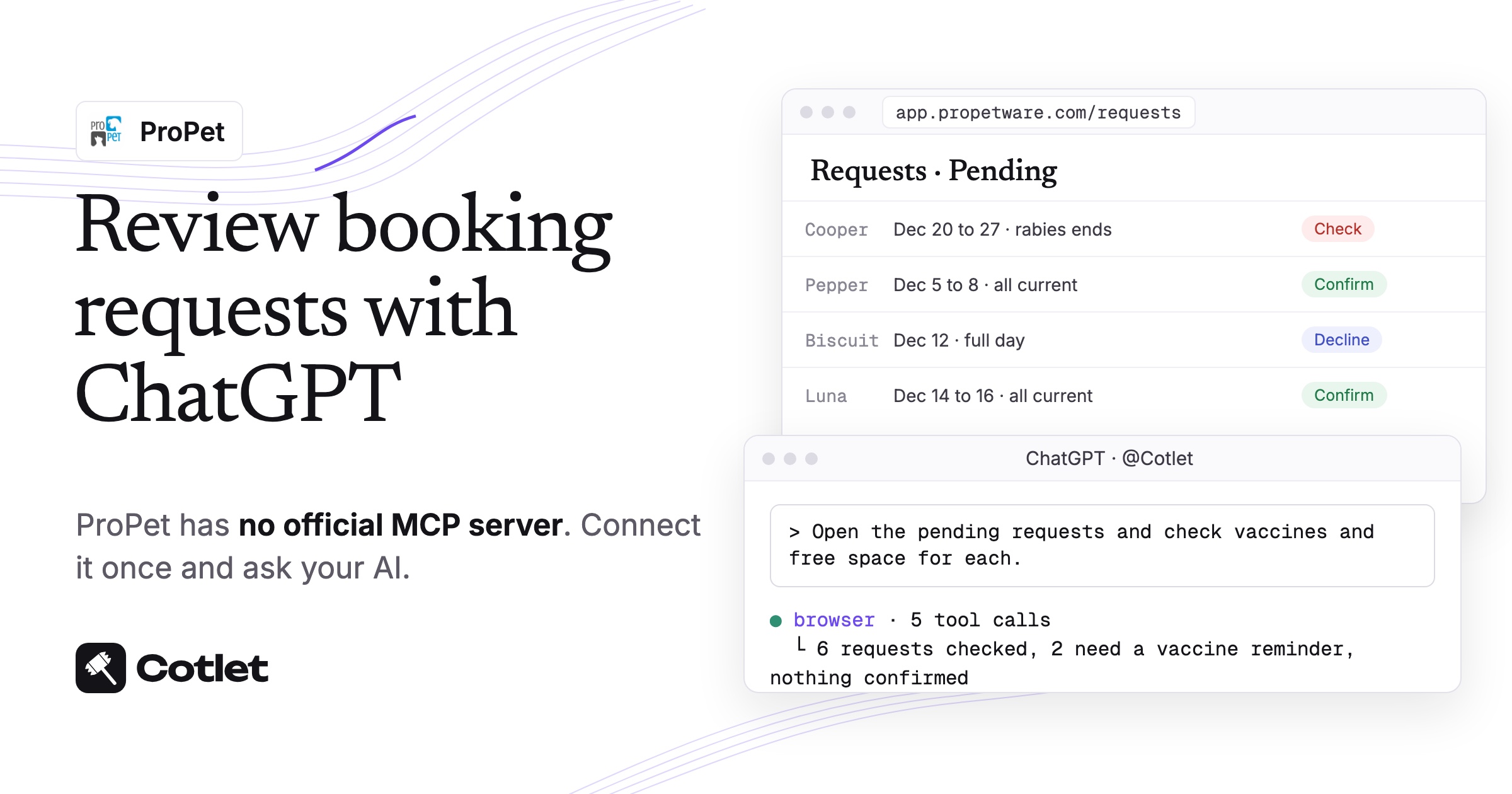
Monday, 7:40 am. Six booking requests came in over the weekend, and each one needs the dates, a space check and a look at the vaccine record before you say yes. As of 27 Nov 2026 ProPet offers no MCP server, ChatGPT app or Claude connector. It does have an Open API, which a developer can use. Cotlet gives an AI agent a Cloud Browser where it signs in to your ProPet account like a staff member and works through the screens you already use.
This is written for owners and managers of boarding kennels, daycares, grooming and training businesses on the ProPet web app.
What the AI can do on the ProPet screens
You describe the list you want. The agent opens the right screen, reads it and answers in plain words.
| ProPet screen | The AI’s job |
|---|---|
| Requests, pending bookings | Reads each request, checks the vaccines and free space, suggests confirm or decline |
| Day Summary Report | Lists pets arriving, leaving and staying, with feeding and medical notes |
| Vaccination Manager | Finds reservations where a vaccine ends before check-out |
| Daycare Dashboard | Shows check-ins that were never closed |
| QuickBooks mapping | Flags services with no QuickBooks account |
| Tools, Export Data | Pulls customers, pets and orders into one sheet |
Reading changes nothing. Confirming a request, sending a message and any charge wait for your yes. More examples are on the MCP page for this app.
What ProPet gives you for AI and integrations
Facts on 27 November 2026:
- Open API: yes. The vendor says it is included in every account at no extra cost, with 76 endpoints, 19 webhook events and 17 key permissions. The owner creates a key under Administration, Integrations, Open API, and the documentation is public. The page talks about beta users, and the vendor home page still says coming soon.
- ChatGPT and Claude: no connector. The MCP Registry returns nothing.
- Zapier: by invitation. The help article exists, but the public Zapier page says ProPet is not yet available there. Make and n8n have no ProPet app.
- Export: built in. Tools, Export Data covers customers, pets and orders.
The Open API suits a developer who wants a website form or a CRM wired in. Reading your own day sheet is a different job, and a browser does it without any code. The access review for ProPet lays out each check.
What you need
- Your ProPet staff login.
- A few requests and reservations on the calendar, so the answers are not empty.
- ChatGPT or Claude. A free Claude plan covers one connector.
- A Cotlet account (pricing).
Step 1: sign in to ProPet inside your Cloud Browser
Open app.propetware.com in the Cloud Browser and enter your own credentials there, in ProPet’s page only. Cotlet keeps the browser profile encrypted and does not store the password. You can revoke the session in one click (security).
Step 2: add Cotlet to the AI you already use
Do it once. Every later chat reuses the ProPet session from step 1.
Pick your AI above to see its steps.
How to connect ProPet to ChatGPT
Do this on chatgpt.com in your browser. Cotlet then works in the ChatGPT desktop and phone apps too.
- Open Plugins in ChatGPT and click Add.
- Click Add custom MCP server. Not in the menu? Turn on Developer mode in Settings, Security and login, then come back.
- Paste the name
Cotletand the server URLhttps://cotlet.dev/mcp/v1/connect. Keep Authentication on OAuth. - Tick “I understand and want to continue” and click Create as a plugin.
- Click Connect Cotlet. A Cotlet page opens, click Allow access.
- In a new chat, type
@Cotletand pick it from the list. - Ask ChatGPT: “Are you signed in to Cotlet through MCP?” Then try a first ProPet task: “In ProPet, open the booking requests waiting for review and tell me which ones have a vaccine problem. Change nothing.”
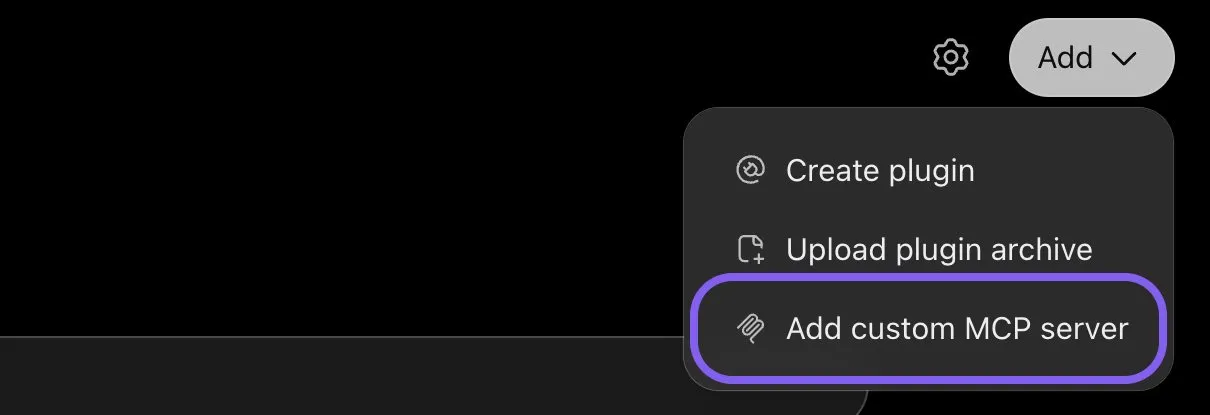
ChatGPT, Add menu on the Plugins page, November 2026.
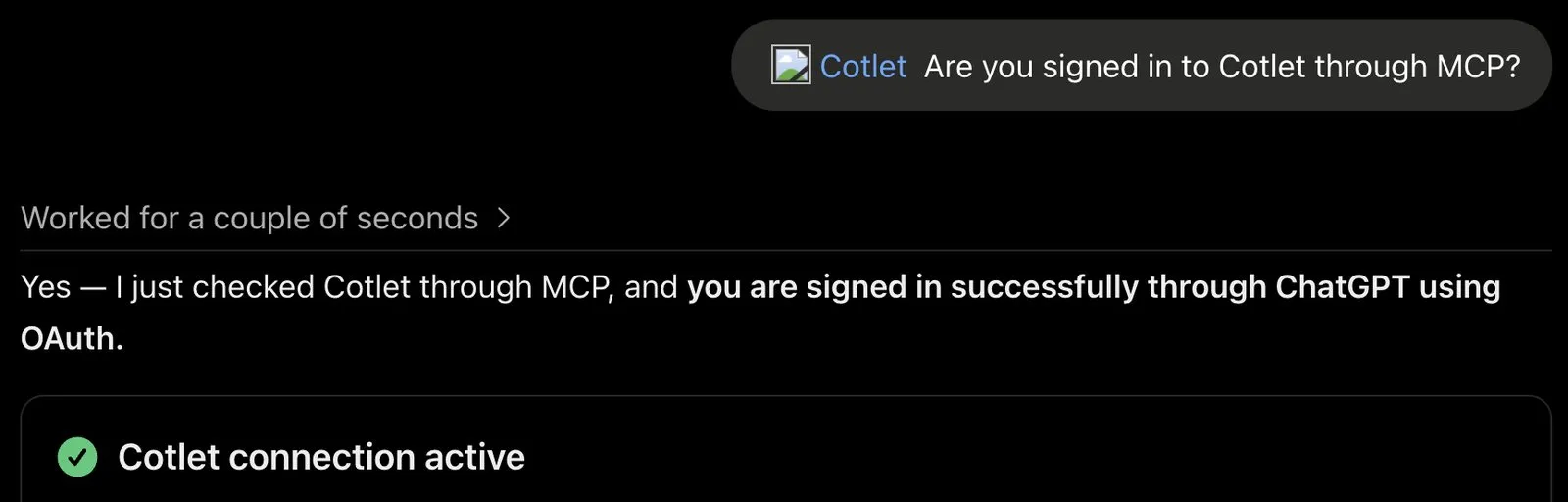
ChatGPT confirming the Cotlet connection, November 2026.
ChatGPT asks “Allow ChatGPT to use Cotlet?” before some steps. Pick Always allow, or the chat waits for your click. On a Business, Enterprise or Edu workspace, an admin has to allow custom MCP servers first.
How to connect ProPet to Claude
- Open Connectors in Claude and click Add. In the desktop app it is under Customize, Connectors.
- Click Add custom connector.
- Paste the name
Cotletand the URLhttps://cotlet.dev/mcp/v1/connect, then click Continue. - Keep the settings and click Add.
- A Cotlet page opens. Click Allow access.
- In a chat, click the plus button, then Connectors, and turn Cotlet on.
- Ask Claude: “Are you signed in to Cotlet through MCP?”, then “In ProPet, run the Day Summary Report for today and list the pets staying with their feeding notes. Send nothing.”. Claude asks before it uses a Cotlet tool the first time. Click Allow.

Claude, Customize, Connectors, Add menu, November 2026.

Claude, chat menu, Connectors, November 2026.
Claude’s free plan allows one custom connector. On a Team or Enterprise plan, an owner adds Cotlet in Organization settings, Connectors, and you click Connect next to it.
How to connect ProPet to Claude Code
Add Cotlet without a key, then sign in once in the browser:
claude mcp add --transport http cotlet https://cotlet.dev/mcp/v1/connectRun /mcp in Claude Code, pick cotlet and sign in to Cotlet. Prefer an API key, for example on a server? Create one in the Cotlet console and use:
claude mcp add --transport http cotlet https://cotlet.dev/mcp/v1 \
  --header "Authorization: Bearer $COTLET_API_KEY"
How to connect ProPet to Codex
Create an API key in the Cotlet console, put it in the COTLET_API_KEY environment variable and add this to ~/.codex/config.toml:
[mcp_servers.cotlet]
url = "https://cotlet.dev/mcp/v1"
bearer_token_env_var = "COTLET_API_KEY"
How to connect ProPet to Cursor
Create an API key in the Cotlet console, put it in the COTLET_API_KEY environment variable and add this to ~/.cursor/mcp.json:
{
  "mcpServers": {
    "cotlet": {
      "url": "https://cotlet.dev/mcp/v1",
      "headers": { "Authorization": "Bearer ${env:COTLET_API_KEY}" }
    }
  }
}
How to connect ProPet to Grok
Grok takes custom MCP servers on grok.com, per xAI’s connectors documentation (checked 8 November 2026).
- Open grok.com/connectors and click New Connector.
- Pick Custom and paste the server URL
https://cotlet.dev/mcp/v1/connect. - Sign in to Cotlet when Grok asks, then click Allow access.
- Ask Grok: “Are you signed in to Cotlet through MCP?”
On Grok Business, an admin adds the connector first in the xAI console, under Grok Business, Connectors. The Grok chat inside X has no custom connector menu.
How to connect ProPet to Hermes Agent
Add Cotlet to ~/.hermes/config.yaml in the format of the Hermes MCP config reference:
mcp_servers:
  cotlet:
    url: "https://cotlet.dev/mcp/v1"
    headers:
      Authorization: "Bearer ${COTLET_API_KEY}"
    trust: untrusted
Put COTLET_API_KEY in ~/.hermes/.env and check it with hermes mcp test cotlet. With trust: untrusted, Hermes runs reads at once and asks before every write. More on Hermes in our post on the Hermes Agent browser.
How to connect ProPet to n8n
Use the MCP Client node, or the MCP Client Tool inside an AI Agent node:
- Server Transport: HTTP Streamable
- MCP Endpoint URL:
https://cotlet.dev/mcp/v1 - Authentication: Bearer Auth, with your Cotlet API key as the token
- Tools: let the AI Agent node use Cotlet’s browser tools; it reads Cotlet’s ProPet guide first and works in your signed-in ProPet account
Use it for work that should run on its own, such as a 4 pm list of daycare check-ins that are still open.
Any other MCP client
Point the client at https://cotlet.dev/mcp/v1 over Streamable HTTP, with the header Authorization: Bearer <your Cotlet API key>. A client that supports OAuth sign-in can use https://cotlet.dev/mcp/v1/connect instead and needs no key. The full reference is in the MCP docs.
Three requests to try first
Start with lists. Writing comes afterwards.
Review the booking requests
Open the booking requests waiting for review. For each one tell me the dates, pet, vaccine status and whether space is free, and suggest confirm or decline. Confirm nothing yet.
ProPet explains how pending booking requests work. The agent walks that queue and gives you a short verdict per request.
Catch vaccines that lapse mid-stay
List pets in reservations over the next 3 weeks whose vaccines are expired or expire before check-out. Draft a reminder for each owner and send nothing.
A dog whose rabies record ends on day two of a boarding stay is easy to miss. The vaccination records hold the dates, and the agent compares them with each reservation.
Find the check-ins nobody closed
Which daycare check-ins are still open from earlier days? List the pet, owner and date and tell me which ones are probably missing a check-out.
The open daycare orders screen shows them, and the agent adds a guess about which ones were simply forgotten.
More for the rest of the week
- Run the Day Summary Report each morning and send yourself the list of pets staying with their feeding notes.
- List last week’s invoices with the QuickBooks account behind each service, and flag the unmapped ones.
- Put customers, pets and last year’s orders in one sheet for your accountant.
Cost
ProPet is untouched. A Cotlet trial gives 2,000 credits for 7 days and asks for no card. After that, a pack starts at $29, lasts a year and bills only for calls that succeed (pricing).
FAQ
Does ProPet have an API or an MCP server?
It has an Open API in every account, with keys under Administration, Integrations, Open API. It has no official MCP server. Cotlet works in your signed-in account, with no key.
Is the ProPet Zapier integration open to everyone?
No. It is by invitation, and the public Zapier page says ProPet is not yet available.
Is Cotlet affiliated with ProPet?
No. They are separate companies.
Try it on your own account
Ask for the booking requests first. Start a free week, sign in to ProPet and ask. The catalog lists more apps.