How to connect Rightmove Plus to ChatGPT, Claude and AI agents
Rightmove's ChatGPT app is for home hunters, not your branch (checked 26 Nov 2026). Let ChatGPT answer Rightmove enquiries and report leads per branch.
Cotlet team 12 min read
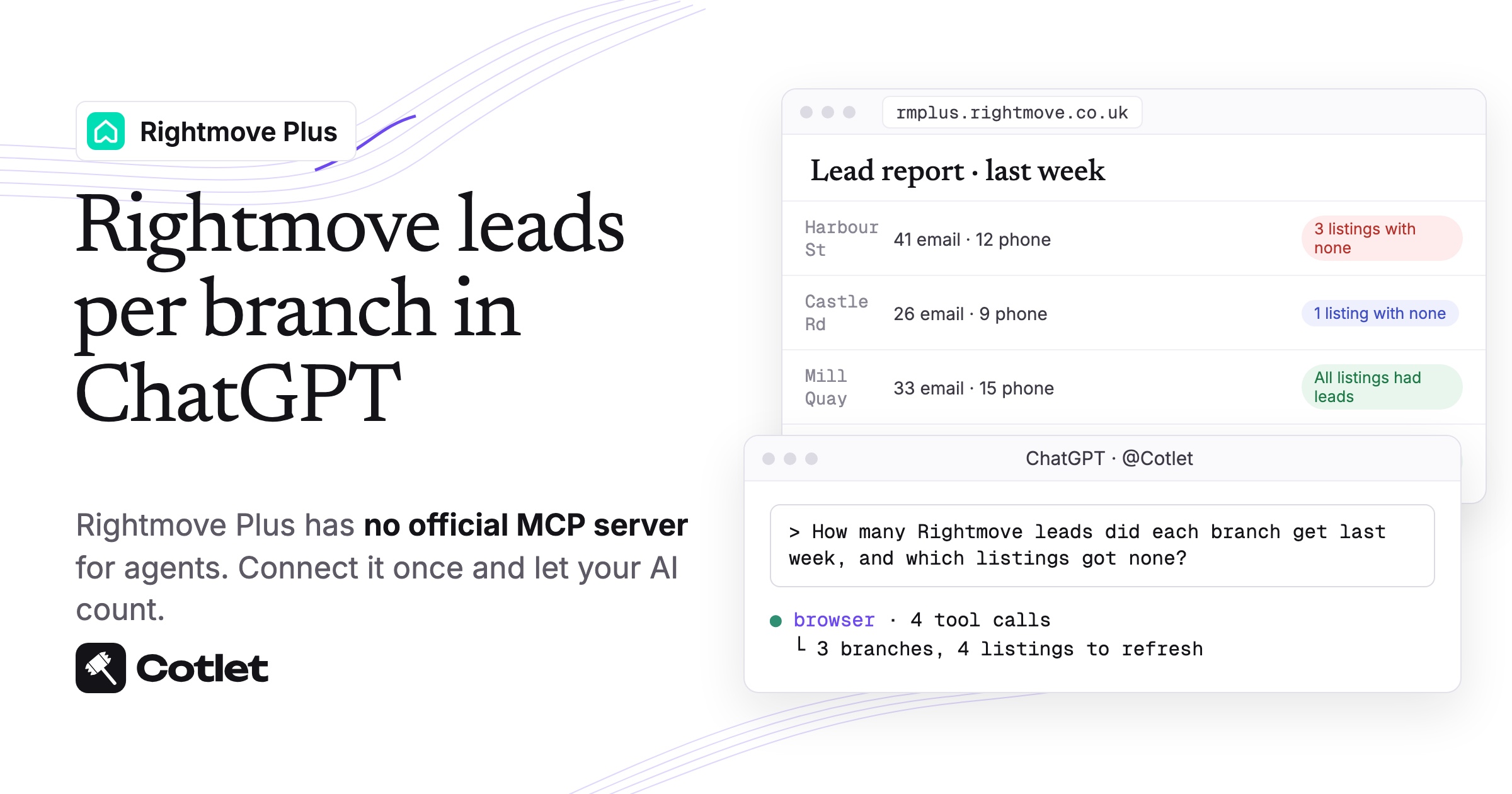
Rightmove has an official app in ChatGPT, but it is built for home hunters, and Rightmove Plus, the agent side, has no official MCP server or Claude connector, as checked on 26 November 2026. Its data feeds carry listings from your software provider to the portal and do not hand your enquiries or lead reports back. To let ChatGPT, Claude or another AI agent read Enquiry Manager, pull lead numbers per branch and spot tired listings, connect Rightmove Plus through Cotlet. You sign in once inside your own Cloud Browser, and the AI works in the screens your team already opens. It takes about ten minutes and no code.
If you are reading this, you probably run or manage a branch that lists on Rightmove: a sales or lettings office that checks Enquiry Manager first thing and builds a Monday lead report by hand. Cotlet is for that agency side of Rightmove. The home hunter who types “@Rightmove” into ChatGPT is using Rightmove’s own app, and that stays the way they find you. What changes is how fast your office answers them.
What ChatGPT and Claude can do in Rightmove Plus once connected
Here is where the agent goes inside Rightmove Plus when you hand it a job:
| Area of Rightmove Plus | What the AI handles |
|---|---|
| Enquiry Manager | Reads new enquiries with the property and the question, drafts a reply each |
| Lead reports | Counts email and phone leads per branch and per listing for any week |
| Listings | Finds live listings with few photos, no floorplan or no recent views |
| Market share | Reads your share of your default patch and compares two months |
| Branch Marketing | Updates your Premium Agent Profile text after you check it |
A reply to an applicant and any change to your profile wait for your OK first. Reading a report or listing listings changes nothing.
Each screen and its approval rule is listed on the Rightmove Plus MCP server page. For a lead sheet in n8n or Google Sheets, see Rightmove Plus API with Cotlet. The fact check with sources sits on Does Rightmove Plus have an API or MCP server?.
Does Rightmove Plus have AI, an API or an official ChatGPT app?
Rightmove moved early on AI for consumers. Agents got less. Checked on 26 November 2026:
- A ChatGPT app for home hunters. Rightmove calls itself the first UK property portal to launch in ChatGPT. Anyone on free or paid ChatGPT can call it with “@Rightmove” to discover property. It does not open an agent’s enquiries, listings or reports.
- Feeds for listings, through your software. The Automated Datafeed and the Real Time Datafeed let your CRM supplier push listings to Rightmove. They are an upload route, so they do not give you a key for your own lead report.
- No official MCP server or Claude connector for agents. The MCP Registry has two Rightmove scrapers from third parties, none from Rightmove.
- No Zapier, Make or n8n app. Rightmove does not appear in any of those directories.
- Reports live in Rightmove Plus. The lead report and market share report are screens in the agent portal, per Rightmove’s customer help.
That leaves one way today for your own AI to touch your Rightmove data: a hosted MCP server working inside your signed-in session.
What to have ready
- Your Rightmove Plus username and password, the ones you use at rmplus.rightmove.co.uk.
- A user that sees the branches you want reported. Multi-branch groups often split this per office.
- The way you like enquiries answered: a template, a signature, the viewing times you offer.
- An AI chat. ChatGPT on the web works, and Claude’s free tier is enough because Cotlet is a single connector.
- A Cotlet sign-up; the trial week asks for no payment details (pricing).
Step 1: sign in to Rightmove Plus in your Cloud Browser
Your Cotlet console has a Web browser (cotlet.dev/app/browser/web). Point it at rmplus.rightmove.co.uk and log in with the Rightmove Plus username your office was given. Any code Rightmove sends goes into Rightmove’s own box.
Rightmove’s page is where the password ends up, and nowhere else. The browser has saving switched off, and the session it keeps sits in an encrypted profile tied to your Cotlet account. Removing the agent’s access is one click in the console. When Rightmove times you out, the agent reports it in the chat with a link to log back in. See security.
Step 2: connect Rightmove Plus to ChatGPT, Claude or another AI agent
Pick your assistant below. The tab for it walks you through the setup in a few clicks.
Pick your AI above to see its steps.
How to connect Rightmove Plus to ChatGPT
Do this on chatgpt.com in your browser. Cotlet then works in the ChatGPT desktop and phone apps too.
- Open Plugins in ChatGPT and click Add.
- Click Add custom MCP server. Not in the menu? Turn on Developer mode in Settings, Security and login, then come back.
- Paste the name
Cotletand the server URLhttps://cotlet.dev/mcp/v1/connect. Keep Authentication on OAuth. - Tick “I understand and want to continue” and click Create as a plugin.
- Click Connect Cotlet. A Cotlet page opens, click Allow access.
- In a new chat, type
@Cotletand pick it from the list. - Ask ChatGPT: “Are you signed in to Cotlet through MCP?” Then try a first Rightmove Plus task: “How many Rightmove leads did each of my branches get last week?”
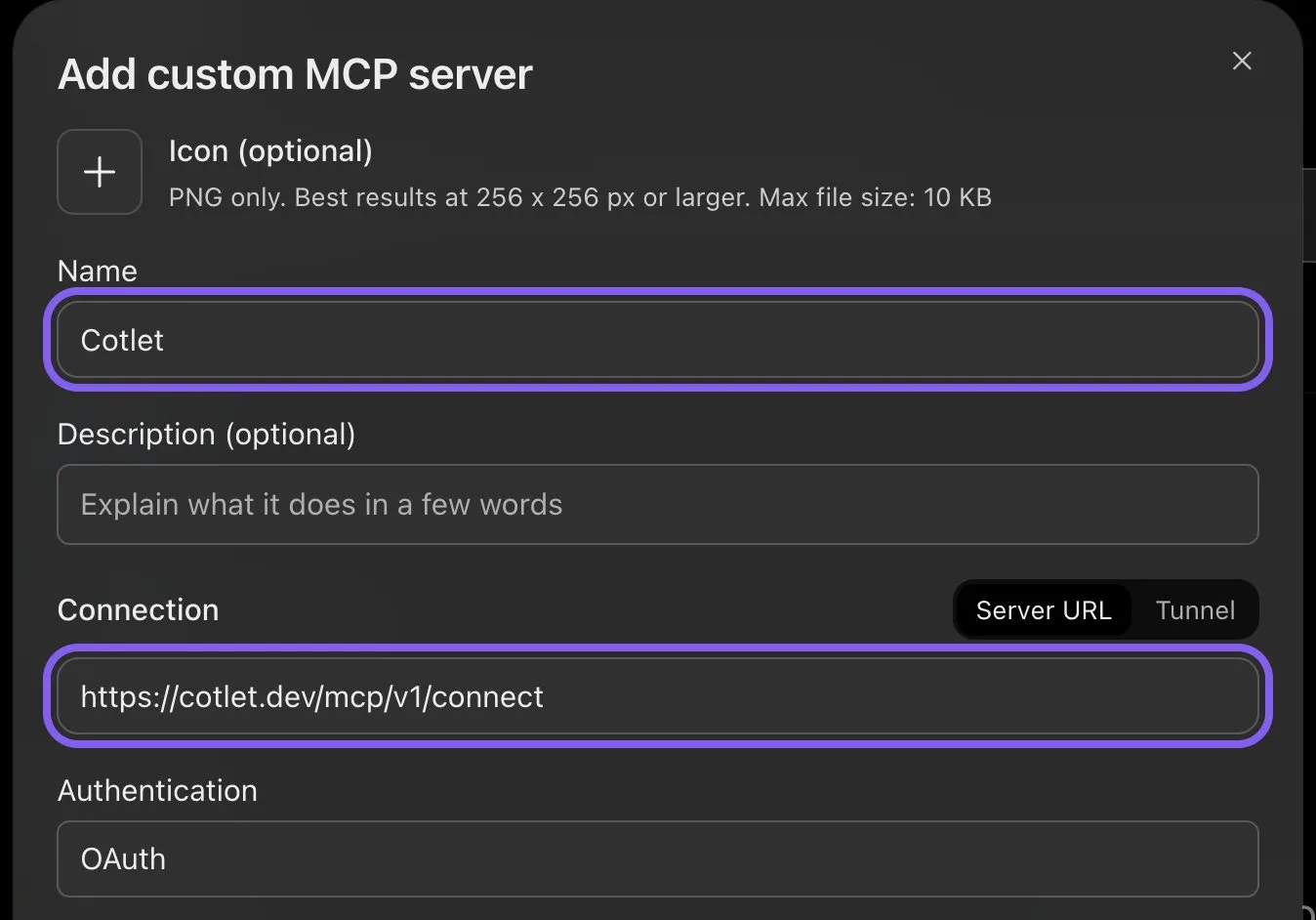
ChatGPT, Add custom MCP server form, November 2026.
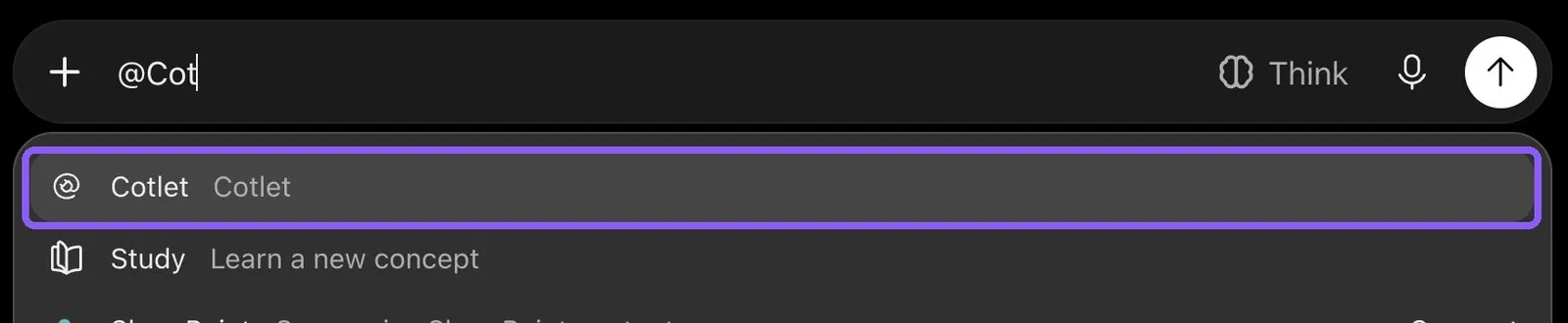
ChatGPT, picking Cotlet in a new chat with @, November 2026.
ChatGPT asks “Allow ChatGPT to use Cotlet?” before some steps. Pick Always allow, or the chat waits for your click. On a Business, Enterprise or Edu workspace, an admin has to allow custom MCP servers first.
How to connect Rightmove Plus to Claude
- Open Connectors in Claude and click Add. In the desktop app it is under Customize, Connectors.
- Click Add custom connector.
- Paste the name
Cotletand the URLhttps://cotlet.dev/mcp/v1/connect, then click Continue. - Keep the settings and click Add.
- A Cotlet page opens. Click Allow access.
- In a chat, click the plus button, then Connectors, and turn Cotlet on.
- Ask Claude: “Are you signed in to Cotlet through MCP?”, then “Which of my Rightmove listings had no views in the last 14 days?”. Claude asks before it uses a Cotlet tool the first time. Click Allow.

Claude, Customize, Connectors, November 2026.

Claude, Add custom connector, last screen, November 2026.
Claude’s free plan allows one custom connector. On a Team or Enterprise plan, an owner adds Cotlet in Organization settings, Connectors, and you click Connect next to it.
How to connect Rightmove Plus to Claude Code
Add Cotlet without a key, then sign in once in the browser:
claude mcp add --transport http cotlet https://cotlet.dev/mcp/v1/connectRun /mcp in Claude Code, pick cotlet and sign in to Cotlet. Prefer an API key, for example on a server? Create one in the Cotlet console and use:
claude mcp add --transport http cotlet https://cotlet.dev/mcp/v1 \
  --header "Authorization: Bearer $COTLET_API_KEY"
How to connect Rightmove Plus to Codex
Create an API key in the Cotlet console, put it in the COTLET_API_KEY environment variable and add this to ~/.codex/config.toml:
[mcp_servers.cotlet]
url = "https://cotlet.dev/mcp/v1"
bearer_token_env_var = "COTLET_API_KEY"
How to connect Rightmove Plus to Cursor
Create an API key in the Cotlet console, put it in the COTLET_API_KEY environment variable and add this to ~/.cursor/mcp.json:
{
  "mcpServers": {
    "cotlet": {
      "url": "https://cotlet.dev/mcp/v1",
      "headers": { "Authorization": "Bearer ${env:COTLET_API_KEY}" }
    }
  }
}
How to connect Rightmove Plus to Grok
Grok takes custom MCP servers on grok.com, per xAI’s connectors documentation (checked 8 November 2026).
- Open grok.com/connectors and click New Connector.
- Pick Custom and paste the server URL
https://cotlet.dev/mcp/v1/connect. - Sign in to Cotlet when Grok asks, then click Allow access.
- Ask Grok: “Are you signed in to Cotlet through MCP?”
On Grok Business, an admin adds the connector first in the xAI console, under Grok Business, Connectors. The Grok chat inside X has no custom connector menu.
How to connect Rightmove Plus to Hermes Agent
Add Cotlet to ~/.hermes/config.yaml in the format of the Hermes MCP config reference:
mcp_servers:
  cotlet:
    url: "https://cotlet.dev/mcp/v1"
    headers:
      Authorization: "Bearer ${COTLET_API_KEY}"
    trust: untrusted
Put COTLET_API_KEY in ~/.hermes/.env and check it with hermes mcp test cotlet. With trust: untrusted, Hermes runs reads at once and asks before every write. More on Hermes in our post on the Hermes Agent browser.
How to connect Rightmove Plus to n8n
Use the MCP Client node, or the MCP Client Tool inside an AI Agent node:
- Server Transport: HTTP Streamable
- MCP Endpoint URL:
https://cotlet.dev/mcp/v1 - Authentication: Bearer Auth, with your Cotlet API key as the token
- Tools: let the AI Agent node use Cotlet’s browser tools; it reads Cotlet’s Rightmove Plus guide first and works in your signed-in Rightmove Plus account
Use it for work that should run on its own, such as a Monday morning table of Rightmove leads per branch, posted to your team channel.
Any other MCP client
Point the client at https://cotlet.dev/mcp/v1 over Streamable HTTP, with the header Authorization: Bearer <your Cotlet API key>. A client that supports OAuth sign-in can use https://cotlet.dev/mcp/v1/connect instead and needs no key. The full reference is in the MCP docs.
These three cover the daily inbox, the weekly numbers and the slow drift of a listing going stale.
Reply to new enquiries before the next agent does
Open Enquiry Manager and show today’s Rightmove enquiries with the property and what each person asked. Draft a reply to each with two viewing times this week. Send nothing until I approve.
A home hunter often sends the same enquiry to three agents. The AI reads each one, notes what the person asked about, and writes a reply that answers that question and offers times. The drafts land in your chat as a list. You approve, edit or skip each, and only the approved ones go out.
Build the Monday lead report per branch
How many email and phone leads did each of my branches get from Rightmove last week, and which live listings got none? Put it in a table.
Lots of offices still copy this from the report screen into a spreadsheet every Monday. The AI reads the lead report per branch, counts both lead types and adds the listings with zero leads underneath. Ask for the same figures for the week before, and you see which branch slipped.
Find listings that need a refresh
List my live Rightmove listings with fewer than 10 photos, no floorplan, or no views in the last 14 days, by branch.
A listing with six photos and no floorplan rarely gets the click. The AI checks each live listing and returns the weak ones with what is missing. The fix itself, new photos or a floorplan, still comes from your CRM feed, so you know exactly what to send to the negotiator.
Cost: your Rightmove contract and Cotlet credits
Your Rightmove fee is untouched by any of this. Cotlet bills separately through prepaid credit packs: $29 gets 5,000 credits, and they keep for 12 months. Expect around 10 credits per completed request, zero for one that errors, plus a flat 50 a day for the Cloud Browser on days Rightmove Plus is enabled. A week of trial comes first, no card involved (pricing).
FAQ
Is this the same as the Rightmove app in ChatGPT?
No. Rightmove’s ChatGPT app helps home hunters discover property. Cotlet works in your agency’s Rightmove Plus account: your enquiries, lead reports and listings.
Can AI answer Rightmove enquiries for my agency?
Yes. Your AI reads new enquiries in your signed-in Rightmove Plus account, drafts a reply for each with the property details, and sends it only after your OK.
Can I export the lead report from Rightmove Plus?
The report sits in Rightmove Plus, and Rightmove’s feeds do not return it. Your AI reads the lead report and writes the numbers into a table or a Google Sheet. Saved as an endpoint, the same numbers reach n8n every Monday.
How do I see my market share in Rightmove Plus?
Rightmove Plus has market share reports for your patch. Ask the AI to read this month’s and last month’s and put them side by side, with your share of new listings and of sales agreed.
Is Rightmove worth the fee for my agency?
Only your numbers can answer that. Ask the AI to add up this quarter’s Rightmove invoices and divide them by the leads each branch got. You get a cost per lead per branch to weigh against your other portals.
Can AI check which of my Rightmove listings need better photos?
Yes. It counts photos per live listing, checks for a floorplan and reads recent views, then lists the weakest first.
Is Cotlet connected to Rightmove?
No. Cotlet is an independent company with no link to Rightmove. The AI works through your own Rightmove Plus login in your own Cloud Browser.
Let the AI open Enquiry Manager first
Enquiry Manager is the first tab most branches open. Let an assistant get there before you and leave the drafts ready. Sign up for Cotlet, log in to Rightmove Plus inside the Cloud Browser, then link ChatGPT or Claude. Your listings come from Alto? That app is in the catalog as well.


