How to connect Roofr to ChatGPT, Claude and any AI agent
Roofr has no API, MCP server or AI connector (checked 25 Nov 2026). Let ChatGPT or Claude follow up proposals, move stuck jobs and chase invoices.
Cotlet team 11 min read
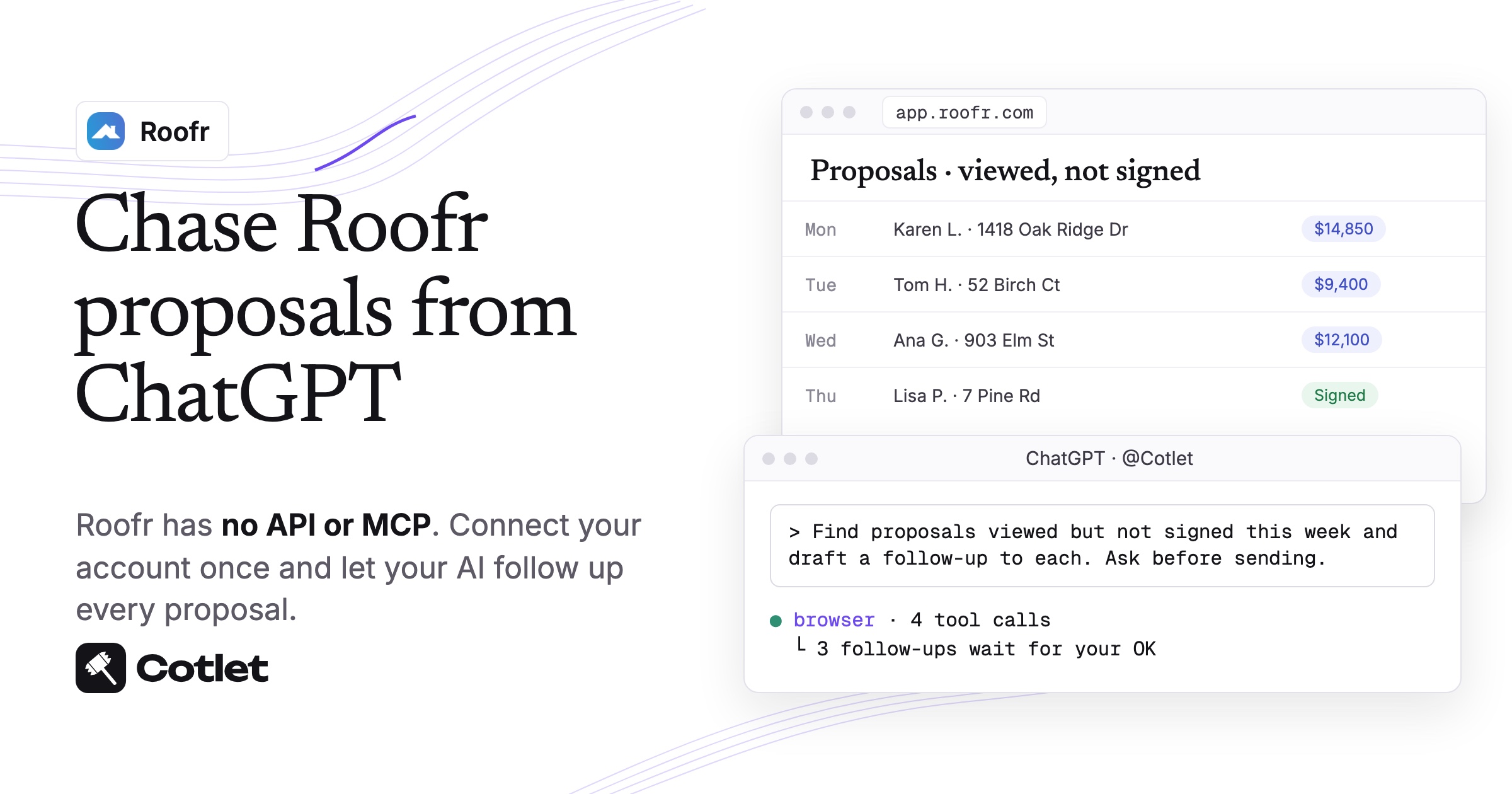
Roofr offers roofing contractors no public API, no official MCP server and no ChatGPT or Claude connector, as checked on 25 November 2026. What it does offer is a Zapier app, which its own pricing FAQ calls “limited Zapier workflows”. To let ChatGPT, Claude or another AI agent work across your Roofr job board, proposals and invoices, you connect it through Cotlet. Log in to app.roofr.com once inside your own Cloud Browser, and your AI handles the follow-ups there. Count on ten minutes and zero code.
Roofr is built for roofing companies: measure a roof, send a proposal with e-signature, move the job across a CRM board, invoice and order materials. The roofers who search for an AI link usually have plenty of proposals out and too little time to chase them between inspections. Cotlet is made for the owner, sales rep or office admin who runs that Roofr account. Homeowners still get their proposals, signatures and invoices through Roofr itself.
What ChatGPT and Claude can do in Roofr once connected
Say what you need in a normal sentence, and the AI handles it in Roofr:
| Area of Roofr | What the AI handles |
|---|---|
| Job board | Lists jobs by stage, finds jobs stuck in one stage, moves a job to the next stage |
| Proposals | Finds proposals sent, viewed, signed or lost, and drafts a follow-up to the customer |
| Instant Estimator leads | Lists new website leads with the address and the estimate they saw |
| Invoices | Lists unpaid invoices by age and drafts a reminder for each |
| Reports | Reads the measurement reports ordered on a job |
Messages to homeowners and moves on the board wait for your OK first. Lists, counts and drafts change nothing in Roofr.
Each of these, with its inputs, is set out on the Roofr API and MCP server page.
Does Roofr have AI, an API or an official ChatGPT app?
Roofr’s own route to other software is narrow. As of 25 November 2026:
- No public API. Roofr publishes no developer docs. The key under Settings, Integrations connects your account to Zapier and nothing else.
- No MCP server and no AI app. The MCP Registry has no Roofr entry, and neither the ChatGPT nor the Claude directory lists Roofr.
- Zapier, mostly outbound. Roofr on Zapier fires on eight events, such as a new Instant Estimator lead or a proposal viewed or signed. Its single action creates a job and customer. It cannot write a follow-up, read an invoice’s age or move a stuck job.
- No outside CRM. The pricing FAQ says Roofr does not “embed or integrate our tools into external CRMs or systems”.
So for an AI agent that works across the whole board, a hosted MCP server inside your logged-in Roofr session is the practical route today. If Roofr later opens an API, switch to it.
What you need on hand
- The email you log in to app.roofr.com with, and its password or the Google account linked to it.
- A plan with the board, proposals and invoices you want the AI to use. Roofr’s Starter plan is free, and paid plans run $249 or $349 a month on its pricing page.
- A sense of your follow-up rules, such as how many days after a viewed proposal you call.
- ChatGPT or Claude. The free Claude plan fits exactly one custom connector, enough for Cotlet.
- A Cotlet account. The first seven days are free and no card is taken (pricing).
Step 1: sign in to Roofr in your Cloud Browser
Your Cotlet console opens a Cloud Browser for your account. Point it at app.roofr.com/login and log in with your email and password, or with Google. Once the job board shows up, the agent has what it needs.
Roofr gets your password and nobody else does, since the Cloud Browser has no password store. The profile carrying your Roofr session stays encrypted with AES-256-GCM when idle. Should Roofr log you out, the agent halts the task and posts a new login link in the chat. Full details live on the security page.
Step 2: connect Roofr to ChatGPT, Claude or another AI agent
Roofr reaches your assistant through one Cotlet address, whether that is ChatGPT, Claude, Claude Code, Codex, Cursor, Grok, Hermes Agent, n8n or some other MCP client. Open the matching panel.
Pick your AI above to see its steps.
How to connect Roofr to ChatGPT
Do this on chatgpt.com in your browser. Cotlet then works in the ChatGPT desktop and phone apps too.
- Open Plugins in ChatGPT and click Add.
- Click Add custom MCP server. Not in the menu? Turn on Developer mode in Settings, Security and login, then come back.
- Paste the name
Cotletand the server URLhttps://cotlet.dev/mcp/v1/connect. Keep Authentication on OAuth. - Tick “I understand and want to continue” and click Create as a plugin.
- Click Connect Cotlet. A Cotlet page opens, click Allow access.
- In a new chat, type
@Cotletand pick it from the list. - Ask ChatGPT: “Are you signed in to Cotlet through MCP?” Then try a first Roofr task: “Which Roofr proposals were viewed but not signed this week?”
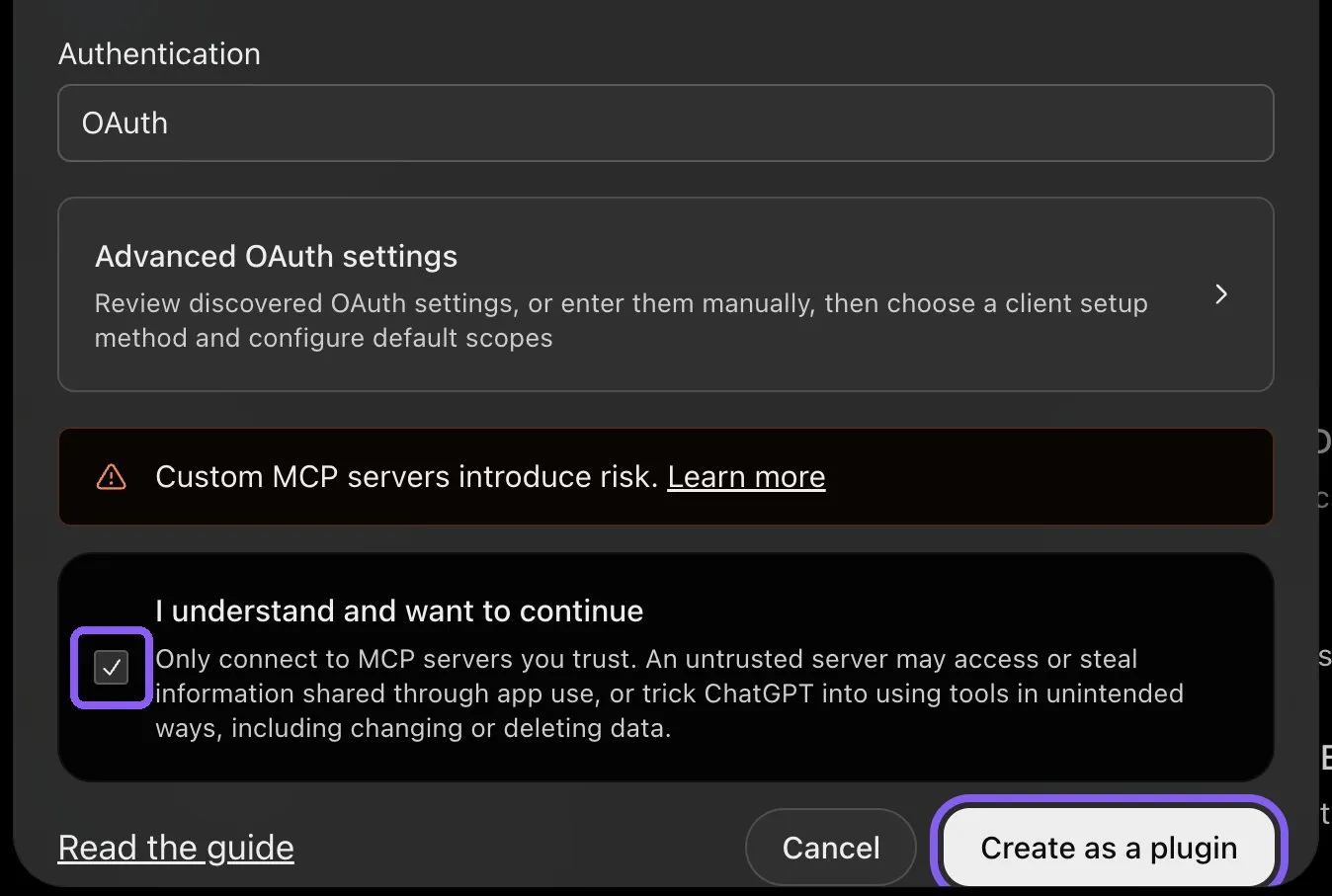
ChatGPT, bottom of the custom MCP server form, November 2026.
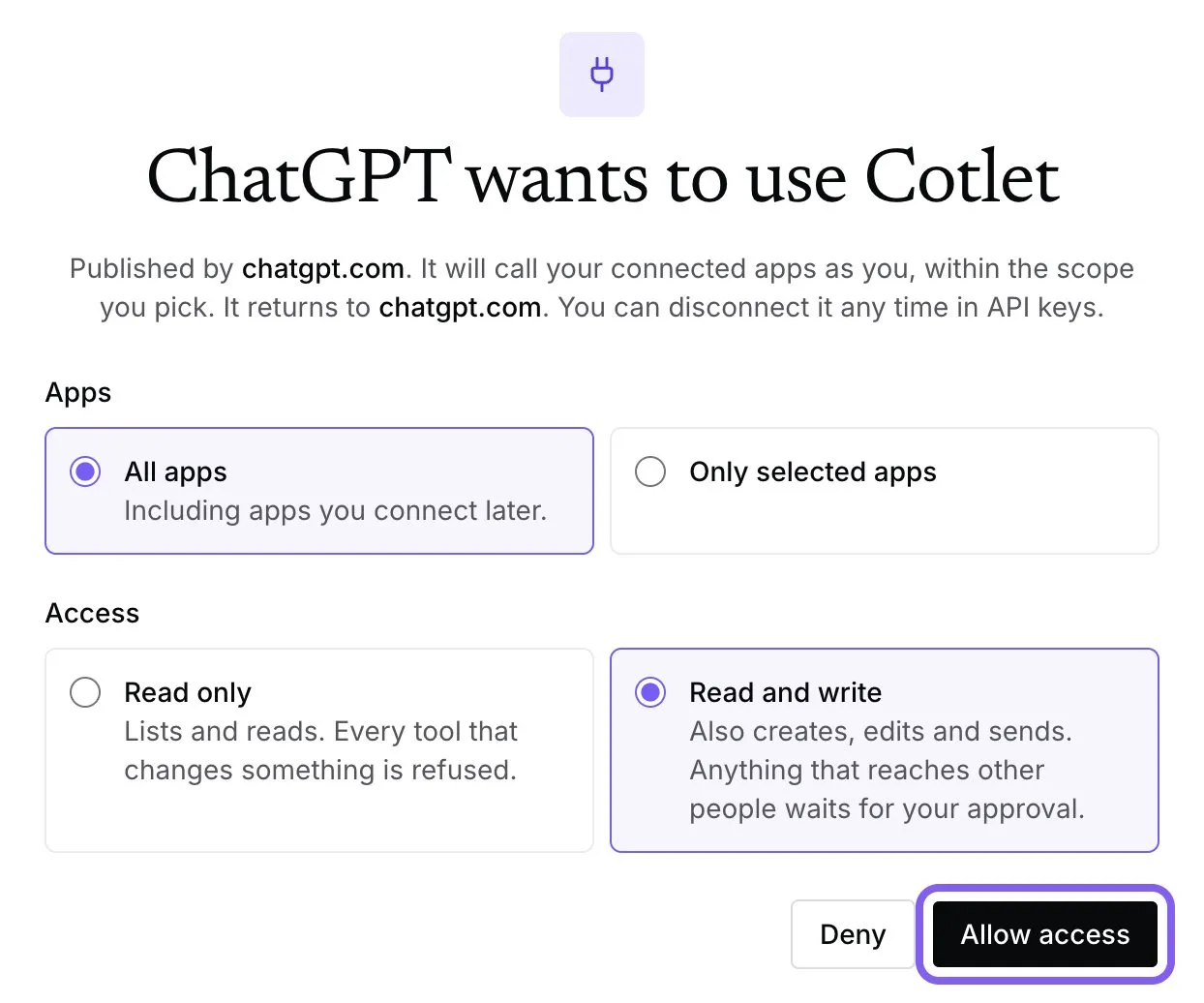
Cotlet consent page after you connect it in ChatGPT, November 2026.
ChatGPT asks “Allow ChatGPT to use Cotlet?” before some steps. Pick Always allow, or the chat waits for your click. On a Business, Enterprise or Edu workspace, an admin has to allow custom MCP servers first.
How to connect Roofr to Claude
- Open Connectors in Claude and click Add. In the desktop app it is under Customize, Connectors.
- Click Add custom connector.
- Paste the name
Cotletand the URLhttps://cotlet.dev/mcp/v1/connect, then click Continue. - Keep the settings and click Add.
- A Cotlet page opens. Click Allow access.
- In a chat, click the plus button, then Connectors, and turn Cotlet on.
- Ask Claude: “Are you signed in to Cotlet through MCP?”, then “Which Roofr jobs have sat in one stage for over 7 days?”. Claude asks before it uses a Cotlet tool the first time. Click Allow.

Claude, Customize, Connectors, Add menu, November 2026.

Claude, Add custom connector, last screen, November 2026.
Claude’s free plan allows one custom connector. On a Team or Enterprise plan, an owner adds Cotlet in Organization settings, Connectors, and you click Connect next to it.
How to connect Roofr to Claude Code
Add Cotlet without a key, then sign in once in the browser:
claude mcp add --transport http cotlet https://cotlet.dev/mcp/v1/connectRun /mcp in Claude Code, pick cotlet and sign in to Cotlet. Prefer an API key, for example on a server? Create one in the Cotlet console and use:
claude mcp add --transport http cotlet https://cotlet.dev/mcp/v1 \
  --header "Authorization: Bearer $COTLET_API_KEY"
How to connect Roofr to Codex
Create an API key in the Cotlet console, put it in the COTLET_API_KEY environment variable and add this to ~/.codex/config.toml:
[mcp_servers.cotlet]
url = "https://cotlet.dev/mcp/v1"
bearer_token_env_var = "COTLET_API_KEY"
How to connect Roofr to Cursor
Create an API key in the Cotlet console, put it in the COTLET_API_KEY environment variable and add this to ~/.cursor/mcp.json:
{
  "mcpServers": {
    "cotlet": {
      "url": "https://cotlet.dev/mcp/v1",
      "headers": { "Authorization": "Bearer ${env:COTLET_API_KEY}" }
    }
  }
}
How to connect Roofr to Grok
Grok takes custom MCP servers on grok.com, per xAI’s connectors documentation (checked 8 November 2026).
- Open grok.com/connectors and click New Connector.
- Pick Custom and paste the server URL
https://cotlet.dev/mcp/v1/connect. - Sign in to Cotlet when Grok asks, then click Allow access.
- Ask Grok: “Are you signed in to Cotlet through MCP?”
On Grok Business, an admin adds the connector first in the xAI console, under Grok Business, Connectors. The Grok chat inside X has no custom connector menu.
How to connect Roofr to Hermes Agent
Add Cotlet to ~/.hermes/config.yaml in the format of the Hermes MCP config reference:
mcp_servers:
  cotlet:
    url: "https://cotlet.dev/mcp/v1"
    headers:
      Authorization: "Bearer ${COTLET_API_KEY}"
    trust: untrusted
Put COTLET_API_KEY in ~/.hermes/.env and check it with hermes mcp test cotlet. With trust: untrusted, Hermes runs reads at once and asks before every write. More on Hermes in our post on the Hermes Agent browser.
How to connect Roofr to n8n
Use the MCP Client node, or the MCP Client Tool inside an AI Agent node:
- Server Transport: HTTP Streamable
- MCP Endpoint URL:
https://cotlet.dev/mcp/v1 - Authentication: Bearer Auth, with your Cotlet API key as the token
- Tools: let the AI Agent node use Cotlet’s browser tools; it reads Cotlet’s Roofr guide first and works in your signed-in Roofr account
Use it for work that should run on its own, such as a Friday afternoon list of proposals viewed but not signed, each with a follow-up drafted for your approval.
Any other MCP client
Point the client at https://cotlet.dev/mcp/v1 over Streamable HTTP, with the header Authorization: Bearer <your Cotlet API key>. A client that supports OAuth sign-in can use https://cotlet.dev/mcp/v1/connect instead and needs no key. The full reference is in the MCP docs.
Give one of these to your AI tonight, then look at the board in Roofr tomorrow morning.
Follow up proposals the homeowner opened but did not sign
Find Roofr proposals that customers viewed but did not sign this week. Draft a short follow-up to each that mentions their roof and the options in the proposal, and ask me before you send.
A viewed proposal means the homeowner is thinking about it, which is the best moment to call or write. Roofr’s Zapier trigger can tell another app a proposal was viewed, but it cannot write the follow-up. The AI finds the viewed, unsigned proposals, reads each one and drafts a message that names the job. You approve, and the messages go out through Roofr.
Unstick jobs that stopped moving
Which Roofr jobs have sat in one board stage for more than 7 days? List them with the stage, the customer and what the next step should be.
Jobs stall quietly in Inspection or Proposal sent while you are on roofs. The AI reads the board, measures how long each job has sat in its stage and suggests the next step for each. It only reads, unless you then tell it to move a job, which it does after your OK.
Chase the invoices that are getting old
List my unpaid Roofr invoices older than 14 days, oldest first, with the customer and amount. Draft a polite reminder for each and send nothing yet.
A roofing invoice is a big number to leave sitting. The AI sorts unpaid invoices by age and writes a reminder per customer. The drafts wait for you, so you decide which customers get a call instead of an email.
Roofr’s bill and Cotlet’s credits
Your Roofr plan does not change. Cotlet runs on its own one-off credit packs, $29 for 5,000 credits, usable for 12 months. Ten credits go on each successful call and none on a failed one. The Cloud Browser draws 50 credits for every day Roofr is switched on for agents. Trying it costs nothing for the first week and needs no card (pricing).
FAQ
Does Roofr have an API?
There is no public Roofr API or developer documentation, as of 25 November 2026. The integration key in Roofr’s settings only links Zapier.
Is there a Roofr MCP server or ChatGPT app?
Roofr publishes neither, and the MCP Registry has nothing for it. Cotlet runs an MCP server for Roofr at https://cotlet.dev/mcp/v1/roofr, and it acts in the Roofr account you are logged in to.
Can ChatGPT order roof reports or send proposals in Roofr?
ChatGPT works in Roofr through Cotlet, in the same screens you use. Anything that reaches a customer or spends money, such as sending a proposal or ordering a report, waits for your OK first.
Can Claude move jobs on my Roofr board?
Yes. Add Cotlet to Claude as a custom connector, as shown in step 2, and ask Claude to move a job. It shows you the move and waits for your yes.
Can the agent touch my Roofr payments or material orders without me?
No. Payments, billing and material orders stay with you, and anything that sends or spends waits for your approval.
Is Cotlet affiliated with Roofr?
No. Cotlet is an independent company. The agent works through your own Roofr login, in a Cloud Browser that belongs to your account.
Let the proposals chase themselves this week
You already measured the roofs and priced the jobs. Let an agent do the follow-ups while you are on the next roof. Start a free Cotlet week, log in to Roofr in the Cloud Browser and link ChatGPT or Claude. Running Jobber or Housecall Pro next to Roofr? Both are in the catalog.


