How to connect Sling to ChatGPT, Claude and any AI agent
Sling has no official MCP server, and its API needs code (checked 26 Nov 2026). Let ChatGPT or Claude copy schedules and catch double clock ins.
Cotlet team 11 min read
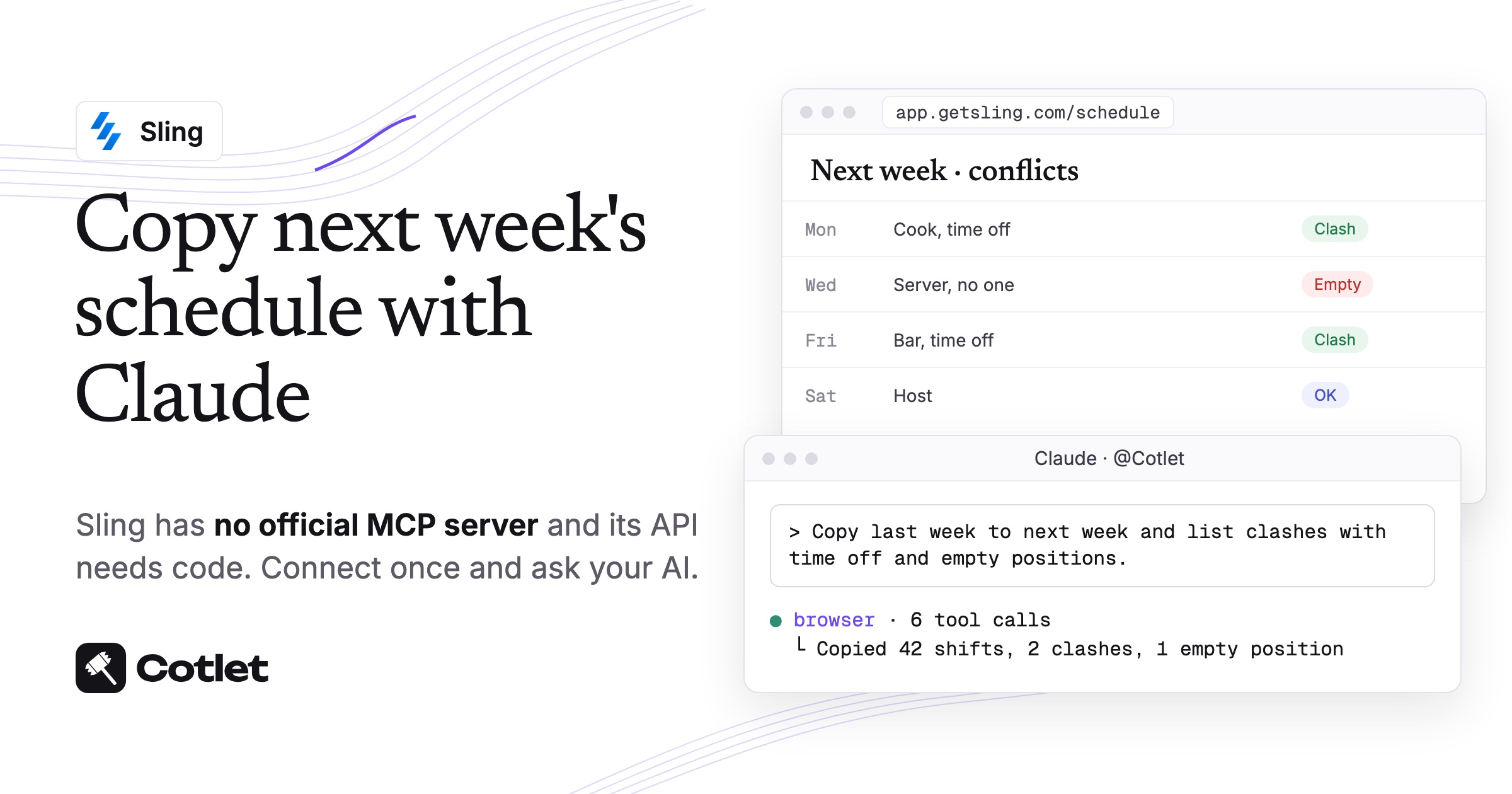
It is Wednesday, and next week’s schedule is a copy of last week’s with holes in it. Two people have time off that clashes with their shifts. Your Toast timesheets show some people clocked in twice for the same day. Sling holds all of it. Sling, checked on 26 November 2026, lacks an official MCP server and an app in ChatGPT or Claude. It does have a public API, but that API wants a developer. An AI can still reach your account through your login. You sign in one time in a browser that Cotlet hosts, then ChatGPT or Claude works the Schedule, Time off and Timesheets pages like an admin would. Ten minutes, no code.
This post is for the owner or manager of a restaurant, cafe or shop who runs the team in Sling, many of them also on Toast. Employees who check shifts and clock in use the Sling app and can skip this. Cotlet serves whoever builds the week and closes the pay period.
What ChatGPT and Claude can do in Sling once connected
You describe the result you want. The AI works through the screens a Sling admin uses.
| Where in Sling | What the AI does |
|---|---|
| Schedule, copy shifts | Copies last week to next week and lists shifts that clash with approved time off and positions nobody holds |
| Schedule, auto-assign | Auto-assigns next week’s open shifts from availability and shows the result before publishing |
| Time off | Lists pending requests, which ones conflict with the schedule and which are safe to approve |
| Timesheets and payroll export | Exports the pay period as CSV and lists people with overtime |
| Labor cost | Compares scheduled labor cost with projected sales and flags days over your labor percent |
| Toast integration | Checks the integration status and lists remote clock ins that never reached Toast |
| Tasks | Creates tomorrow’s opening checklist and shows who left yesterday’s tasks undone |
Reading changes nothing. Nothing gets published, approved or created until you answer, and payments stay blocked. The Sling MCP server page has the longer job list.
Does Sling have AI, an API or an official ChatGPT app?
As of 26 November 2026:
- The API is public. It has Swagger docs at api.getsling.com and example scripts in the Sling API docs repo. Any user gets a token by logging in through the API, and the token has the same access as that user. An admin sees all shifts and an employee sees their own.
- It is for people who code. You write the calls, store the token and handle the answers. Sling’s docs also describe an endpoint that maps a Toast identity.
- No official connector. The MCP Registry has no Sling scheduling entry, and ChatGPT and Claude list no Sling app.
- Sling belongs to Toast. It is Sling by Toast, and the two connect for clock ins and projected sales.
The API fits a developer who needs raw records. A hosted server that works in your signed-in session suits an owner who wants answers in plain words, including steps the API does not cover. Each route side by side: Does Sling have an API or MCP server?.
Before you start
- Admin or manager access to Sling. A staff login only shows that person’s shifts.
- Positions and availability entered, which gives auto-assign material to work with.
- The Sling and Toast integration turned on, if Toast is your POS.
- A ChatGPT plan, or Claude’s free tier with its one custom connector.
- A Cotlet account, first week free, no card asked (pricing).
Step 1: sign in to Sling in your Cloud Browser
Launch the Cloud Browser from the Cotlet console and open login.getsling.com. Enter the email, then the password, yourself. If your account arrived through Toast, use the Toast sign-in.
Sling is the one site that receives the password. What Cotlet holds is an encrypted session, and a switch in the console cuts it. Once Sling closes the session, a new link is sent. More on the security page.
Step 2: connect Sling to ChatGPT, Claude or another AI agent
Hand Cotlet’s address to your AI tool once. The session already saved in Sling does the rest, with no password in sight. Pick the tool you use.
Pick your AI above to see its steps.
How to connect Sling to ChatGPT
Do this on chatgpt.com in your browser. Cotlet then works in the ChatGPT desktop and phone apps too.
- Open Plugins in ChatGPT and click Add.
- Click Add custom MCP server. Not in the menu? Turn on Developer mode in Settings, Security and login, then come back.
- Paste the name
Cotletand the server URLhttps://cotlet.dev/mcp/v1/connect. Keep Authentication on OAuth. - Tick “I understand and want to continue” and click Create as a plugin.
- Click Connect Cotlet. A Cotlet page opens, click Allow access.
- In a new chat, type
@Cotletand pick it from the list. - Ask ChatGPT: “Are you signed in to Cotlet through MCP?” Then try a first Sling task: “Copy last week’s Sling schedule to next week, then list shifts that clash with approved time off.”
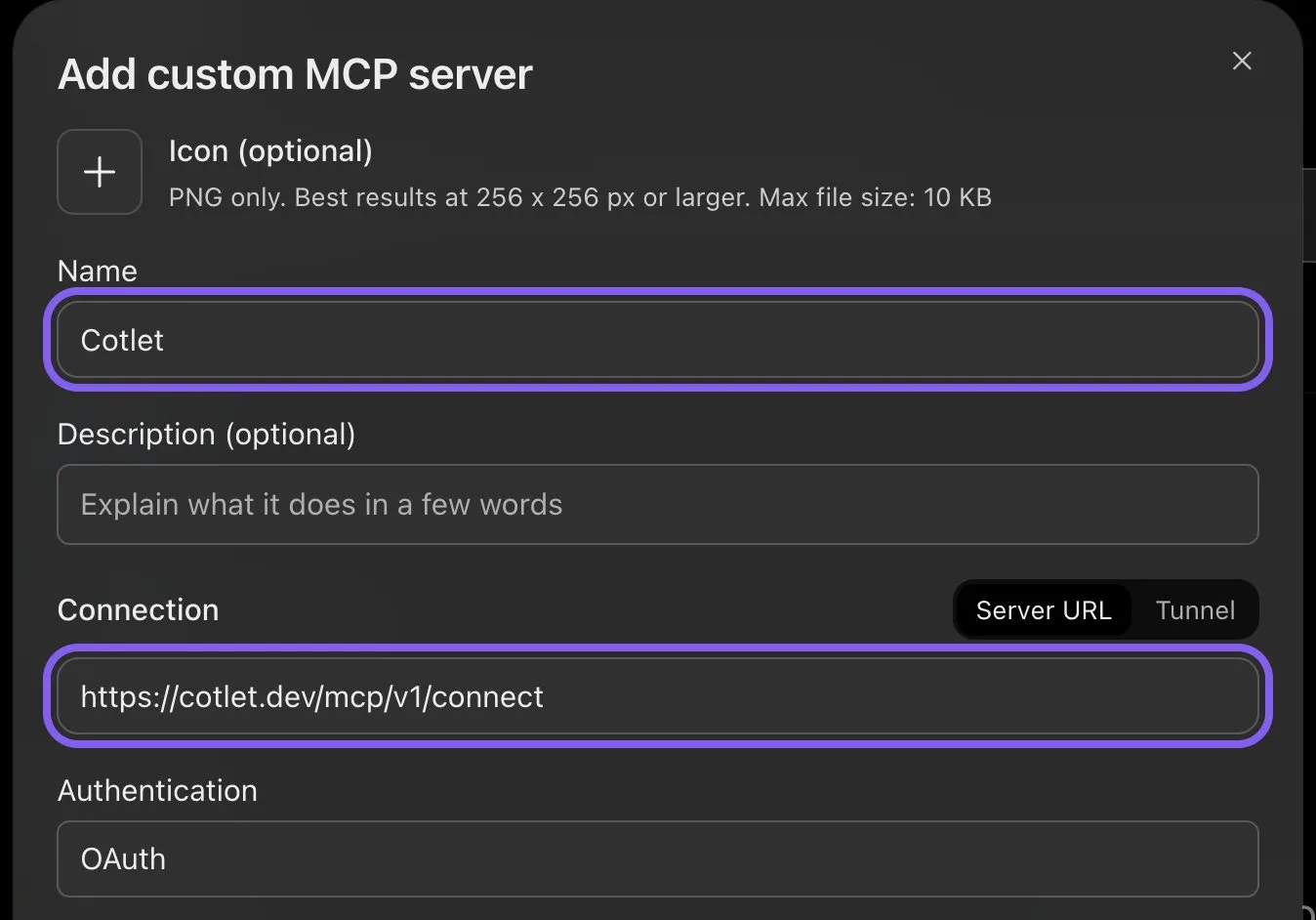
ChatGPT, Add custom MCP server form, November 2026.
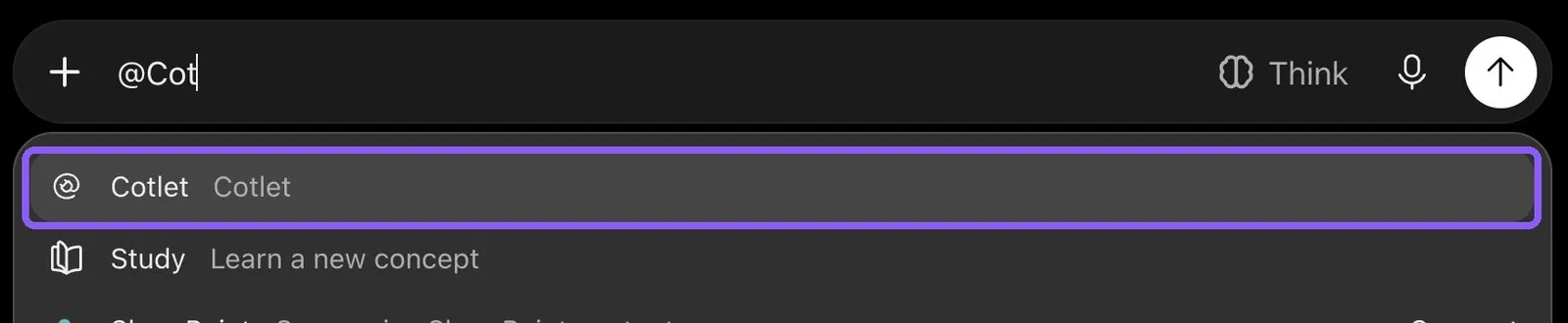
ChatGPT, picking Cotlet in a new chat with @, November 2026.
ChatGPT asks “Allow ChatGPT to use Cotlet?” before some steps. Pick Always allow, or the chat waits for your click. On a Business, Enterprise or Edu workspace, an admin has to allow custom MCP servers first.
How to connect Sling to Claude
- Open Connectors in Claude and click Add. In the desktop app it is under Customize, Connectors.
- Click Add custom connector.
- Paste the name
Cotletand the URLhttps://cotlet.dev/mcp/v1/connect, then click Continue. - Keep the settings and click Add.
- A Cotlet page opens. Click Allow access.
- In a chat, click the plus button, then Connectors, and turn Cotlet on.
- Ask Claude: “Are you signed in to Cotlet through MCP?”, then “Find Sling timesheet rows this pay period where a scheduled time and a clock in both exist for the same person and day.”. Claude asks before it uses a Cotlet tool the first time. Click Allow.

Claude, Add custom connector form, November 2026.

Claude, Add custom connector, last screen, November 2026.
Claude’s free plan allows one custom connector. On a Team or Enterprise plan, an owner adds Cotlet in Organization settings, Connectors, and you click Connect next to it.
How to connect Sling to Claude Code
Add Cotlet without a key, then sign in once in the browser:
claude mcp add --transport http cotlet https://cotlet.dev/mcp/v1/connectRun /mcp in Claude Code, pick cotlet and sign in to Cotlet. Prefer an API key, for example on a server? Create one in the Cotlet console and use:
claude mcp add --transport http cotlet https://cotlet.dev/mcp/v1 \
  --header "Authorization: Bearer $COTLET_API_KEY"
How to connect Sling to Codex
Create an API key in the Cotlet console, put it in the COTLET_API_KEY environment variable and add this to ~/.codex/config.toml:
[mcp_servers.cotlet]
url = "https://cotlet.dev/mcp/v1"
bearer_token_env_var = "COTLET_API_KEY"
How to connect Sling to Cursor
Create an API key in the Cotlet console, put it in the COTLET_API_KEY environment variable and add this to ~/.cursor/mcp.json:
{
  "mcpServers": {
    "cotlet": {
      "url": "https://cotlet.dev/mcp/v1",
      "headers": { "Authorization": "Bearer ${env:COTLET_API_KEY}" }
    }
  }
}
How to connect Sling to Grok
Grok takes custom MCP servers on grok.com, per xAI’s connectors documentation (checked 8 November 2026).
- Open grok.com/connectors and click New Connector.
- Pick Custom and paste the server URL
https://cotlet.dev/mcp/v1/connect. - Sign in to Cotlet when Grok asks, then click Allow access.
- Ask Grok: “Are you signed in to Cotlet through MCP?”
On Grok Business, an admin adds the connector first in the xAI console, under Grok Business, Connectors. The Grok chat inside X has no custom connector menu.
How to connect Sling to Hermes Agent
Add Cotlet to ~/.hermes/config.yaml in the format of the Hermes MCP config reference:
mcp_servers:
  cotlet:
    url: "https://cotlet.dev/mcp/v1"
    headers:
      Authorization: "Bearer ${COTLET_API_KEY}"
    trust: untrusted
Put COTLET_API_KEY in ~/.hermes/.env and check it with hermes mcp test cotlet. With trust: untrusted, Hermes runs reads at once and asks before every write. More on Hermes in our post on the Hermes Agent browser.
How to connect Sling to n8n
Use the MCP Client node, or the MCP Client Tool inside an AI Agent node:
- Server Transport: HTTP Streamable
- MCP Endpoint URL:
https://cotlet.dev/mcp/v1 - Authentication: Bearer Auth, with your Cotlet API key as the token
- Tools: let the AI Agent node use Cotlet’s browser tools; it reads Cotlet’s Sling guide first and works in your signed-in Sling account
Use it for work that should run on its own, such as a Daily list of pending time off requests that clash with the schedule.
Any other MCP client
Point the client at https://cotlet.dev/mcp/v1 over Streamable HTTP, with the header Authorization: Bearer <your Cotlet API key>. A client that supports OAuth sign-in can use https://cotlet.dev/mcp/v1/connect instead and needs no key. The full reference is in the MCP docs.
Three Sling jobs to try first
Start with the week you rebuild every Wednesday.
Copy last week and fix the gaps
Copy last week’s schedule to next week. Then list shifts that conflict with approved time off and positions with no one assigned.
Sling can copy shifts in a few clicks, and the copy knows nothing about this week’s time off. The AI copies, then compares each shift with approved requests and returns two short lists: clashes and empty positions. You fix them, or ask it to draft the changes first.
Double clock ins with Toast
Find timesheet rows this pay period where a scheduled time and a clock in both exist for the same person and day. List the likely duplicates.
Sling’s Toast admin manual explains how the two systems share clock ins. When they overlap, one person shows up twice. The AI reads the pay period’s timesheets and lists the pairs that look doubled, with the person, day and both times. You correct them before payroll.
Tomorrow’s opening checklist
Create tomorrow’s opening checklist as tasks for the opener, and show me who has not completed yesterday’s tasks.
Tasks in Sling hold checklists for the shift. The AI shows the tasks it would create, adds them after your yes, and lists yesterday’s open ones by person. You see the gap before the next opener arrives.
What it costs
Your Sling plan is untouched and no API code is written. Cotlet credits come in one-time packs, 5,000 for $29, good for twelve months. Working calls use 10 to 100 credits, failed calls none. A new account begins with 500 credits and seven trial days. After the trial, a browser left ready for agents uses 50 credits daily (pricing).
FAQ
If Sling has an open API, why not use it?
Yes. Sling has a public API with documentation, and any user can get a token with their own login. The token has the same access as that user. Cotlet adds work on the screens you use, for steps the API does not cover.
Does Sling have an official MCP server?
No. The MCP Registry shows nothing for Sling scheduling, and Sling is missing from both ChatGPT and Claude. Cotlet is a hosted server that acts on your behalf inside Sling.
Can AI auto-assign open shifts in Sling?
It runs auto-assign on next week’s open shifts and shows you the result. You publish when you are happy.
Can it list time off that clashes with the schedule?
Yes. It reads pending requests, checks each against posted shifts and tells you which are safe to approve.
Can it check why remote clock ins did not reach Toast?
It reads the Toast integration status in Sling and lists employees whose remote clock ins did not show in Toast timesheets this week. It changes no settings.
Is Cotlet part of Sling or Toast?
No. Cotlet is its own company and uses nothing but your login.
Try it before Wednesday’s rebuild
Shifts, time off and timesheets already sit in Sling. What you lack is Wednesday afternoon. Open a free week of Cotlet, sign in through the Cloud Browser and give your AI the rebuild. Other restaurant tools in use? The catalog lists them.


