How to connect splose to ChatGPT, Claude and any AI agent
splose has no official MCP server, and its API is on request for the account owner (checked 26 Nov 2026). Let Claude watch NDIS funding and chase invoices.
Cotlet team 13 min read
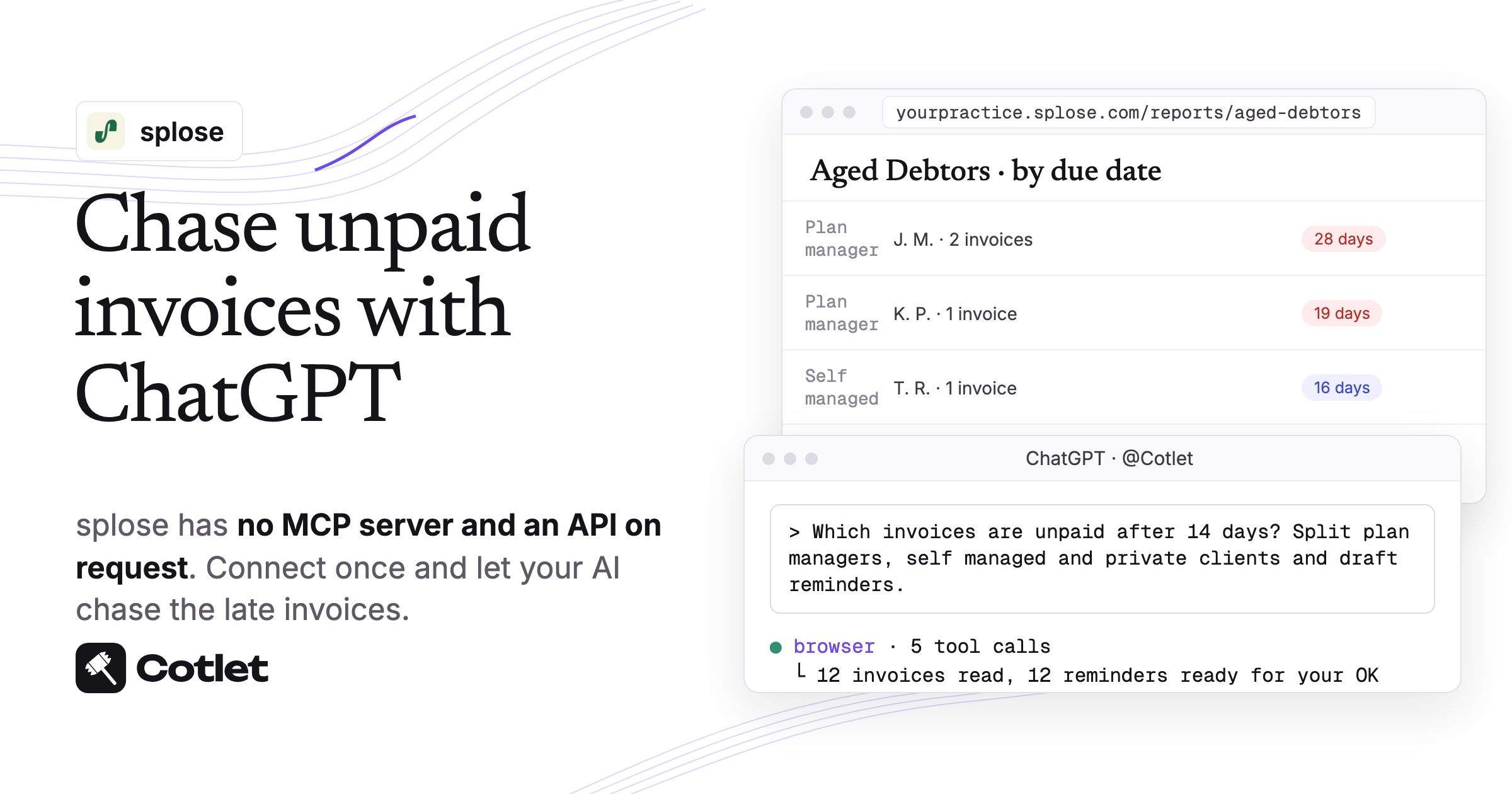
As of 26 November 2026, splose offers no MCP server of its own and no ChatGPT or Claude connector. Its REST API exists, yet a key comes only to the account owner, after a request to support, and never on a trial workspace. Cotlet takes another road: a hosted Cloud Browser where you log in to splose once. From then on ChatGPT, Claude or any agent can click through your calendar, cases and invoices as you would. Setup is roughly ten minutes, with no code.
It suits the owner of an OT, speech, psychology or physio practice in Australia, New Zealand or the UK, and the practice manager who chases plan managers every Monday. Cotlet is for whoever runs the practice inside splose. Your clients still book online, fill in forms and get reminders the way they do today.
What ChatGPT and Claude can do in splose once connected
You type a request in everyday language, and the AI visits the splose screen that holds the answer.
| Part of splose | What the AI handles |
|---|---|
| Cases and funding periods | Reads the budget left and the booked sessions on each NDIS case, and lists the clients who will run out first |
| Invoices | Finds completed appointments that have no invoice yet, grouped by funder |
| Aged Debtors report | Lists unpaid invoices by age, separates plan managers from self managed and private clients, and drafts a reminder for each |
| Waitlist | Ranks clients by how long they have waited and matches them to free slots by practitioner, day and time |
| Calendar | Finds the gaps in a practitioner’s week and shows who on the waitlist fits each one |
| Cancellations | Counts cancellations by reason and practitioner, so you can check short notice ones against your cancellation rules |
Anything that reaches a client or payer waits for you: messages, invoice edits and bookings. Reading a case or drafting text leaves splose untouched.
The full screen list is on the splose MCP server page. To feed the same lists into a sheet or n8n, see build a splose API.
Does splose have AI, an API or an official ChatGPT app?
Here is what a splose practice gets, as of 26 November 2026:
- A documented API, on request. The REST API has public docs, a Bearer key and a limit of 60 calls a minute. Access is granted on request to the account owner only, with a start date and planned uses such as Zapier or data extraction. The key tab appears in My Account after approval. The same help article says that building on the API needs programming knowledge.
- Closed during the trial. API keys cannot be generated on a trial workspace. An active paid subscription comes first, then the owner’s request.
- splose AI, inside splose. AI Blocks draft notes from transcripts and client history, voice to text transcribes a session, and an AI scheduling copilot works in the calendar. None of it gives ChatGPT or Claude access to your practice.
- Partner integrations. The integrations page lists Xero, Physitrack and the AI reception partners Lyngo AI and BookedSolid. Each does one job.
- No MCP server from splose. The MCP Registry has a single splose entry, made by usefulapi. It runs on their host, reads patients, appointments, invoices and cases, and can book and cancel appointments and record payments. splose does not publish it.
- No Zapier, Make or n8n app. Their pages return 404 on the day of writing.
A developer who needs a one-off sync and can wait for approval can use the API. For the rest, a hosted server working inside your own logged-in session is faster. Each route gets a score on the splose API and MCP status page.
Before you start
- Your splose login and the address of your workspace, which looks like name.splose.com. The AI opens what your role opens, so check that you can see Cases, the Waitlist and Reports.
- Your threshold for low funding, such as 20% of a period budget left.
- Your rule for an overdue invoice, such as 14 days.
- Cases with funding periods turned on. splose needs a case type, a total budget, an issue date and an expiry date before it lets you switch them on.
- A ChatGPT or Claude account. Free Claude works, since you need one connector.
- A Cotlet account to sign up with (pricing).
Step 1: sign in to splose in your Cloud Browser
In the Cotlet console, launch the Cloud Browser and visit splose.com. The Log in button wants either your workspace name or your email. Enter it, add the password, and give the code if your account requires one. Once the calendar appears, this step is finished.
The password goes to splose alone. Cotlet never stores it, and your browser profile is kept encrypted. A logout by splose later just means the AI hands you a fresh sign-in link. More on the security page.
Step 2: connect splose to ChatGPT, Claude or another AI agent
Give your AI client Cotlet’s MCP address one time, and every splose screen your login can see becomes available to it. Choose the client you use.
Pick your AI above to see its steps.
How to connect splose to ChatGPT
Do this on chatgpt.com in your browser. Cotlet then works in the ChatGPT desktop and phone apps too.
- Open Plugins in ChatGPT and click Add.
- Click Add custom MCP server. Not in the menu? Turn on Developer mode in Settings, Security and login, then come back.
- Paste the name
Cotletand the server URLhttps://cotlet.dev/mcp/v1/connect. Keep Authentication on OAuth. - Tick “I understand and want to continue” and click Create as a plugin.
- Click Connect Cotlet. A Cotlet page opens, click Allow access.
- In a new chat, type
@Cotletand pick it from the list. - Ask ChatGPT: “Are you signed in to Cotlet through MCP?” Then try a first splose task: “Which splose invoices are unpaid after 14 days, split by plan managers and private clients?”
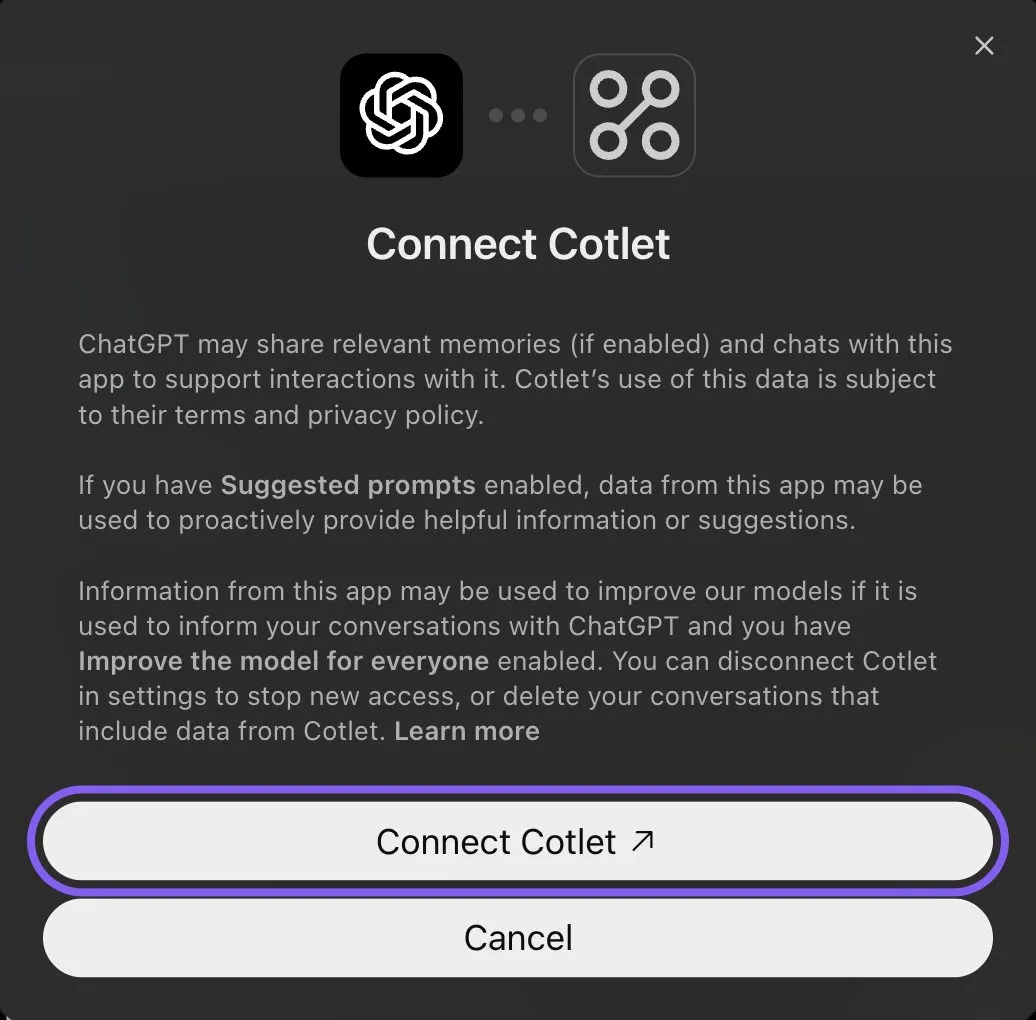
ChatGPT, connecting the Cotlet plugin, November 2026.
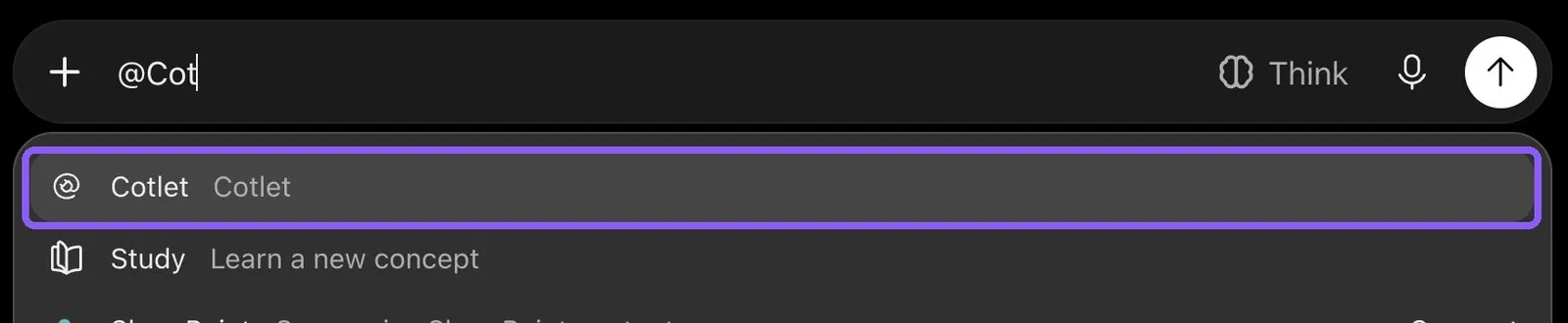
ChatGPT, picking Cotlet in a new chat with @, November 2026.
ChatGPT asks “Allow ChatGPT to use Cotlet?” before some steps. Pick Always allow, or the chat waits for your click. On a Business, Enterprise or Edu workspace, an admin has to allow custom MCP servers first.
How to connect splose to Claude
- Open Connectors in Claude and click Add. In the desktop app it is under Customize, Connectors.
- Click Add custom connector.
- Paste the name
Cotletand the URLhttps://cotlet.dev/mcp/v1/connect, then click Continue. - Keep the settings and click Add.
- A Cotlet page opens. Click Allow access.
- In a chat, click the plus button, then Connectors, and turn Cotlet on.
- Ask Claude: “Are you signed in to Cotlet through MCP?”, then “Which NDIS clients in splose will use up their funding period before it ends?”. Claude asks before it uses a Cotlet tool the first time. Click Allow.

Claude, Add custom connector, last screen, November 2026.

Claude, chat menu, Connectors, November 2026.
Claude’s free plan allows one custom connector. On a Team or Enterprise plan, an owner adds Cotlet in Organization settings, Connectors, and you click Connect next to it.
How to connect splose to Claude Code
Add Cotlet without a key, then sign in once in the browser:
claude mcp add --transport http cotlet https://cotlet.dev/mcp/v1/connectRun /mcp in Claude Code, pick cotlet and sign in to Cotlet. Prefer an API key, for example on a server? Create one in the Cotlet console and use:
claude mcp add --transport http cotlet https://cotlet.dev/mcp/v1 \
  --header "Authorization: Bearer $COTLET_API_KEY"
How to connect splose to Codex
Create an API key in the Cotlet console, put it in the COTLET_API_KEY environment variable and add this to ~/.codex/config.toml:
[mcp_servers.cotlet]
url = "https://cotlet.dev/mcp/v1"
bearer_token_env_var = "COTLET_API_KEY"
How to connect splose to Cursor
Create an API key in the Cotlet console, put it in the COTLET_API_KEY environment variable and add this to ~/.cursor/mcp.json:
{
  "mcpServers": {
    "cotlet": {
      "url": "https://cotlet.dev/mcp/v1",
      "headers": { "Authorization": "Bearer ${env:COTLET_API_KEY}" }
    }
  }
}
How to connect splose to Grok
Grok takes custom MCP servers on grok.com, per xAI’s connectors documentation (checked 8 November 2026).
- Open grok.com/connectors and click New Connector.
- Pick Custom and paste the server URL
https://cotlet.dev/mcp/v1/connect. - Sign in to Cotlet when Grok asks, then click Allow access.
- Ask Grok: “Are you signed in to Cotlet through MCP?”
On Grok Business, an admin adds the connector first in the xAI console, under Grok Business, Connectors. The Grok chat inside X has no custom connector menu.
How to connect splose to Hermes Agent
Add Cotlet to ~/.hermes/config.yaml in the format of the Hermes MCP config reference:
mcp_servers:
  cotlet:
    url: "https://cotlet.dev/mcp/v1"
    headers:
      Authorization: "Bearer ${COTLET_API_KEY}"
    trust: untrusted
Put COTLET_API_KEY in ~/.hermes/.env and check it with hermes mcp test cotlet. With trust: untrusted, Hermes runs reads at once and asks before every write. More on Hermes in our post on the Hermes Agent browser.
How to connect splose to n8n
Use the MCP Client node, or the MCP Client Tool inside an AI Agent node:
- Server Transport: HTTP Streamable
- MCP Endpoint URL:
https://cotlet.dev/mcp/v1 - Authentication: Bearer Auth, with your Cotlet API key as the token
- Tools: let the AI Agent node use Cotlet’s browser tools; it reads Cotlet’s splose guide first and works in your signed-in splose account
Use it for work that should run on its own, such as a Monday 8 am list of appointments not yet invoiced.
Any other MCP client
Point the client at https://cotlet.dev/mcp/v1 over Streamable HTTP, with the header Authorization: Bearer <your Cotlet API key>. A client that supports OAuth sign-in can use https://cotlet.dev/mcp/v1/connect instead and needs no key. The full reference is in the MCP docs.
Start with whatever worries you most this month. Funding and money are the two that cost real revenue.
Catch NDIS funding before it runs out
Which NDIS clients will use up their funding period before it ends at the current booking rate? List remaining budget and booked sessions.
Funding periods split a case budget into periods, roll unused funds into the next one and warn you when you overbook. That warning only shows while you book. The AI goes through the cases for you, sets each budget against the sessions already booked and lists the clients on course to overrun. You get a short list with the period end date next to each name, and nothing changes in splose.
Chase unpaid invoices from plan managers
Which invoices are unpaid after 14 days? Split plan managers, self managed and private clients and draft reminders.
The Aged Debtors report sits under Reports, Financial. It ages invoices by issue date or due date and keeps saved filters. It leaves out invoices of archived clients, so a total that looks short may be explained by an archived record. The AI runs the report, groups the rows by payer type and writes one reminder per payer that names the invoice and the amount. splose can already send an invoice to a plan manager contact. Your reminders go out only after you approve them.
Fill a gap from the waitlist
Who has waited longest on the waitlist for OT, and which free slots this month match their availability?
A waitlist entry holds a preferred location, practitioner and services, plus morning, afternoon or evening. In the calendar, splose shows waitlist matches with the longest wait first. The AI filters the waitlist to OT, compares each preference with the free slots and returns names with times. When a client says yes, it asks for your OK and then books the slot. splose then moves that client to the Closed list for the service.
What it costs on top of splose
Your splose subscription is untouched. On the Cotlet side you buy packs once, with no recurring charge: $29 buys 5,000 credits, valid for a year. Successful calls draw 10 to 100 credits each, failed ones draw none. After the trial, keeping a Cloud Browser connected to splose draws 50 credits per day. The first 7 days are free with 500 credits, and no card is asked for (pricing).
FAQ
Can my practice use a splose API?
Yes, with conditions. splose documents a REST API, and the account owner has to request access from support on a paid plan. Cotlet needs no key and no approval, since it uses the splose login you already have.
Can I use the splose API without asking support for access?
No. The API Keys tab appears only after support approves the owner’s request, and trial workspaces cannot have keys. As of 26 November 2026 there is no self-serve key.
How do I get splose API access and what can I do with it?
The owner contacts splose support with a start date and planned uses, waits for approval and refreshes the page. The key then shows under My Account, API. splose keeps no copy of it. The API reads patients, appointments, invoices, payments, cases, waitlists and support items, and it can create patients, appointments and payments. It sends no webhooks that we could find.
Is there an official splose MCP server?
No. Neither an MCP server, a ChatGPT app nor a Claude connector comes from splose. The only splose entry in the MCP Registry comes from a third party and is hosted by them.
Can AI check NDIS budgets in splose for me?
Yes. Ask for clients whose budget left is under your threshold or whose period ends soon. The AI reads each case and gives you the list. Funding periods must be turned on for a case to show them.
Can AI find splose appointments that have not been invoiced?
Yes. Give it a date range and it lists completed appointments with no invoice, grouped by funder.
Can AI find inactive splose clients and draft a check-in?
Yes. Ask for clients with no appointment in 8 weeks and no discharge. The AI drafts one message each and waits for your OK before anything is sent.
Can AI report short notice cancellations in splose for NDIS billing?
Yes. splose records a reason and an NDIS cancellation code for each cancellation and can apply a fee by notice period. The AI counts cancellations per practitioner and lists the short notice ones so you can check them against your rules.
How do I connect splose to Zapier or Google Sheets?
You cannot use an app, because there is none on Zapier. Support names Zapier as an example use for an API key, which needs owner approval. The simpler route is Cotlet: your AI reads the screen and writes the rows to your sheet, and a Cotlet endpoint can feed Zapier, Make or n8n.
How is Cotlet different from splose AI?
splose AI stays in splose and handles notes and the calendar. Cotlet puts ChatGPT, Claude or n8n to work in your splose account on a schedule, and links it with your sheets, email and other tools.
Is Cotlet part of splose?
No. Cotlet is a separate company, unaffiliated with splose, and it acts only as the login you gave it.
Try it on your own splose account
A funding period ends on its date whether or not anyone is watching, and an unpaid invoice never gets younger. Open a free trial, log in to splose in the Cloud Browser and put one question to Claude: who is running low on funding? More practice software sits in the catalog.


