How to connect Squeegee to ChatGPT, Claude and any AI agent
Squeegee has no official MCP server, and its API is in early access (checked 27 Nov 2026). Let ChatGPT or Claude replan rounds and chase invoices.
Cotlet team 10 min read
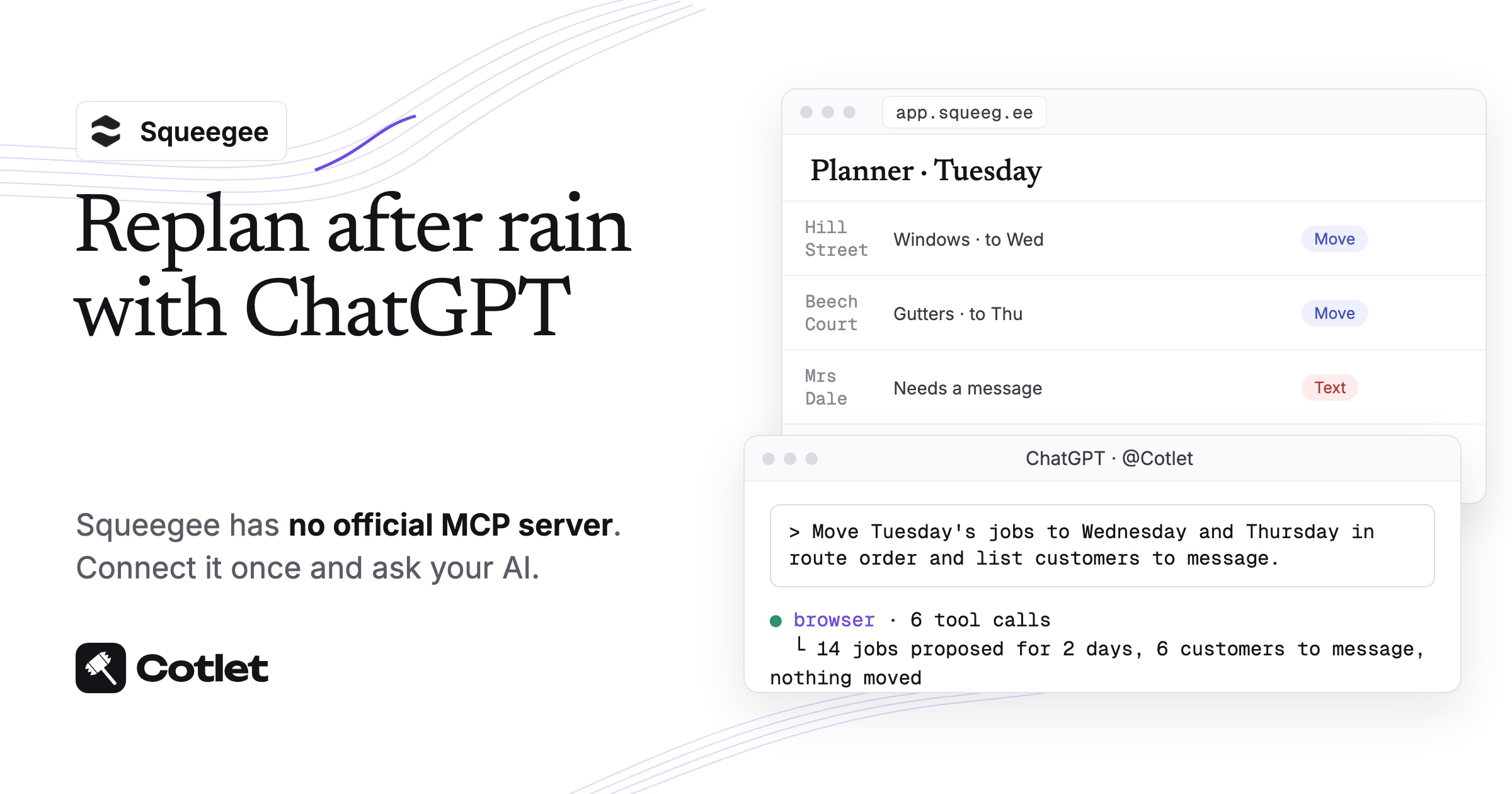
It rained all Tuesday, and now the whole round has to move. Which jobs go to Wednesday, which to Thursday, and which customers need a message? On 27 November 2026 Squeegee had no official MCP server and no ChatGPT or Claude app. Its public API opened in early access in October 2026, and support has to switch it on for your account. Cotlet skips that wait: your AI works in the planner you already use, in a Cloud Browser under your login.
This is for owners and admins of UK window cleaning, gutter, bin and other round based service businesses, and some commercial cleaners, who run the planner, quotes, invoices and payments in Squeegee (squeeg.ee). Staff accounts and customer pages are not covered. The name is also an everyday English word, so searches get noisy.
What ChatGPT and Claude can do in Squeegee once connected
Tell the AI which day, round or customer group, and what result you want.
| Squeegee area | Job for the AI |
|---|---|
| Planner | Moves a day’s jobs to other days in route order and lists customers to message |
| Invoices | Lists jobs done yesterday whose invoice was not sent |
| Outstanding invoices | Shows overdue invoices by customer, days late and payment method, with a reminder drafted for each |
| Automatic payments | Finds new customers with no Direct Debit mandate and drafts the request |
| Quotes | Builds a quote from your standard prices and shows which quotes are still unaccepted |
| Price Change | Previews a percentage rise for one round and flags customers with custom prices |
| Reports | Compares money collected, outstanding and failed Direct Debits with last month |
Reading is harmless. A message, a price change or an invoice leaves only after you approve, and payments stay blocked. Extra ideas are on the Squeegee MCP page.
Does Squeegee have AI, an API or an official ChatGPT app?
Findings from 27 November 2026:
- API: early access, by request. Squeegee announced its public API on 23 October 2026. It is not self-serve at first. You contact support, they switch API access on for your account, and then owners and admins create keys under Admin, API, each limited to chosen permissions. It is free during early access. Later, Advanced, Ultimate and Infinite plans get a monthly token allowance and Core gets none, and Squeegee promises 30 days notice before charging.
- Partner API. An older Partner API exists for integration partners, per the release notes.
- MCP: not offered. The MCP Registry lists no Squeegee server, and the release notes up to version 1.57.18 never mention an MCP server or an AI assistant.
- Chat directories: empty. Neither ChatGPT’s nor Claude’s directory has a Squeegee entry.
- No Zapier app. zapier.com/apps/squeegee returns 404.
Developers will like the API once access is on. For an owner today, the signed-in session is quicker. Each point is scored in Squeegee’s API and MCP review, and the API page covers an endpoint of your own.
Before you start
- An owner or admin login for Squeegee at app.squeeg.ee.
- A browser sign in, not the desktop app. Squeegee itself recommends the browser.
- The round or day you want to start with.
- A ChatGPT subscription or a Claude account.
- A Cotlet account (pricing).
Step 1: sign in to Squeegee in your Cloud Browser
Load app.squeeg.ee in the Cloud Browser and log in with Google or with email, as you do today.
Your password stays on Squeegee’s own page, out of Cotlet’s reach. The saved session is encrypted, and a single switch disconnects the AI (security).
Step 2: connect Squeegee to ChatGPT, Claude or another AI agent
Connect Cotlet to your AI one time, and after that it can use the session you just started. Take the AI you prefer.
Pick your AI above to see its steps.
How to connect Squeegee to ChatGPT
Do this on chatgpt.com in your browser. Cotlet then works in the ChatGPT desktop and phone apps too.
- Open Plugins in ChatGPT and click Add.
- Click Add custom MCP server. Not in the menu? Turn on Developer mode in Settings, Security and login, then come back.
- Paste the name
Cotletand the server URLhttps://cotlet.dev/mcp/v1/connect. Keep Authentication on OAuth. - Tick “I understand and want to continue” and click Create as a plugin.
- Click Connect Cotlet. A Cotlet page opens, click Allow access.
- In a new chat, type
@Cotletand pick it from the list. - Ask ChatGPT: “Are you signed in to Cotlet through MCP?” Then try a first Squeegee task: “In Squeegee, list overdue invoices by customer with days late and payment method. Send nothing.”
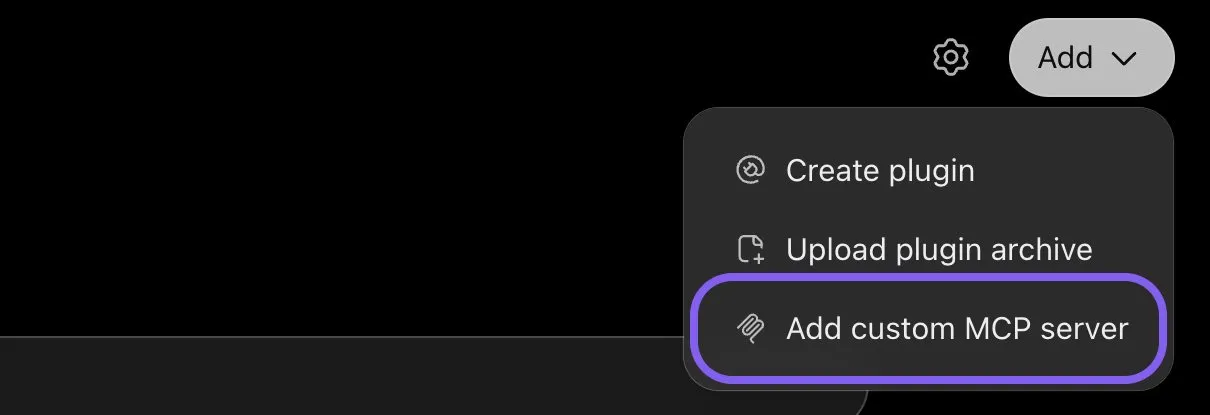
ChatGPT, Add menu on the Plugins page, November 2026.
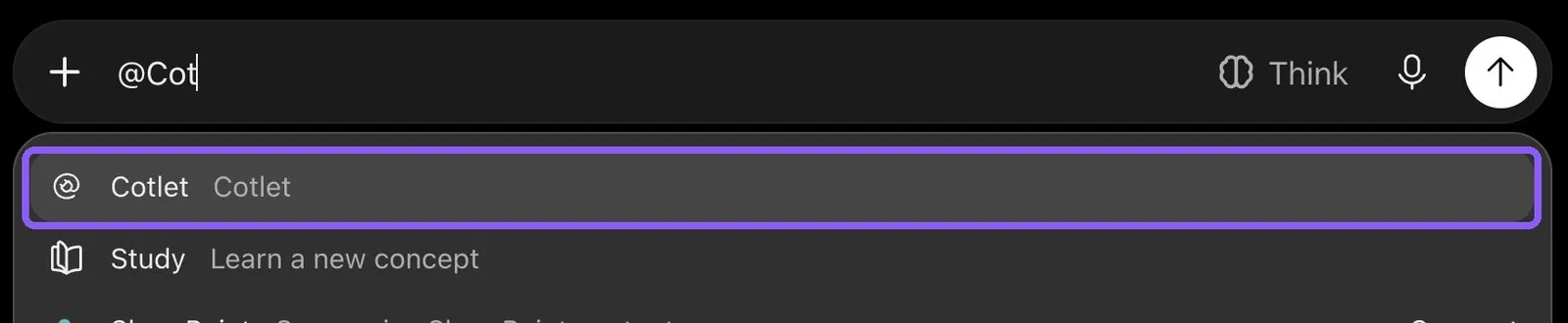
ChatGPT, picking Cotlet in a new chat with @, November 2026.
ChatGPT asks “Allow ChatGPT to use Cotlet?” before some steps. Pick Always allow, or the chat waits for your click. On a Business, Enterprise or Edu workspace, an admin has to allow custom MCP servers first.
How to connect Squeegee to Claude
- Open Connectors in Claude and click Add. In the desktop app it is under Customize, Connectors.
- Click Add custom connector.
- Paste the name
Cotletand the URLhttps://cotlet.dev/mcp/v1/connect, then click Continue. - Keep the settings and click Add.
- A Cotlet page opens. Click Allow access.
- In a chat, click the plus button, then Connectors, and turn Cotlet on.
- Ask Claude: “Are you signed in to Cotlet through MCP?”, then “In Squeegee, list jobs marked done yesterday whose invoice was not sent. Change nothing.”. Claude asks before it uses a Cotlet tool the first time. Click Allow.

Claude, Add custom connector, last screen, November 2026.

Cotlet consent page after you add the connector in Claude, November 2026.
Claude’s free plan allows one custom connector. On a Team or Enterprise plan, an owner adds Cotlet in Organization settings, Connectors, and you click Connect next to it.
How to connect Squeegee to Claude Code
Add Cotlet without a key, then sign in once in the browser:
claude mcp add --transport http cotlet https://cotlet.dev/mcp/v1/connectRun /mcp in Claude Code, pick cotlet and sign in to Cotlet. Prefer an API key, for example on a server? Create one in the Cotlet console and use:
claude mcp add --transport http cotlet https://cotlet.dev/mcp/v1 \
  --header "Authorization: Bearer $COTLET_API_KEY"
How to connect Squeegee to Codex
Create an API key in the Cotlet console, put it in the COTLET_API_KEY environment variable and add this to ~/.codex/config.toml:
[mcp_servers.cotlet]
url = "https://cotlet.dev/mcp/v1"
bearer_token_env_var = "COTLET_API_KEY"
How to connect Squeegee to Cursor
Create an API key in the Cotlet console, put it in the COTLET_API_KEY environment variable and add this to ~/.cursor/mcp.json:
{
  "mcpServers": {
    "cotlet": {
      "url": "https://cotlet.dev/mcp/v1",
      "headers": { "Authorization": "Bearer ${env:COTLET_API_KEY}" }
    }
  }
}
How to connect Squeegee to Grok
Grok takes custom MCP servers on grok.com, per xAI’s connectors documentation (checked 8 November 2026).
- Open grok.com/connectors and click New Connector.
- Pick Custom and paste the server URL
https://cotlet.dev/mcp/v1/connect. - Sign in to Cotlet when Grok asks, then click Allow access.
- Ask Grok: “Are you signed in to Cotlet through MCP?”
On Grok Business, an admin adds the connector first in the xAI console, under Grok Business, Connectors. The Grok chat inside X has no custom connector menu.
How to connect Squeegee to Hermes Agent
Add Cotlet to ~/.hermes/config.yaml in the format of the Hermes MCP config reference:
mcp_servers:
  cotlet:
    url: "https://cotlet.dev/mcp/v1"
    headers:
      Authorization: "Bearer ${COTLET_API_KEY}"
    trust: untrusted
Put COTLET_API_KEY in ~/.hermes/.env and check it with hermes mcp test cotlet. With trust: untrusted, Hermes runs reads at once and asks before every write. More on Hermes in our post on the Hermes Agent browser.
How to connect Squeegee to n8n
Use the MCP Client node, or the MCP Client Tool inside an AI Agent node:
- Server Transport: HTTP Streamable
- MCP Endpoint URL:
https://cotlet.dev/mcp/v1 - Authentication: Bearer Auth, with your Cotlet API key as the token
- Tools: let the AI Agent node use Cotlet’s browser tools; it reads Cotlet’s Squeegee guide first and works in your signed-in Squeegee account
Use it for work that should run on its own, such as a Monday list of overdue invoices before you start the round.
Any other MCP client
Point the client at https://cotlet.dev/mcp/v1 over Streamable HTTP, with the header Authorization: Bearer <your Cotlet API key>. A client that supports OAuth sign-in can use https://cotlet.dev/mcp/v1/connect instead and needs no key. The full reference is in the MCP docs.
Three Squeegee jobs to try first
Ask for lists first, and check them on screen before the AI touches a day.
Replan the week after rain
Move all jobs from Tuesday’s round to Wednesday and Thursday keeping route order, and show me the customers who need a message.
The planner lets you replan jobs across days. The AI proposes the new days, keeps the order of the route, and prepares one short message per affected customer. Nothing moves and nobody is texted until you approve.
Chase overdue invoices
List overdue invoices by customer with days late and payment method, and draft the reminder for each.
Squeegee can send invoices when the job is done, but customers still pay late. The AI sorts the list so cash customers and failed Direct Debits are separate, and writes a polite reminder for each group. You send them from Squeegee or tell the AI to.
Preview a price rise
Apply a 6 percent price rise to all customers on the Friday round from next month and list customers with custom prices that need a check.
Squeegee has a Price Change module. The AI first lists the customers on the round and flags the odd prices, so the rise does not flatten a deal you made on purpose. The change is saved after your yes.
Three more requests for the same week
- Check which new customers this month have no Direct Debit mandate and draft the message asking them to set it up.
- Create a quote for these three addresses with my standard window and gutter prices, and show the status of last week’s quotes.
- Pull this quarter’s income and expenses for the HMRC submission and list items with no category.
What it costs
Squeegee billing is unchanged. Cotlet credits come in packs of 5,000 for $29, good for a year, and a call that fails costs nothing. Trial details are on pricing.
FAQ
Does Squeegee have an API I can use for my window cleaning business?
In early access since October 2026, yes. You write to support, they enable it for your account, and then owners and admins make keys under Admin, API. Cotlet needs none of that, because it works in the browser right now.
Does Squeegee have an official MCP server?
Not yet, as far as we found on 27 November 2026. ChatGPT or Claude can still reach your Squeegee account through Cotlet’s browser session, with no developer.
Can ChatGPT or Claude change prices or move jobs in Squeegee?
It can prepare both and show you the effect first. Moving jobs, changing prices and sending messages wait for your approval.
Does Zapier, Make or n8n have a Squeegee app?
No app turned up on 27 November 2026. An n8n workflow on a timer can call Cotlet, though.
Is this an official Squeegee integration?
No. Cotlet stands on its own, and Nexdynamic, the company behind Squeegee, was not involved.
Try it on your own Squeegee account
A rainy Tuesday is the best test, but any Monday works. Start a free Cotlet week, log in once and replan one day. Other cleaning software is in the catalog.